Until macOS 26, the Mac had no clipboard history. Copy something, copy something else, and the first was gone. macOS 26 Tahoe added one inside Spotlight (⌘Space, then ⌘4). It is off until you switch it on and keeps copies for seven days at most. Earlier versions still hold exactly one item. A clipboard manager is for a history that does not expire, or for a Mac that does not run Tahoe.
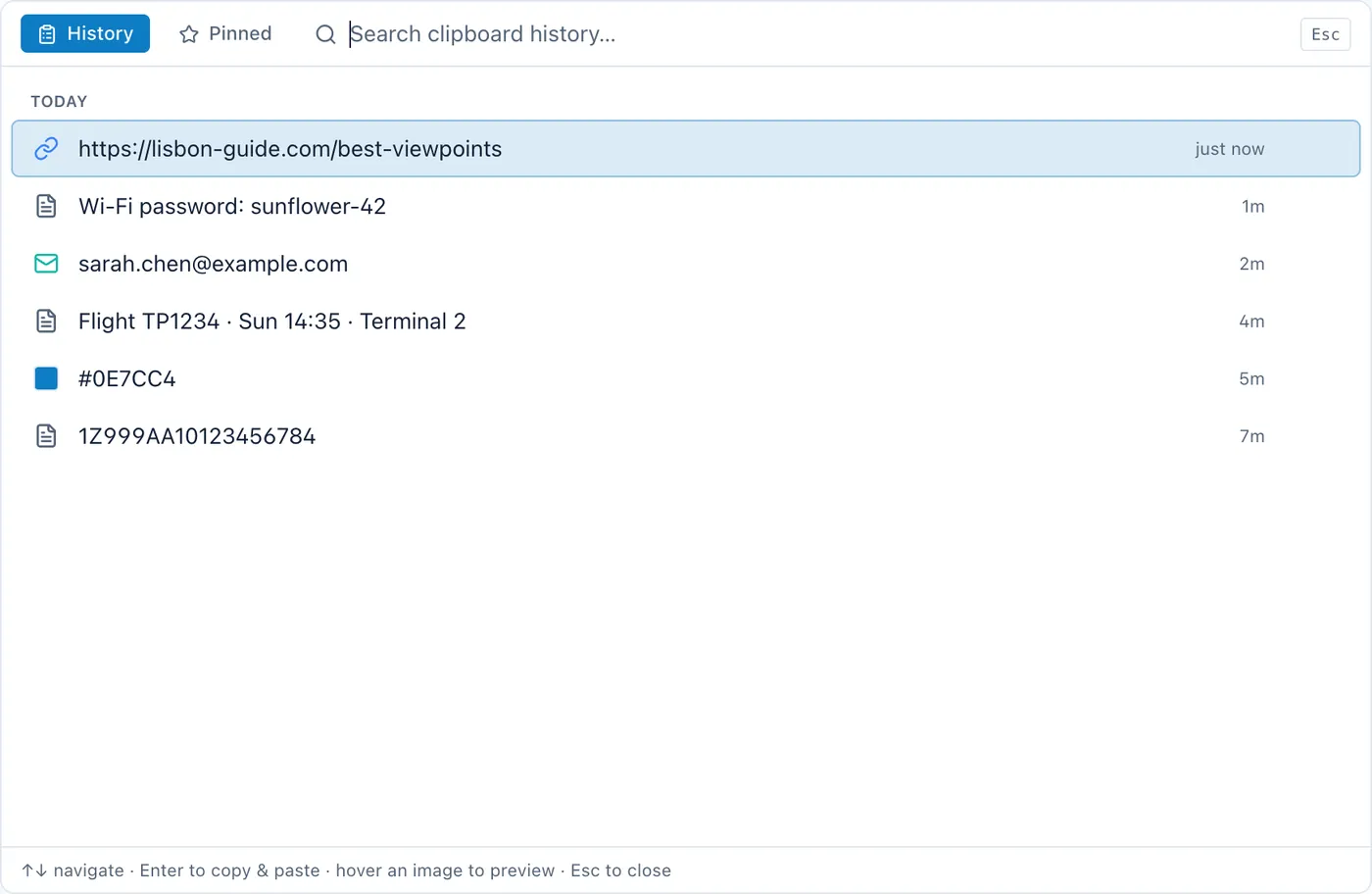
Cyanote's clipboard manager keeps every copy in a searchable list held in a local database on your Mac, opens from any app with one global hotkey, and lets you pin the snippets you paste constantly. It is part of an app that also holds your notes, to-dos, board, calendar, habits and routines, for $7.99 once.
That last sentence is the whole reason this page exists, and the rest of it is about why.
The honest part: "buy once" is not a reason to pick this one
It would be easy to sell this page on not being a subscription. It would also be misleading, because the one-time-purchase clipboard manager is a crowded category on the Mac and several of them undercut Cyanote outright.
| App | Price | Model |
|---|---|---|
| ClipV | $3 | One-time |
| Copydrop | $8.99 | One-time, lifetime licence |
| Maccy | Free (or $9.99 App Store build) | Open source |
| Clibo | $14.99 | One-time |
| Raycast | Free; Pro from $8/month annually | Freemium launcher |
| Paste | $29.99/yr or $89.99 once | Subscription or lifetime |
| Cyanote | $7.99 | One-time — and six other tools come with it |
USD, checked 13 August 2026; prices move, so check before deciding. If your requirement is "a clipboard manager I pay for once", ClipV at $3 meets it for less money, and Maccy meets it for none. Those are real recommendations. Cyanote is not the cheapest way to buy a clipboard manager and this page is not going to pretend otherwise.
What actually makes this one different
Look down that table again and notice what every entry has in common: they are all clipboard managers and nothing else. Then look at the apps that do bundle several tools together — NotePlan, Lunatask, Brite, Agenda, Notion. Not one of them has a clipboard manager.
That gap is the entire argument. You can buy an excellent clipboard manager, or you can buy an all-in-one app, and until now you could not buy one thing that was both.
Why that matters in ordinary use: the thing you copied and the thing you are writing are almost always related. A link going into a note about the project. A snippet moving from a code note into a task. A date going from an email into the calendar. When the clipboard lives inside the app holding the note, that trip is one hotkey rather than a switch between two applications — and the history is searchable from the same place as everything else you keep.
It is the least measurable claim on this page and the one I notice most in daily use, so I will make it once and leave it there.
What it does
- Unlimited history. No cap, no rolling window, no tier that unlocks more of it.
- Search. Type a few characters of something you copied and it comes back.
- Pinned snippets. The address, the bank reference, the boilerplate reply — the three things you paste thirty times a week stop scrolling away under ordinary copying.
- One global hotkey. Works from any app, not only from inside Cyanote.
- Local only. Written to a database on your Mac. No account, no upload, no sync — not a setting you switch off, but an absence.
"But Maccy is free"
It is, it is genuinely good, and if a clipboard manager is all you want then it is a reasonable place to stop reading.
Maccy is free and open source, local-only, keyboard-first, and it respects the system's concealed-content flag so your password manager's copies are not logged. It is deliberately minimal and text-focused. There is also a $9.99 App Store build with the same features, sold as a way to support the developer.
So the answer to "why pay?" is not that Maccy is missing something as a clipboard manager. For most people it is not. It is that $7.99 here is not really being spent on the clipboard at all — it is being spent on not running a separate app for notes, another for tasks, another for habits and another for the calendar, with the clipboard included rather than added.
What it refuses to keep
Think about what passes through your clipboard in an ordinary week. Passwords, on the way from a password manager to a login form. A two-factor code. Your address. A card number. An API key. A private link that grants access to whoever holds it.
A clipboard history turns that stream into a record. That is exactly what makes it useful and exactly what makes it a liability, and how a tool handles the distinction is worth checking before you install anything — this one included.
Cyanote's position is the blunt one: the history is a local database on your Mac and there is nowhere else for it to go. No account, no server, no sync. That is the same decision that makes the app $7.99 once rather than monthly, because there is no infrastructure to pay for. The longer discussion is here.
What it does not do
- No sync. Nothing reaches your iPhone, iPad or a second Mac.
- No image indexing. Paste is built for that; this is not.
- No shared pinboards. There is no collaboration anywhere in Cyanote.
- Not the deepest clipboard manager on the Mac. Paste has spent years on this one thing. Cyanote's is good; it is not that.
- Windows is a separate purchase. The Windows version is sold on the Microsoft Store; the Mac copy bought here does not include it.
If one of those is the feature you came for, buy the app that has it — there is a full head-to-head with Paste if that is the one you are weighing.
Requires macOS 12 or later, Apple Silicon or Intel. Fourteen-day refund, no reason needed.