For years the honest answer to this question was that macOS had no clipboard history. That changed with macOS 26 Tahoe. The history lives in Spotlight: press ⌘ + Space, then ⌘ + 4, and you get a list of what you copied recently. It is off until you turn it on, and nothing in it lasts longer than seven days.
If your Mac is on macOS 15 or earlier, none of that applies and the old answer still stands. The clipboard holds one item, the general pasteboard in Apple's own terms, and copying something else replaces it. That case has its own section further down.
For a lot of people the Spotlight history is enough. What follows is how to use it, where it stops, and when a dedicated clipboard manager earns its place.
How to turn on clipboard history in macOS 26
Open Spotlight with ⌘ + Space and press ⌘ + 4. You can do it in one movement: keep your thumb on ⌘, tap Space, then 4. The mouse route is the Spotlight icon in the menu bar, then the clipboard icon at the right-hand end of the Spotlight bar.
The first time you open it, macOS asks whether you want to turn the feature on. It records from that moment, so anything you copied before you said yes is not in there and never will be.
Once it is on, select an item and press Return, or click it, and it is pasted straight away. If you only want it back on the clipboard without pasting, there is a Copy button beside each item. One thing worth knowing: pasting from Spotlight strips text formatting, so a bold heading copied from a web page arrives as plain text.
How long it keeps things
The settings are at the very bottom of System Settings → Spotlight. Since macOS 26.1 there are three retention periods: 30 minutes, 8 hours and 7 days. Eight hours is the default. Before 26.1, eight hours was the most it would keep, so on 26.0 that is your ceiling.
The same pane has a Clear Clipboard History button. It wipes the clipboard history without wiping the rest of your Spotlight history, which is what you want after copying something you would rather not have kept.
Where it stops
None of this makes it a bad feature. A short memory is a defensible default for a buffer that carries passwords and two-factor codes through it all day, and a history that empties itself is safer to leave switched on than one that does not.
But the limits give it a particular shape:
Seven days is the ceiling. Items expire on the timer you choose, and the longest is a week. I have not found any mention, in the settings or in anyone's write-up of the feature, of a way to pin an item so it outlives that. There is no permanent history.
It is off until you turn it on. That is the right default, and it means it cannot help with something you copied before you did.
It lives inside Spotlight. You reach it through the Spotlight panel rather than a key of its own. Two keystrokes is quick once your fingers know it, but it is a mode of the search panel rather than a window of its own.
It drops formatting on paste. Fine for links and reference numbers, less fine for a formatted paragraph.
It needs macOS 26. On an older Mac it does not exist.
The moments where that shows are specific:
- You paste the same three snippets every week, an address, a bank reference, a stock reply, and every Monday they have aged out.
- You remember copying something about a supplier roughly a fortnight ago, and a fortnight is twice as long as the history.
- Your Mac does not run Tahoe, or you have not updated it.
If none of that sounds familiar, turn the Spotlight history on, set it to seven days if you are on 26.1 or later, and stop reading. That is a real answer and it costs nothing.
If what you need is to paste several things in the order you copied them, that is a different job, and copying and pasting multiple items on a Mac covers the tools built for it.
Clipboard history on macOS 15 and earlier
Before Tahoe, macOS has no clipboard history at all. Copy something, copy something else, and the first one is gone: not archived, not recoverable. There are three things people mistake for history on these versions. None of them is.
Finder's clipboard viewer
Open Finder, then Edit → Show Clipboard. A small window appears showing what is on the clipboard right now. That is the whole feature. It is a window onto the single current item, useful for checking whether a copy worked and useless for getting back anything older.
Universal Clipboard
Copy on your Mac, paste on your iPhone. It is genuinely good and it is not history. It moves the one current item between your devices and expires it after a short while. There is no list, and nothing is stored.
Undo
⌘ + Z will bring back text you deleted in a document. It has nothing to do with the clipboard and will not help you recover something you copied over.
On these versions a clipboard manager is the only way to get a history. Cyanote runs on macOS 12 and later.
Why a short memory is the safe default
The clipboard is a system-wide scratch space that every app can read. That is what makes it useful, and it is also why keeping a history of it is an uncomfortable feature to ship.
Think about what passes through your clipboard in an ordinary week. Passwords, on the way from a password manager to a login form. A two-factor code. Your address. A card number. An API key. A private link that grants access to whoever holds it. All of it, sitting in the same buffer as the URL you copied to send to a friend.
A clipboard history turns that stream into a record. That is exactly what makes it useful and exactly what makes it a liability. A history that expires after a day or a week limits the damage. A history that keeps everything has to be more careful about what it lets in, and how a given tool handles that is the thing worth paying attention to.
What a clipboard manager adds
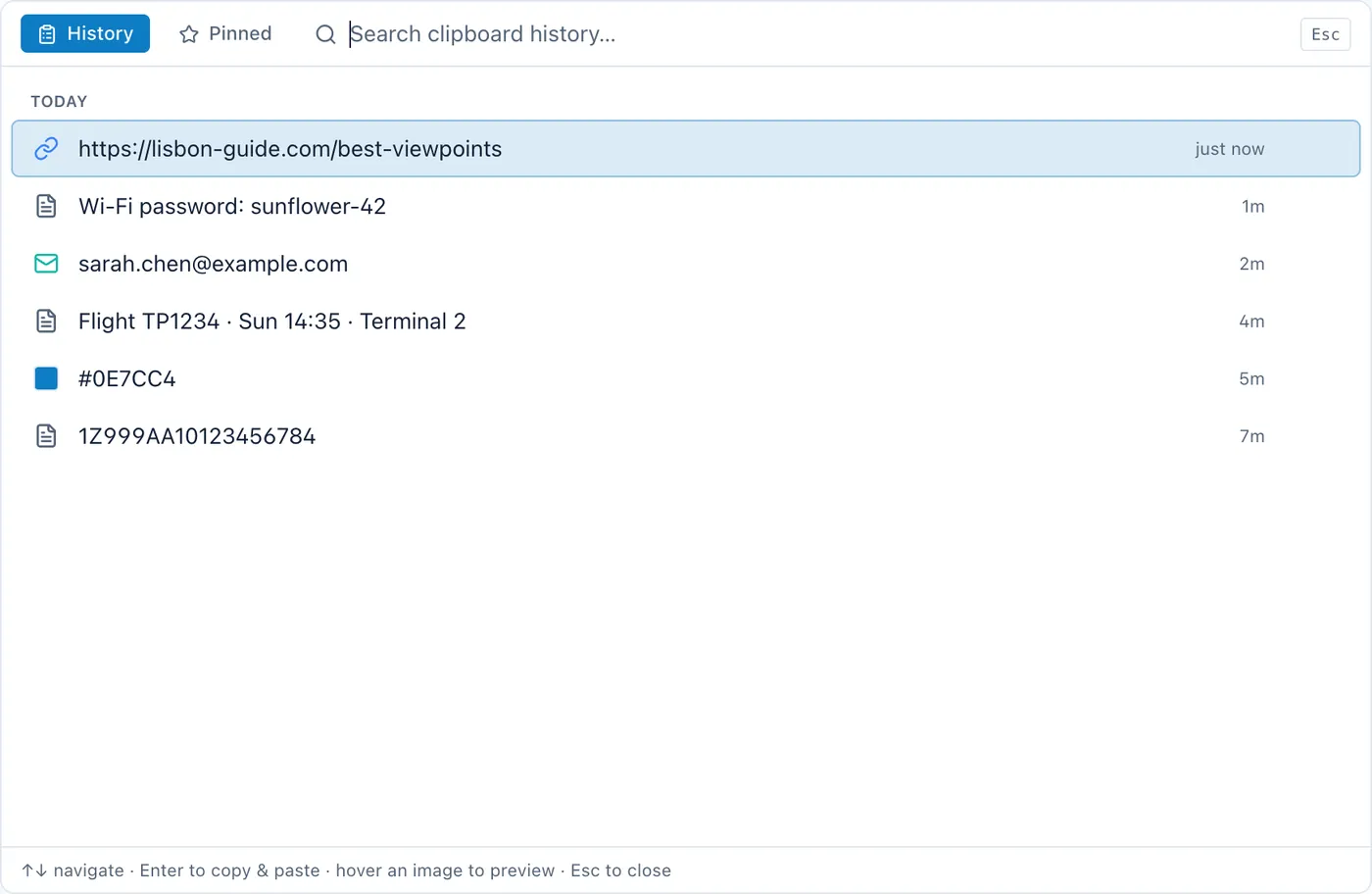
A clipboard manager is a small background app that watches the clipboard and keeps what passes through it. When you want something back, you open it with a hotkey, find the item, and it goes back on the clipboard or straight into the app you were in.
Against the Spotlight history, the differences worth checking are these:
How long it keeps things
The point of most clipboard managers is a history that does not expire on a timer. Some cap it at a number of items, some keep everything until you delete it.
Where the history is stored
This is the first question, not the last. A clipboard manager sees everything you copy. If it syncs that to a server, everything you copy is now on somebody else's computer. If it keeps the history in a local database on your own machine, it isn't. Both designs exist and the marketing rarely leads with which one you are getting.
Whether it is searchable
A list of the last few items is a convenience. A searchable history of everything is a different tool. You stop thinking of it as "undo for copying" and start using it as a place things can be found later.
What it does with sensitive copies
Good behaviour: recognising when a password manager put something on the clipboard and declining to keep it. Also good: letting you delete an individual item, and clear the lot in one action. A history that never expires makes this matter more, not less. What your clipboard manager is not supposed to remember goes into how that works.
Pinned items
The three snippets you paste constantly should not scroll away or expire. Pinning is what turns a history into a set of shortcuts.
Its own shortcut
A dedicated key that opens the history from any app, without going through a search panel first. Small, but you press it dozens of times a day.
Disclosure, since this blog belongs to one: Cyanote has a clipboard manager built in. On the Mac it keeps an unlimited history, text and images, in a local database on your Mac, with no account and no sync. It opens from any app with Option + Shift + V (⌥⇧V), with a separate shortcut for pinned snippets, and you can search the whole history. Copies a password manager marks as private are not kept. Pasting an item straight into the app you were in needs the Accessibility permission, which is a bigger permission than its name suggests. It does not clash with Spotlight's ⌘ + 4, so nothing stops you running both.
It is one of several things the app does rather than the only one, which is either the point or the drawback, depending on what you came for. The Mac version is $7.99 once.
If the subscription question is what is actually holding you up, that is its own decision. And if you are weighing this against Paste specifically, the two are compared here, prices included.
Before you install one
Two things I would do regardless of which tool you choose.
Check what it wants access to. A clipboard manager needs to read the clipboard, and that is a reasonable thing for it to ask. It does not need an account, and it does not need to send anything anywhere. If it wants both, ask what for.
And decide what you want it to forget. The most useful setting in any clipboard manager is the one that stops it keeping the things you would rather it didn't, whether that is a password-manager exclusion, an app blocklist, or a history that expires. Spotlight's history gets this by expiring. A manager that keeps everything has to get it some other way.
Frequently asked
Does macOS have a clipboard history?
Yes, from macOS 26 Tahoe. It is inside Spotlight: ⌘ + Space, then ⌘ + 4. It is off until you turn it on, and the first time you open it macOS asks.
How long does the Mac keep clipboard history?
Since macOS 26.1 you can choose 30 minutes, 8 hours or 7 days in System Settings → Spotlight. The default is 8 hours. On 26.0 the most was 8 hours.
Can I see clipboard history on macOS Sequoia or earlier?
No. Finder's Edit → Show Clipboard shows only the current item. On those versions you need a clipboard manager.
Can I get back something I copied before I turned it on?
No. Spotlight only records copies made after the feature is switched on.
How do I clear the Mac's clipboard history?
System Settings → Spotlight, then Clear Clipboard History at the bottom. It leaves the rest of your Spotlight history alone.
The short version
On macOS 26, turn on the Spotlight clipboard history, and on 26.1 or later set it to seven days. It is already there and it costs nothing. If a week turns out to be too short, you want snippets that stay put, or your Mac is on an older version, a clipboard manager is the fix: something that keeps the history on your own disk, lets you search it, and leaves your passwords out of it.