The idea is about thirty years old and it is a good one: let a note point at another note by name, and let the note being pointed at show you who pointed. That is it. Two sentences.
What grew on top of it is the reason most people bounce off. Somewhere in the last decade, linking notes stopped being a text feature and became a practice, with a vocabulary — atomic notes, evergreen notes, maps of content, zettelkasten, second brain — and a genre of YouTube video about the graph view of somebody's vault, which is beautiful and tells you nothing.
You can have the feature without the practice. It is worth having.
What a link actually buys you
Search finds a note when you remember a word that was in it. Links find a note when you remember a different note that mentioned it.
That second case is more common than it sounds. You cannot remember what the contractor was called, but you know you wrote about the kitchen. You cannot remember the name of the library, but you know it came up when you were setting up the project. In both cases you have a handle on something adjacent, and a link turns that adjacency into a route.
Backlinks — the note showing you what points at it — are the same trick pointed the other way. Open the note about a person and you see every meeting they were in, without having filed a single one of those meetings under their name. That is a filing system that builds itself as a side effect of writing normally, which is the only kind anybody sustains.
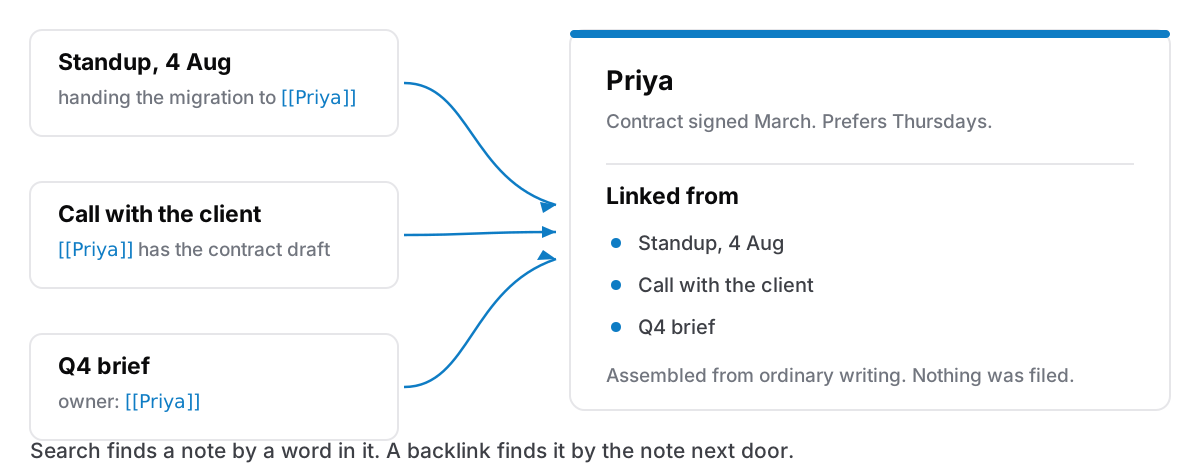
The small version, in three rules
This is the entire method as I actually use it. It takes no setup and no vocabulary.
One, link a name the first time you write it in a note. People, projects, clients, recurring problems. Not concepts, but names. [[Priya]], [[Kitchen rewire]], [[Invoicing]]. If the note does not exist yet, most apps create it empty when you follow the link, and an empty note that already has three things pointing at it is more useful than a full one nobody links to.
Two, do not link things you would never look up. A link to [[Tuesday]] or [[email]] is noise. The test is whether you can imagine opening that note on purpose. If you cannot, leave the words as words.
Three, never reorganise the links. They are not a structure you maintain. They are a residue of writing. The moment you start tidying them you have joined the practice, and the practice is where people stop.
That is the whole thing. Three rules, no software beyond an editor that supports [[.
What the graph view is for
Honest answer: mostly nothing.
The force-directed picture of every note connected to every other note is one of the most screenshotted features in this category and one of the least used after week two. It is genuinely lovely, and it will occasionally show you a cluster you did not know you had. But it does not answer questions. "Which notes mention this client" is a question. "What does the shape of my knowledge look like" is a screensaver.
If an app has a graph view, enjoy it. If choosing between apps comes down to whether one has it, choose on something else.
Where the methodology goes wrong
Not because the ideas are bad — several of them are good — but because of what they ask for up front.
The heavy note-linking systems ask you to decide, at the moment of writing, what a note is: whether it is atomic, whether it is permanent or fleeting, which index it belongs to, whether it has earned a place in the permanent collection. That is a lot of classification work applied to the thing you were doing to avoid work. The overhead lands entirely on capture, which is the exact point in the process that has to stay cheap or the system dies.
You can watch this happen in the wild. Someone sets up a beautiful vault in January, writes forty carefully processed notes, and by March is writing into the phone's default notes app because it does not ask any questions. The methodology did not fail on the merits. It failed on friction, at the only moment where friction is fatal.
The small version has no capture cost. You type two brackets in the middle of a sentence you were writing anyway.
What to check before you rely on it
Links are only worth building if they survive.
Do links break when you rename a note? Some apps rewrite every reference automatically. Some leave you with dead text. This matters more than it sounds, because notes get renamed constantly in the first month.
Are backlinks shown, or only forward links? Forward links alone are half the feature. The assembling-itself part is the backlink list.
What happens on export? If you leave, do the links come out as something a person or another app can follow, or as [[Priya]] sitting in a text file pointing at nothing? Ask this before you have two years of them. It is the same question as what happens when your notes app shuts down, applied to the one feature that is hardest to reconstruct by hand.
Can you link to a sub-page, not just a top-level note? If notes nest, links that only reach the top level will start failing you around the time the collection gets deep enough to need them.
The honest version of the choice
If you genuinely want the full practice — a system you tend, with indexes and structure notes and a defensible taxonomy — Obsidian is the app for it and has been for years. As of 17 August 2026 the core app is free for personal use, your notes are Markdown files in a folder you own, and the plugin ecosystem is where every idea in this space gets tried first. Nothing bundled into a general-purpose app will out-depth it, and I would not pretend otherwise.
What a general app can offer is the part most people actually use: [[ works, backlinks appear at the bottom, and nobody asks you to have a philosophy. If you have tried the full version twice and stopped twice, that is not a discipline problem. It is a sign you wanted the feature and were sold the practice.
Cyanote's version is deliberately the small one. Type [[ in any note to link to another, and the note you linked to lists what points at it. Notes nest into sub-pages, and the links reach them. Everything sits in a single SQLite database on your own disk, and the whole collection — links included — exports to a JSON file you can read. There is no graph view. There is also nothing to set up.