You download something, double-click, and macOS says it cannot be opened because it is from an unidentified developer, or that it cannot verify the app is free of malware.
Two wrong readings follow. Some people conclude the app has a virus and delete it. Others conclude macOS is being annoying and reach for the bypass. Neither is right, and the actual meaning is narrow enough to state precisely.
What Gatekeeper checked
macOS looked for two things, and the warning tells you which one failed.
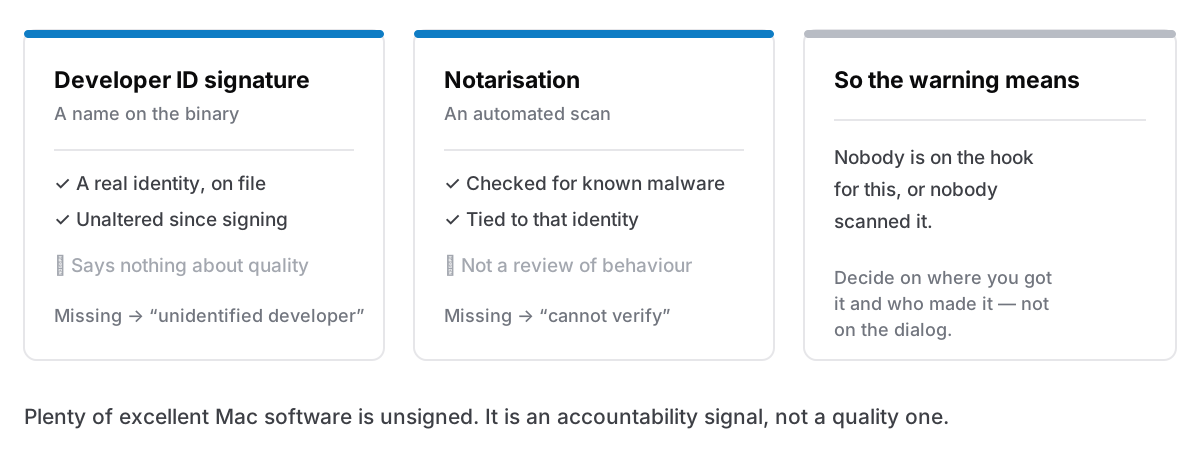
A Developer ID signature. The developer enrolled in Apple's programme, has a real identity on file with Apple, and used their certificate to sign the app. The signature also proves the app has not been altered since. If this is missing, macOS calls it an unidentified developer, meaning literally that: nobody's name is attached.
Notarisation. The developer uploaded the finished build to Apple, which scanned it automatically for known malicious content and issued a ticket. This is not a review of quality or behaviour. It is an automated malware scan plus a record that a specific, identifiable developer shipped this specific binary.
Neither check says the app is good, safe, or well made. Together they say: a real identity is attached, and an automated scan found nothing known. That is a lower bar than people assume, and a meaningfully higher one than nothing, mainly because accountability raises the cost of shipping something bad.
What changed, and why the old advice fails
For years the standard workaround was Control-click the app, choose Open, and confirm. Half the internet still says this.
Apple removed that path in macOS Sequoia. The developer note announcing it is explicit: users can no longer Control-click to override Gatekeeper for software that is not signed correctly or notarised, and must go to System Settings → Privacy & Security to review the security information before allowing it to run.
So the current route, if you have decided to trust something:
- Try to open it once. It will be refused.
- Open System Settings → Privacy & Security.
- Scroll down. There is a message naming the app that was blocked, with an Open Anyway button.
- Confirm, and authenticate.
The extra friction is deliberate. It makes the decision explicit, in a settings pane, rather than something you can be talked through on a phone call by someone claiming to be support, which was the attack the old shortcut enabled.
What you should never do
Do not run xattr -d com.apple.quarantine because a forum told you to. That command strips the flag macOS uses to know the file came from the internet, and it makes the warning disappear for any file, including one that should have triggered it. It is the single most commonly pasted dangerous command in Mac support threads, and the people posting it are usually trying to help.
Do not disable Gatekeeper entirely. spctl --master-disable turns the whole system off for everything, permanently, to solve one download. If you have done this at some point in the past, it is worth checking whether it is still off.
The distinction that matters: allowing one specific app you have reasoned about is a decision. Removing the mechanism that would have asked you next time is not.
How to decide whether to trust it
The warning has told you what macOS does not know. The rest is yours, and these are the questions worth asking.
Where did the download come from? The developer's own site over HTTPS, or a link in a search ad, or a download-portal mirror? Mirrors are where re-bundled installers live, and the app can be legitimate while the copy you got is not.
Does the developer have a name and a history? A site, a changelog, a support address, a track record, people discussing it publicly. Software with no findable author asking you to override a security warning is a bad combination regardless of what it does.
Is it open source, and are you getting it from the actual project? A great deal of good Mac software is unsigned simply because the developer will not pay Apple annually to give it away. That is a legitimate reason and a common one, but it makes provenance everything, since the project's release page and a random mirror carry very different risk.
Is the warning proportionate to what you are installing? A small utility that draws a window is one thing. Something that wants Accessibility permission, a kernel extension or admin rights is another, and an unsigned app that immediately asks for broad system permissions deserves considerably more scepticism.
The version of this you should walk away from
Some cases are not judgement calls.
- The download arrived by email or a message, and you did not go looking for it.
- A web page told you your Mac has a problem and offered a fix.
- Someone on a call is asking you to open Privacy & Security and click Open Anyway.
- The app is a "cracked" or "patched" build of paid software. Repackaged installers are one of the most reliable malware vectors on macOS, and the whole point of the repackaging was to modify a binary somebody else signed.
In all four, the warning is doing precisely the job it was designed for.
The other side: what it costs developers
Worth knowing, because it explains why so much decent software trips it.
Signing requires a paid Apple Developer membership, renewed annually. Notarisation requires uploading each build to Apple and waiting for a result, which adds a step to every release. For a hobbyist giving software away, that is a recurring cost and a recurring chore in exchange for no warning dialog, and plenty of them reasonably decline.
Which means the warning is not a quality signal. Some of the best Mac utilities ever written are unsigned, and plenty of mediocre commercial software is signed and notarised. It is an accountability signal, and only that.
The honest version
The warning means: nobody is on the hook for this, or nobody checked it. Decide with provenance, not with the dialog.
Cyanote's Mac build is a universal binary — Apple Silicon and Intel — signed with a Developer ID certificate and notarised by Apple, so it opens normally and none of the above applies to it. The Windows version is sold through the Microsoft Store, which signs the package it installs, so it does not open with the unknown-publisher warning an unsigned download gets. Being able to say which of your builds trips a security warning, and why, seems like the least a download page owes you.