You have a Mac, a growing pile of things you meant to write down, and no particular desire to pay $40 to find out whether you like an app. So you search for a free notes app, and get a list of thirty, ranked by nothing in particular, most of which will want an account before they will accept a sentence.
Here is the short version, and I would rather give it to you at the top than bury it under a comparison table.
Most people should open Apple Notes and stop reading
It is already on the machine. It costs nothing, forever. It opens instantly, syncs to your iPhone with no configuration, locks individual notes behind Touch ID, scans a document through the camera, and has grown folders, tags, smart folders, tables, checklists and links between notes over the past few years.
If your requirement is somewhere to put things, that is the answer, and the rest of this article is optional reading. I have written a whole post on when it is actually worth moving off Apple Notes, and the honest conclusion there was that most people should not. Nothing has changed.
The two other free apps Apple ships are worth knowing about for the same reason. TextEdit still comes with macOS, and a folder of .txt or .rtf files is a genuinely durable system that no company can alter. Stickies has been in macOS since 1994 and is still there in macOS 26. Neither is fashionable. Both will open in ten years. If Stickies is the one you reach for, there is a guide to getting more out of it.
So: if the bundled apps fit, use them. What follows is for the case where they do not, because the word "free" on the other thirty results in that list is doing four completely different jobs, and the difference decides whether the app is still there in three years.
Free is four different things
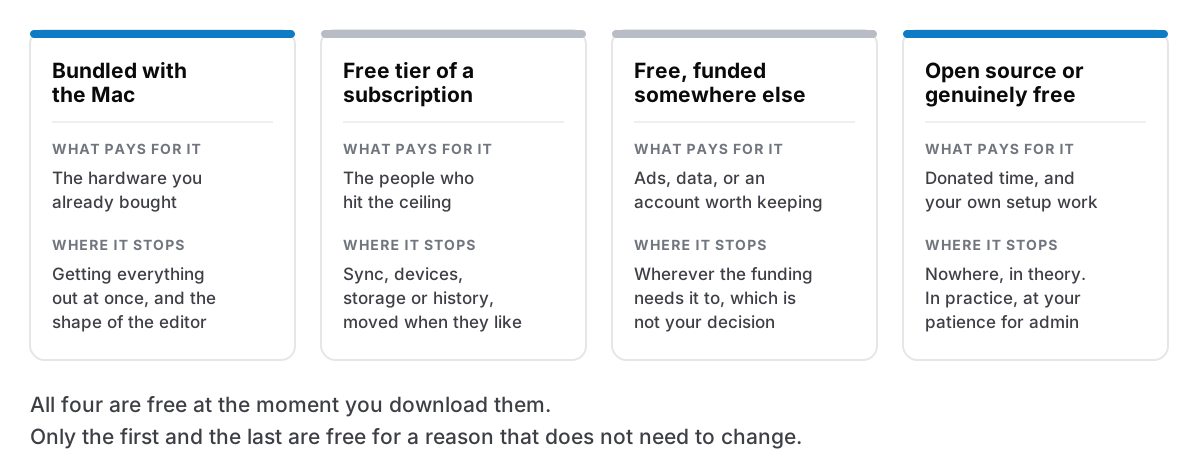
Bundled with the hardware. Apple Notes, TextEdit, Stickies. You paid for these when you bought the Mac, and Apple's incentive is for the machine to be worth buying again, which is a stable arrangement — probably the most stable on this list. There is no tier to be moved, no account to lapse, no funding round to fail. What you give up is control over the direction: the app changes when Apple decides it changes, and the ceilings are Apple's ceilings. The one that catches people is export. Apple's own guide documents exporting one note at a time, as PDF or Markdown, from the File menu. In the macOS 26 generation you can in practice select several notes and export them together as Markdown, which is a real improvement and is not in Apple's documentation, so treat it as a thing that works rather than a thing you are owed. There is still no single "export everything" command. That does not matter until the day it is the only thing that matters, which is the argument for checking your exit before you need it.
A free tier of a subscription product. This is most of the list. The app is real, the free tier is real, and the company's business model requires that some proportion of free users eventually hit a wall. That is not dishonest — someone has to pay for the servers, and the people who upgrade are paying for the people who do not. It is simply worth knowing where the wall is before you put four years of writing behind it.
The wall is usually one of four things: sync, number of devices, storage, or history. Notion's free plan is generous on content — unlimited pages and blocks — and draws the line elsewhere: page history is kept for seven days, and file uploads are capped at 5 MB. Evernote is the cautionary version. In December 2023 it capped free accounts at 50 notes and one notebook, and applied that to existing free users, not just new ones. People who had been storing things in Evernote free for a decade woke up to a limit below what they already had.
The free tier is fine right up to the day your notes are the thing being held.
Free because something else is paying. Ads, data, or an account worth keeping you inside. This category deserves more care than it usually gets, because the obvious accusation is often wrong. Google Keep is free and shows no ads, and Google states that Keep content is not used for advertising. It is still free for a reason, and the reason is that Keep is one of the things that makes a Google account worth having. That is a legitimate arrangement and also a fragile one, in the specific sense that the app's fate is decided by a strategy that has nothing to do with note-taking.
Where this category genuinely goes wrong is further down the App Store: small free apps carrying analytics SDKs you did not choose, and the newer crop of free AI note-takers whose terms let your text be used for training. Read the privacy policy of anything free that wants your writing. It is a ten-minute job and it is the only way to find out.
Open source, or genuinely free. Joplin is open source, still actively released — version 3.6.x shipped through 2026 — and syncs for nothing through Dropbox, OneDrive or Nextcloud, with an optional paid Joplin Cloud if you would rather not arrange it yourself. Obsidian's app is free for everyone, including for work: the commercial licence became optional in February 2025 and buys no extra features. Its paid Sync service is separate and costs roughly $4 per user per month billed annually — check the current figure before you plan around it. And a folder of Markdown files in any editor costs nothing at all and will never change its terms.
The price here is real, it is just not money. You pay in setup, in the hour you spend deciding how sync works, and in being your own support desk when it breaks. For some people that is a pleasant afternoon. For others it is the reason they stopped.
What to check before you commit anything you would mind losing
Five questions. Run them before you have four hundred notes in something, not after.
Can you get everything out, in a format readable without the app? Not one note at a time. Everything, including attachments, into files something else can open. Markdown or plain text is ideal; a single proprietary blob is not an escape route.
Does it work with no account? An app that requires a sign-in is an app that can lock you out, and account recovery is not your decision to make. What works without an account is a narrower list than it looks.
What specifically happens at the free tier's ceiling? Get the actual number. Is it note count, device count, storage, or history length? Does hitting it make the app read-only, or stop it accepting new notes? And is export itself a paid feature — because that is the one that traps people.
Who pays for the developer's time? If you cannot answer this, you do not know what the app is for. Hardware, upgraders, advertisers, donors, or a single payment from you. Each has a different failure mode, and none of them is "nobody, forever".
How old is it, and is it still shipping? A public changelog going back years is the most useful signal available. The counter-example arrived this year: Automattic announced on 2 March 2026 that Simplenote is no longer in active development, with only basic maintenance planned. The apps still work and sync is still running, with no shutdown announced — but a well-loved free app went quiet, and nobody was billed anything on the way. Free does not mean permanent. It means nobody owes you a migration path. That is the whole of what happens when your notes app shuts down, arriving slowly instead of all at once.
The honest recommendations
For most Mac users: Apple Notes. Free, installed, fast, syncs to the phone, and good enough that switching is usually a downgrade dressed as an upgrade.
For plain-text people who enjoy tinkering: Obsidian, free for personal and commercial use, or simply a folder of Markdown files in any editor you like. Both leave you holding files rather than an account.
For cross-platform with sync, on no budget: Joplin, open source, syncing through a cloud drive you already pay nothing for. Standard Notes is the other real option — its free plan covers unlimited notes on unlimited devices with end-to-end encryption, and it is now part of Proton while keeping its own product and pricing.
And for people who specifically want no account and no subscription: the one-time-purchase category still exists, and Cyanote is in it. I will not pretend that is a neutral recommendation — I make it — but the category is real and worth knowing about, and there are several good apps in it besides mine.
What a one-time purchase actually buys, and what is wrong with it
If none of the free options fit, the thing a single payment buys is narrow and specific: an app that keeps working when you stop paying attention to it, because there is nothing to renew and no server to go dark. No tier to be moved. No account to expire. What buying once actually has to include to mean anything is a short list, and most of it you can check from the outside.
The model has a genuine structural weakness, and I would rather name it than let you find it later. A single payment means the developer's income depends entirely on finding new customers, forever. Nothing about your purchase funds next year's work — it funded last year's. That pressure is exactly why so many apps that started as a purchase ended up as a rental, and it is a real reason to look at how long a one-time-purchase app has been shipping before you trust it with a decade of writing. I have written out the arithmetic of a ten-dollar app in full, including the part where it does not work.
The honest version
Free is very often the right answer. For a large majority of people reading this, the best free notes app for a Mac is the one already in the Applications folder, and the second best is a folder of text files.
The mistake is not choosing free. It is choosing free without knowing which kind of free it is — and finding out three years in, when the tier moves, the funding changes, or the app quietly stops being developed, that the thing you were relying on was never a promise.
Ask what pays for it. Then decide.
If you have run those questions and landed on wanting no account, no subscription and everything in one local database on your own Mac, Cyanote is $7.99, once. If you landed on Apple Notes instead, that is a good outcome too, and it cost you nothing.