You have a response body that is one long line and you need to read it. So you do what everyone does: search "json formatter", click the first result, paste, read.
I have done this a thousand times. Almost all of those times it was fine. The problem is that "almost all" is doing real work in that sentence, and the paste is never the thing you were paying attention to. You were debugging, the object was in the way, and the tool was a means of getting past it in four seconds.
What you are actually pasting
Take an honest inventory of what tends to end up in those boxes.
A JSON response with a customer's email, address and order history in it. A JWT, which is to say a live credential, decoded on a page whose only claim is that it does it in the browser. A stack trace containing internal hostnames and file paths. A config file with the connection string still in it. A CSV a colleague sent you. Someone's phone number, because you were checking a regex against real data rather than making one up.
Nobody sets out to paste a customer record into a stranger's website. It happens because the tool is a text box and the thing in your clipboard is what you happen to be debugging.
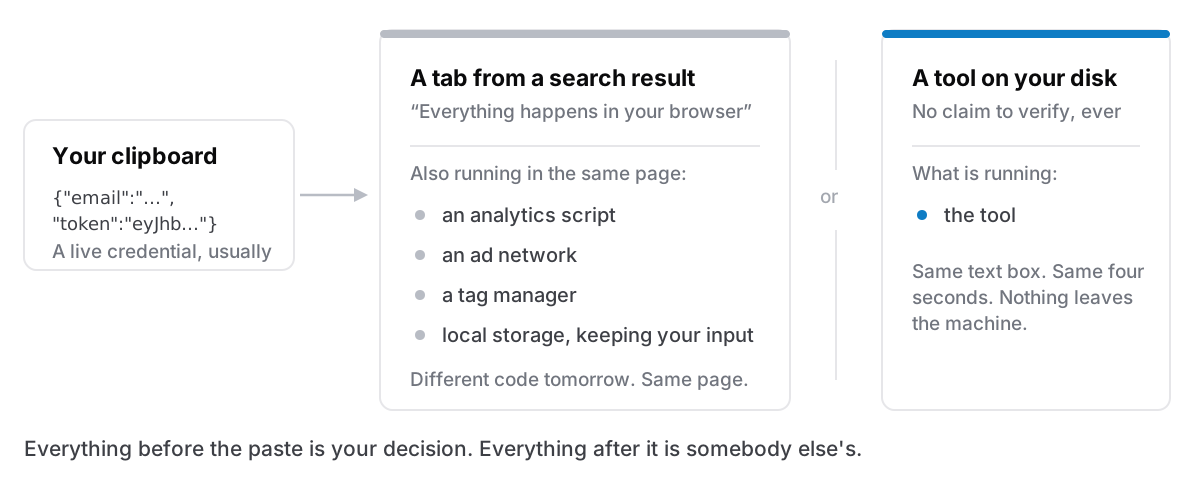
"It all happens in your browser" — and the three ways that fails
Most of these sites say the processing is client-side, and most of them are telling the truth. It is a real and meaningful protection. It is also a promise you cannot verify at paste time, and it does not cover several things people assume it covers.
You cannot check it, and it can change. You could open the network tab and read the source — once, today. The site can ship different JavaScript tomorrow, to you specifically, and nothing about the page will look different. You are trusting a claim about code you are not reading, on every visit.
The page is not one party. A tool page pulling in analytics, an ad network, a tag manager and a font is running four other companies' code in the same document as your paste. Client-side processing says the tool does not send your data anywhere. It does not say the ad script in the same page cannot read the DOM, because it can.
Autosave and history. Plenty of these tools save your last input to local storage so it is there when you come back. Convenient, and it means the JWT is still sitting in the browser profile on a laptop that gets shared, imaged, or resold. Some have "share this" buttons that upload on click, one misclick away from a paste becoming a URL.
None of this makes the sites malicious. It makes the arrangement unverifiable, which for anything under an NDA or a data-protection policy is the same practical answer.
The part your employer's policy already says
Worth checking your own rules before assuming this is paranoia. Most organisations that handle personal data have a written line about not putting it into third-party services that have not been reviewed. A JSON formatter is a third-party service. It just does not feel like one, because it has no logo, no login and no invoice.
The same policy that would stop you emailing a customer export to a personal address is the one that covers pasting it into a page you found in a search result. The intent is identical. The friction is not, which is exactly why one happens constantly and the other does not.
The fix is boring
Do the operation on your own machine.
For a lot of these there is a command already installed. jq . formats and validates JSON. base64 -d decodes. pbpaste | ... reads the clipboard directly. If you live in a terminal, that is the whole answer and you can stop reading.
The reason people use websites anyway is not ignorance of jq. It is that the terminal version requires remembering the flag, and the website requires remembering nothing. For a four-second task, "remembering nothing" wins every time. That is a UI problem, not a security problem, and it is why telling people to just use the CLI has been failing for fifteen years.
The version that actually sticks is a local tool with a text box in it. Same shape as the website, same four seconds, same nothing-to-remember, but the text never leaves the machine, so there is no claim to verify.
The list worth having locally
The tools that come up over and over, in roughly the order people reach for them:
- JSON format and validate. The single most-pasted thing on the internet.
- Base64 encode and decode. Often on something that came out of a header.
- JWT decode. The one that should worry you most, because a JWT is a bearer credential and pasting it is handing over the credential, not a description of it.
- URL encode and decode, and a URL inspector for pulling a query string apart.
- A regex tester. Where real data gets pasted more than anywhere else, because made-up test data never has the edge case in it.
- Text compare. Two versions of a config, side by side.
- Case and line operations — sort, dedupe, join, split, trim.
- Invisible-character stripping. The fix for text copied out of a PDF or a chat client that looks identical and breaks a comparison.
- A timestamp converter. Because nobody reads epoch seconds on sight.
That is nine things. None of them is hard. Collectively they account for a startling share of what gets typed into a search bar during a workday.
The honest version
If you are formatting a JSON blob you generated yourself with no real data in it, a website is fine and the risk is genuinely zero. This is not an argument that those sites are dangerous; it is an argument that the habit is indiscriminate, and the habit does not check what is in the clipboard before it fires.
There are good local answers at every price. DevUtils and Boop are both well-liked Mac apps built for exactly this. If a dedicated one fits how you work, use it. This is a category where several people have done the job properly.
Cyanote has these on a Tools page, next to the notes: case and line operations, invisible-character stripping, text compare, Base64, URL and JWT encode and decode, JSON format and validate, a regex tester, a URL inspector and a timestamp converter. They are there because the paste usually happens two seconds after something got copied, which is also why the clipboard history sits in the same window. Nothing you type into them is sent anywhere, because the app has no server to send it to.