Every notes app has AI features now, and most of them are genuinely useful. Summarise this. Find the note about the thing. Turn these bullets into a paragraph. Ask a question and get an answer drawn from what you have written.
There is one property they share that is worth stating plainly before you decide how you feel about it: almost all of them work by sending your notes to somebody else's computer.
That is not a scandal and it is not hidden. It is how the technology works at the quality people expect. But it inverts the arrangement for anyone who chose a notes app for privacy reasons, and it is worth understanding at the level of what actually leaves.
What each feature transmits
The features are sold as one category and they have very different footprints.
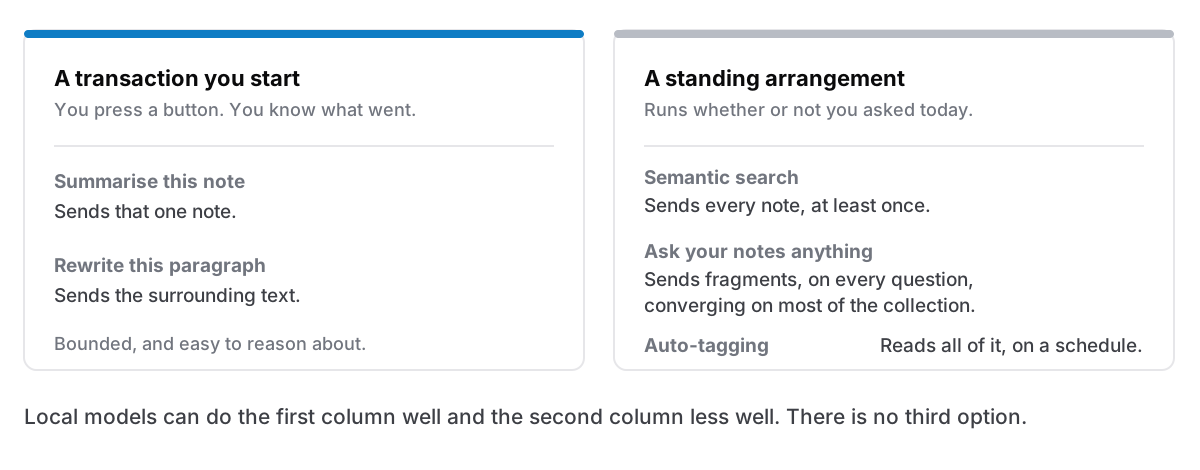
Summarise this note. Sends that note. Bounded, and the easiest to reason about — you know exactly what went.
Rewrite or continue this paragraph. Sends the surrounding text. Also bounded, usually small.
Semantic search across everything. Sends all of it, at least once. To search by meaning rather than by word, every note has to be turned into embeddings, and unless that happens on your machine, every note is transmitted. This is the feature people most underestimate, because it feels like search — a local-seeming operation — and it is the one with the largest footprint.
"Ask your notes anything." Sends whichever notes the system judges relevant to your question, on every question. Over months that converges on most of your collection, in fragments, with no record of which fragments went where.
Automatic tagging, linking or organising. Reads everything, on a schedule, whether or not you are using the app.
If you are weighing this, that ordering is the useful one. The first two are a transaction you initiate. The last three are standing arrangements.
The questions to ask
Vendors vary enormously and several are genuinely careful. These are the questions that distinguish them.
Is my content used for training? Most business-focused vendors now say no by default. Check whether that is the default or an opt-out, and whether it differs by plan. Free tiers sometimes have different terms.
How long is it retained? Many providers keep API inputs for a period for abuse monitoring, commonly around 30 days. That is reasonable operationally and it means your notes exist on their infrastructure after the request.
Who is the third party? Most apps do not run their own models. Your notes are going to the app vendor and to whichever model provider they use, which is two organisations and two sets of terms.
Is it opt-in per action, or always on? A button you press is a decision. Background indexing is a policy.
Can it be turned off completely? Not "disabled in the UI" — actually not running. Worth checking, because some indexing runs regardless of whether you use the features.
What can genuinely run locally
This is improving and it is worth knowing what is realistic in 2026.
Local embeddings for semantic search: yes, realistically. Embedding models are small enough to run on any modern Mac, and the quality is good. This is the local AI feature that most makes sense, because it is the one with the worst privacy profile when remote.
Local summarisation and rewriting: yes, with caveats. Small models run on Apple Silicon and produce useful output. They are noticeably worse than the frontier hosted models, and they cost several gigabytes of download plus real memory while running. Whether that trade is good depends on how much better you need the output to be.
Local "ask your notes anything": partially. The retrieval part runs locally. The answering part is where local models are weakest, and it is the part people judge the feature on.
The honest summary: local AI is genuinely viable in 2026 and it is not as good. Anyone claiming the gap has closed is selling something, and anyone claiming local models are useless has not tried recently.
The thing nobody mentions about app size
A local model is a few gigabytes. That is a large change to what installing a notes app means. An app that was 15 MB becomes a multi-gigabyte download, holds significant memory while running, and has real implications on an older machine.
Which is why most apps that offer local AI make it an optional download, and why apps that value being small often decline the feature entirely. It is a real architectural fork, not a checkbox.
Where this leaves a local-first app
Being straight about the position, since this is the part where a page like this usually gets evasive.
An app with no server has three options. Call somebody else's API, which contradicts the reason people chose it. Ship a local model, which multiplies the download size and gives worse results. Or not have AI features, and be worse at some genuinely useful things than the competition.
There is no fourth option, and anyone telling you their local-first app has frontier-quality AI with nothing leaving the machine is describing something that does not exist.
What a local app does have, and it is worth weighing: very good conventional search. Ranked full-text search across everything answers a large share of what people use AI search for, instantly, with no model, no transmission and no wait. It fails on the questions where you cannot remember any word from the note, which is exactly where semantic search shines, and that is the honest boundary between them.
How to decide
If the material is ordinary — work notes, projects, drafts, things you would not mind a colleague reading — hosted AI features are a reasonable trade and the productivity is real. Check the training and retention terms, and get on with it.
If some of it is sensitive — client work under NDA, health, legal, a journal, anything covered by a policy — the useful move is not to refuse AI entirely. It is to keep the sensitive material somewhere without it, and use AI-equipped tools for the rest. Two places with a clear line beats one place with a policy you hope holds.
If you cannot tell what is going where, that is itself the answer. A feature you cannot characterise is one you cannot consent to, and vagueness at this specific point is worth reacting to, the same standard as any other claim about what an app transmits.
The honest version
AI features in notes apps are useful and I am not going to pretend otherwise. Summarising a long meeting note, finding something by meaning, turning fragments into prose — these save real time.
The cost is a copy of your writing on infrastructure you do not control, and whether that matters depends entirely on what you write. For most notes it does not. For some notes it very much does, and the mistake is having one policy for both.
Cyanote has no AI features at all. Nothing is summarised, nothing is embedded, nothing is sent. The Mac app makes three network requests in total, the Windows edition fewer, and none carries a word you have written. What it has instead is ranked full-text search across every note, code block and table, running against a local database, returning results while you are still typing. That is a real trade rather than a superior position: if what you want is to ask your notes a question in plain language, this app does not do that, and one that does will serve you better.