Kanban started on a factory floor. Taiichi Ohno's system at Toyota — introduced as a production-control method in 1954 — used physical cards — kanban means signboard — to signal that a station was ready for more work. Nothing was produced until something downstream asked for it. Software teams borrowed it in the 2000s, and somewhere after that it arrived on individual to-do lists, mostly in the form of three columns labelled To Do, Doing and Done.
That last translation loses the thing that made it work. What follows is what survives the trip to one person, and what to do instead of the three columns everyone starts with.
The idea that actually transfers
Kanban's core insight is not columns. Columns are how you see it. The insight is limiting how much is in progress at once.
On a factory line the reason is inventory: half-finished work sitting between stations is money doing nothing. For a person, the equivalent is more familiar. Eleven things started, none finished, and a nagging sense of being busy without anything shipping. Every one of those started things costs you something to keep in your head, and the cost is charged whether or not you touch it that day.
A board makes that visible in a way a list cannot. A list of thirty tasks looks the same whether you have started three of them or all thirty. A board with fourteen cards in Doing looks obviously wrong from across the room.
That is the whole benefit, and it is a real one. If you take nothing else from Kanban, take the limit.
Why To Do / Doing / Done disappoints one person
The standard three columns come from team boards, where they answer a genuine question: which stage of a shared process is this in, and who has it now? Design, then build, then review, then ship. The columns are handoffs.
Working alone, you have no handoffs. Everything is yours at every stage. So the middle column stops describing a stage and starts describing "things I have opened", which is not information. You knew that. Meanwhile "To Do" becomes a single undifferentiated wall of forty cards, which is a list with extra scrolling and less detail per line.
The columns are answering a question you don't have.
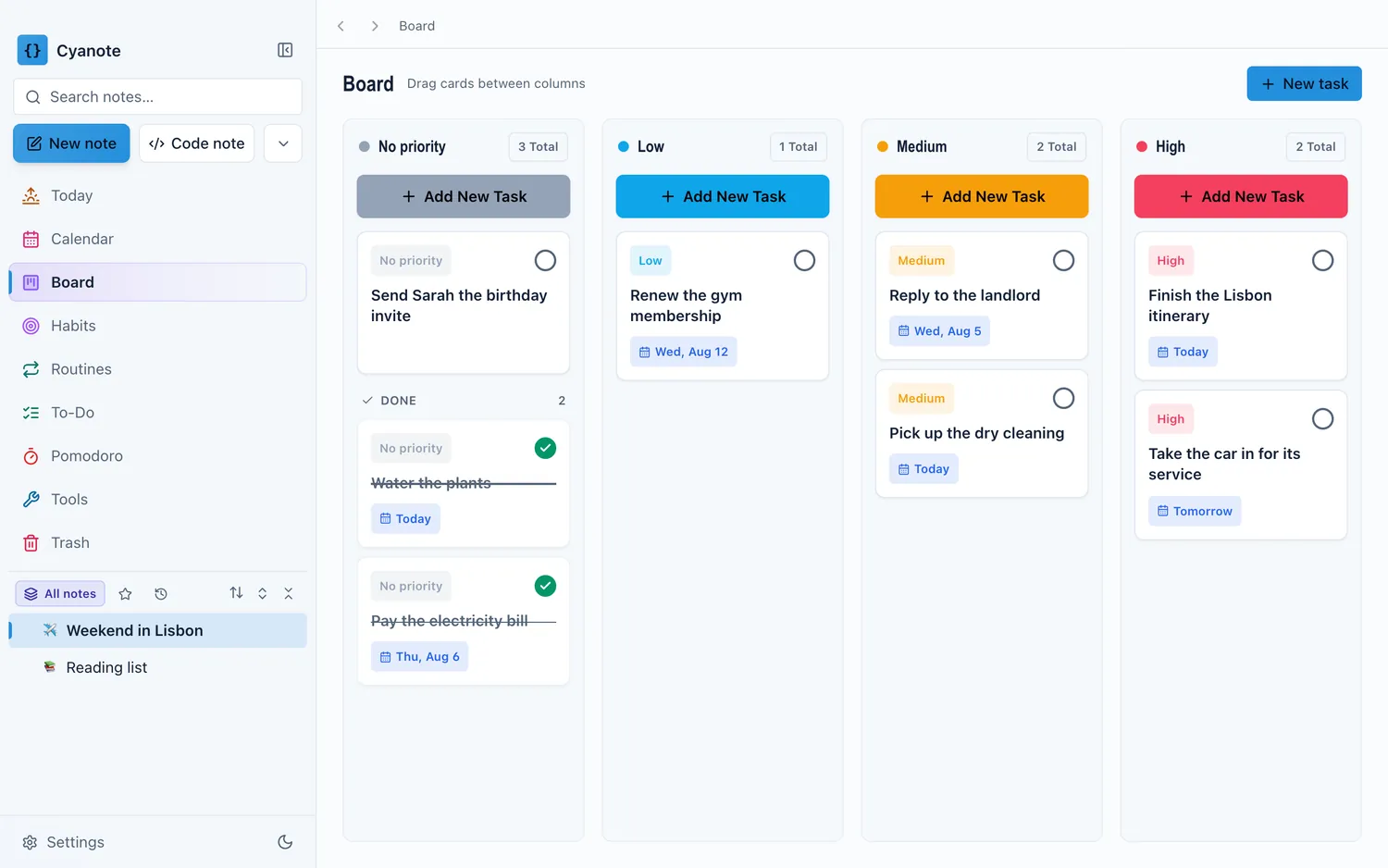
Columns worth using instead
For one person, the useful axis is usually when, or how much this matters, rather than what stage it is in.
By commitment. Today · This week · Later · Someday. Cards move leftward as they become real. This is the version most people find sticks, because it maps onto the actual decision you make each morning, which is not "what stage is this in" but "am I doing this today or not".
By priority. High · Medium · Low · No priority. Blunter, and genuinely good if your work arrives as a stream of requests from other people and the hard part is triage rather than scheduling.
By energy. Deep work · Shallow · Errands · Waiting on someone. Odd-looking, and effective if your days vary a lot. At 4pm on a Thursday you do not need your most important task, you need one you can actually do, and this is the only layout that answers that.
Whichever you pick, keep Waiting as its own column. Work that is blocked on another person is not done and is not yours to do, and it is the single most common thing to lose track of. A column full of them, reviewed weekly, is worth more than most productivity advice.
Set the limit and make it hurt slightly
Pick a number for how many cards may be in your active column at once. Three is a good starting point for most people; five if your work is genuinely interrupt-driven.
The rule that gives it teeth: to start something new when you are at the limit, something has to come out. Not "finish it" necessarily — you can push a card back to This week, or to Waiting if it is blocked. But you have to make the swap deliberately and see yourself do it.
This is uncomfortable at first, which is the point. The discomfort is information you were previously ignoring. Almost everyone who tries this discovers their real number of simultaneous commitments was somewhere near eleven and that it had been that way for months.
Small things that make a board work
- One card, one outcome. "Website" is not a card; it is a column pretending to be one. If you cannot say what "done" looks like in a sentence, it is a project and its next action is the card.
- Done is not a graveyard. Keep the last week or two visible, then archive. Seeing a fortnight of finished work is one of the few honest counterweights to the feeling of never getting anywhere. Keeping eight months of it is just a slow list.
- A due date is a promise, not a wish. If most cards have dates and most dates pass unremarked, the dates have stopped meaning anything and you have lost the ability to see the ones that are real.
- Review the board weekly. Boards rot faster than lists, because a stale card looks identical to a live one. Ten minutes a week to move things back and delete what you were never going to do.
When a list is simply better
Boards are not universally superior, and the honest limits are worth stating.
If your work is a long, flat queue of similar items — a hundred small edits, a reading list, invoices to send — a list wins. It shows more per screen, sorts instantly, and the spatial layout of a board buys you nothing when every item is the same shape.
If most of your commitments are appointments, a calendar wins. Kanban has no opinion about time and no way to show that two things collide at 3pm on Thursday.
And if you have fewer than about ten live tasks, a board is ceremony. The visualisation earns its keep when there is enough work that you cannot hold the shape of it in your head. Below that, you can, and the cards are just something else to maintain.
The answer I keep coming back to is not one of these. It is the same tasks seen as a list when you are working through them and as a board when you are deciding what to work on — a decision that pairs well with a weekly pass over the whole lot — which is a question about the view, not about the tool.
That is the bet Cyanote makes with its to-dos: one set of tasks, a list when you are working through them and a board when you are deciding what to work on, with priorities and due dates carried between the two.