There is a moment, a few months into any reminder system, where you notice you have swiped one away without reading it.
Not ignored it deliberately. Read the shape of the banner, recognised the category, dismissed it, all before the words registered. Your hand did it. And once your hand can do it, the reminder is no longer a reminder. It is a small ambient tax you pay several times a day for nothing.
Nothing broke. It fired exactly as configured. That is the problem.
Why the decay is structural
Every notification you receive teaches you something about the next one. If the last twenty were things you already knew, did not need, or could not act on where you were standing, the twenty-first arrives pre-discounted.
The trap is that the systems decay in the direction of more. When something gets missed, the obvious fix is another reminder: earlier, or louder, or repeated. That works for about a week, and then the new reminders join the baseline and get discounted too. Now you have twice the volume and the same hit rate, and the only remaining move is another escalation.
Meanwhile every alert has a cost that does not show up anywhere. It arrives while you are doing something, and the interruption is paid whether or not the reminder was useful. A banner you dismiss in half a second costs considerably more than half a second of attention, and the ones for things you were never going to act on cost the same as the ones that matter.
The three questions that kill most of them
For every recurring alert you get, in order:
Could I act on this, here, when it arrives? If a reminder fires while you are on a train and the action requires a laptop, it is not a reminder. It is an anxiety generator with a schedule. Either move it to a time when you are at the laptop, or delete it. Those are the only two honest options.
Did I already know? The reminder for the thing you think about every day is pure noise. It fires, you think "yes, I know", you dismiss. That loop is where the swipe reflex gets trained, and it is trained by the harmless ones.
What happens if this one never fires? Sometimes the answer is genuinely nothing. A habit you have kept for eight months does not need a nudge; it has become the thing the nudge was for. Reminders for established habits are the most-swiped category there is.
Most people's setups lose half their alerts to those three questions and get more reliable, because the survivors stop arriving in a crowd.
Push and pull are different tools
This is the distinction that fixes most of it, and almost no app makes it for you.
Push — a banner, a sound, a badge — is for things where the moment is the point. A call at four. A train at 18:12. Something in the oven. The defining feature is that being told later is worthless, which is what justifies the interruption.
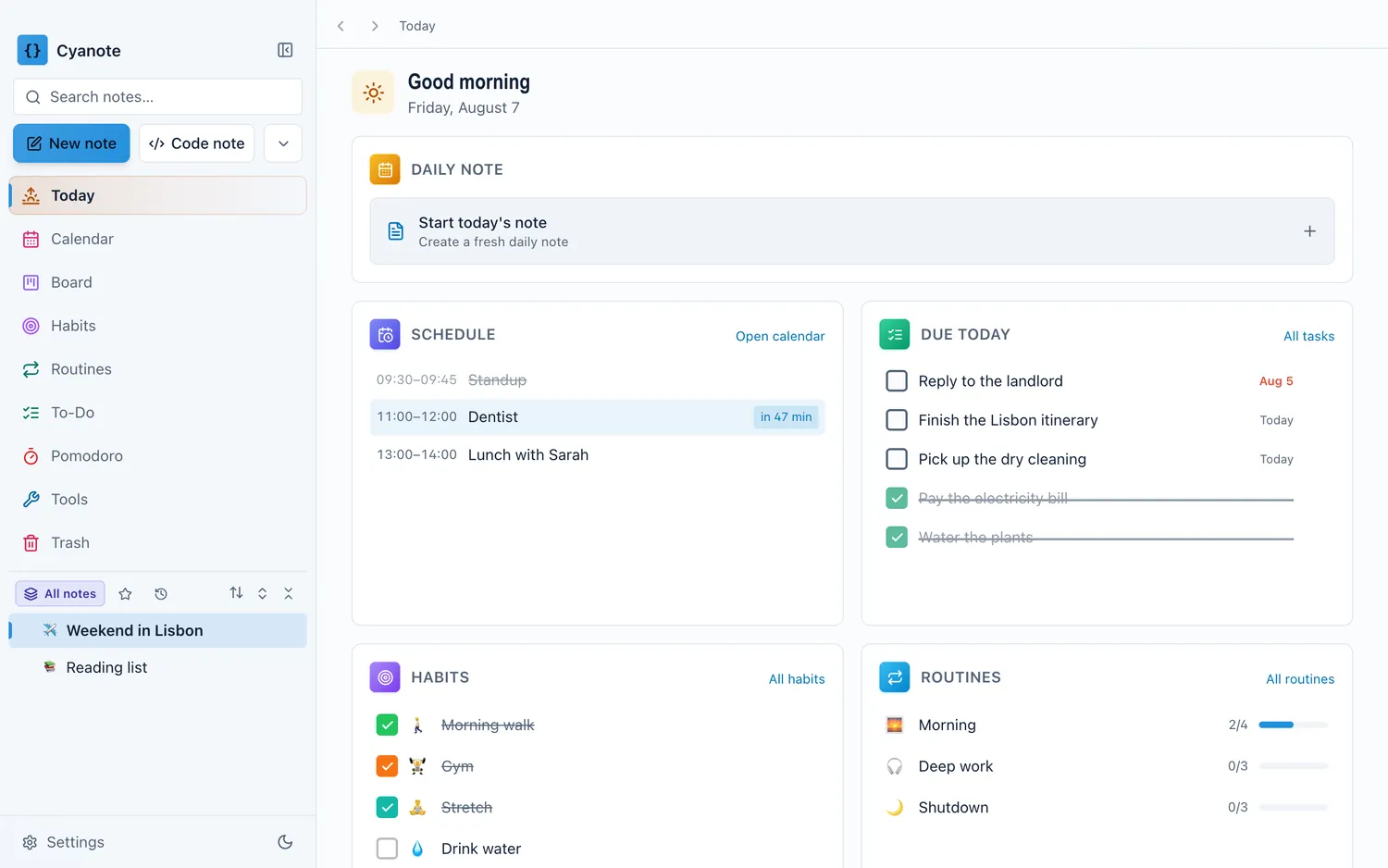
Pull — a list you go and look at — is for everything else. What is due today. What is left this week. The three things you said you would do. None of that needs to interrupt you, because you will look at the list at a natural boundary anyway: starting the day, finishing a task, coming back from lunch.
The mistake nearly everyone makes is pushing pull-shaped information. "You have 6 tasks due today" as a banner at 9am does not help; you were going to open the list at 9am regardless. All it does is add one more thing to the pile your hand has learned to swipe.
Move everything that is not time-critical from push to pull and the remaining pushes start getting read again. That is the whole mechanism.
The lead time nobody tunes
Default reminder timing is usually fifteen minutes before, and fifteen minutes is wrong for almost everything.
The right lead time is however long it takes to do the thing that makes the event possible. For a video call, that is two minutes: open the link. For a meeting across town, it is however long the journey takes plus a margin. For something you need to have prepared for, the useful reminder is the night before, when you can still prepare. The one fifteen minutes beforehand only tells you it is too late.
Apps offer 5, 10, 30 minutes, an hour, a day. Those exist because they are the actual useful shapes: two of them are "get to the thing", two are "wrap up what you are doing first", and the day-ahead is "you need to prepare". Picking deliberately instead of accepting the default is a two-second decision that decides whether the alert is worth anything.
And for repeating events, check that the reminder repeats with it. A weekly meeting whose reminder only fired for the first occurrence is a specific and very common disappointment.
What to do with the ones you cannot act on
There is a category left over: reminders that fire at the right time about a real thing, which you nonetheless cannot do anything about right now.
The answer is not snooze. Snooze is how a task becomes a thing you dismiss six times, and by the sixth the app has taught you the item is optional.
The answer is a place to put it that you trust: one list, checked at a known moment. That is what makes the difference between deferring something and losing it, and it is the entire reason a weekly review is worth twenty minutes. If you have a reliable moment where everything deferred gets looked at again, you can dismiss an alert honestly rather than snoozing it dishonestly.
What a good setup looks like
Small enough to describe in five lines.
- Push, only for the clock. Events with a time, with a lead that matches what the event needs.
- Pull, for everything else. One view of today: what is scheduled, what is due, what is outstanding. You go to it.
- No reminders for established habits. If it is holding, the alert is noise. If it is not holding, the alert is not what was missing.
- No badges you have stopped reading. A number you have not acted on in a fortnight is decoration with anxiety attached.
- One place deferred things land, looked at on a schedule you actually keep.
That is a system that stays credible, and credibility is the only property that matters. A reminder is worth exactly as much as your willingness to read the next one.
The honest version
If your work genuinely is time-critical — on-call, clinical, operational, anything where the cost of missing something is high — you want more alerting, not less, and you want it escalating and redundant. This post is not for that. Escalation exists because sometimes the cost of interruption is the cheap side of the trade.
For an ordinary week, the failure is almost never a reminder that did not fire. It is thirty that did, of which four mattered.
Cyanote's version leans toward pull. Today shows the day's schedule, what is due, the habits still outstanding and the routines not yet run, with the next event counting down beside it: one place you look rather than a stream that arrives. Events remind at 5, 10 or 30 minutes, an hour or a day ahead, and a repeating event carries its reminder to every occurrence. Tasks take a due date and a reminder in the same sentence you type them in. All of it runs from a local database on your own computer, which means the notifications come from your machine and nothing about your schedule is sitting on a server to be alerted from.