Automatic daily backups sound like a feature you can add in an afternoon. Write the data to a file once a day, keep a week of them, done.
The afternoon version would have destroyed people's clipboard history, and it would have done it inside the safety feature, at the moment it was being used.
The weight problem
The first measurement made the naive design impossible. In an export of a real database:
| What | Size |
|---|---|
| Every note, task, habit, routine and folder | 0.01 MB |
| Clipboard history | 33.3 MB |
| Total | 33.3 MB |
The clipboard is not most of the file. It is, to three significant figures, the whole file. Everything a person would actually grieve losing is a rounding error beside a fortnight of copied screenshots, which is a version of the same discovery that started the clipboard rework, arriving from a different direction.
Writing that every day, seven times over, is a couple of hundred megabytes of a user's disk spent almost entirely on data they would not miss. So: leave the clipboard out of the automatic backup. Obvious.
Why leaving it out was the dangerous option
A restore in Cyanote clears the tables the backup does not mention. That is deliberate, and it is the difference between a restore and a merge. If you restore last Tuesday's file, you want last Tuesday, not last Tuesday plus every stray row created since, interleaved in an order nobody can reason about. Restoring to a known state means arriving at that state exactly.
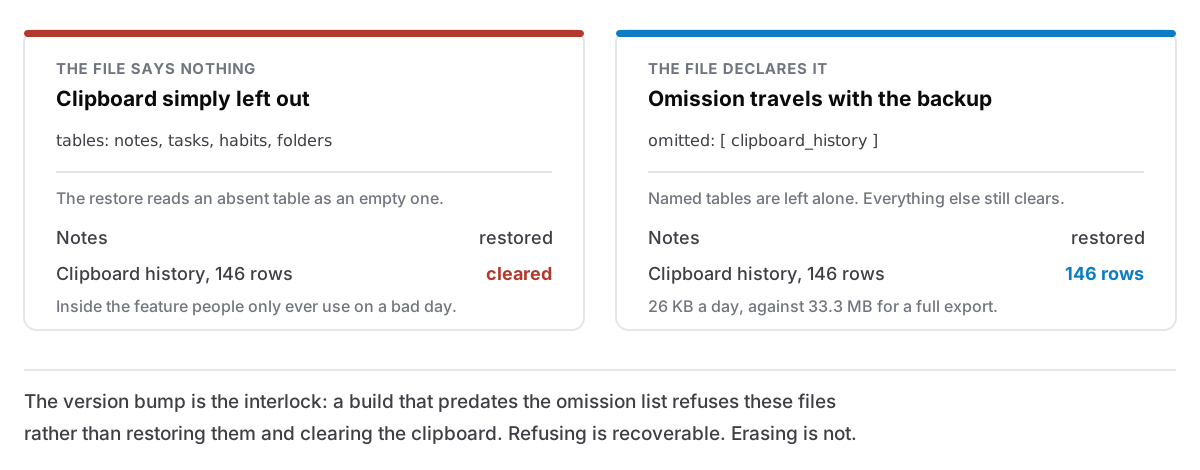
Put the two together. An automatic backup that simply omits the clipboard is, to the restore logic, a backup taken when the clipboard was empty. Restore it and the clipboard is emptied to match.
So the naive design produces a feature that silently destroys 33 MB of a user's data every time they use the thing they turned to because something had already gone wrong. A safety feature that destroys data is worse than no safety feature, because people only reach for it on their worst day.
Saying what you left out
The fix is for a backup to be able to declare its own omissions. A file can now carry an omitted list, meaning: these tables are deliberately not in here; leave whatever is in them alone. Anything not named is still cleared, which is what keeps this a restore.
Three constraints shaped how that shipped.
Old files must still restore. Manual backups carry everything and stay in the original format, byte-compatible with what earlier versions wrote. A file exported last month restores exactly as it always did.
Old builds must not restore new files. This is the interlock, and it is the reason the omission list came with a format bump rather than being an optional field. A build that predates the omission list does not know that omitted means anything. Handed one of these files it would read the tables present, clear the ones absent, and wipe the clipboard, inside a version of the app that believes it is doing the right thing. Because the format number is higher than it understands, it refuses the file outright instead. Refusing is recoverable. Erasing is not.
Ambiguity is refused, not guessed at. The omission list decides which tables survive, so validation holds it to the same standard as the data. A file that declares omissions but claims the old format is rejected. So is a file in the new format with no list. So is a file that both omits a table and contains it. That one is contradictory and there is no safe reading of it, so there is no reading of it at all.
The rescue copy
There is one more rule, and it is the one I would keep if I could keep only one.
Before a restore touches anything, the app writes a snapshot of your current data — the state you are about to replace — as a file next to the backup you chose. Beside the backup, deliberately, because that is a folder you can reach and the app's own data directory is not.
That is the difference between a restore and a gamble. Pick the wrong file, or realise thirty seconds afterwards that you restored the wrong week, and the thing you overwrote is sitting on disk with a name that says what it is.
If the rescue copy cannot be written — a read-only folder, a full disk — the restore is cancelled and says so. Not attempted-with-a-warning. Cancelled. The user is one click into a destructive operation on a bad day; a missing safety net is exactly when to stop, and "we couldn't make a backup of your current notes, so we didn't proceed" is a sentence someone can act on.
Retention that only deletes its own files
Automatic backups are named to a strict pattern, and retention deletes exactly what matches that pattern and nothing else. The date in the name has to be a real calendar date, leap years included. A file called cyanote-auto-2026-13-40.json is not ours whatever it looks like.
That precision exists for one reason: the folder is a folder the user can put things in. A manual backup, one of those rescue copies, an old file dragged in from a previous Mac: a sweep that deleted "the oldest files here" would eat all of them. Anything that is not recognisably a file this feature wrote is invisible to retention, and cannot be deleted by it, and cannot push a daily out of the window either.
The count is seven, and the number the app is allowed to keep is clamped in the Rust side rather than trusted from the interface. Deletion is the one operation where a bug on the other side of the bridge could empty a folder or fill a disk, so the rule for what may be deleted lives where it can be tested against a real directory.
What the tests actually assert
Measured against a copy of a real database, never opened for writing:
- Notes: 11, mangled down to 7, restored to 11.
- Clipboard rows added after that backup was taken: 141 before, 146 after the additions, 146 after the restore. Nothing lost, because the file declared the clipboard omitted.
- One automatic export: 26 KB, against 33.3 MB for a full one.
- Retention against nine dailies plus a manual backup and a rescue file: exactly the two oldest dailies deleted, everything else untouched.
Thirty-three tests pass on the Rust side, five of which exist purely to pin restore semantics: what gets cleared, what survives, what is refused. Those five are the ones I would be most reluctant to lose, because every one of them describes a way a user's data could quietly disappear inside a feature named after safety.
The rule underneath
A backup format is not really a data format. It is a set of promises about what a future version of your software is allowed to do to somebody's disk, written down in a file that will outlive the version that wrote it.
Which means the interesting questions are all about the reader, not the writer: what does a build from eight months ago do with this file? What does a build from next year do? What does the restore do with a table the file does not mention, and is that answer written down anywhere, or is it just what the code happens to do today?
Mine was just what the code happened to do. It took a size measurement in an unrelated feature to make me read it. If you want the map of what is in the file in the first place, it is all one SQLite database, and the schema behind it is append-only for the same kind of reason.