Everything Cyanote holds — every note, task, habit tick, calendar event and clipboard entry — lives in one SQLite file on your disk. Fifteen tables. You can copy it to a USB stick while the app is running and open it on another Mac.
That is the property the whole app is built around, so it is worth showing what is actually in there.
The fifteen tables
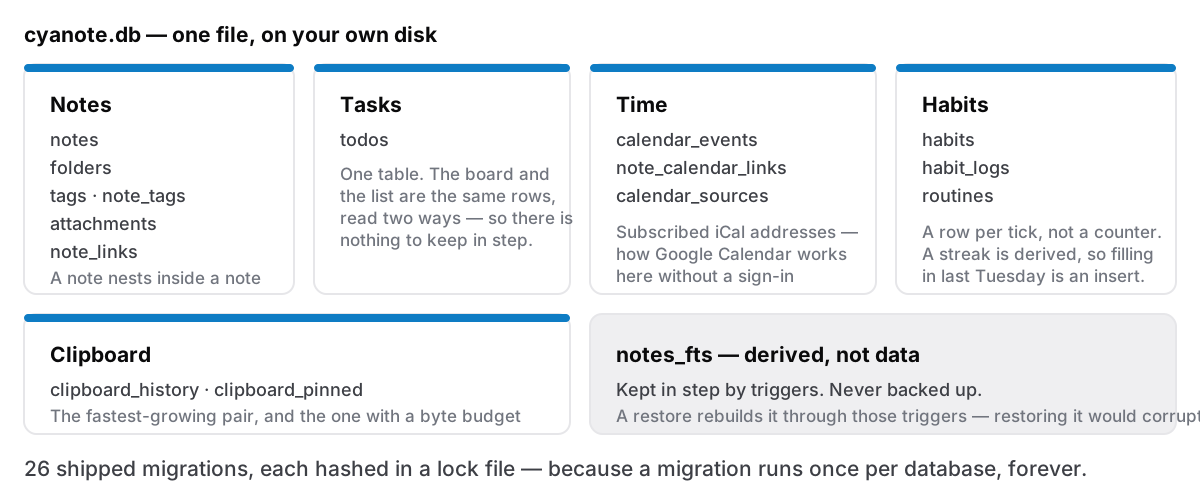
They group into five areas, which is roughly how the app grew.
Notes. folders, notes, tags, note_tags, attachments, note_links. A note holds its document as JSON, plus a plain-text copy for searching. note_links is what makes [[ work in both directions. It records that A points at B, so B can show a backlink without anybody scanning every note to find out. notes also points at itself through parent_id, which is how a note nests inside another note rather than sprawling across the sidebar.
Tasks. todos. One table. Priority, due date, reminder time as epoch milliseconds. The board view and the list view are the same rows read two ways. There is no board table, because a card and a to-do were never different things and modelling them separately would have created a synchronisation problem out of nothing.
Time. calendar_events, note_calendar_links, calendar_sources. The last one holds subscribed iCal URLs, which is how Google Calendar works here without a sign-in: you paste an address, the app fetches it.
Habits. habits, habit_logs, routines. A log row per tick, not a counter, so a streak is derived, never stored, and filling in last Tuesday is an insert rather than a repair of some running total that has been wrong since March.
Clipboard. clipboard_history, clipboard_pinned. The part that grows fastest, and the part that taught me the most painful lesson in the project.
Fifteen tables for an app that covers notes, tasks, a board, a calendar, habits, routines and a clipboard manager. Not because I was being clever, but because most of those things are lists of dated rows, and the honest schema for a list of dated rows is a list of dated rows.
The search index is not data
notes_fts arrived in migration 18: an FTS5 virtual table, kept in step with notes by triggers. You type, the trigger fires, the index updates. Search reads the index, not the notes.
Two rules fall out of that and both were learned the hard way.
Never back it up. A backup walks the user tables, and a virtual table's shadow tables look exactly like user tables from a distance. Include them and a restore writes rows into an index that is simultaneously being rebuilt by the triggers, which produces corruption of the particularly annoying kind: the data is fine, the search results are quietly wrong. So the backup filters virtual tables and their shadows out, and a restore lets the triggers rebuild the index from the notes. The index is derived. Derived things are recomputed, not restored. The backup format has the user-facing side.
Never hand FTS5 raw user input. Type C++ into a search box and FTS5 sees operators, not text. Ordinary punctuation — a hyphen, a quote, a colon — turns a search into a syntax error or, worse, a different query than the one asked for. Everything goes through a function that builds a MATCH expression properly. The three kinds of search post covers what that feels like from the outside.
The lock file that refuses to let me lie
Here is the rule that governs everything else: a migration runs once per database, forever.
The plugin records which version a database has reached. Editing a migration that has already shipped does nothing at all for the people who ran it, and everything for the person installing tomorrow. You end up with two populations, both on "version 19", with different schemas. Every bug report after that is unreproducible, and you will not suspect the migration, because it is right there in the source saying what you meant.
So there is a file, migrations.lock, with one line per shipped migration: version, description, and a SHA-256 of its canonical content, byte-exact, whitespace included. A check runs on every build. Edit a shipped migration and the build fails.
   1  424a2480…  initial schema
  14  c46a8c60…  locked notes: is_locked flag
  18  29ed172d…  full-text search index over notes (FTS5)
  22  6dfa0592…  index clipboard history for paging and dedup
  26  6d52f7dd…  clipboard image thumbnails
Twenty-six shipped, at the time of writing. The file's own comment includes the instruction that matters most: never hand-edit a hash to make the check pass. That is the exact failure this exists to catch, and it is a five-second fix that produces a six-month bug.
I like this file more than almost anything else in the project. It is thirty lines of tooling that converts a mistake I would definitely make into a build error I cannot ignore.
Indexes, and one I nearly added
Migration 25 added three indexes: notes(parent_id), note_tags(tag_id), note_links(target_note_id). All three cover lookups whose column was not the leading column of any existing key. The parent lookup went from 7.1ms to 0.007ms on a 10,000-note database, a thousandfold, for one line of SQL, which is the sort of ratio that makes you want to add indexes everywhere.
Which is the trap. A fourth index looked equally obvious — one covering the sidebar's own list query — and it was wrong, because that query already had a plan SQLite was happy with, and the index would have cost a write on every save to speed up a read that was not slow. The migration carries a comment explaining why it is not there, with the numbers. Comments about what you deliberately did not do age better than comments about what you did.
The rest of that performance story — where the sidebar was actually spending its time — is its own post, and it was not the indexes.
Why it matters that it is one file
Because you can pick it up.
A database that is one file, with no server, no proprietary container and no sidecar directory, is a database you can copy, move to an external drive, keep in a synced folder, and back up by any means you already trust, Time Machine included, no plugin required. Settings will move it for you. Nothing about the app cares where it sits.
It is also the answer to the uncomfortable question every app in this category should be asked: what happens when the developer stops. SQLite is a public format with a thirty-year support commitment and readers in every language there is. If Cyanote vanished tomorrow, your work is a .db file and SELECT * FROM notes gets it out. No export feature required, no cooperation from me needed. What happens when your notes app shuts down is the version of that argument written for people who do not care what a table is.
Fifteen tables and a lock file is not an exciting architecture. It is the one that survives me.