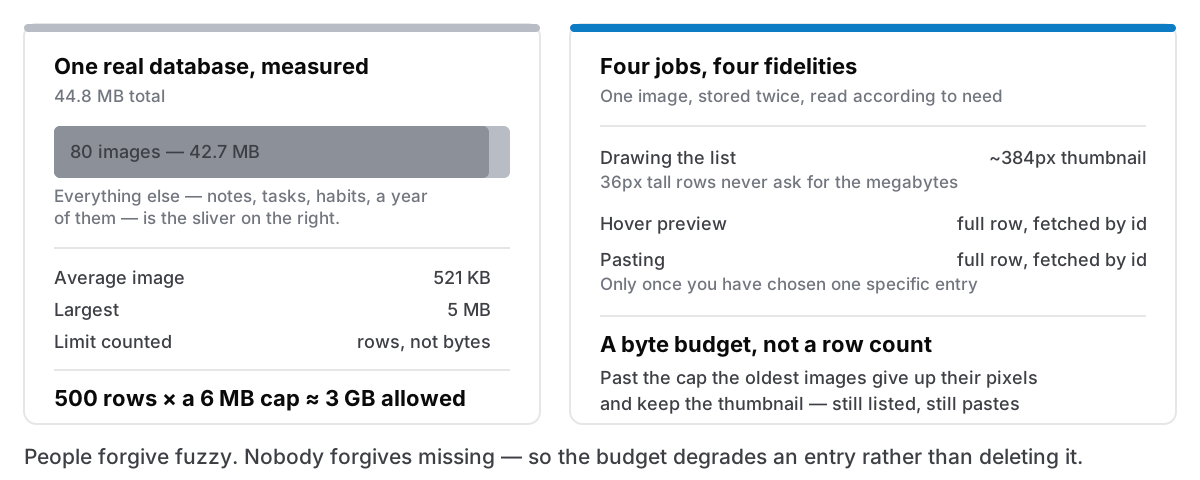
I opened a real Cyanote database to look at something unrelated and found that the clipboard history was 42.8 MB of a 44.8 MB file.
Ninety-five per cent. Not notes, not tasks, not a year of habit ticks. Eighty copied images, averaging 521 KB each, the largest of them 5 MB.
The number that actually frightened me came after: the history limit counts rows. Five hundred rows against a 6 MB per-image cap is about three gigabytes, and nothing in the design said otherwise. Nobody had hit it yet. Somebody would.
A row limit does not bound bytes
This is the whole bug in one sentence, and it is an easy one to write.
"Keep the last 500 clipboard entries" is a completely reasonable rule when you picture a clipboard entry: a URL, a paragraph, a command you copied out of a terminal. Kilobytes. Five hundred of those is a rounding error.
Then you support images, because a clipboard manager that forgets your screenshots is not much of a clipboard manager. And on a Retina Mac an ordinary full-screen grab is 2880×1800. The unit of the limit and the unit of the cost have quietly stopped being the same thing, and every subsequent decision inherits that.
What made it invisible is that the app worked fine. Nothing was slow in a way anyone would report, nothing crashed, no user wrote in. The database was just steadily becoming a screenshot archive nobody asked for, on machines I would never see, because there is no telemetry in this app to tell me otherwise. It surfaced because I went and looked at a real file. That is not a repeatable process, and it is most of the reason I now open one on purpose every few weeks.
The same decision, costing twice
Storage was the visible half. The popup was paying for it too.
Full-resolution image data lived in the same column as text content, base64-encoded. Listing the history selected that column. The popup then drew 36-pixel-tall thumbnails out of it.
Roughly 12 MB crossing the bridge between the Rust side and the interface to paint one screenful of a list, and decoded at full resolution on the other side to be drawn a tenth of an inch tall.
Both problems have the same root: one representation of an image, at full fidelity, used for every purpose. Storing it, listing it, previewing it and pasting it are four jobs with wildly different fidelity requirements, and they were all being served by the largest possible answer.
What replaced it
Every image gets a thumbnail, about 384 pixels, stored beside the original. The list reads only that. Paste and the hover preview fetch the full row by id at the moment they actually need the pixels, which is the moment a user has chosen one specific entry, rather than the moment they opened a list of forty.
A byte budget, not a row count. CLIP_IMAGE_BUDGET caps what the full-resolution copies may occupy between them. Past the cap, the oldest images give up their full-resolution data and keep their thumbnail. That is the part I am happiest with, because of what it does not do: an old screenshot does not disappear. It still appears in the list, and it still pastes. It pastes the thumbnail rather than the original, so it is no longer pixel-exact. A degradation, honestly, but an enormously better one than a gap where your screenshot used to be.
A rule that saved every existing user's history. Rows stored before this change have no thumbnail, and cannot be given one after the fact from the Rust side. Without a special case, the first trim would have looked at those rows, seen an image over budget, dropped the full-resolution data, and left nothing at all, destroying every image already in every user's history, in the update that was meant to fix image handling.
So: a row whose thumbnail is NULL is never emptied, whatever the budget says. Those images keep their pixels until the popup gets around to backfilling a thumbnail for them.
I did not spot that from reading. I spotted it writing out what the trim would do to a row that predates the column, which is a habit worth having whenever a migration adds something that later code assumes is present. Migration 26 in the schema is that column; the NULL rule is the thing that made shipping it safe.
And a check where I had assumed. Thumbnails encode as WebP, which is dramatically smaller — but only where the webview can genuinely encode WebP. The awkward part is that toDataURL does not fail when it cannot; it hands you back a PNG and says nothing. So the app verifies what it actually got rather than trusting what it asked for, and falls back to JPEG where WebP is unavailable. An API that silently substitutes something else is the most expensive kind to trust.
The one that got away for a while
Related, and found the same week: pasting a screenshot into a note took four seconds.
All of it was one call. Handing an image object across the bridge takes a JSON path, and the encoder ran a conversion once per element: 14.7 million calls for a single screenshot. Isolated, the same serialisation was 43ms without that step and 2,672ms with it. It was never bandwidth. The Rust side, at 243ms, was never the bottleneck either.
Sending the PNG bytes and letting Rust decode them removed the JavaScript decode, a canvas round trip and a full pixel copy along with it. A 2560×1440 paste went from 3,151ms to 256ms. On a Retina Mac the four-second case was the common one, because a full-screen grab is exactly that size.
Correctness got checked at the byte level rather than by eye: a known image round-tripped through the pasteboard came back pixel-identical, and the pasteboard was dumped from outside the app to confirm that what any other application receives on ⌘V is a valid, complete PNG. Looking right is not the same as being right, particularly with images, where an off-by-one in a stride produces something that looks perfect and is subtly wrong.
What I would tell the version of me who wrote the original
State the limit in the unit of the cost. If what you are protecting is disk, the limit is bytes. A row count is a proxy that holds exactly until one row can be a thousand times bigger than another, which — for anything touching user-supplied media — is immediately.
Degrade instead of deleting. The budget could have dropped whole entries. Keeping a lower-fidelity version means the history stays complete and the user never encounters an unexplained hole. People forgive fuzzy. Nobody forgives missing.
Check what an API gave you, not what you asked for. WebP that is silently a PNG. A from_bytes call that returns a stub because a build feature was not enabled. Both were caught by verifying the result; neither would have failed loudly on its own.
All of this shipped in 1.0.3, where the public note says the clipboard takes up far less space and its list opens faster when it holds screenshots. Both true. The clipboard manager page covers what it does; when a free clipboard manager stops being enough covers why you would want unlimited history in the first place, a promise that is only honest if somebody has done this arithmetic.