Every screenshot on this website is produced by a script. It seeds a database with demo content, launches the app, clicks through it, and captures each shot at a fixed size.
I did not build that because I enjoy build pipelines. I built it because hand-taken screenshots go stale silently, and a marketing image that shows an interface the app no longer has is a small lie you keep telling for months without noticing.
What hand-shooting actually costs
The failure mode is not that you forget. It is that you remember partially.
You redesign the habits page, so you retake the habits shot. You do not retake the landing page shot that happens to include a sliver of the sidebar, or the comparison-page thumbnail, or the one in the blog post from March. Three months later the app has one appearance and the site has four, and you find out from a customer who says the app looks different from the pictures.
There is a second cost, and it is the one that pushed me over: the content in the shots. A screenshot taken from my own real database is either full of my actual notes — which is a privacy problem — or full of test test test, which is a credibility problem. So you invent demo content for the shot, and the invented content is different every time you take one.
Generated shots fix both. The demo content is a file. Change what you want the pictures to show and re-run the capture; every image is rebuilt from the same seed, at the same moment in the app's life, and they agree with each other because they came from one run.
The regeneration that found four bugs
The first time I regenerated the whole set against a rebuilt interface, I expected stale pixels. What came out was four faults, none of which was about pixels.
A script that deleted work it had not made. The store-listing script wiped its entire output folder on every run, then wrote the numbered shots. It did not produce the hand-made checkout hero that lived in the same folder, so it destroyed it, every single run, and anyone who wanted that image back had to rebuild it. It now clears only the files it writes. "Clean the output directory" is a reasonable-sounding line that quietly claims ownership of everything in it.
A menu that followed the camera around. The note shot opens the slash-command menu, which is the whole point of that shot. Navigation between pages is a synthetic click, and a synthetic click does not dismiss a fixed-position overlay. So the menu stayed open, and was photographed on top of Habits, Today, Calendar, Board and Routines. Five shots showing a menu that has nothing to do with the page under it, produced by a script that thought it had moved on.
Two clicks aimed at buttons that had moved. One targeted a control that had since been relocated into a right-click menu; the other a lowercase text button that had become a capitalised segmented control. Both are exactly what you would expect a UI-driving script to suffer, and both are the pipeline doing its job. A broken selector is the script telling you the interface changed. One of the two turned out better for it: rather than restore the old shot, it now shows the habit grid with a missed day being filled in, which demonstrates something the original never did.
Animations caught mid-flight. Page waits were 450 milliseconds. The page cross-fade is 180 milliseconds, which is fine, but rows stagger in and are still moving at 750. So the bottom rows of longer pages were photographed half-arrived: slightly transparent, slightly offset, in a way that reads as a rendering bug rather than as motion. The wait is a full second now. A screenshot has no motion to explain the blur.
The clock problem
My favourite of these deserves its own section, because it is a category of bug that only exists in captured images.
The Today page is a clock. It shows the day's schedule, what is next, and a countdown to it. Which means a screenshot of it is a screenshot of a moment, and the moment is whenever the capture happened to run.
Take the shot at 23:00 and every event is in the past: struck through, nothing counting down, an empty-looking day. Take it at 07:00 and the day has not started. The image is different every run, and occasionally embarrassing, and nothing about the code is wrong.
So every capture driver now pins the page's clock to 10:12. The shots are identical whatever time they are taken, the schedule reads the way a working morning reads, and the countdown is counting down to something.
Two lessons in that. The obvious one: if you are photographing time-dependent UI, freeze time. The less obvious one: the same trick is exactly what you want for tests. Any interface that renders differently at 23:00 has a whole class of bugs that only appear late at night, and pinning the clock is how you find them on purpose rather than by working late.
The seed is a design document
The demo content is not filler. It is a claim about what the app is for, and it is worth writing deliberately.
The habits seed carries eleven weeks of history with real gaps in it, because a habit grid with a perfect streak is both unrealistic and, worse, discouraging. Mixed repeat cadences, so all three of the colours the grid uses actually appear rather than one of them being theoretical. One task on each to-do shelf, so no shelf is empty and none is crowded.
Its date helper had a genuine bug, and a familiar one: it compared a UTC day against the app's local day. Off by a few hours in one direction and a habit tick lands on the wrong square, visible in a screenshot, and the same class of mistake that puts a task on the wrong day in the actual app.
A pipeline is a test that produces pictures
That is the thing I did not appreciate before building it.
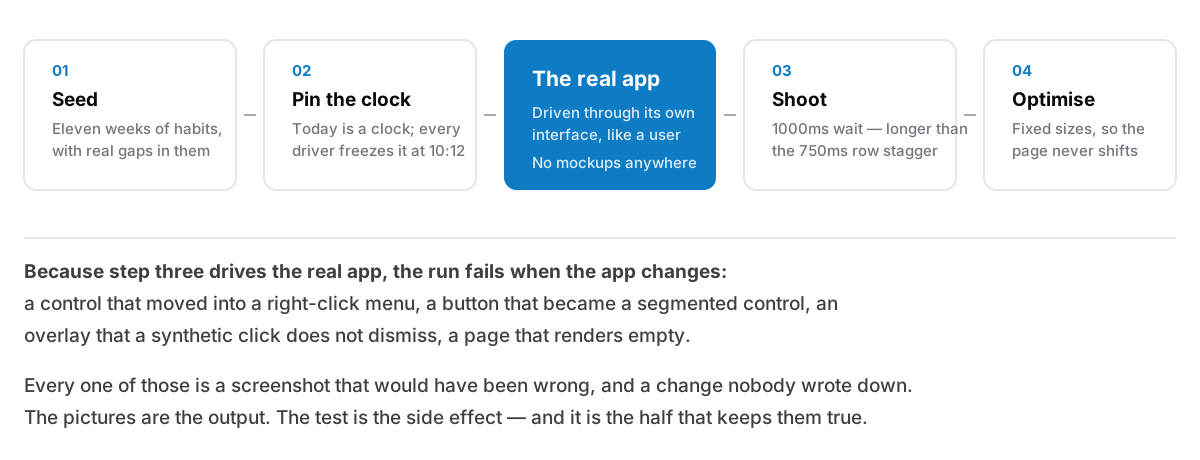
The script opens the app, navigates, opens a menu, ticks a habit, switches theme, fills in a missed day. It uses the interface the way a person does. When a selector stops matching, that is a UI change nobody wrote down. When a shot comes out empty, something is not rendering. When the shots take longer than usual, something got slower.
None of that was the goal. The goal was pictures that are true. But a process whose output is "what the app looks like right now, doing real things" is going to notice when the app changes, and the marketing images being correct turns out to be a side effect of the app being exercised end to end before every release.
Which means the honest version of the argument for generated screenshots is not efficiency. It is that a picture on a sales page is a claim about the product, and a claim you cannot rebuild on demand is one you will eventually be making without knowing whether it is still true.