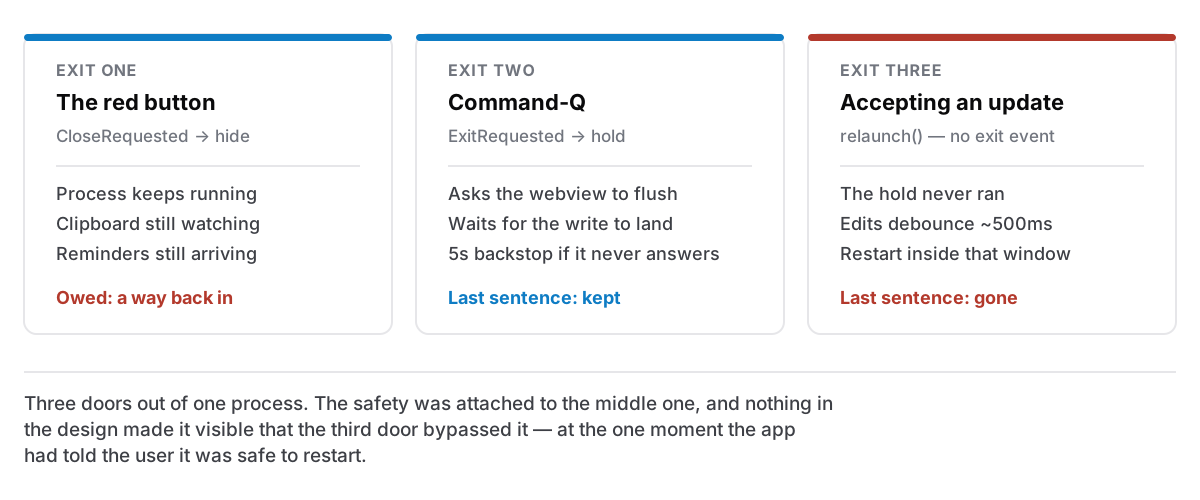
An app can stop being in front of you in at least three ways, and I had quietly assumed they were one thing with three buttons. They are not. Each takes a different path through the process, and two of the three were losing something on the way out.
The red button does not quit
On macOS, closing a window and quitting an application are separate ideas. This is genuinely confusing to people arriving from Windows and completely load-bearing on a Mac: the menu bar belongs to the running app, not to its window, so an app with no windows open is a normal state rather than a dead one.
Cyanote leans on that. The red button hides the main window instead of quitting, because the clipboard manager has to keep watching the pasteboard, and reminders have to keep arriving, and neither can happen from a process that has exited. In the code it is four lines: intercept the close, prevent it, hide the window.
What those four lines produced was an app that could disappear with no way back.
Clicking the Dock icon of a running app is applicationShouldHandleReopen:, and nothing in the app was listening for it. So after the red button, the Dock icon did nothing, the window was gone, and the app was — as far as anyone looking at it could tell — hung. The one route back in was the menu-bar tray icon, which is not where anybody looks, because the Dock is where everybody looks.
The fix is a handler for the reopen event that shows the window. One detail in it is deliberate and worth stating: the event carries a has_visible_windows flag, and I ignore it. Showing a window that is already visible is a no-op, and the case that actually matters is the one where the flag is false. Filtering on it buys nothing and risks the only case there is.
Then the way back arrived too late
Fixing that created a better bug.
The clipboard popup works by taking the foreground, letting you pick an entry, giving the foreground back to whatever you were working in, and pasting. That handover is the entire feature — a paste that lands in the wrong app is worse than no paste at all.
Reopen is an Apple Event. It is queued, not synchronous with the click that caused it, and it can be delivered after the panel has already gone and the paste has already finished. So a mouse click on a clipboard row could produce a reopen that arrived a beat late and helpfully raised the main window, on top of the document that had just been pasted into, in the moment of triumph, undoing the handover the whole feature exists to perform.
Three things now separate "the user clicked the Dock icon" from "the user clicked a clipboard row":
- A flag set for the duration of a paste handover, so a reopen landing anywhere inside it is ignored.
- A flag tracking whether the popup is on screen — set by the two calls that put it there and take it away. The obvious source, asking the panel whether it is visible, turned out to lie: it reported false while the popup was the thing the user had just clicked. A flag you set yourself cannot disagree with the calls that set it.
- A grace window of 2.5 seconds after the last popup interaction, because the first two are instantaneous checks and the event is not instantaneous. Every interaction pushes the deadline out, so a late reopen is still recognisably the popup's, while a genuine Dock click a second later is not.
The general shape: when the system hands you an event that is queued rather than synchronous, no instantaneous check can tell you what caused it. You need a window of time, and you have to pick its length.
Command-Q holds the door
Quitting properly runs a different path again, and this one has to deal with the fact that typing is not saved instantly.
Edits are debounced roughly half a second before they reach SQLite. That is ordinary and necessary — writing to disk on every keystroke would be a lot of writes for no benefit — but it means there is always a short window in which the newest thing you typed exists only in the editor.
So a quit is held. The app asks the webview to flush what it is holding, and does not exit until the write has landed and the webview says so.
There is a backstop, because a wedged webview must not make the app impossible to quit. It used to be 1.5 seconds and it is now five, and the change came from a real failure: a flush retries a locked statement for up to 1050ms each, and a rich note writes several rows. With the clipboard monitor writing at the same time, ⌘Q was hitting the backstop and force-exiting through a flush that was working correctly, throwing away the exact edit the hold exists to save.
Five seconds to quit a jammed app is an annoyance. A lost paragraph is not. When those two are in tension the timeout should be generous, and the fact that a shorter one had felt "snappy" was not evidence of anything.
And then the update did neither
The third exit is the one I had not thought of as an exit at all.
Accepting an update downloads it, installs it, and restarts the app. Under the covers that is relaunch(), which restarts the process directly and, crucially, does not raise the exit event. So the entire hold-and-flush path, the whole reason ⌘Q is safe, never ran for an update.
Which means: accept an update within about half a second of typing, and the last thing you typed was gone. At the one moment the app had explicitly told the user it was safe to restart.
That is the part that bothers me most in hindsight. The bug was not that data could be lost on restart; it was that the app invited the restart. Every safety mechanism I had built was attached to a code path the update did not take, and nothing in the design made that visible: two functions, both of which end with the process going away, one of which raises the event everything else depends on.
The fix is to flush before relaunching, on the same path the quit uses. And the update now asks first: the notice says the app will close and reopen, and Not now leaves the update pending so it can be taken at a better moment rather than waiting for the next check hours later.
Installing is not deferrable, and that is a platform constraint rather than a choice. On Windows the updater hands off to the installer, which takes the process down itself, so an "install now, restart later" button would do two genuinely different things on two platforms while wearing one label. Better to ask honestly and act once.
What I take from it
Three exits, three code paths, one shared obligation: land the user's last sentence, and leave a way back in.
I had tested the obvious one. ⌘Q was solid, because ⌘Q is what you press a hundred times a day while developing. The red button I pressed rarely, since I was usually restarting into a new build anyway. And the update path I had, by definition, tested least of all. You cannot casually accept an update on a machine that is building the update.
The paths you exercise least while building are exactly the paths a user meets most, and they are all the ones where the app is going away, which is the moment it is holding something of theirs. That is not a coincidence to be noted; it is a place to go looking on purpose. Some of the same reasoning applies to what the app does before it goes away — the backup it writes and what a restore is allowed to clear.