A clipboard manager has one job at the end: put the thing you picked into the app you were working in. Cyanote's got that wrong, occasionally, in a way that could paste a password into a note.
Here is how, because the shape of the mistake is more useful than the mistake.
The design that was wrong
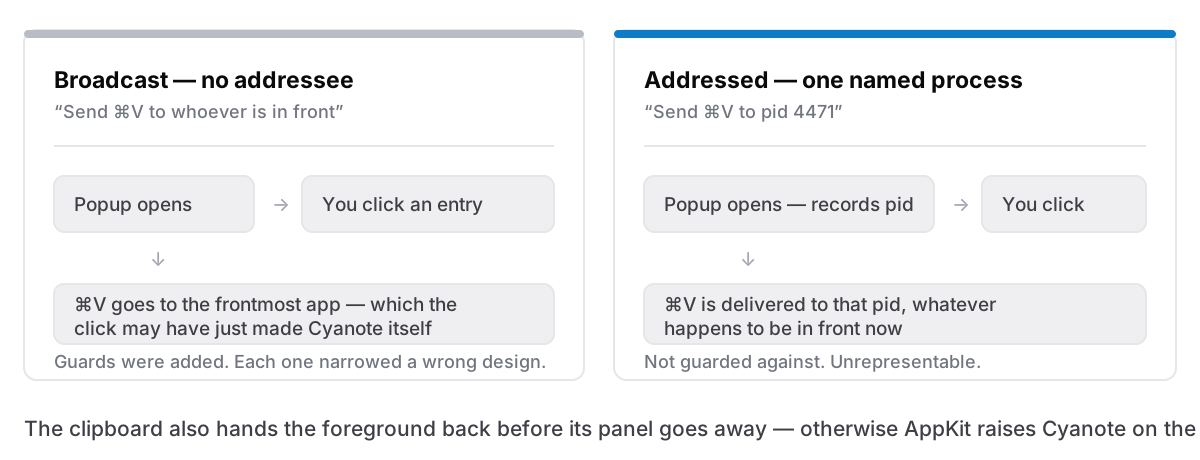
Picking an entry did two things. It put the content on the system pasteboard, then it synthesised a ⌘V keystroke, posted to the system, delivered to whatever application happened to be frontmost at that instant.
The assumption baked into that second step: whatever is frontmost is the app the popup opened over. Usually true. It is the app you were in a moment ago, and the popup is a floating panel that deliberately does not take over.
Usually. A mouse click on the popup could hand Cyanote the foreground first, and then the keystroke went to Cyanote, which pasted the entry into whichever note happened to be open. Keyboard selection mostly won the race. Mouse selection sometimes lost it.
Read that back with the contents of a clipboard history in mind. The entries most worth protecting are exactly the ones you copy and paste immediately: a password out of a manager, an API key, a card number. The failure landed those in a document, silently, in the app that had just promised to be careful with them.
Nobody reported it. I found it while chasing something else, which is the ordinary way these are found, and is an argument for reading your own code paths on purpose rather than waiting.
Guarding versus making it impossible
The obvious fix is a guard. Before posting the keystroke, check whether Cyanote is frontmost; if it is, bail out or restore the other app first and try again.
I had guards. That is what the original design needed to work at all, and one of them had started refusing a legitimate case: pasting into Cyanote itself, which is a completely reasonable thing to want. The guards were accumulating, each one narrowing a broadcast that was wrong in principle.
Broadcasting a keystroke to "whoever is in front" is a message with no addressee. Every guard is an attempt to reason about who might receive it, from a process that cannot actually know.
CGEvent::post_to_pid takes an addressee. The event goes to one named process, whatever is in front.
So the popup now captures the process id of the app that was active at the moment it opened, and the paste is delivered to that pid. Where a paste lands stops being a race and becomes a value recorded up front. The wrong-app paste is not guarded against; it is unrepresentable. There is no longer a code path that can express "send this to whoever is in front", so no future refactor can reintroduce it by accident. The guards came out with it, and pasting into Cyanote works again, because it is now just another pid.
What fell out of the Accessibility grant
Synthesising keystrokes on macOS requires the Accessibility permission, and that grant is per-binary, a detail with two consequences the app had never said out loud.
Restoring the foreground needed the same permission, and used to fail with it. The old code asked System Events to bring the previous app forward, which is Apple Events, which needs the very grant that was missing. So on a build without it, the paste failed and the restore failed together, and the popup looked simply broken rather than blocked. NSRunningApplication.activate needs no permission at all and does the same job. Restoring the window you came from is now unconditional.
A paste that cannot happen says so. If the grant is missing, the popup reports it, offers to open the right settings pane, and points out that the entry is on the clipboard already — so you can press ⌘V yourself and get on with your day. Before, it closed and nothing arrived. Silence is the worst possible response to a permission problem, because the user's only theory is that your software is broken. Why a Mac app asks for Accessibility is the longer version of that argument.
And the order of the two final steps matters more than it looks. The foreground is handed back before the popup's panel is ordered out, not after. When a panel goes away, AppKit has to move key status somewhere, and it picks the app's main window, which raises Cyanote in front of whatever you were doing, one beat after you asked it to get out of the way. Restoring first means that reassignment happens inside an app that is no longer active, so nothing is raised. The same ordering fixes Escape: dismissing the popup without picking anything now puts you back where you were too.
That last one took an embarrassing while to see. I kept reading the activation code, because that is where the bug obviously was, and the bug was in a line of window teardown two functions away that I had never once suspected.
What I took from it
The clipboard is the part of the app with the most exposure to the rest of the system. It opens over other applications, reads what they put on the pasteboard, and types into them. Every one of those is a boundary where "usually true" hides.
Two rules came out of it, and they now apply well beyond the clipboard:
If the code can express the wrong outcome, it will eventually produce it. Not through malice or carelessness — through a race, a refactor, or a user doing something reasonable in an order nobody tried. Deleting the expression beats adding a check.
A silent failure at a permission boundary is worse than a loud one. The user cannot see the boundary. If the app does not name it, the app is what looks broken.
All of this shipped in 1.0.4, described in the public notes as pasting "always landing in the app you were working in", which is accurate and considerably less alarming than the paragraph above. The clipboard manager page covers what it does day to day; when a free clipboard manager stops being enough covers why you would want history at all.