This is not a cheerful subject and it is a short, practical one. Nobody writes about it, and everything in this category has the property.
If your notes are encrypted, on your own machine, with no account and no password written down anywhere, then when you are gone they are gone. That is not a bug. It is precisely the guarantee you were buying. It just has a second consequence that nobody mentions on the marketing page.
Two things people usually want, and they conflict
Some of it should survive. Not the diary. The practical layer: where the accounts are, what the passwords protect, the family history you were the only one who knew, the instructions for the boiler, the letter you meant to leave, the work someone else needs to continue.
Some of it should not. The journal. The half-formed opinions about people. The things you wrote to think rather than to communicate. Most people, asked directly, do not want everything they ever privately wrote read by their family in a difficult week.
Those pull in opposite directions, which is why "just give someone the password" is not a complete answer, and why the whole question tends to get dropped.
The three arrangements
Cloud accounts have a mechanism, of a sort. Apple has a Legacy Contact, Google has Inactive Account Manager. Both let you nominate someone who can gain access after a process. They are genuinely useful and worth setting up if your material is there. They are also all-or-nothing at the account level, they take time, and the process is a bureaucratic one at the worst possible moment.
Local and unencrypted is the accidental default, and it mostly works. If your notes are a database or a folder of files on a machine at home, whoever has the machine and its password has the notes. That is a real answer, if imperfect. It depends on someone knowing the machine matters, and on the disk password being available.
Local and encrypted is the one that needs a decision. Full-disk encryption, an encrypted database, or locked individual notes. Without the key, the data is unrecoverable by anyone, including you, including a specialist. That is the guarantee. It also means the practical layer above dies with you unless you did something deliberate.
What to actually do
Twenty minutes, once, and it is mostly not about notes software.
Use a password manager with an emergency access feature. This is the single most effective step, and it solves the general problem rather than the notes-specific one. Most of the serious password managers offer a recovery contact who can request access, with a waiting period during which you can decline, which handles both the "someone needs in" and "not right now" cases. Your disk password and your notes password go in there.
Write a one-page "where things are" document, and print it. Not encrypted, not in the system it describes. Where the machine is, that there is a password manager, who has emergency access, where the backups are, which accounts matter. It should contain no passwords. It is a map, not a key. Put it with your will, or wherever your important papers live.
Decide, explicitly, what you want read. If there is a journal you would rather nobody read, say so in that document, in a sentence. People overwhelmingly respect a stated wish and are left guessing without one. If you want it destroyed, say that too.
Keep the practical layer separate from the private layer. This is the notes-specific part and it is easy: the household information, the account map, the family history — the things you would want to survive — should be in an unlocked note, or an export, or on paper. The journal can be locked. Encryption is a per-note decision in a lot of software, which means the split costs nothing.
Tell one person the machine matters. A surprising amount of digital material is lost simply because nobody knew to look. "There is stuff on the Mac and there is a note in the file with the will" is enough.
The part specific to local-first software
If you have chosen local software for privacy reasons, you have made a real trade and it is worth completing.
There is no company to write to. No support process, no legal request, no account recovery. Nobody can be persuaded to help, because there is no one in a position to. Every route runs through the machine, the disk password, and whatever you wrote down.
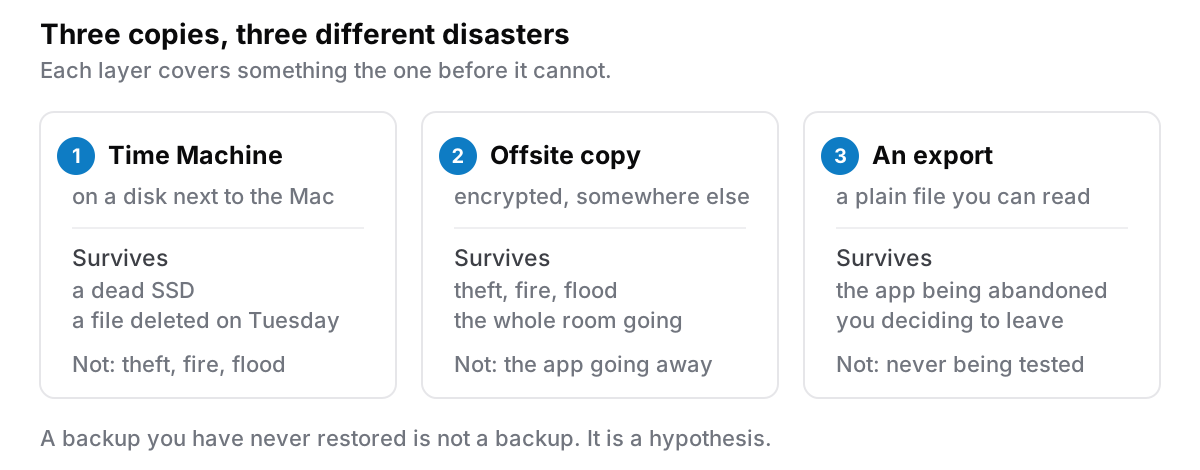
The compensating advantage is that it is entirely in your hands and requires nobody's cooperation. An export sitting on an external drive in a drawer, or printed, is readable forever by whoever finds it: no account, no service, no login. That is a genuinely better inheritance than a subscription somebody has to argue their way into, and it is the same property that protects you when a company disappears, applied to the other kind of ending.
The version for people who will not do any of this
Realistically, most people will not do the twenty minutes. So, the one thing:
Set up emergency access in your password manager. That is it. If your disk password is in there, everything else follows. The machine opens, the notes are readable, whoever needs to get in can. Ten minutes, and it covers the general case and not only your notes.
If you do a second thing, print the one-page map.
The honest version
There is a version of this post that is a sales argument, and it should not be, so plainly: no notes app solves this. It is a password manager question and a piece-of-paper question, and the software you write in is nearly irrelevant to it.
What the software determines is only how many routes exist. Cloud accounts have a slow official route. Local and unencrypted has an informal one. Local and encrypted has exactly one route, and it is the one you set up in advance.
Cyanote is the third kind: one SQLite database on your own computer, and any note can be locked with a password and is encrypted where it sits. There is no account to recover, no legacy contact, and nobody here who could help, which is the guarantee working as intended. What it does give you is a readable JSON export of everything, which is the thing to put on an external drive in a drawer, and per-note locking, so the practical layer can stay open while the private one does not.