I could not find a dedicated bullet journal app built for the Mac. The official Bullet Journal Companion is an iPhone app, and every other BuJo-branded app I found on the Mac App Store is an iPad app that only runs on Apple silicon. So a digital bullet journal on a Mac means building the method out of a general app. If you write by hand with a stylus, use Goodnotes. If you want free, local Markdown files with a daily note, use Obsidian. If you want daily notes, tasks and your calendar in one polished app and are fine paying yearly, NotePlan is the one built most closely around the method. And if you want daily notes, tasks, a calendar and a habit tracker in one window, with no account and one payment, that is what I built Cyanote for.
Whichever you pick, keep migration, the step that makes a bullet journal work, in your own hands. Below I explain why an app that does it for you defeats the point.
The short version
- I found no native BuJo app for the Mac. The official Bullet Journal Companion is $4.99, iPhone-only, and runs on a Mac only as an iPhone app.
- Goodnotes, free for 3 notebooks, $11.99 a year, or $28.99 once. The pick if you want to keep writing by hand.
- Obsidian, free. Local Markdown files, a Daily notes core plugin, and as much setup as you want.
- Logseq, free and open source. A new journal page every day, built around outlines.
- NotePlan, $99 a year. Daily notes, tasks, Markdown and your calendar in one app. Lists "bullet journal" as a use case.
- Apple Notes, free. Fine for a daily log. Weak at dates and tasks.
- Cyanote, $7.99 once. Daily notes, a task list grouped by due date, a calendar and habits, on your own disk. No phone app.
I make Cyanote, so weigh what follows with that in mind. Several apps here are better at parts of this than mine, and I say which.
What a bullet journal actually is
The Bullet Journal is a paper method by Ryder Carroll, and its official how-to page lays out the parts. You "rapid log" short entries with a bullet in front: a dot for a task, an open circle for an event, a dash for a note. Tasks change state: an X when done, a > when migrated forward, a < when pushed back into the future log. The entries go into four standard collections. The daily log is "designed for day-to-day use", the monthly log is "an overview of your month", the future log is "an overview of your year", and an index helps you find things.
Then there is migration. At the end of a month you go back through the open tasks and rewrite the ones still worth doing into the new month. The official page says:
Migration is more than just rewriting your to-dos, it's about taking time to ask what is important to keep.
The friction is deliberate. A task you have rewritten three times is a task you should probably drop, and having to write it out again is how you notice.
The method's own site admits that paper is the point. Its FAQ calls the analog format a feature, not a flaw, because it keeps digital distractions away. It also says you can bring digital tools in. So the question is how to keep the parts that work when you move it onto a screen.
Where each part goes on a Mac
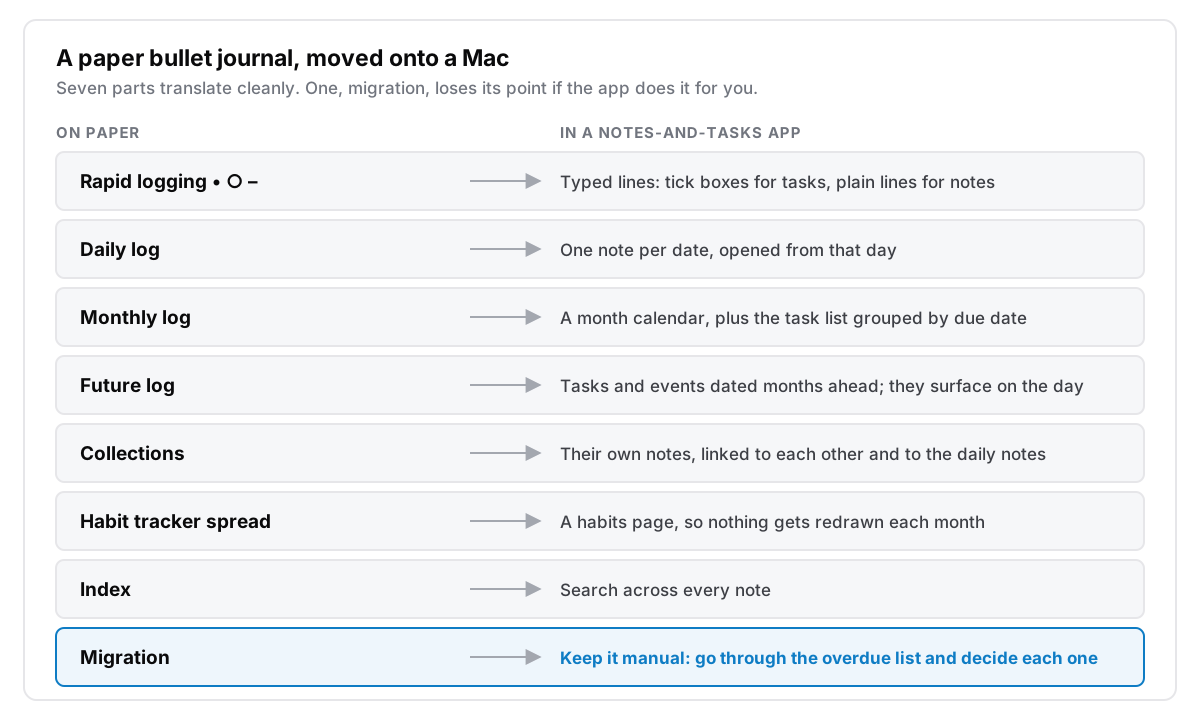
Most of the method moves onto a screen better than it moves onto a new notebook. The daily log becomes one note per date. The future log becomes tasks and events dated months ahead, which come back on their own when the day arrives, so you no longer copy them forward by hand. Collections become their own notes. The index becomes search, which is better than an index you have to keep up. A habit tracker spread you redraw every month becomes a page that does not need redrawing.
Migration is where software can get it wrong. An app that rolls unfinished tasks into today on its own, or lets them pile up unseen under dates that have passed, skips the decision the method asks for. What you want is the opposite: an app that shows you a plain list of what is overdue, and makes you deal with each one. Do it now, give it a new date, move it to a someday list, or delete it.
A study by E. J. Masicampo and Roy Baumeister, published in 2011 in the Journal of Personality and Social Psychology, explains why that matters. Across several experiments, unfinished goals kept intruding on people's thinking during unrelated tasks, and making a specific plan for the goal stopped the intrusions. They concluded that making a specific plan let people stop thinking about the unfinished goal, even before they acted on it. An overdue task with no decision attached is the open loop they describe. A task you have given a date, or crossed out on purpose, is closed.
Bullet journal apps for Mac compared
| App | Price | Runs on a Mac as | Account | Your journal lives |
|---|---|---|---|---|
| Bullet Journal Companion | $4.99 once | iPhone app, Apple silicon only | None listed | The app |
| Bullet: Daily Planner | Free; $79.99 lifetime | iPad app, Apple silicon only | Not stated | The app |
| Goodnotes | Free (3 notebooks), $11.99/yr, or $28.99 once in-app | Mac app, macOS 15.6+ | Not stated on the pricing page | Device; cross-device sync is a Pro feature |
| Obsidian | Free; Sync $4/mo billed yearly | Mac app | None | Markdown files on your disk |
| Logseq | Free, open source | Desktop app | None | Markdown or Org-mode files |
| NotePlan | $99/yr or $12/mo | Native Mac app | Not stated | Markdown files on your device, synced through your iCloud |
| Apple Notes | Free, built in | Native Mac app | Apple account to sync | iCloud, or on the Mac |
| Cyanote | $7.99 once | Native Mac app | None | One database file on your disk |
Prices in US dollars from each developer's site or the US App Store, retrieved 13 October 2026, before tax.
The official app, and the iPad apps in a Mac window
The Bullet Journal Companion costs $4.99 and its App Store listing says "Only for iPhone". It can run on a Mac with an M1 chip or later as an iPhone app, but it is not a Mac app, and its latest version, 2.5.0, dates from November 2023. It is also not trying to be your journal. The listing says plainly, "This app is NOT designed to replace your notebook", and logged items expire after 72 hours. It is a capture inbox for people who keep a paper journal.
The dedicated digital BuJo apps on the Mac App Store are iPad apps. Bullet: Daily Planner, Journal is free to download with subscriptions from $3.99 a month or a $79.99 lifetime purchase. Its listing says "Designed for iPad" and "Not verified for macOS", and it needs a Mac with an M1 chip or later. If you track on an iPad and only sometimes open the Mac, that can be fine. If the Mac is where you spend the day, an iPad app in a window is a compromise you will feel.
Goodnotes: if the pen is the point
If writing by hand is why you keep a bullet journal, keep doing it. Goodnotes is the best-known way to do that on Apple devices, with dot-grid paper and planner templates, and it has a Mac app.
There is some evidence for the pen, though it is weaker than its reputation. A widely cited 2014 study by Pam Mueller and Daniel Oppenheimer in Psychological Science found laptop note-takers did worse on conceptual questions, and put it down to their tendency to transcribe lectures word for word. But a direct replication by Heather Urry and colleagues in the same journal in 2021, with 145 students and a small meta-analysis of similar studies, found no reliable difference between typed and handwritten notes. A 2024 EEG study in Frontiers in Psychology found more elaborate brain connectivity during handwriting than typing in 36 students, but it measured brain activity, not what anyone remembered. Handwriting may help some people think, but nobody has shown that it makes a planner work better.
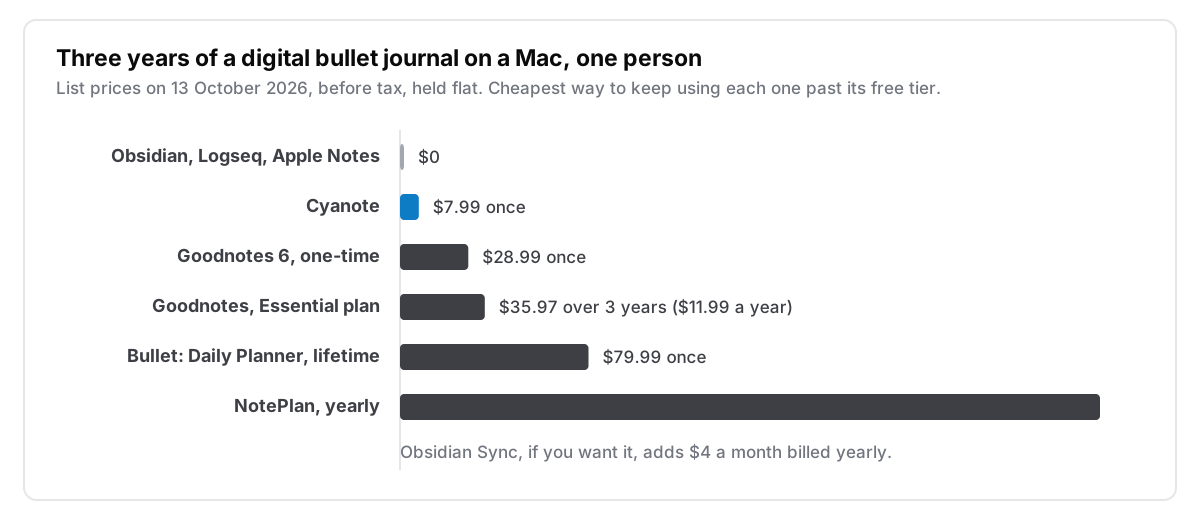
Goodnotes' pricing page lists a free plan with 3 notebooks and 100MB of storage, Essential at $11.99 a year and Pro at $35.99 a year. Sync across devices is listed under Pro. The App Store listing also sells a "Goodnotes 6 One-Time Payment" at $28.99, which the website does not mention, so check what you are offered before you pay. The Mac version needs macOS 15.6 or later.
Where it falls short. Handwriting on a Mac means a trackpad or a mouse, which is no fun. Goodnotes really belongs on an iPad with an Apple Pencil, and the Mac is where you read it back. A handwritten task also cannot remind you of anything.
Pick it if you own an iPad and a pencil, and the writing itself is what you like about the method.
Obsidian and Logseq: free, local, and as much setup as you want
Obsidian is "Free without limits", needs no sign-up, and stores everything as Markdown files on your own disk. Its Daily notes core plugin "opens a note based on today's date, or creates it if it doesn't exist", which is a daily log out of the box. Tick boxes are tasks. Everything else, from monthly logs to a migration view, comes from community plugins and templates you assemble yourself. Sync is optional, at $4 a month billed yearly.
Logseq is free, open source under the AGPL, works with Markdown and Org-mode files, and is built around outlines rather than pages. It opens on today's journal, adding a new journal page each day you open it. Its newer database version is still labelled beta, with a warning that data loss is possible, so stay on the file-based version for a journal you care about. For rapid logging, an outliner where every line is a bullet is about as close to the paper method as software gets.
Where they fall short. Neither is a calendar. Both reward people who enjoy configuring their tools, and a bullet journal can quietly turn into a plugin project. I wrote about that trap in leaving Obsidian.
Pick one if you want your journal in plain files you can open with anything, and the setup sounds like fun rather than a chore.
NotePlan: the closest fit, on a subscription
NotePlan is the app built most directly around this way of working. A daily note for each day, tasks inside the notes, time blocking against your real calendar, and your notes kept as Markdown files on your own device. Its home page says notes "move between devices through your own iCloud account", with nothing routed through its servers except shared spaces. Its pricing page lists "Bullet Journal" among its use cases, and it runs on Mac, iPad, iPhone and the web.
Where it falls short. The price. It is $99 a year or $12 a month, with no lifetime option on its pricing page. That is $297 over three years, and for a paper method whose main cost is a notebook, that is a lot. NotePlan is also included in Setapp if you already pay for that. I compared the two apps in detail on the NotePlan alternative page.
Pick it if you want a daily note tied to a calendar on every Apple device and are happy to pay yearly for it.
Apple Notes: the free daily log
Apple Notes is already on your Mac and your iPhone. A note per day with a checklist in it is a perfectly good daily log, and pinned notes can stand in for collections.
Where it falls short. It has no due dates. A checklist item cannot be due on Thursday, so there is no future log, no monthly view and no overdue list to migrate from. You end up scrolling back through old notes looking for unticked boxes, which is migration done the slow way.
Pick it if you mainly want the daily log and keep the rest in your head or on paper.
Cyanote: the method in one window, paid for once
This is the app I make, so here is exactly what it does for a bullet journal and what it does not.
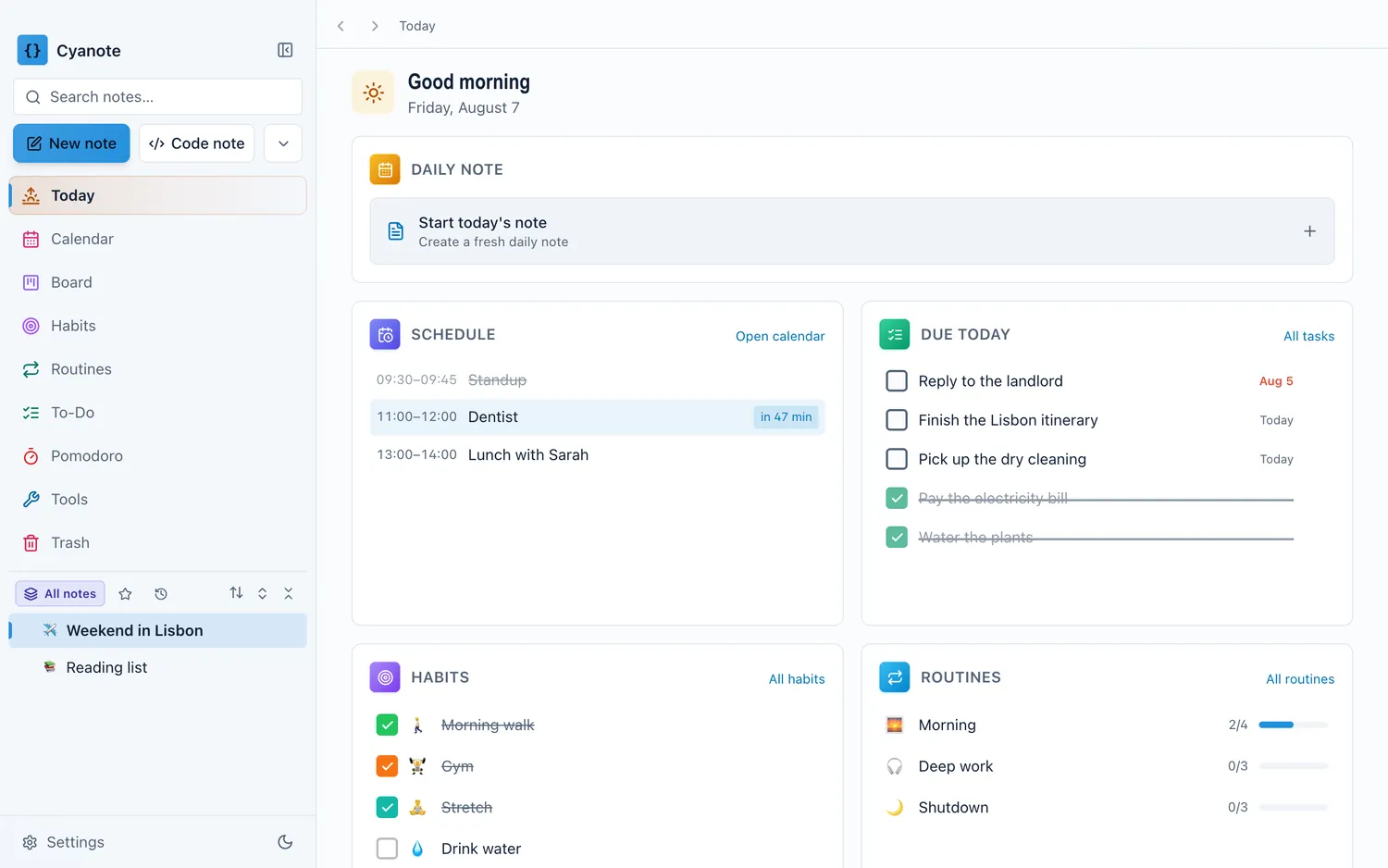
- Daily log. A daily note template with sections for today's focus, the schedule, notes and a running log. Each day in the calendar's week view has a button that opens that day's note, and creates it if it does not exist yet.
- Rapid logging. Type a task the way you would say it, such as "call the dentist friday", and the date is lifted out of the words.
- Future and monthly logs. Tasks and events can carry any date, and the calendar has a month view and a week view.
- Migration. The task list groups everything by when it is due, with Overdue at the top as its own group. Nothing is moved forward for you. You open the list and decide each one, which is the step the method wants you to take. Overdue tasks also appear on the Today page, still showing their original date in red, until you deal with them.
- Habit tracker. A habits page where each habit shows its last several weeks at a glance, up to six in a wide window, so the spread never needs redrawing.
- Collections and index. Notes link to each other with
[[, every note shows what links back to it, and search covers the full text of every note.
It runs on your Mac, keeps everything in one database file on your own disk, and never asks you to make an account. It costs $7.99 once, with no subscription. There is also a Windows version on the Microsoft Store, a separate $7.99 purchase; buying one does not unlock the other.
Where it falls short. There is no iPhone or iPad app, so your bullet journal stays on the computer you bought it for. There is no handwriting. And it is a newer, one-person app, without the years of plugins Obsidian has.
Pick it if you plan at your Mac, you want the daily, monthly and future logs, your tasks and a habit tracker in one place, and you would rather pay once than subscribe.
Which one to pick
- You love the pen: Goodnotes on an iPad, read back on the Mac.
- You want free and local, and enjoy setup: Obsidian, or Logseq if you think in outlines.
- You want it on your phone and calendar too, and will pay yearly: NotePlan.
- You only need a daily log: Apple Notes.
- You want the whole method on one Mac, with no account and no subscription: Cyanote.
Whichever you choose, keep migration manual. Once a month, or at the end of each week if that suits you better, open the overdue list and decide each task on purpose. A 20-minute weekly review is a good home for it. If habits are the part of your journal you care most about, I compared the dedicated options in habit tracker apps for Mac. And if you are still deciding what belongs on a date and what belongs on a list, what belongs on the calendar covers that.
FAQ
Is there an official Bullet Journal app for Mac?
No. The official Bullet Journal Companion is an iPhone app. It runs on Macs with Apple silicon as an iPhone app, it describes itself as a companion to a paper notebook rather than a replacement, and its items expire after 72 hours.
Can I keep a bullet journal in Apple Notes?
For the daily log, yes: one note per day with a checklist works. Apple Notes has no due dates on checklist items, though, so the future log, monthly log and migration have to happen by hand.
Is a digital bullet journal worse than paper?
Not by any evidence I could find. A well-known 2014 study by Mueller and Oppenheimer favoured handwritten notes for lectures, but a 2021 direct replication by Urry and colleagues, with about twice the original first study's sample found no reliable difference. Pick paper if you enjoy it. If you plan at a computer all day, a digital journal you actually open beats a notebook you leave at home.