For most people with an iPhone, the best habit tracker app for a Mac is Streaks. It costs $5.99 once, runs natively on the Mac, and syncs with your phone through iCloud with no account to make. If you want Android or a browser as well, Habitify is the cross-platform habits-only pick, at $59.99 for a lifetime licence. If habits are one part of a bigger system with tasks, a journal and mood tracking, look at Lunatask. And if you work at one computer and want your habits in the same window as your notes and to-dos, with no account at all, that is what I built Cyanote for.
The catch with this category is that most of the well-known habit apps are not on the Mac at all. Below is what runs there, checked against each developer's own pages and App Store listings on 7 October 2026.
The short version
- Streaks, $5.99 once. A real Mac app, synced through iCloud, up to 24 habits. The default pick if you have an iPhone.
- Habitify, free for 3 habits, or $59.99 once. A Mac app plus iPhone, Android, Apple Watch and the web, with its own account and sync.
- Way of Life, free to download. No Mac build. It runs only as the iPad app on a Mac with Apple silicon.
- Lunatask, free for 7 habits, $72 a year or $300 once. Habits inside tasks, journaling and mood tracking, end-to-end encrypted, on every platform including Linux.
- A Notion template, $0. Fine if you already live in Notion; clumsy as a daily check-in.
- Cyanote, $7.99 once. Habits next to notes, tasks, a calendar and clipboard history, stored on your own disk. No phone app.
- No Mac app: Productive, HabitMinder and (Not Boring) Habits don't run on a Mac, and Habitica has no Mac app either; on a Mac you use its website.
I make Cyanote, so weigh what follows with that in mind. Several apps here are better habit trackers than mine, and I say which ones and why.
What a habit tracker has to do
A habit tracker does one job: it puts today's habits in front of you, and you tick them or you don't. The charts, badges and streak animations are built around that daily glance. I wrote about why that glance matters more than any feature in tracking habits without a separate app, and it shapes which app is right for you.
It also helps to know what the research says about how long you will be using it. The best-known study, by Phillippa Lally and colleagues at UCL, followed 96 volunteers building a daily habit. Lally told the University of Surrey in January 2026 that the average was 66 days, but the range ran from 18 to 254. A 2024 systematic review in Healthcare of 20 studies and 2,601 people found medians of 59 to 66 days, with individuals anywhere from 4 to 335.
So plan on two months at least, and probably longer. That is long enough for the price model to matter: a subscription is a cost you keep paying long after the habit has stuck.
Lally's original paper found that missing one opportunity "did not materially affect the habit formation process." A tracker that wipes a 40-day streak to zero for one missed Tuesday is being stricter than the evidence. Some people find that strictness motivating. For others, the reset is the day they stop opening the app.
Mac habit trackers compared
| App | Price | Runs on a Mac as | Account | Your data lives |
|---|---|---|---|---|
| Streaks | $5.99 once | Native Mac app | None | iCloud |
| Habitify | Free (3 habits), $2.49/mo billed yearly, $59.99 lifetime | Native Mac app | Required | Habitify's servers |
| Way of Life | Free, Premium in-app | iPad app, Apple silicon only | None | Device, plus backups you choose |
| Lunatask | Free (7 habits), $6/mo billed yearly, $300 lifetime | Mac app | Required | Lunatask's cloud, encrypted |
| Notion + template | Free plan $0 | Mac app | Required | Notion's cloud |
| Cyanote | $7.99 once | Native Mac app | None | A file on your disk |
Prices in US dollars from each developer's site or the US App Store, retrieved 7 October 2026, before tax.
Streaks
Streaks has won an Apple Design Award, it is a single $5.99 purchase on one App Store listing that covers iPhone, iPad, Apple Watch and Mac, and the Mac version is a native app that needs macOS 14.6 or later. Habits sync through iCloud, so there is nothing to sign up for, and its App Store privacy label lists only crash data, not linked to you.
It can also read Apple Health and mark a habit done on its own when the data says you did it, which no Mac-only app can match.
Where it falls short. It holds up to 24 habits, which is plenty for nearly everyone. Its whole model is the unbroken chain, and its own site warns that a miss resets your streak. If that pressure works on you, good. If you know it doesn't, keep reading. And it is Apple-only: there is no Windows or Android version.
Pick it if you have an iPhone, you want the habit on your wrist and your Mac, and you would rather pay $5.99 than think about it again.
Habitify
Habitify is the cross-platform pick. It has a native Mac app, plus iPhone, Apple Watch, Android and a web app, all synced through a Habitify account. It also connects to Apple Health, Google Fit and Apple Calendar, and has Zapier, IFTTT and an API if you like wiring things together.
The pricing page lists a free plan limited to 3 habits, Premium at $2.49 a month billed yearly ($29.88 a year), and Premium Lifetime at $59.99 once. Its App Store listing shows in-app purchases under different names and prices, so check what you are charged if you buy inside the iPhone app.
Where it falls short. It needs an account, and your record lives on Habitify's servers rather than in your iCloud or on your disk. Three free habits is a trial, not a plan.
Pick it if you have an Android phone, or a Windows PC at work, or anything else that rules out an iCloud-only app.
Way of Life
Way of Life is a long-running iPhone habit tracker built around chains, a scoreboard and trend charts, and it can lock behind Face ID, Touch ID or a passcode. Your record stays on the device, backups go to a cloud storage provider you choose, and you can export everything as CSV, Excel or JSON.
There is no Mac version, though. The App Store listing says it runs as the iPad app on a Mac with an M1 chip or later, which means an Intel Mac cannot run it at all, and the result looks and feels like an iPad app in a window. The listing does not describe syncing between devices, so do not count on your phone and Mac agreeing.
Pick it if the iPhone is where you track, and the Mac is an occasional second screen.
Lunatask
Lunatask is a life organiser with habits in it: tasks, a journal, mood tracking, notes and a list of the people you want to stay in touch with. Habits show your current and best streak. It has apps for Mac, Windows, Linux, iPhone and Android, which no other app here does.
Everything is end-to-end encrypted. Lunatask's security page says your data is encrypted on your device before it is uploaded and stored in AWS in Virginia. You need an account for that to work. According to its pricing page, the free plan covers 7 daily habits and 2 areas of life. Premium is $6 a month billed yearly ($72 a year), or $8 monthly, and there is a $300 lifetime licence.
Where it falls short. If you only want habits, you are paying for a great deal you won't use. I compared it with Cyanote in more detail on the Lunatask alternative page.
Pick it if you want habits, mood and tasks in one encrypted system you can open on any phone or computer, including Linux.
A Notion template, or Apple's Reminders
Notion's Free plan is still $0 for one person, and plenty of people have published habit-tracker templates for it: a database with a checkbox per habit per day. If Notion is already where your week lives, this costs nothing and keeps everything in one place.
It is slow as a daily check-in, though. Ticking a box in a database row takes more steps than tapping a ring, and on a phone it takes more still. A template also has no idea what a streak is unless you build the formula yourself. If Notion is the thing you are trying to get away from, I covered that in the Notion alternative comparison.
macOS itself has no habit tracker app. You can make a reminder repeat every day in Reminders, but you get no streak, no grid of days and no weekly target.
Cyanote
Cyanote is a $7.99 one-time Mac app for notes, tasks, a calendar, habits, routines and clipboard history. The habits page shows every habit with the last four weeks laid out against the same dates, so a missed day reads straight down the list. Any square can be filled in after the fact, which matters when you did the thing and forgot to tick it. Habits can repeat every day, on chosen weekdays, or a target number of times a week, and days a habit wasn't due stay blank rather than counting as a miss. The same page shows how this week is going, the last ninety days and your longest streak.
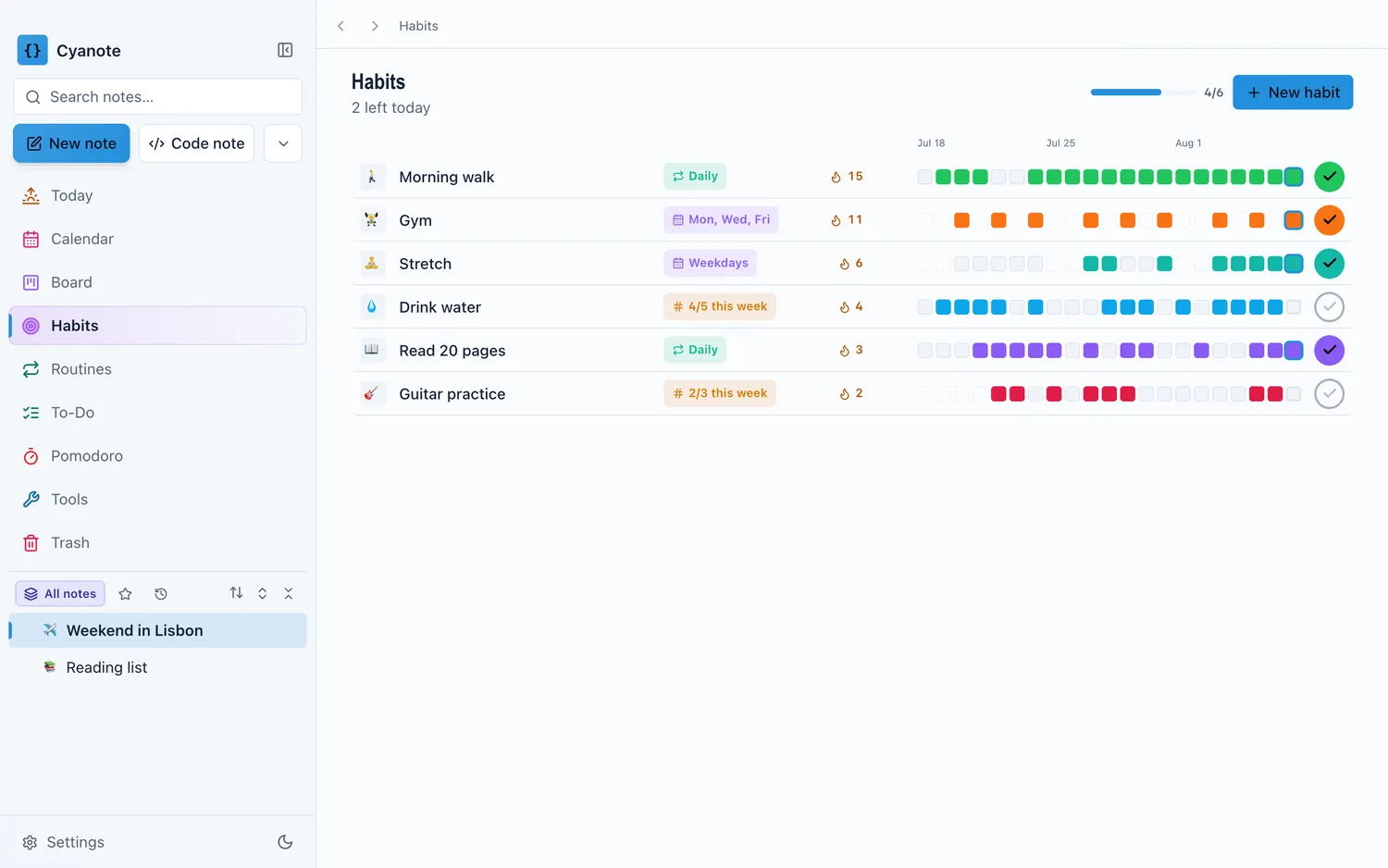
The difference is where it sits. The Today page puts the habits you haven't done yet next to the day's events and tasks, so you see them because you opened the app to do something else. Everything is in one database on your own disk, with no account, and your habits are never sent anywhere.
Where everything above beats it. There is no iPhone app, no Apple Watch, no Apple Health and no sync. If you want to tick a habit from your phone at the gym, Streaks is the better buy, and for less money. Cyanote also runs on Windows, but that is a separate $7.99 purchase on the Microsoft Store, and the two don't sync.
Pick it if you spend your day at one computer and would rather check your habits in the app you already have open than in yet another one. The pricing page has the details. I put it in context with other bundled apps in all-in-one productivity apps for Mac.
What three years costs
Since a habit takes months, the fair comparison is a few years, not the first month. Here is three years for one person, at today's prices, paying the cheapest way past each free plan's limit.
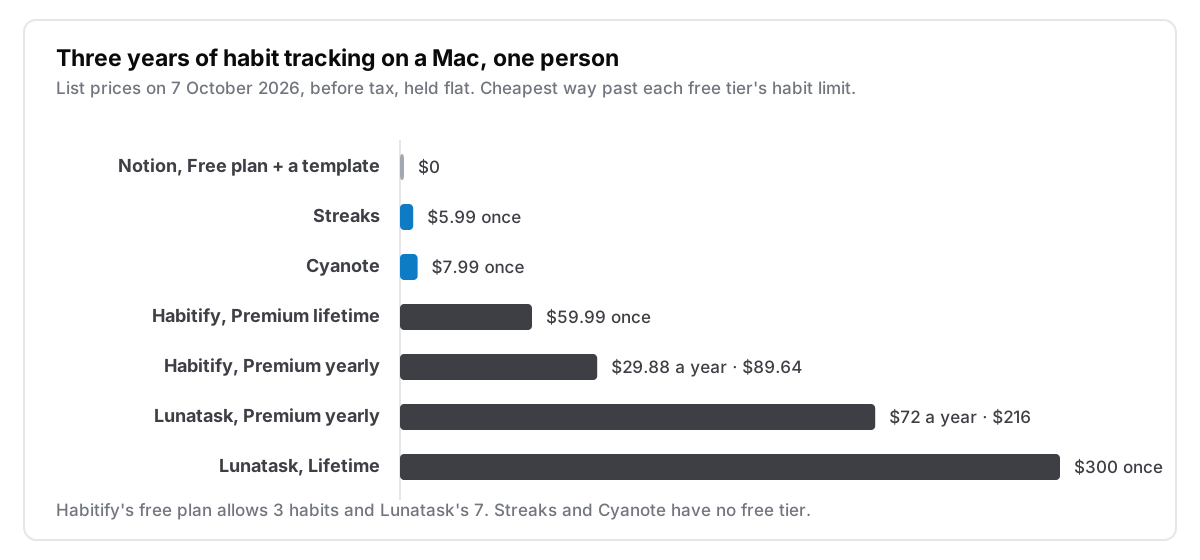
The free plans are real options if you stay under their limits: 3 habits on Habitify, 7 on Lunatask. Most people starting out should track fewer habits than they think, so a free plan may be all you ever need.
Where your record lives
Your habit data is a few years of ticks, nothing sensitive for most people. But if you track sleep, drinking, medication or mood, where that record lives matters more.
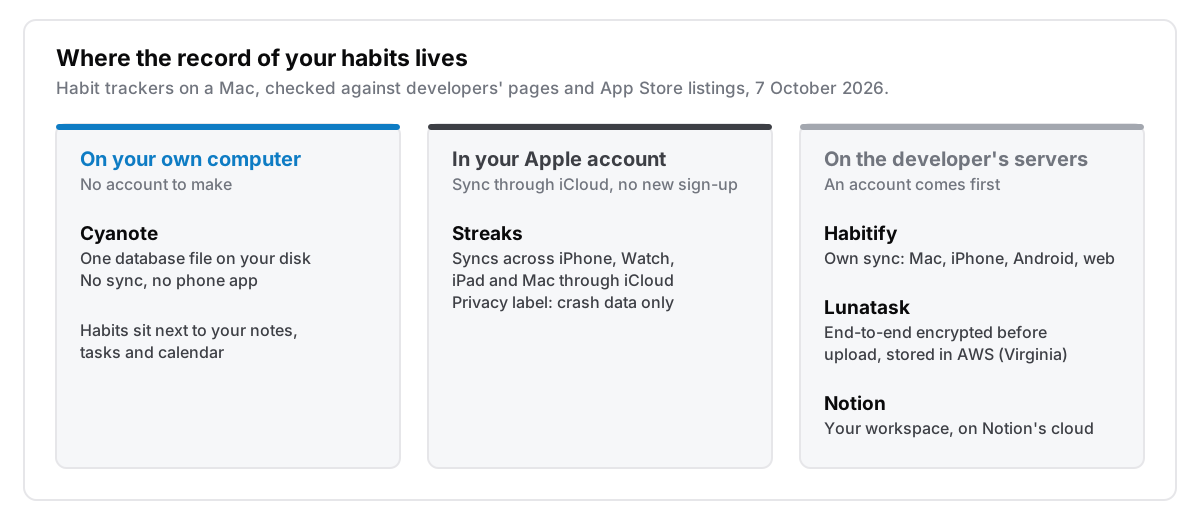
If you want the record to follow you to your phone, you need one of the middle or right columns. If you would rather it never left your computer, you need the left one, and you give up the phone to get that. None of the apps here offers both. Way of Life sits in between: the record stays on your phone unless you turn on its cloud backup. I explained that trade-off in more detail in what local-first actually means.
How to choose
Answer these in order and stop at the first yes:
- Do you track habits on your iPhone or Apple Watch? Get Streaks.
- Do you use Android, or need a browser on a work PC? Get Habitify, and buy the lifetime licence if you expect to keep it more than two years.
- Do you want habits, mood, journaling and tasks in one encrypted app on every platform? Get Lunatask.
- Does your week already live in Notion? Use a template, and see if you still tick it after a month.
- Do you work at one Mac and want habits next to your notes and tasks, with no account? That's Cyanote.
The honest version
The best habit tracker is the one you open every day, and that depends more on your habits than the app's features. If your phone is always with you, track on the phone, and Streaks at $5.99 is very hard to beat. If you sit at one Mac all day and the phone stays in a drawer, track there, in whatever app you already have open. Whichever you pick, start with two or three habits, and don't let one missed day decide for you. The research says it matters much less than the streak counter suggests.
If your habit tracker is one page of a paper bullet journal, I wrote up how the rest of that method moves onto a Mac in bullet journal apps for Mac.