If you want a to-do list app for your Mac that you pay for once, the safest pick for most people is Things 3. It costs $49.99 on the Mac App Store, has no subscription and no in-app purchases, and syncs for free. If you need projects, tags and a weekly review with real depth, OmniFocus 4 still sells a one-time licence: $74.99, and it covers your Mac, iPhone and iPad together. If you would rather keep your tasks in Apple's Reminders and just want a better window onto them, GoodTask is $39.99. And if you want your to-dos in the same app as your notes and calendar, with no account at all, that is what I built Cyanote for, at $7.99.
Most of the well-known task apps are subscriptions now. Todoist and TickTick both charge yearly, and OmniFocus pushes its subscription first. Below is what you can still buy outright, checked against each developer's own pages and the US App Store on 8 October 2026.
The short version
- Things 3, $49.99 once on the Mac. The polished default. The iPhone app ($9.99) and iPad app ($19.99) are separate purchases.
- OmniFocus 4 Standard, $74.99 once. The most powerful option here, and one licence covers Mac, iPhone and iPad. Pro is $149.99.
- GoodTask, $39.99 once on the Mac. A power-user front end for Apple Reminders and Calendar. The iPhone app is a separate purchase.
- 2Do, $49.99 once from its own site. Syncs through the service you choose, including iCloud, Dropbox and CalDAV.
- TaskPaper, $24.99 once. Your list is a plain-text file you can open in any editor.
- Apple Reminders, free. Already on your Mac and your iPhone. Its full feature set needs iCloud.
- Cyanote, $7.99 once. Tasks next to notes, a calendar, habits and clipboard history, stored on your own disk. No phone app.
I make Cyanote, so weigh what follows with that in mind. Several apps here are better task managers than mine, and I say which and why.
Mac to-do apps compared
| App | Price | What it covers | Account | Your tasks live |
|---|---|---|---|---|
| Things 3 | $49.99 once | Mac only | Only to sync | Things Cloud, if you sync |
| OmniFocus 4 | $74.99 once, or $99.99/yr | Mac, iPhone, iPad, Apple Watch, Vision Pro | Omni Account | Omni Sync Server, if you sync |
| GoodTask | $39.99 once | Mac only | Your Apple account | iCloud, through Reminders |
| 2Do | $49.99 once, with 18 months of updates | Mac | None | The sync service you pick |
| TaskPaper | $24.99 once | Mac only | None | A text file you save |
| Apple Reminders | Free | Mac, iPhone, iPad, iCloud.com | Your Apple account | iCloud |
| Cyanote | $7.99 once | Mac only | None | A file on your disk |
Prices in US dollars from each developer's site or the US App Store, retrieved 8 October 2026, before tax.
For contrast, the two best-known subscription apps: Todoist Pro is $60 a year or $7 a month on its website, and TickTick Premium is $49.99 a year. Neither offers a lifetime option on its official pages. Both have real free plans, which is the main reason so many people use them.
Things 3
Things 3 from Cultured Code is the app most people mean when they ask for a good to-do app on a Mac. It is a single $49.99 purchase on the Mac App Store, with no in-app purchases, and it was last updated in late September 2026. Cultured Code describes it plainly as a one-time up-front purchase, and the Mac version has a 15-day free trial.
Sync goes through Things Cloud, which is included with your purchase. You need a free Things Cloud account to use it, but only to sync; one Mac on its own needs no account. iCloud and Dropbox are not supported, and there is no web app.
Where it falls short. Each device is its own purchase. The iPhone app is $9.99 and the iPad app is $19.99, so Mac, iPhone and iPad together come to $79.97. It has no Windows, Android or browser version, so it is no use if your work computer is a PC.
Pick it if you live on Apple devices and want the app to stay out of your way.
OmniFocus 4
OmniFocus is the deep end: projects inside folders, tags, deferred start dates, and a review mode built for people who run a lot of open loops at once. The Omni Group now leads with a subscription, but its buy page still sells perpetual licences. Standard is $74.99, Pro is $149.99, and either one is a universal purchase covering Mac, iPhone, iPad, Apple Watch and Vision Pro. The page says it "includes all 4.x updates", which also tells you a version 5 would be a new purchase. There is a 14-day free trial and a 30-day money-back guarantee.
The alternative is the OmniFocus Subscription at $99.99 a year, which adds the web version and removes upgrade costs. If you own a licence and want the browser too, OmniFocus for the Web is a separate $49.99 a year.
Where it falls short. It is a lot of app. If your list is twenty things a week, you will spend more time arranging OmniFocus than using it. It also needs a current system: the buy page lists macOS 15.2 or later.
Pick it if you manage many projects at once, you do a weekly review, and you want one purchase that covers your iPhone too.
GoodTask
GoodTask doesn't keep its own task database. It syncs with your Reminders and Calendars, and adds what Apple's app leaves out: smart lists that filter by tag or combine lists and calendars, quick actions for adding tasks, and day, week and month views of your schedule. The Mac app is $39.99, and it is updated often: its latest version came out in October 2026.
Because your tasks are ordinary Reminders, they still show up on your iPhone in Apple's own app, and Siri can add to them. If you stop using GoodTask, nothing needs moving.
Where it falls short. The App Store listing says the iPhone, iPad and Vision Pro app "requires a separate purchase for full access". Your tasks also sit in iCloud, so they are only as private and as reliable as Reminders is.
Pick it if you already use Reminders and want more control without moving your list anywhere.
2Do
2Do is sold from its own website with a 14-day trial. Its store page sells a perpetual licence for $49.99 with "No Subscription Required". Its selling point is sync: Dropbox, iCloud, Apple Reminders, Todoist, Fastmail, Fruux, Toodledo or any CalDAV server. As its site puts it, there is "never a requirement to store your data with us."
Where it falls short. The licence includes 18 months of updates. After that you keep the last version you got, and paying again for more updates is optional. Its site doesn't list a version number or a last-update date, so I can't tell you how actively it is maintained.
Pick it if you want to choose exactly where your tasks sync.
TaskPaper
TaskPaper is the odd one out. Your list is a plain-text file with a little structure (projects end in a colon, tasks start with a dash, tags start with @), and the developer's pitch is that the files are future-proof because any text editor can open them. It is $24.99 on the Mac App Store.
Where it falls short. It has no reminders and no calendar, and it doesn't sync on its own: the file goes wherever you save it. The latest version on the App Store is from 2025, so it changes slowly.
Pick it if you like working in text and want a list that will still open in twenty years.
Apple Reminders
Reminders is free and already on your Mac, iPhone and iPad, and you can open it on iCloud.com from any browser. It has lists, sections, tags, subtasks, due dates, locations and repeats. Apple's guide notes that all its features are available "when you use updated iCloud reminders", so in practice you are using it with your Apple account.
For a lot of people this is enough, and you should try it properly before paying for anything here. The more common problem is a list nobody reviews, and that follows you into any app. I wrote about reminders you don't start ignoring for that problem.
Cyanote
Cyanote is a $7.99 one-time Mac app for notes, tasks, a calendar, habits, routines and clipboard history. The task side is a single list grouped by when things are due, with priorities, due dates and reminders. You type a task the way you'd say it. "Pay rent tomorrow 9am !high" comes out with the date, time and priority filled in, each shown as a chip you can remove if it guessed wrong. There's more on that in typing a task the way you say it. The same tasks can also be shown as a board.
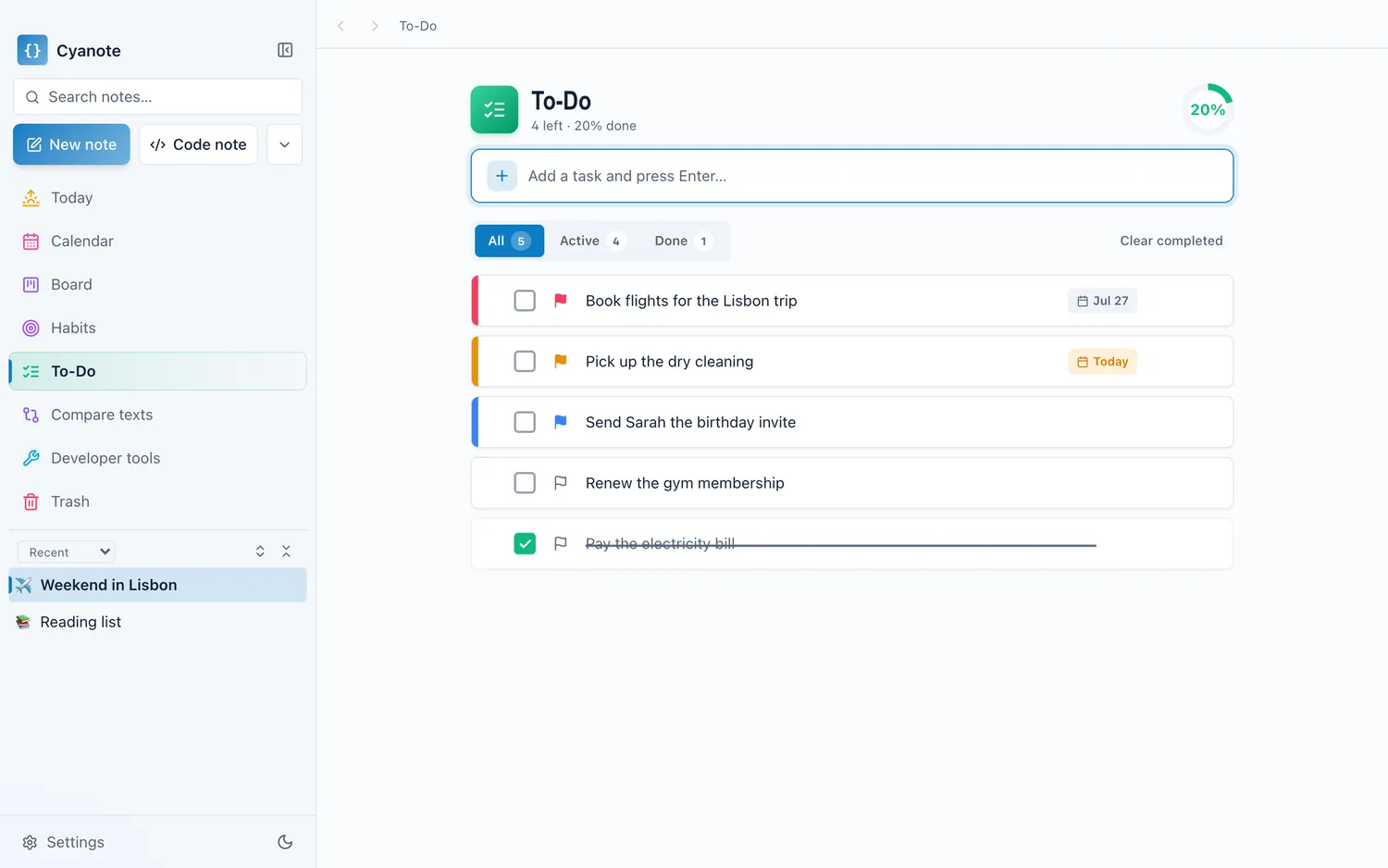
The difference is what sits around the list. The Today page puts the day's tasks next to your calendar events, outstanding habits and routines, and the Pomodoro timer can count sessions against a task. Everything lives in one database on your own disk. There is no account, and Cyanote doesn't send your tasks anywhere.
Where everything above beats it. There is no iPhone app, no sync and no Siri. If you add tasks on your phone while you're out, Things or Reminders will serve you better. It also has nothing like OmniFocus's projects-and-review system. Cyanote also runs on Windows, but that is a separate $7.99 purchase on the Microsoft Store, and the two don't sync.
Pick it if you plan your day at one computer and want your tasks in the same window as your notes and calendar. The pricing page has the details.
What three years costs
A task manager is something you keep for years, so the first month is the wrong comparison. Here is three years on one Mac at today's list prices.
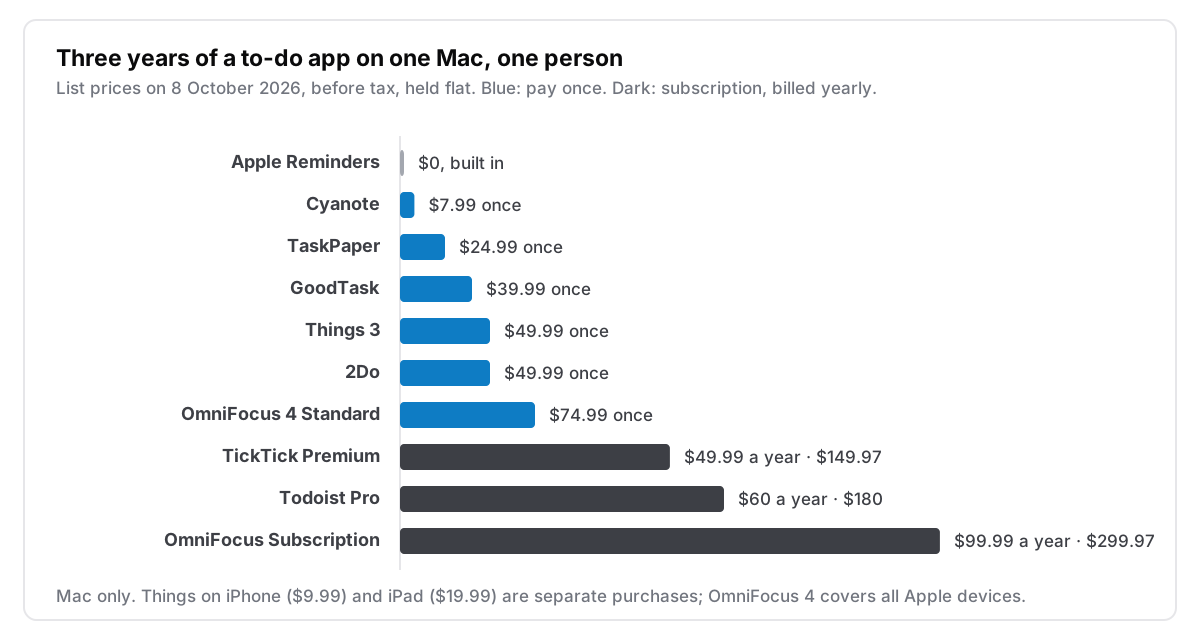
Two caveats make this fairer to the subscriptions. Todoist and TickTick both run on Windows and Android as well as Apple devices, which none of the one-time Mac apps does. And their free plans are real: if you stay inside the limits, they cost nothing. The comparison only bites once you'd pay for Premium.
What one purchase covers
What the price covers matters as much as the price. A "$49.99 app" can mean one Mac or every device you own.
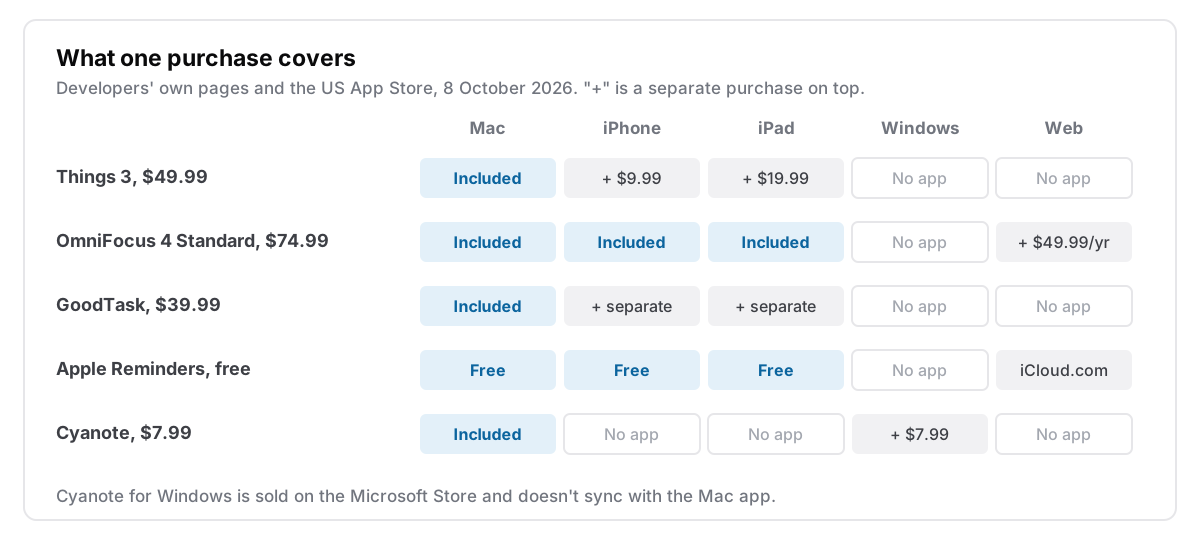
If your phone matters, OmniFocus's $74.99 compares with $79.97 for Things across three devices, and with $39.99 plus the iPhone app for GoodTask. If your phone doesn't matter, every Mac-only app is cheaper than it looks.
What "buy once" does and doesn't mean
Paying once buys the version you paid for. It doesn't guarantee future versions free. OmniFocus says so outright: the licence covers 4.x, and its App Store listing sells upgrades from earlier versions as discounted purchases. None of the other developers here promise free upgrades forever either, and I don't for Cyanote.
What buying once does give you is an app that keeps working if you stop paying, because there is nothing left to pay. It holds best for the apps that don't need a server to open your data: TaskPaper's text file, Cyanote's database on your disk, Things on a single Mac with no sync. Apps that sync through the developer's cloud carry a small extra dependency, and it is worth knowing which kind you're buying. I covered what happens to that kind of app in what happens when your notes app shuts down.
How to choose
Answer these in order and stop at the first yes:
- Is Reminders already enough if you actually review it? Then keep it, and spend nothing.
- Do you use a Windows PC or an Android phone too? None of the Mac-only apps will follow you. Todoist or TickTick is the honest answer, and I explained what you give up leaving Todoist if you are on the fence.
- Do you juggle many projects and do a weekly review? OmniFocus 4 Standard, and the one licence covers your iPhone.
- Do you want a calm, polished list on Apple devices? Things 3.
- Do you like Reminders but want more power? GoodTask.
- Do you work at one Mac and want tasks next to notes and a calendar, with no account? That's Cyanote.
Which one I'd buy
The best to-do app is the one you open every morning and trust enough to empty your head into. For most people on a Mac and an iPhone, that is Things, and it is worth the $59.98 for the Mac and iPhone apps. If you have outgrown it, OmniFocus is still sold the old way. If you have never really given Reminders a chance, start there, because it costs nothing to find out what you need from a paid app.