Some jobs come back every week and go wrong the same way every time. Not because they are hard, but because they have six steps and you remember five.
The shutdown at the end of the day where you always forget one thing. The invoice run where the numbers are right and the sending happens Tuesday. The publish that works except for the one cache nobody clears. Each of these has a shape, you have performed it forty times, and you still occasionally drop a step, because holding six things in your head while doing the first one is not something people are good at.
A recurring task is not a checklist
This is the mismatch, and most to-do apps only offer the first one.
A recurring task says: do the thing. "Invoicing, every Friday." It appears, you tick it, it comes back next week. What it never tells you is what the thing consists of, so the contents live in your head and degrade quietly. You did it forty times, so you are confident, and confidence is precisely the state in which a step gets skipped.
A checklist says: the thing is these six items, in this order. You do not have to remember; you have to read. That difference is the entire value, and it is why aviation, surgery and every industry with expensive mistakes converged on the same boring artefact.
The half-finished weekly job is almost always a recurring task pretending to be a checklist. The fix is not more discipline. It is writing the six items down once.
What makes a checklist that survives
Most home-made checklists die within a month. The ones that hold have a few properties in common.
Written during the job, not before it. A checklist authored in advance describes what you imagine you do. One written while actually doing the thing — jotting each step as you take it — describes what you actually do, including the small awkward step you would never have thought to include and which is exactly the one that gets forgotten.
Every item is a physical action. "Check the deploy" is not an item; it is a category. "Open the status page and confirm the version number" is an item, because you can be certain whether you have done it. If an item's completion is a matter of opinion, it will be ticked in a mood rather than in fact.
In the order you actually do them. Not grouped by theme, not sorted by importance. Sequence is what makes a checklist a checklist. You are meant to read the next line, not scan a set.
Short. Six to ten items. Past that, people stop reading and start pattern-matching, which is the failure the checklist existed to prevent. If it genuinely has thirty steps, it is two or three routines.
Edited on the day it fails. The first time you follow it and something still goes wrong, add the line. A checklist that is never revised is a document; one revised four or five times is a tool.
Where a clock belongs, and where it does not
Some checklists need timings and most do not.
A shutdown routine has no timings. Six steps, done at the pace they take, and putting a clock on them adds pressure to a thing whose purpose is to end the day calmly.
A morning routine or a focus block sometimes does, because the timing is the method: twenty minutes on this, ten on that, and the constraint is what stops the first item eating the hour. This is where a checklist and a timer belong in the same object rather than in two apps, the same argument as a Pomodoro timer that lives where the work does.
The rule of thumb: put a clock on a step only when finishing on time is part of doing it correctly. Everywhere else, a timer is decoration that turns a helpful list into a small performance review.
The five that most people end up with
Not a prescription, just an observation about what recurs.
A shutdown. The five things that make tomorrow morning start cleanly rather than in a heap: close the loops, write down where you got to, clear whatever inbox you keep.
A start. The two or three things that put you in front of the work rather than in front of your email. Usually shorter than people expect.
A weekly review. The one everybody has heard of, which works when it is a checklist and stalls when it is an aspiration. Twenty minutes is the realistic version.
A recurring work job. Invoicing, publishing, reporting, the backup you verify. Whatever your version is of a job with steps that comes back on a schedule.
A leaving-the-house or travel list. Unglamorous, and the one that has saved most people the most actual money.
Where this goes wrong
Turning a checklist into a habit tracker. They look similar and measure different things. A habit is one recurring action you are trying to make automatic; a routine is several actions that need to happen together. Ticking a six-item list and calling it a streak conflates "did the thing" with "did all of the thing", and the number stops meaning anything.
Building the system instead of using it. There is a version of this where you spend a Sunday designing eleven routines with nested sub-steps and colour coding, and follow none of them. The rule that prevents it: write one, use it four times, then write the second.
Keeping them somewhere you do not open. A checklist in an app you visit weekly is a checklist you will not read at the moment you need it. It has to be where you already are when the job starts, which is usually the same window as your notes and your day, not a separate icon you have to remember exists.
The honest version
If your checklists coordinate other people, have conditional branches, or need an audit trail of who did what, this is a workflow tool problem and a proper one will serve you far better than a list in a notes app. Process management is a real category and it exists for good reasons.
For your own recurring jobs, the whole thing is: six items, in order, somewhere you will see them. That is close to a solved problem and needs almost no software.
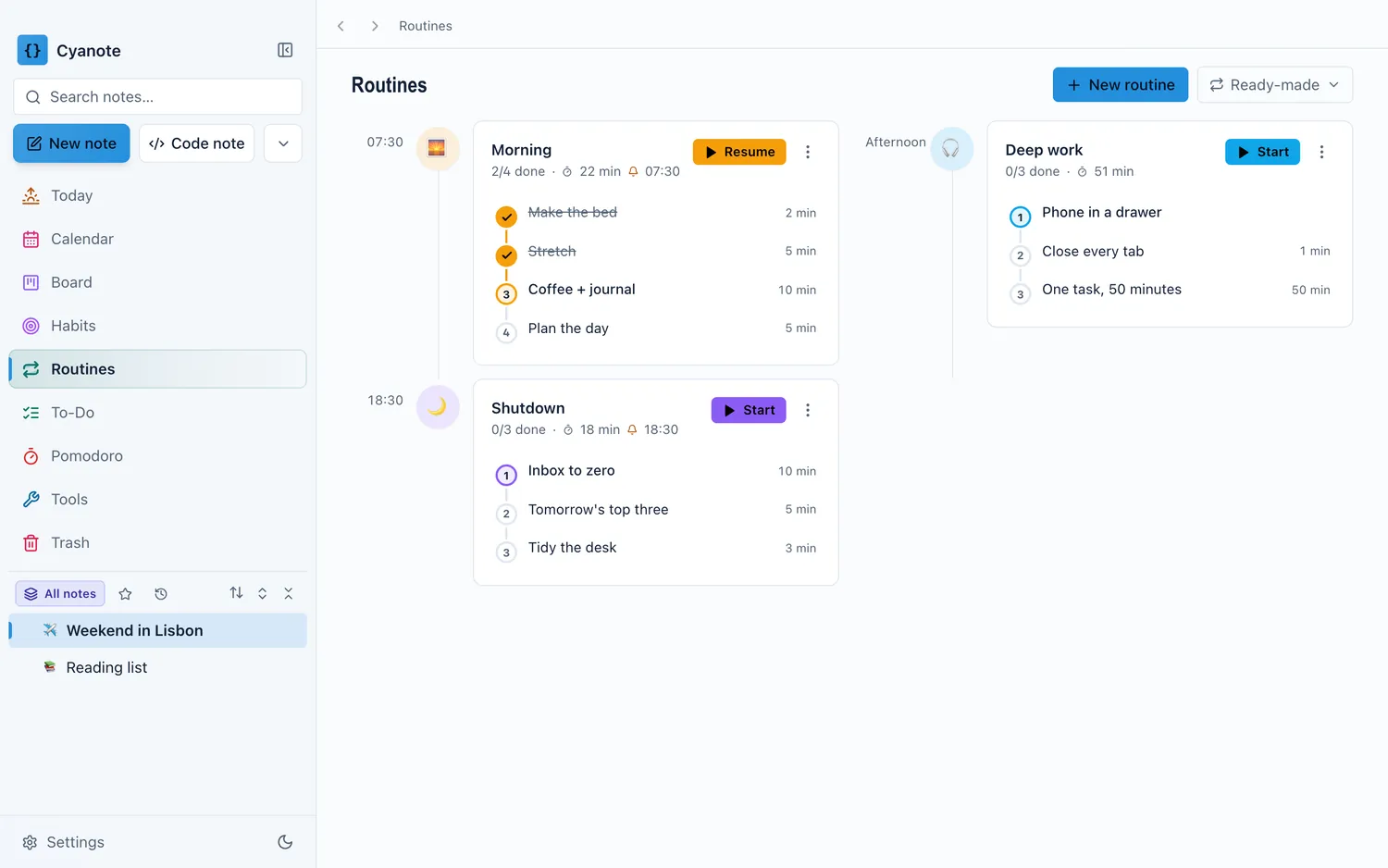
Cyanote's routines are checklists with an optional clock on the steps where the clock is part of the method, sitting in the same window as the notes, the tasks and the day. Today shows the routines not yet run alongside what is due and which habits are outstanding, so a routine is something you meet rather than something you have to remember to go and open. It all lives in one database on your own computer, which means your shutdown list is not an item on somebody's server.