The Pomodoro Technique is close to the simplest productivity method that exists: 25 minutes of work, a 5-minute break, repeat, with a longer break every fourth round. Francesco Cirillo developed it in the late 1980s, named for the tomato-shaped kitchen timer he used at the time. There is nothing to configure and nothing to learn. Which makes it a strange method to have accumulated so many dedicated apps to run it.
The technique doesn't need an app
You could run a Pomodoro session with a kitchen timer, and for the first decade or so people mostly did. The method's entire value is the boundary — a fixed block where you've pre-committed to one task and a fixed break where you've pre-committed to stopping. Nothing about that requires software.
What software adds is the parts around the boundary: a sound when the block ends, a count of how many rounds you've done today, a way to see the streak. Useful, but worth naming as decoration on a method that works without any of it, the same relationship a habit tracker's charts have to the actual checkmark.
Where a separate timer app costs you something
The problem isn't that dedicated Pomodoro apps are bad at the timer. They're usually good at it. The problem is where they sit relative to the work.
You're writing, or coding, or working through a task list, and you switch to the timer app to start a session. Twenty-five minutes later it makes a sound, and you switch to it again to start the break, then switch back again to resume. None of those switches is expensive on its own. Multiplied by six or eight rounds a day, it's a small tax paid entirely in the currency the technique exists to protect: your attention, spent on the tool that's supposed to be protecting it.
There's a sharper version of this if the timer app has its own notifications, its own badge, its own reason to check in on you. At that point the tool meant to reduce context-switching has become a second source of it.
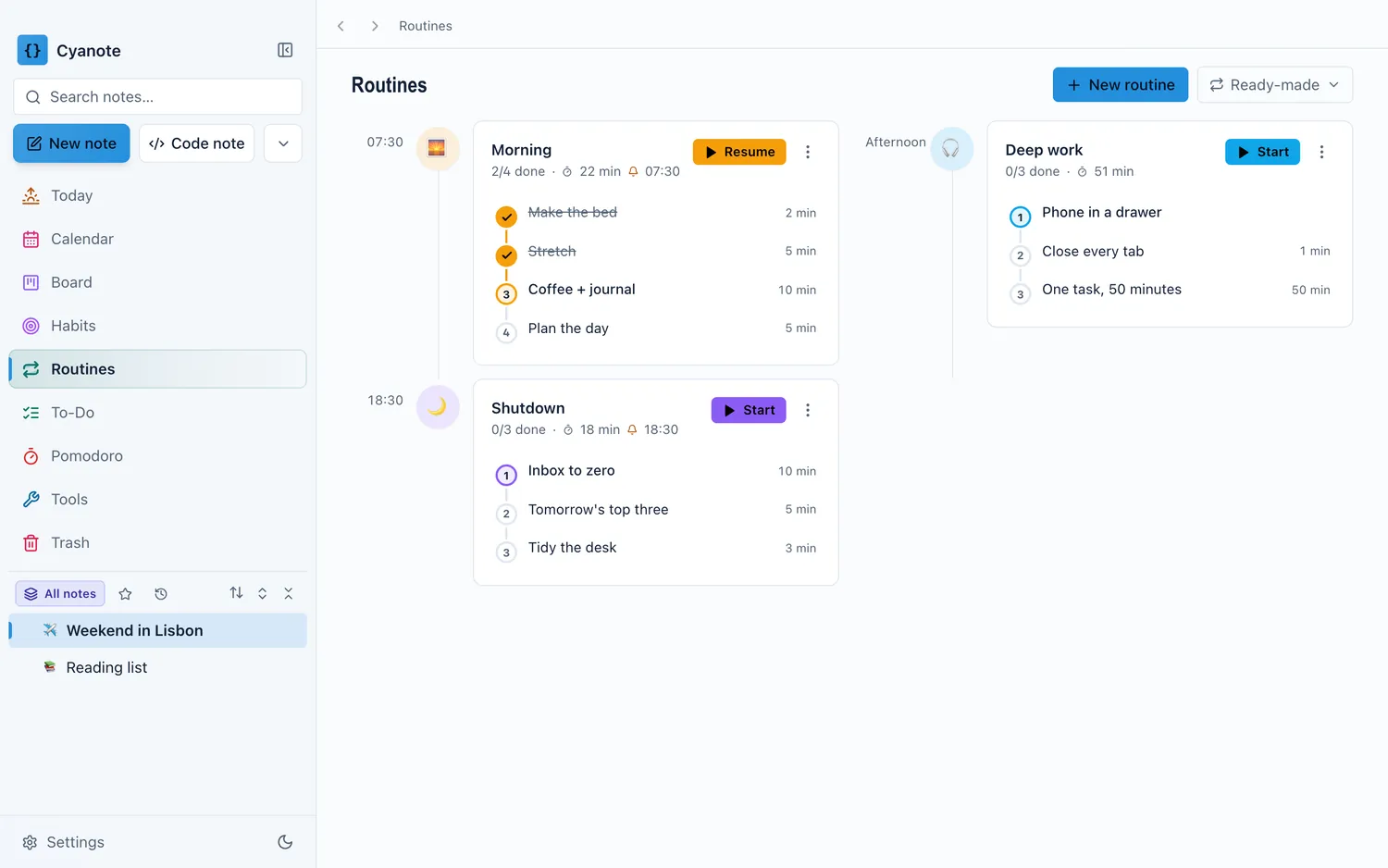
What changes when the timer is where the work is
The mechanism doesn't change: still 25 minutes, still a break, still the same countdown. What changes is that starting it doesn't cost an app switch, because it's a control inside the window you were already using to do the work. You start a round from your task list, keep working in the same place, and the timer runs alongside rather than requiring its own visit.
That matters more for the break than the work block. The moment a 25-minute timer ends is exactly the moment you're most likely to open something distracting "for a second", and if the timer itself lives inside the app that also holds your to-do list, the natural next glance is at the list, not at whatever's one tab over in a browser. A five-minute break inside a focus tool tends to stay five minutes. A five-minute break that starts by opening a browser tab rarely does.
This is the same logic behind running a weekly review in twenty minutes rather than letting it sprawl. A bounded block only holds its boundary if the tool running it isn't itself an invitation to wander.
Routines are the same idea, run longer
A single Pomodoro round is a 25-minute boundary around one task. A routine is the same idea stretched across a morning, an evening, or a weekly reset — a fixed sequence of steps you run without re-deciding the order each time.
The value of both is identical: deciding the shape of the block once, in advance, so you're not negotiating with yourself in the moment about what comes next or how long it should take. A routine that lives next to your to-do list can pull directly from it. The same way a Pomodoro session started from your task list already knows what you're working on, a morning routine sitting next to your notes can open straight into the day's first task instead of ending in "okay, now what."
A dedicated Pomodoro app is a perfectly good answer
As with the rest of this app, worth saying plainly rather than around.
If you want serious analytics on your focus time — long-range charts of deep work, integrations with a calendar or a task manager you already use, a genuinely well-designed standalone experience — a dedicated timer will do more than a Pomodoro control tucked into a bigger app. As of 16 August 2026, Session is $4.99 a month or $39.99 a year and is built specifically around deep-work tracking; Be Focused is a one-time $4.99 on the Mac App Store and covers the core technique cleanly without a subscription; Forest gamifies the block by growing a virtual tree, with Forest Plus from $5.99 a month for the extras, though its Mac presence is a browser extension rather than a native app. Years of attention have gone into each of those, in a way a timer that's one feature among five isn't trying to match.
What the bundled version is solving is narrower: not "make the best possible Pomodoro app," but "don't make starting a 25-minute focus block cost an app switch in the first place."
What to check before you rely on either
If a timer's alerts are the thing that pulls you out of focus — a notification banner, a sound that cuts through headphones at the wrong volume — check what you can turn off before you commit to a method that depends on the boundary being quiet rather than loud.
Check whether the break is actually enforced or just suggested. A timer that lets you skip the break with one click is teaching you to skip the break.
And ask whether the routine or timer data needs an account to work. A 25-minute countdown has no reason to touch a server, and neither does a checklist of morning steps.
The honest version of the choice
If focus tracking is a discipline you're serious about — data across weeks, integration with a bigger deep-work practice — a dedicated app built entirely around that will outperform a timer that's one part of a larger tool.
For the far more common case — you want the boundary the Pomodoro Technique provides without paying an app-switch tax to get it, and a routine that doesn't require its own launch to run — the value is in the timer not needing a reason of its own to be open. It borrows the one your task list already gives you.
Cyanote's timer and routines sit in the same window as the notes, the to-dos and the calendar, running locally with no account and nothing sent anywhere. It's one part of five, and if deep-work analytics or a gamified tree is what actually keeps you consistent, Session, Be Focused or Forest will serve that specific need better than a bundled timer ever will.