Most people speak at somewhere around 120 to 150 words a minute and type at 40 or so. That gap is why dictation keeps coming back, and it is also, unhelpfully, why people keep being disappointed by it.
Speed is not the binding constraint on writing a note. Structure is. Dictation gives you a great deal of raw material very quickly, which is genuinely useful in about four situations and actively counterproductive in most of the others.
Turning it on
macOS has dictation built in, and it works in any text field in any app: a note, a search box, a task, a message. System Settings → Keyboard → Dictation, switch it on, and set the shortcut you want. Then put the cursor where you want the words and press it.
Two things worth knowing before you start.
Language support and where the audio goes varies. On recent Apple silicon Macs, several languages run entirely on your machine; for others, audio is sent to Apple for processing. Which category yours falls into is worth checking in that settings pane rather than assuming, particularly if you dictate anything you would not send to a third party. If you have chosen a notes app specifically because nothing you write leaves your Mac, it would be a shame to route it out loud.
You have to say the punctuation. "Full stop", "comma", "new paragraph", "open quote". This feels ridiculous for about a day and then becomes automatic, and it is the single biggest difference between output you can use and output that is one 400-word sentence.
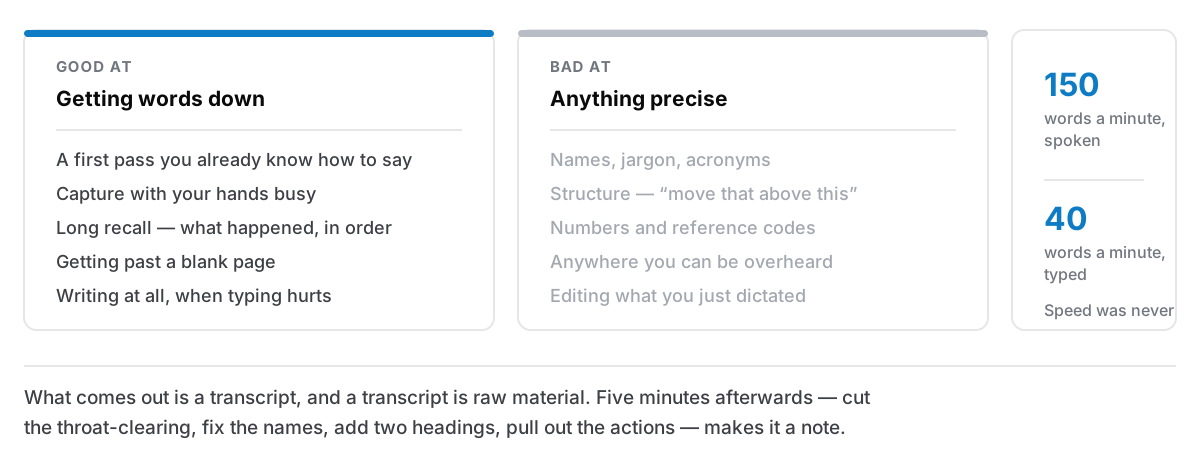
What it is genuinely good at
A first pass at something you already know how to say. If you have just come out of a meeting, or you have been thinking about a problem on a walk, the words are already assembled. Dictation gets them out at the speed you thought them instead of the speed you type.
Capture with your hands busy. Cooking, driving with a passenger, holding a baby, walking to the station. This is the case where dictation is not merely faster but is the only option, and something captured badly is worth more than something not captured.
Long recall. Describing what happened, in order, at length — an incident, a conversation, a symptom, a site visit. Recall is verbal by nature and speaking it out is less effortful than typing it.
Getting past a blank page. Talking to yourself about what you want to write produces material with no editing pressure. It is bad prose and it is not supposed to be prose; it is the thing you edit.
And, for some people, it is the difference between writing and not. Dictation is an accessibility feature before it is a productivity one — repetitive strain, arthritis, limited hand use, dyslexia. If typing is a cost you pay in pain, everything below about "it needs a cleanup pass" is an obviously acceptable trade.
What it is bad at
Names, jargon and anything spelled unusually. Product names, colleagues' surnames, technical terms, acronyms. Expect these to be wrong and expect to fix them, which is fine for a paragraph and miserable for a page.
Structure. You can say "new paragraph". You cannot easily say "actually, move that bit above this bit", which is what writing mostly is.
Numbers and identifiers. Reference codes, dates in awkward formats, anything where one wrong character makes it useless. Type these.
Anywhere you can be overheard. An office, a train, a shared house. Not only for privacy. Self-consciousness makes people dictate badly, in a flat mumble that transcribes worse.
Editing. Fixing dictated text by voice is slower than fixing it by keyboard, so dictation works best as a burst you clean up with your hands afterwards.
The pass that turns speech into a note
This is the part people skip, and skipping it is why so many people conclude dictation does not work for them.
What comes out of dictation is a transcript. A transcript is raw material, not a note, the same distinction that makes an automated meeting transcript so much less useful than five lines somebody actually wrote, which is worth its own argument.
So do one pass, immediately, while you still remember what you meant:
- Cut the first sentence. It is almost always throat-clearing.
- Fix the names. They are wrong; you know which ones.
- Put in the headings. Two or three. This is the step that converts a wall into something you can skim.
- Pull out the actions. Anything that is a task belongs on your list, not buried in paragraph four.
- Delete the repetition. Speech circles back on itself; text should not.
Five minutes on a five-minute dictation, and the result is a note rather than a recording of you thinking. Skip it and you have a transcript you will not re-read, which is a slower way of forgetting.
Where it fits
The workflow that works for most people is not "dictate instead of typing". It is:
Dictate into the scratch note. Everything captured out loud lands in the one note you never tidy, exactly like everything else you capture badly and fix later — that note exists precisely for this.
Clean up in the same sitting if you can. The cleanup is cheap while the meaning is fresh and expensive a day later.
Keep typing the precise things. Codes, numbers, anything short. The switch costs nothing and dictation has no advantage on a line of eight words.
Used that way it is a genuinely good tool: it removes the friction from getting words down, which is the half of note-taking where friction actually stops people, and it leaves the thinking part where it belongs, with you, afterwards, with a keyboard.