You wrote it on the train. It was on the phone, in your hand, forty minutes ago. Now you are at the Mac with Notes open and it is not there — not in the sidebar, not in search, not in Recently Deleted.
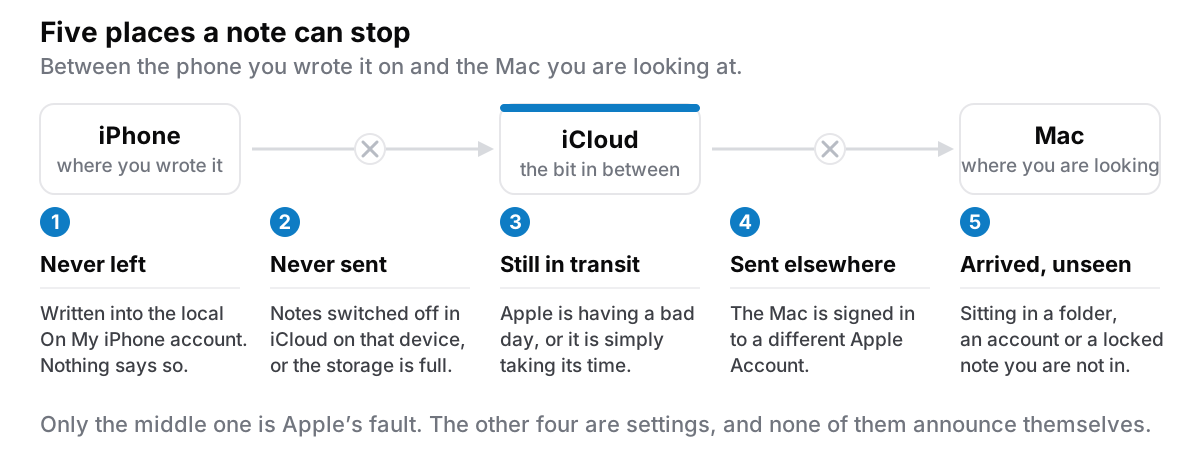
Two things are worth knowing before you start pulling settings apart. This is very rarely data loss: the note exists, on the device you wrote it on, and something between there and here has not happened yet. And the Notes app is unhelpful about which thing, because all of the common causes look identical from the outside — an app that appears to be working perfectly, with a note missing from it. No queue, no error, no last-synced timestamp. Silence is what success and failure both look like.
So the useful thing is an order to check in. Roughly most-likely first.
One: the note is in an account that never syncs
This is the most common cause, it is invisible, and it produces the panicked "my iPhone is not syncing with my Mac" search at eleven at night.
Notes holds more than one account at once. There is iCloud. There is a local account, called On My iPhone or On My Mac depending on the device. And there may be accounts that arrived with your email setup — a Gmail or Exchange account offering a notes folder alongside the mail.
Notes written into a local account stay on that device. Not slowly, not eventually: never. That is the design, not a fault, and nothing in the interface tells you it is happening.
To check, open Notes and go up to the folder list — on the Mac, the sidebar; on the phone, the back arrow until you reach the top. More than one top-level heading means more than one account, and the note may well be under the wrong one. On the Mac the local account is a checkbox in Notes' own settings, under the Notes menu; on the phone the equivalent lives in Settings, in the section for Notes itself.
While you are there, look at the default account setting on the phone, in the same place. It decides where new notes go, and it governs Siri, Quick Note and the Control Centre button too. If it says On My iPhone, everything you capture is landing somewhere it will never leave — which is how people end up with four months of writing in the wrong place.
One detail that catches people: changing the default does nothing to notes already written. Select them, move them into a folder under the iCloud heading, and then fix the default so it stops happening.
Two: Notes is switched off in iCloud, on one device
Each iCloud app has its own switch, and Notes can be off on one machine while everything else syncs happily — which is exactly why this gets missed.
The setting is in the same place on both platforms, described loosely enough to survive an OS update: open Settings (System Settings on the Mac), click or tap your own name at the top, find the iCloud section, and in the list of apps saved to iCloud there is a line for Notes. Recent versions hide the full list behind a "See All"; older ones show it directly. It has moved before and will move again, but it has always been under your name.
Check it on both devices — this failure is asymmetric by nature, so verifying the one you are standing at proves nothing.
If the switch is already on, turning it off and back on is reasonable to try, but read the prompt rather than tapping through it. Switching iCloud Notes off asks you what to do about the copies currently on that device, and the wording matters.
Three: the two devices are not on the same Apple Account
Easy to dismiss, worth thirty seconds, more common than it sounds.
At the top of Settings on each device, under your name, compare the email address — not the display name, which is often identical on both. Mismatches turn up after a restore, after a repair, and in households where a second account made years ago for a work machine quietly became the one on half the devices. The fix is annoying, because moving accounts means getting the notes out of one and into the other, but at least it stops being a mystery.
Four: iCloud storage is full
Apple's own documentation is blunt about what a full account does: devices stop backing up, new photos and videos stop uploading, iCloud Drive and other iCloud apps stop staying up to date across your devices, and iCloud mail stops sending and receiving. Notes is one of the "other iCloud apps". Check usage under your name, in the iCloud section. The free tier is small and it fills without ceremony — usually a photo library, or backups from a phone you no longer own.
Check it earlier than its position here suggests, for two reasons. The symptom is genuinely silent; nothing turns red. And it is never only the notes — if sync has been stalled a fortnight, your iPhone backups have been stalled a fortnight too, which is a considerably larger problem than the missing address.
Five: the note is locked, shared, or otherwise unusual
Locked notes are end-to-end encrypted with a password you set. They sync like anything else, but the contents will not open on a device that does not have that password, and a note you cannot open looks a great deal like a note that did not arrive. If you changed the password on one device, the other may still be asking for the old one.
Shared notes run through a different mechanism, because collaboration requires Apple's servers to be able to act on the note — which is also why shared notes are excluded from Advanced Data Protection. They can stall independently of everything else in the account.
A device several versions behind. If one machine is on a much older OS, Notes may show a prompt asking you to upgrade before newer notes appear at all. A device that cannot be upgraded is a device that will not see everything, and no setting fixes that.
Six: check whether it is Apple
Before you spend an hour toggling switches, spend ten seconds at Apple's system status page — apple.com/support/systemstatus — which lists the iCloud services individually. If there is an incident open, nothing you do locally will help, and the correct action is to stop touching things. This is not the likely cause; it is just very cheap to rule out and expensive to discover after an hour.
Seven: wait, with both apps open and on wifi
Notes sync is neither instantaneous nor continuous. It happens when the app is open, the device is awake and the network is available, and a note with a large attachment moves far slower than a line of text.
So: open Notes on both devices, leave them in the foreground, stay on wifi, and give it ten minutes. On the phone, pulling down on the folder list nudges it. Repeatedly force-quitting is worse than waiting, because it interrupts the process you are trying to encourage.
One thing never to do: do not delete the note from the device that still has it in order to "force a re-sync". Get a copy out first — mail it to yourself, AirDrop it, screenshot it, anything. The copy you are looking at is the one that definitely exists.
The part underneath all of this
I want to put this carefully, because the smug version of the argument is everywhere and it is not honest.
Sync is the component that fails. Not Apple's sync specifically — sync. Every cause above is the same shape: something that works only when two devices, an account, a network, a quota and somebody else's server all agree, simultaneously, about what is true. Five things, each able to be individually fine while the arrangement is broken. No implementation of that cannot fail, and anyone selling you one that cannot is selling a longer mean time between failures, not a different category of thing.
What you get for it is enormous, which is why most people should keep using iCloud sync. You write on a train and it is on your desk when you arrive. You lose the phone in a taxi and the notes are not lost with it. You buy a new Mac, sign in, and everything is already there. One bad evening is not a reason to give that up.
What it costs is a category of failure that otherwise does not exist, and the awkward fact that the failure is silent. A local file that is on the disk is on the disk — that is where your notes actually live rather than where they are meant to end up, and it is the one property sync cannot give you by construction. The longer version of how iCloud stores notes is its own post.

Making it cost less next time
Whatever you decide about sync, four habits make the next incident smaller.
Do a one-off account audit. Ten minutes, once. Open Notes on each device, see which accounts exist, check the default account for new notes on the phone, and move anything stranded locally into iCloud. Highest return on the list, because it converts the most common failure into one that cannot recur.
Get a copy out on a schedule. Apple documents exporting a note at a time, which is fine for one and miserable for four hundred — the macOS 26 generation will export several selected notes as Markdown, but there is no "export everything" button — getting a whole collection out takes other tooling. Monthly is plenty; quarterly beats never.
Remember that sync is not a backup. A deletion syncs too, promptly and everywhere, and so does a bad edit. A backup is a copy that does not change when the original does, which is the whole definition and the reason a restore should replace rather than merge.
Keep one capture route that does not need sync. For the note you genuinely cannot lose in transit, there is a way across that does not involve a queue, and it is worth knowing before the evening you need it. The same problem in reverse is what people hit on a Windows machine.
The honest version
Nine times out of ten the note is in an account that was never going to sync, and the fix takes a minute once you know where to look. Most of the rest is a switch off on one device, a full account, or Apple having a bad hour. Very little of it is a lost note.
If it keeps happening, take it seriously — not as a reason to distrust iCloud, which is well-run, but as a signal about how much you want to depend on a mechanism whose failure mode is silence. There are four narrow reasons to move off Apple Notes; this is only one, and not the strongest.
Cyanote is the other shape: everything in one SQLite file on your own Mac, no account, no sync, a JSON export of the whole collection whenever you want it, $7.99 once. It has no iPhone app, so it solves this problem by not having it and hands you a different one instead. That is the actual trade, and for plenty of people it is the wrong one.