"Local-first" — a term coined in a 2019 essay by Ink & Switch — has become a marketing word, which is a shame, because underneath it is a genuinely useful distinction — and one with real costs that the marketing tends to skip.
Here is the plain version. In a cloud app, the server holds the truth. Your device holds a cache of it. When you type, the change is sent somewhere, accepted, and sent back. In a local-first app, your computer holds the truth. The app reads and writes it directly. The network, if there is one at all, is a convenience layered on top.
That sounds like an implementation detail. It is not. It changes how the app behaves on a bad train, what happens when the company folds, who can read what you wrote, and whether your notes still exist in ten years. It also takes some things away, and I will get to those, because a post that only lists the upsides is an advert.
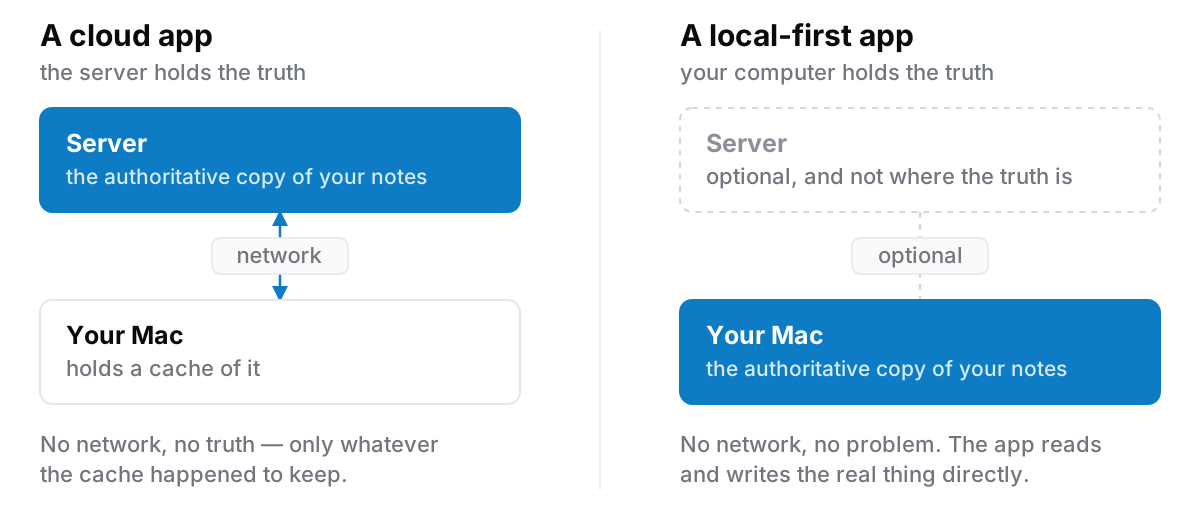
What it changes, concretely
The app is fast in a way that is hard to fake
When you press a key in a cloud-first editor, something has to go over a network eventually. Good apps hide this well: optimistic updates, local caches, careful loading states. But the seams show under load: a long note that takes a second to open, a search that spins, a list that arrives a beat after the window does.
A local-first app reading a file on your own disk has no network to hide. Opening a note is a disk read measured in single-digit milliseconds. Search across everything you have written is a local index query. There is no clever engineering here. The latency is simply not there to begin with.
Offline is not a mode
Cloud apps have an offline mode, which is a set of behaviours that switch on when the network goes. It works, mostly, and then you find the edge: the note that will not open because it was never cached, the sync conflict when you land, the file that quietly reverted.
For a local-first app, offline is not a mode. It is the normal condition. A plane, a basement, a hotel with a captive-portal wifi that never quite lets you through. None of these are events. Nothing behaves differently because nothing was depending on the network in the first place.
Nobody else has a copy
This is the part people care about most and describe least precisely. It is not really about trusting or distrusting a particular company. It is about the number of places your writing exists.
If your notes are on a server, then your notes are readable by: the company, anyone the company is legally compelled to answer, anyone who breaches the company, and any future owner of the company after an acquisition you were not consulted about. None of those require bad intent. They are just what having a copy means.
If your notes are on your disk, that list is: you, and anyone with your computer.
It outlives the company
Cloud apps die badly. The service shuts down, you get ninety days' notice and a zip file export in a format nothing else reads, and the structure — the links, the nesting, the dates — arrives as mush.
A local-first app that shuts down leaves you exactly where you were. The files are still on your disk, in whatever format they were in yesterday. The app stops getting updates; your notes do not stop existing. This is the least discussed advantage and, on a ten-year horizon, probably the largest.
The costs, honestly
Here is what you are actually giving up. I would rather you read this now than discover it a week after buying something.
No sync between machines
This is the big one and it is not a small inconvenience.
If your notes are on your MacBook, they are on your MacBook. Sit down at a desktop and they are not there. There is no "log in and everything appears", because there is no account and nothing to appear from.
Some local-first apps solve this with peer-to-peer sync or by putting the data folder in iCloud Drive or Dropbox, which works but reintroduces a cloud service and, with it, conflicts when two machines edit the same thing. Others, Cyanote included, do not solve it at all yet: one computer, one set of notes.
If you genuinely work across two machines all day, this is disqualifying, and you should choose a cloud app with a clear conscience. Being honest about that is more useful to both of us than pretending single-device is a lifestyle choice.
No phone
Related, and equally real. Local-first on a desktop means the thought you have on a bus does not go into the same place as everything else. Plenty of people run a small capture app on their phone and move things over weekly. That works, and it is an extra step you did not previously have.
Backups become your job
With no server there is nobody keeping a spare copy for you. A cloud app's genuine advantage is that a stolen laptop is an inconvenience rather than a loss.
Local-first moves that responsibility across the line to you. This is manageable — Time Machine, or an occasional export to an external disk, covers it entirely — but it only works if you actually do it. Set it up on day one, not after the first scare.
No collaboration
Shared documents, comments, someone else's cursor in your paragraph: these need a server, because they need a shared truth that two people can both reach. Local-first apps are for one person's own thinking. That is a genuine limitation and not a philosophy.
How can you tell whether an app is actually local-first?
The label is easy to claim. Three questions settle it:
- Can you create an account-less install? If signing up is mandatory, the server holds something. That may be fine, but it is not local-first.
- Where is the data, and can you open the folder? A real answer is a path. If the answer is "in the app", ask again.
- Turn the wifi off and use it for an hour. Everything should work. Not "most things", but everything.
A fourth, softer test: what happens when you cancel? If there is nothing to cancel, that tells you where the data was.
Where Cyanote sits
Cyanote stores everything in a SQLite database on your own computer, Mac or Windows. There is no account, no server holding your notes, and no telemetry. The Mac app makes two network requests of its own and no others. A new install sends the licence key from your purchase email to Lemon Squeezy, once, to confirm the purchase. That is the only moment the app needs a network at all, and there is nothing to sign in to. After that it checks for a new version, about every six hours while it is open, carrying no key, no account and no identifier. Neither request carries a word you have written. The Windows edition is bought and installed through the Microsoft Store, so it makes neither. Individual notes can be locked with a password on top of that.
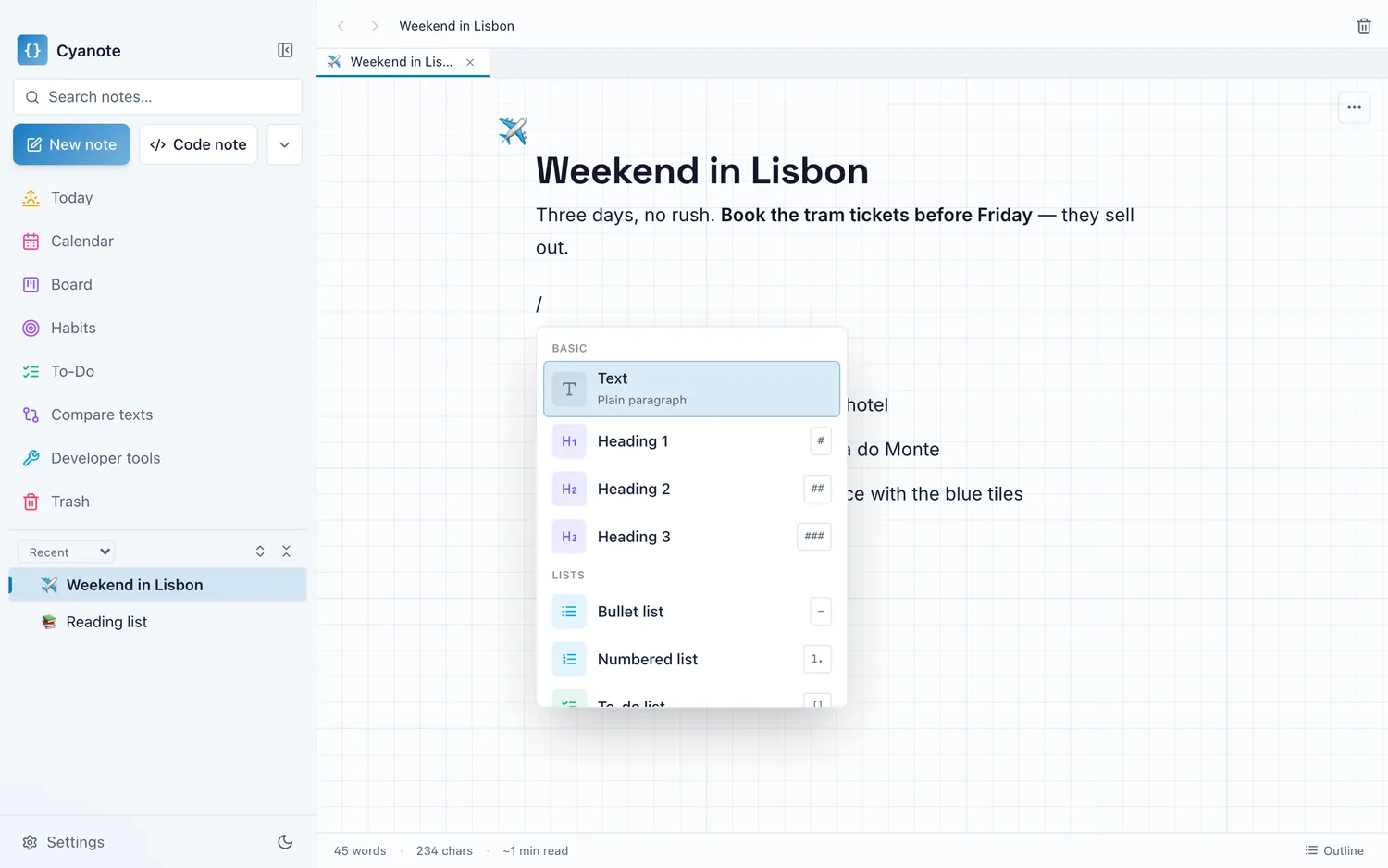
It takes the trade-offs above rather than dodging them. There is no sync and no iOS app. What it offers in exchange is that the whole thing — notes, tasks, calendar, habits, clipboard history — opens instantly, works in a basement, and cannot be read by me or anyone else. Backup and restore is a single JSON file you can write anywhere you like, and a restore always takes a rescue snapshot of what it is about to replace before it does anything.
Optional network features exist and are opt-in: you can subscribe to a Google Calendar so events appear alongside your tasks. That is a deliberate exception, and it is a read of a calendar you already publish. Nothing goes the other way.
Who should choose a local-first app?
Choose local-first if you work mostly at one machine, if you write things you would rather not have on someone else's server, and if you would like the tool you learn this year to still be there in five.
Do not choose it if you move between machines constantly, if capture on a phone is central to how you think, or if you would rather someone else be responsible for your backups. Those are real requirements and cloud apps meet them properly.
If the first description fits, Cyanote is a $7.99 one-time purchase with no subscription behind it — I wrote about why it exists in I replaced five subscriptions with one $7.99 app, and about the routine I use to keep a week in order in the weekly review, in 20 minutes.