Open your calendar app right now and look at tomorrow's first meeting. You will see a time, a title, and maybe a video-call link. What you will not see is the paragraph of context you had in your head when you booked it: what you actually need to say, the number you were going to check first, the follow-up from last time. That lives somewhere else, if it lives anywhere at all.
That gap is the whole subject here.
A calendar answers one question
A calendar is built to answer "when." It is extremely good at that one job — recurring events, time zones, invitations, the free/busy grid that makes scheduling with other people possible at all. None of that is in question.
What it was never built to answer is "why," or "with what." The event is a box with a start time. Anything you needed to prepare, remember, or bring to it has to live somewhere else, and "somewhere else" is doing a lot of quiet work in that sentence.
Where the missing half actually goes
In practice it goes in one of three places, and each has its own failure mode.
A separate notes app. You open the calendar, see the meeting, then switch apps and search for notes about it — if you remembered to title them in a way you'd recognise later. Two apps, two windows, and the connection between "this meeting" and "these notes" exists only in your memory, not in either tool.
The event description field. Better than nothing, and worse than it looks. Most calendar apps give that field no formatting, no links between entries, and a search that treats it as an afterthought. It becomes a place things go to be typed once and never read again.
Nowhere. The most common answer, and the reason meetings open with "sorry, can you remind me what this was about."
None of these is a character flaw. They are what happens when the tool that shows you when and the tool that holds why are not the same tool, and moving information between them is a chore you have to remember to do under time pressure, the exact conditions under which people don't.
What changes when they share a window
Less than the pitch usually implies, and something specific: the trip disappears.
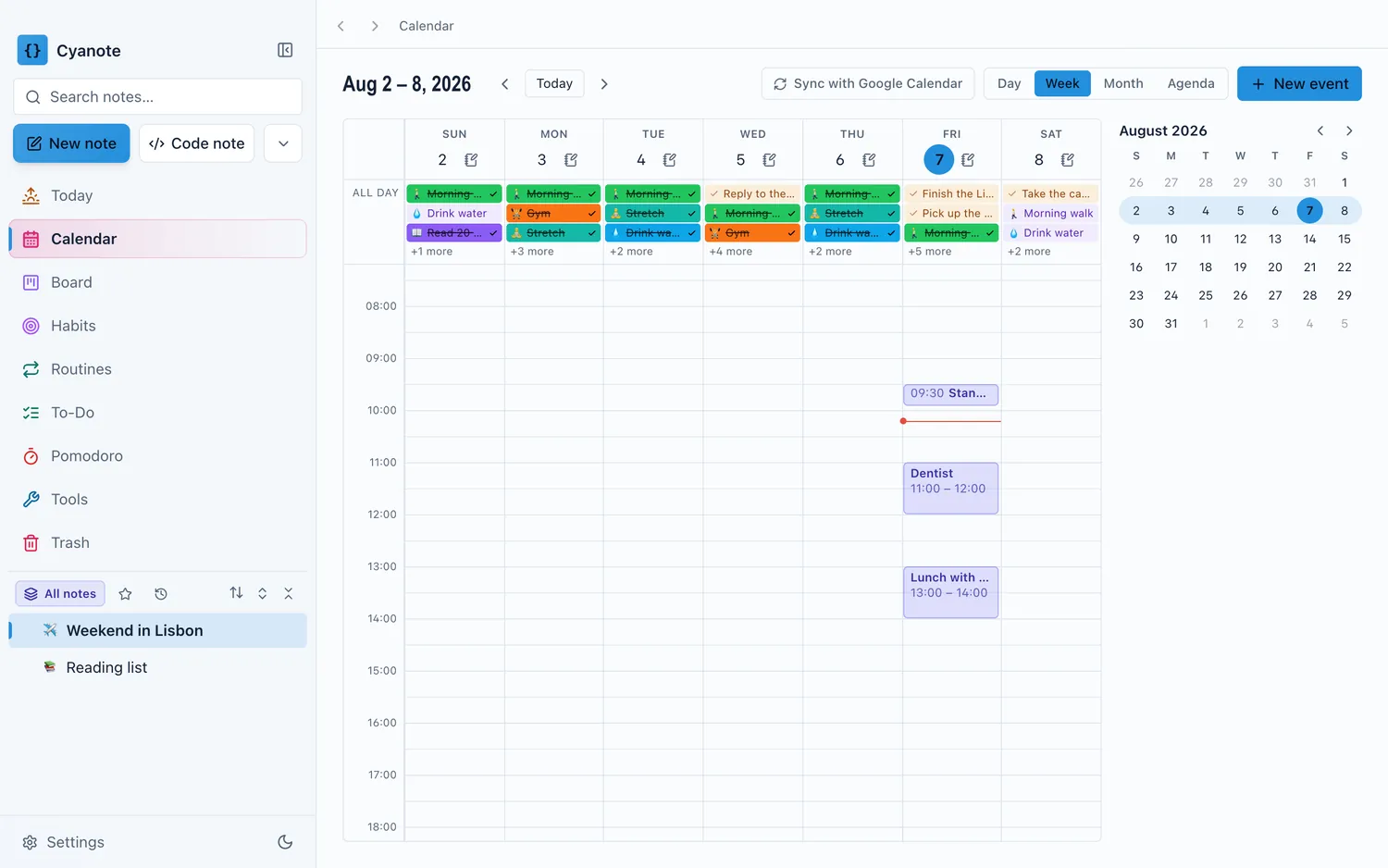
When the calendar sits in the same app as your notes and your to-dos, an event on Thursday and the note about Thursday's meeting are one click apart instead of one app-switch and one search apart. You don't have to remember to link them, because there was never a wall to cross in the first place. You write the note the same place you see the date.
The other half is the to-do side. A task with a real deadline is a calendar problem wearing a to-do list's clothes. Keeping tasks and events in the same app means "when is this actually due" and "what does my Thursday look like" are one glance, not two tools reconciled by hand. If your task list is currently a kanban board, how a personal Kanban board holds up against a real weekly to-do list is worth reading before you decide whether the board or the calendar should own a given deadline. They answer different questions, and a lot of task lists try to make one column do both jobs.
A dedicated calendar app is a perfectly good answer
I'd rather say this plainly than bury it, the same as I would for any of the other pieces of this app.
If your calendar life is genuinely just scheduling — you manage several shared calendars, you're coordinating meeting times across a team, you live and die by natural-language event entry — a dedicated calendar app will beat a bundled one on the thing it specialises in. As of 16 August 2026, Fantastical's Individual Premium plan is $6.99 a month or $56.99 a year, with a real free tier underneath it for people who don't need the extras; BusyCal is a one-time purchase in the same space, aimed at people who want the polish without a subscription. Both have had years to get scheduling exactly right, in ways a smaller calendar view inside a bigger app is not trying to compete with.
The combined calendar is not for that job. It's for the much larger number of days where the interesting question is "what am I doing today, and what do I need to remember about it," rather than "schedule this meeting with four people across three time zones."
Where the intersection actually sits
This is the same shape of gap I found writing about the clipboard manager next to the notes app: as of 16 August 2026, none of the dedicated Mac calendar apps do notes, to-dos and a clipboard history, and none of the all-in-one productivity apps has a calendar that holds up against a purpose-built one on its own terms.
So the honest framing isn't "an all-in-one calendar beats Fantastical." It doesn't try to. It's that a calendar view sitting in the same window as the rest of your day removes the specific friction of context that lives on the wrong side of an app switch, and that most days don't need what a specialist calendar is optimised for anyway.
What to check before you rely on one
If you're weighing a bundled calendar against a dedicated one, the questions worth asking are about what it can't do rather than what it can.
Does it handle recurring events properly, including the edge cases — a meeting that moves for one week only, an event that repeats on the last weekday of the month? This is where thin calendar implementations show their seams first.
Can it show more than one day at a time when you need to plan a week rather than react to today? A calendar that only does "today" is a to-do list wearing a date.
Does it sync with the calendars you don't control — a shared family calendar, a work calendar someone else manages? A calendar that only knows about events created inside it is a smaller tool than it looks like on the pricing page.
And the same storage question that applies everywhere in this app: is the calendar data local, or does using it mean handing your schedule to a server you don't control?
The honest version of the choice
If scheduling across other people's calendars is the actual job — team meetings, shared availability, invitations that need to go somewhere real — a dedicated calendar app is doing work a bundled one isn't built for, and no amount of window-proximity fixes that.
The combined view earns its place on the much more common day: the one where you're not scheduling anything, you're just trying to see what's happening and what you need to know about it, without a trip across two apps to reassemble the two halves of the same fact.
Cyanote's calendar sits in the same window as the notes, the to-dos and the board, in a local database on your own computer, with no account and no sync to a second device. That last part means it will lose to Fantastical or BusyCal the moment you need your calendar on more than one machine, worth knowing before you switch, not after.