You copy an address out of an email because you will need it in twenty minutes. Twenty minutes later you have copied four other things, and the address is now the fifth item down a list you have to open and scroll.
That is the ordinary case, and it works. The interesting case is the one just past it: you copy something and, halfway through pasting it, realise you are going to want it next month too. Now you are doing paperwork. Open the clipboard history, find the item, put it back on the clipboard, switch to the notes app, make a note, paste, give it a title so you can find it again.
Nothing there is difficult. It is just a border crossing, and you are the border guard.
A clipboard manager and a notes app are solving the same problem
Both exist because you noticed something and could not use it yet. That is the whole job: catch it now, use it later. The only difference between the two tools is how long "later" is.
A clipboard manager assumes minutes. It captures everything automatically, asks you nothing, and lets the old stuff fall off the end. A notes app assumes months. It captures nothing automatically, asks you for a title and a place to put it, and keeps things until you delete them.
Neither is wrong. They are two settings on one dial. The problem is that in most setups the dial does not turn. It is a wall, and moving anything across it is a manual act you perform by hand, several times a day, forever.
What the wall actually costs
Not much, on any single occasion. That is why it survives. The costs are the kind you only see when you go looking for them.
Things you meant to keep, that scrolled away
Every clipboard history has a limit. A few hundred items sounds enormous until you count what an ordinary day puts through the clipboard: file paths, URLs, half-sentences you moved between two documents, a code from a text message, someone's phone number, the same boilerplate reply four times.
At that rate a fortnight-old item is not old. It is gone. And the ones you lose are not random. They are the ones you copied, used, and thought "I should save that" about while doing something else more urgent. The intention to keep something almost never arrives at a convenient moment.
Things you kept, but without their context
The other failure runs the opposite way. You do save it. You paste the snippet into a note, and because you were mid-task you paste it into whatever note was open, or a new untitled one, with no sentence explaining what it is.
Three weeks later you have a note containing a bare URL, or a serial number, or four lines of configuration, and no idea what any of it was for. It is technically kept and practically lost. A clipboard history at least tells you when you copied something, which is often enough to reconstruct why.
The tax of two of everything
Two hotkeys. Two windows. Two search boxes, one of which sees only the last few hundred things you copied, the other only the things you wrote down.
The search box is the one that stings. When you half-remember an address and cannot recall whether you saved it properly or merely copied it once, you have to look in both places, in order.
What a single window changes
Less than the pitch usually implies, and something specific.
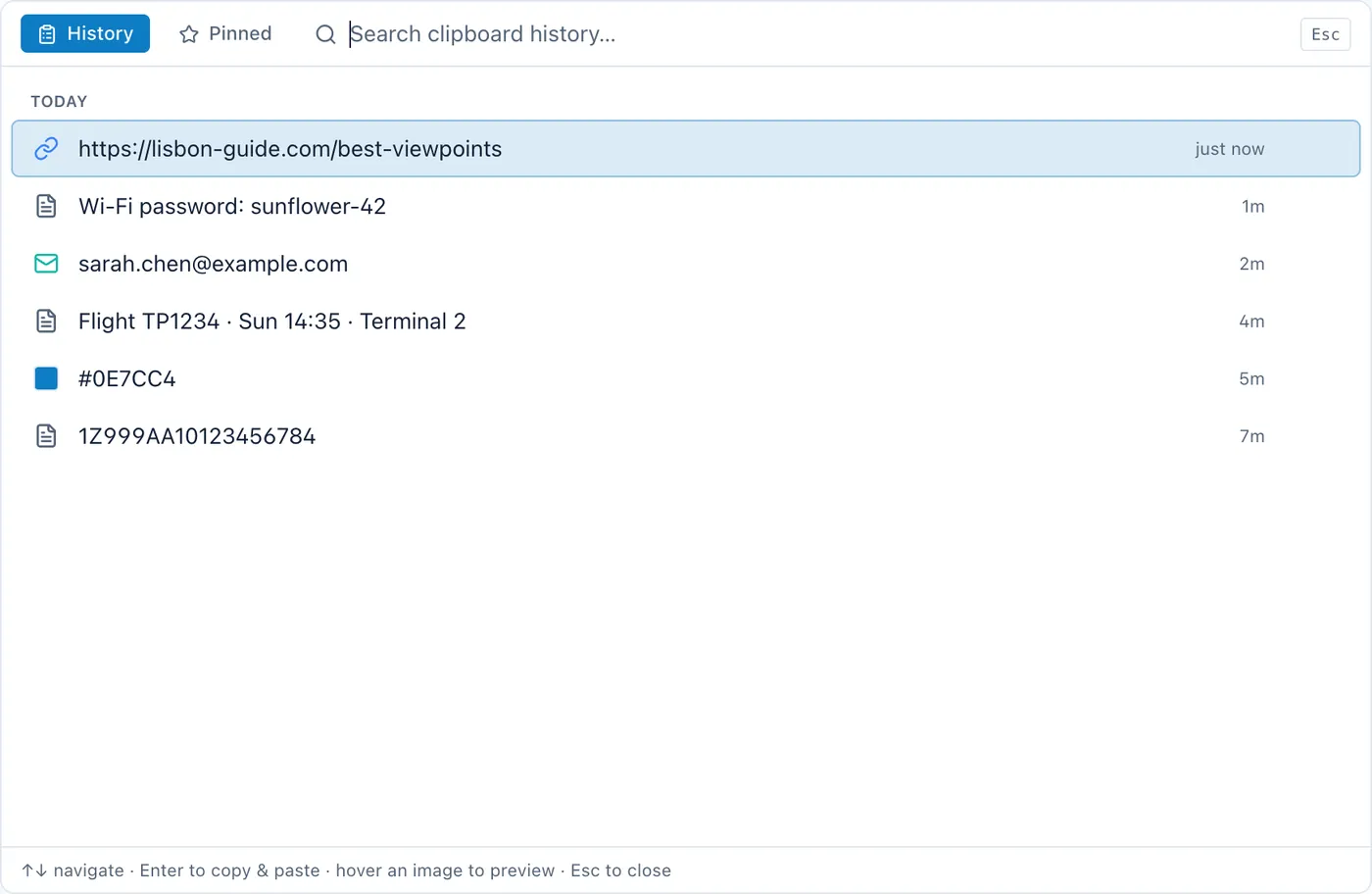
When the history and the notes are in one app, the border crossing becomes a decision instead of an errand. You find the item in the history, you keep it, and it becomes a note. There is no second window, no re-copying, no titling ritual performed under time pressure. You are still choosing what is worth keeping, which is the part that should stay manual, but you are not also doing the clerical work of the move.
The other change is the search box. One box that looks at both what you wrote and what you copied removes an entire category of question — the "did I save that or just copy it" question — because the answer no longer determines where you look.
If you want the mechanics of the capture side on its own, how clipboard history works on a Mac covers what the system does and does not give you, and why there is a gap to fill in the first place.
Two separate apps is a perfectly good answer
I would rather say this plainly than bury it.
A dedicated clipboard manager will be better at being a clipboard manager. That is what it spends all of its attention on: paste stacks, plain-text pasting, rules per application, quick-look previews, keyboard behaviour tuned over years. As of 13 August 2026, Paste is $2.49 a month, $29.99 a year, or $89.99 once, and Maccy is free and open source with a $9.99 App Store build for people who want to support it. Those are honest prices for tools that do one job carefully.
If you already have a launcher you like, the argument is even weaker. Raycast is free, with Pro from $8 a month billed annually as of the same date, and its clipboard history sits behind a key you already press fifty times a day. Muscle memory is worth more than architecture. Replacing a hotkey you have already learned is a real cost, and it does not show up on any comparison table.
And there is a version of the combined app that is worse than two apps: the one where the clipboard part is a checkbox on a feature list, kept only because it made the list longer. A history you cannot search, cannot pin to, and cannot switch off is not a clipboard manager. It is a liability with an icon.
The intersection is genuinely thin
This is the part I found surprising when I went looking. As of 13 August 2026, none of the established all-in-one Mac productivity apps includes a clipboard manager, and none of the dedicated Mac clipboard managers does notes, tasks, calendar and habits.
So the choice is not usually between two good combined apps. It is between two specialists and one generalist, and the generalists are few.
There is a reason for the gap, and it is not laziness. A clipboard manager sees everything you copy, so shipping one inside a larger app means taking on that responsibility for a feature most of your users will never open. Plenty of good software has looked at that and declined, which is a defensible call.
What to check before you combine them
If you do want the two halves in one place, the questions are about the clipboard half, because that is the one that gets neglected.
Can you set how many items it keeps, and can you turn it off entirely? An off switch that also clears what has already been saved is the difference between a setting and a promise.
Does it decline to record what your password manager marks as concealed? This is the baseline, not a bonus.
Is the history searchable and can you pin things? Without those two, the combined app is a worse clipboard manager than the free ones, and the integration will not make up for it. It is worth reading how the app describes what its clipboard manager on a Mac actually keeps rather than trusting the feature list, and where it stores it.
And ask the boring question about storage. A history on your own disk and a history on somebody's server are different products wearing the same word.
The honest version of the choice
If your clipboard is a scratch space and nothing more, if what you copy is used within the minute and never wanted again, then a good dedicated manager, or a launcher you already own, is the right tool and the rest of this is not your problem.
The combined app earns its place in one specific situation: when you keep finding that the things you copy and the things you write down are the same things at different ages, and you are tired of moving them across by hand.
Cyanote sits on that side: notes and a clipboard history in one window with one search box, on a single Mac, in a local database, with no sync and no second device. That last part is a real cost, not a rounding error, and if you work across two machines it is disqualifying on its own. Two well-chosen apps will beat one badly-fitting one every time, and there is no argument here that says otherwise.