Fantastical is worth paying for if you schedule meetings with other people every week. Premium costs $56.99 a year, and the features that justify it are about meetings: booking links, meeting polls, one-click video calls and unlimited invitees. If your calendar is mostly your own plans, the free version of Fantastical already does the thing it is best known for: typing an event as a sentence and watching it land in the right place. And if you just want to see your week, the calendar that came with your Mac is enough.
The rest of this post shows exactly where the free tier stops, what five years of each option costs, and which alternatives win for which kind of week.
The short version
- Fantastical has a real free tier. It lets you write events as plain sentences, see full-screen day to year views and pull in tasks from iCloud Reminders, Todoist and Google Tasks.
- Premium is $56.99 a year or $6.99 a month in the Mac App Store, with a 14-day trial. It also unlocks Cardhop, Flexibits' contacts app. A family plan for up to five people is $89.99 a year.
- Premium pays for itself in scheduling time if you schedule with others every week. Openings, Proposals, Zoom and Teams links, more than one invitee and Apple Watch support are all paid features.
- Over five years, Premium billed yearly costs $284.95. Billed monthly, it costs $419.40. Pay yearly; monthly only makes sense as a one-month bridge after the trial.
- Cancelling isn't a disaster. Your events live in iCloud, Google or Exchange, not in Fantastical, so other calendar apps can still read them.
I make Cyanote, a $7.99 one-time Mac app that has a calendar in it, next to notes, tasks, habits and clipboard history. It is not a Fantastical competitor in any serious sense, and I say where it fits near the end. Weigh what follows knowing who wrote it.
What Fantastical costs in October 2026
Fantastical is a calendar and task app from Flexibits. It runs on Mac, iPhone, iPad, Apple Watch and Apple Vision Pro, and, since October 2024, on Windows too. One subscription, called Flexibits Premium, unlocks the paid features in Fantastical and in Cardhop on every device you own.
Flexibits' own pricing page lists the plans but leaves the dollar amounts until checkout. The Mac App Store listing shows them:
| Plan | Who it covers | Monthly | Yearly |
|---|---|---|---|
| Free | One person | $0 | $0 |
| Flexibits Premium | One person | $6.99 | $56.99 |
| Premium for Families | Up to five people | $10.49 | $89.99 |
| Team | Per user | Price shown at checkout | Price shown at checkout |
In-app purchase prices from the Mac App Store listing, retrieved 19 October 2026, before tax. The listing doesn't label which price is monthly and which is yearly; the split shown matches Flexibits' monthly and yearly plans. Plan names, the five-member family limit and the 14-day trial are from Flexibits' pricing page.
Flexibits said on its blog in November 2022 that its prices would change on 3 January 2023, and I couldn't find an announced change since. The older Fantastical 2 was sold once, and its owners keep those features: Flexibits' FAQ says Fantastical 2 features "do not require a Flexibits Premium subscription". That only covers people who bought it back then. New buyers can't get a one-time version.
What the free version still does
For a lot of people the free tier settles the question, because it is a complete calendar app. On Flexibits' pricing page, these rows are checked in both the Free and Premium columns:
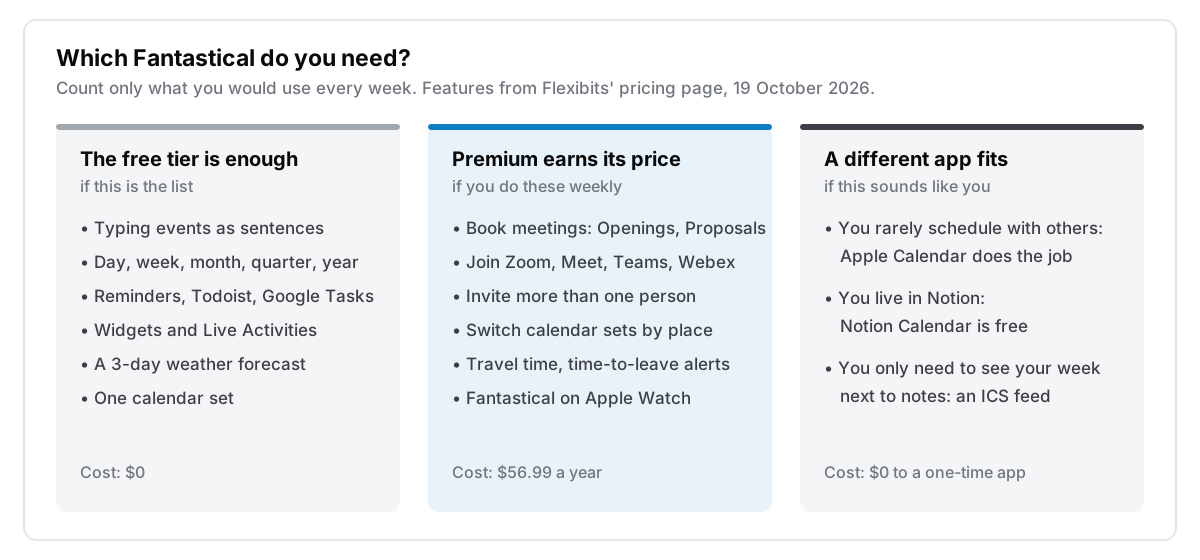
- Adding events and tasks in plain sentences. The pricing page's example is "Lunch with John at 123 Main Street on Tuesday". This is the feature most people mean when they say Fantastical, and it's free.
- Full-screen day, week, month, quarter and year views.
- Full task support, including iCloud Reminders and Todoist. The App Store listing adds Google Tasks.
- Every account you already have. iCloud, Google and Exchange calendars all show in one place.
- Notifications, widgets, Live Activities and event location details.
The free tier also comes with lower limits on some features: a 3-day weather forecast instead of 10, one calendar set instead of unlimited, one invitee per event, and "Meet With" availability for one other person.
If what you mostly do is look at your week, add your own plans and tick off reminders, that list covers you. You can stop here and download it free.
What Premium adds
Everything Premium adds is in Flexibits' pricing table. It falls into four groups. In my reading, the first group is the one that justifies the price.
Scheduling with other people. Openings lets someone book a slot from your free time, like a booking page. Proposals sends a poll with several possible times. RSVP adds registration and deadlines. Premium also removes the one-invitee limit and adds Google Meet, Zoom, Webex and Microsoft Teams support, with a Join button on the event and in the menu bar. If you set up five meetings a week, this is the bit that saves you real time.
Context switching. You get unlimited calendar sets, switched automatically by time or by location, so work calendars disappear when you get home. It also adds travel time, time-to-leave alerts and urgent alarms.
More devices and faster sync. Apple Watch support is Premium only, and so are push sync, calendar mirroring, and forwarding an email to Fantastical to turn it into an event.
Customisation. Templates for events and tasks, custom colours, emoji badges, custom icons and sounds, interesting calendars such as sports fixtures, and a 10-day forecast.
Cardhop, the contacts app, comes with Premium. If you already pay for a contacts app, that is worth something. If you don't, it probably isn't a reason to subscribe.
What five years of each option costs
You'll likely keep a calendar app for years, so price it over years. At today's prices held flat, here is five years for one person:
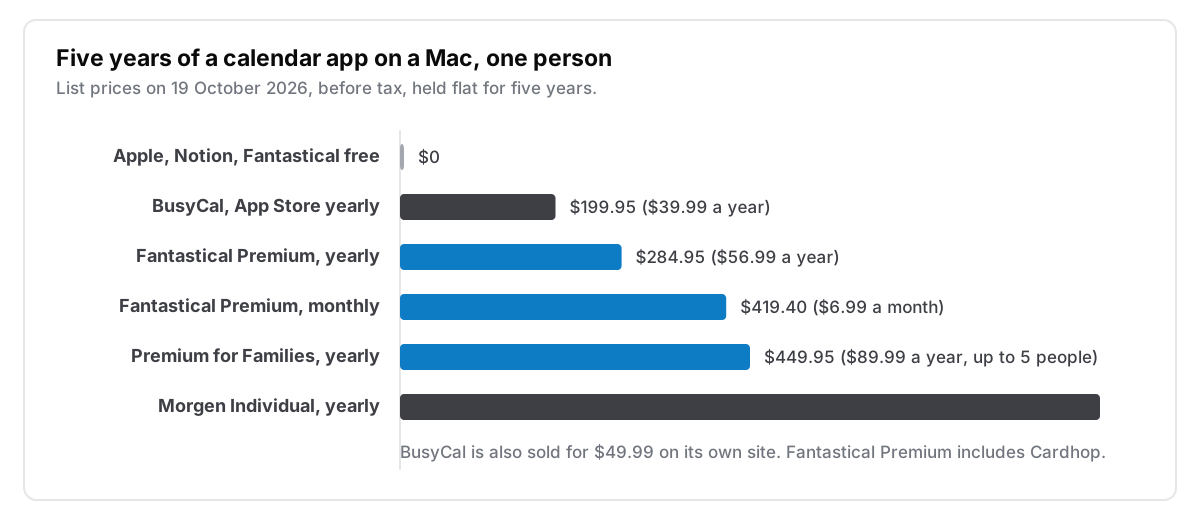
Monthly billing is the expensive way to buy the same thing. $6.99 a month is $83.88 a year, which is 47% more than the yearly price. Use the monthly plan for a month after the trial if you're unsure, then switch to yearly or cancel.
Fantastical is mid-priced for this category. Morgen's Individual plan costs $15 a month billed yearly, which works out to $180 a year, about three times Fantastical. BusyCal costs less than both. It costs $49.99 on BusyMac's own site and is also in Setapp, which I priced out in is Setapp worth it. On the Mac App Store it is a free download with optional subscriptions of $4.99 a month or $39.99 a year. The chart uses the App Store subscription because BusyMac's site doesn't say whether the $49.99 price is a one-time licence.
$56.99 a year is about $4.75 a month. If Openings saves you two back-and-forth emails a week, it's cheap. If you never send a meeting invite, it's $56.99 a year for a nicer-looking calendar, and only you can decide what that is worth.
What happens when you stop paying
This is where Fantastical looks better than most subscriptions. Fantastical is a client, not a place your data lives. Your events stay in iCloud, Google or Exchange, so they are still there in Apple Calendar, on your phone and on the web after you cancel, because they never lived in Fantastical in the first place.
Flexibits' FAQ says that if you cancel, "you can keep using the subscription until the next billing date", and that charges already billed are non-refundable. From then on you are a free-tier user, with everything described above. What you lose is the Premium features and whatever you set up with them, such as templates, calendar sets beyond the first, and booking links people may still have bookmarked.
Compare that with apps that store your data themselves. If a notes app or a task manager on a subscription stops opening, the hard part is getting your data out. I wrote about that in what happens when your notes app shuts down. A calendar client mostly avoids that problem, and that's a point in Fantastical's favour.
The alternatives, and who each one suits
| App | Price, 19 October 2026 | Best for |
|---|---|---|
| Apple Calendar | Free, built into macOS | Your own plans, iCloud users, anyone who rarely schedules with others |
| Fantastical, free tier | $0 | Natural-language entry and better views without paying |
| Fantastical Premium | $56.99 a year | Booking meetings, video calls, Apple Watch, several calendar sets |
| BusyCal | $49.99 direct, or $39.99 a year on the App Store | Power users who want a dense, configurable Mac calendar |
| Notion Calendar | Free | People whose work already lives in Notion |
| Morgen | $15 a month billed yearly | Time-blocking tasks into the calendar with an AI planner |
A few notes on that table:
- Apple Calendar is underrated because it's free and already there. It reads the same iCloud, Google and Exchange accounts Fantastical does. What it doesn't have is natural-language entry as good as Fantastical's, or booking pages.
- Notion Calendar is free and runs on Mac, Windows, iPhone and Android, according to Notion's page. It syncs Google, Outlook and iCloud calendars. Notion makes it, so it works best if your work already lives in Notion.
- Morgen is the one to compare if what you actually want is to plan your tasks into time blocks. It costs a lot more than Fantastical. Its pricing page offers a 14-day trial with no credit card.
Why this question comes up at all
A price like $56.99 a year doesn't feel large on its own. It comes up because it sits next to all the others. Deloitte's Digital Media Trends dashboard, updated on 15 October 2026, says 43% of US consumers cancelled a paid video streaming service in the previous six months. It also says almost two-thirds are frustrated that subscription prices keep going up. Those are streaming figures, not app figures, but the habit is the same: people are going through their recurring charges one by one and asking which ones earn their place.
A calendar is a good place to do that, because there is a free option on every Mac that covers the basic job. That makes Fantastical one of the easier subscriptions to decide on. Work out which column of the diagram above describes your week. If it's the middle one, pay for Premium yearly. If it isn't, use the free tier and keep the $56.99.
I did the same for every app I paid for, and wrote it up in I replaced five subscriptions with one $7.99 app.
Where Cyanote fits, and where it doesn't
Again: I make Cyanote, so this section is about my own app.
Cyanote isn't a calendar client, and if your week is meetings, it's the wrong answer. It can't RSVP to an invitation, it doesn't have booking pages, and it doesn't sign in to Google or iCloud. For that, use Fantastical or Apple Calendar.
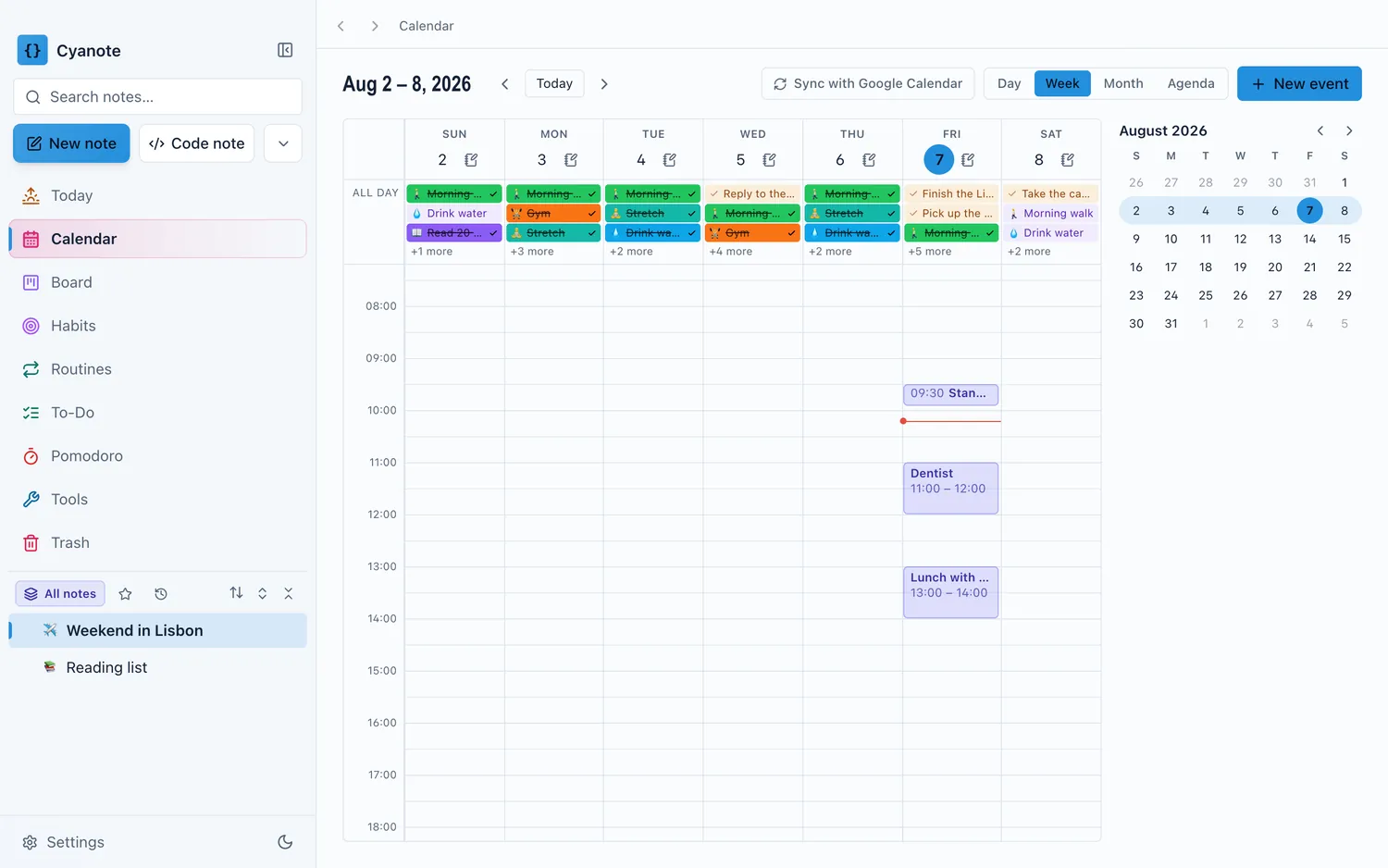
What it does is show your week next to your notes, tasks and habits, without signing in to anything. You paste a calendar's private ICS address to subscribe read-only, or import an .ics file. Events you create yourself have a time, a place, notes, repeats and reminders. All of it is stored in one local file on your Mac. I wrote up how the read-only route works, and its limits, in seeing your calendar without signing into it.
Cyanote costs $7.99 once on the Mac, with no subscription and no account. It's sold separately on Windows through the Microsoft Store, also for $7.99, and one purchase doesn't unlock the other. If you came here because you were looking at Fantastical as part of a bigger setup that also does notes and tasks, a Mac app for notes, tasks and a calendar covers that question in more detail. It also explains when a dedicated calendar app is still the better choice.
Questions people ask
Is Fantastical free?
Yes. The free tier includes natural-language entry, all the full-screen views, task support for iCloud Reminders, Todoist and Google Tasks, and widgets. Premium adds scheduling, video-call integrations, Apple Watch support and more calendar sets.
How much is Fantastical Premium?
It's $56.99 a year or $6.99 a month for one person in the Mac App Store, and $89.99 a year or $10.49 a month for a family of up to five. Both include Cardhop, and both come with a 14-day free trial.
Does Fantastical work on Windows?
Yes. Flexibits lists Windows on its Fantastical page, alongside Mac, iPhone, iPad, Apple Watch and Apple Vision Pro. One Premium subscription covers all of them.
Do I lose my events if I cancel Fantastical Premium?
No. Your events are stored in your iCloud, Google or Exchange account, not in Fantastical. After cancelling you keep Premium until the next billing date. After that you're on the free tier, and every other calendar app can still read your events.