Open a new notes app and the first screen is usually a form. Email, password, maybe a verification code. You fill it in without thinking, because that is what software does now.
It is worth stopping on that screen for a second, because an account is not a formality. It is a decision about where your writing lives and who else has a copy, made before you have typed a single word.
What the account is actually for
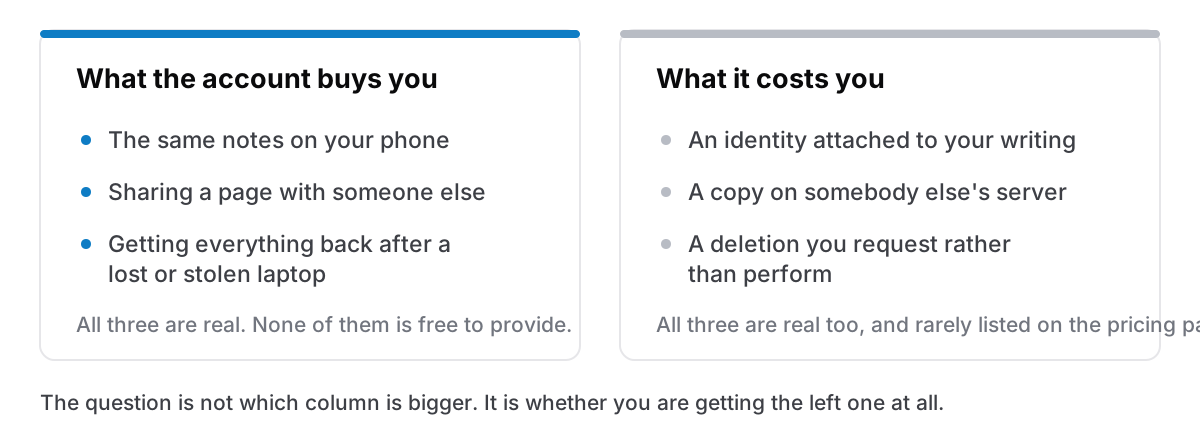
Three things, and they are all genuinely useful:
Your notes on more than one device
This is the big one and it is the honest reason most apps ask. Sync needs somewhere in the middle to sync through, and that somewhere needs to know which notes are yours.
Sharing with other people
A shared page needs a shared truth that two accounts can both reach.
Recovery
Laptop stolen on a Thursday, notes back on the replacement by Friday. That only works if somebody else has a copy.
If you use any of those three, the account is not overhead. It is the product, and the sign-up form is the price of admission to a thing you actually want.
What it costs, stated plainly
An identity attached to your writing
Before the account, your notes were text on a disk. After it, they are text on a disk plus a record on a server saying this person wrote these things. That record is what makes sync possible, and it is also a thing that exists.
A copy you do not control
Once the notes are on a server, the list of parties who can read them is longer than one: the company, anyone it is legally compelled to answer, anyone who breaches it, and whoever owns it after an acquisition nobody consulted you about. None of that requires bad intent. It is just what having a copy means.
Deletion becomes a request
With a local file, deleting is an act you perform. With an account, it is something you ask for and then trust. In Europe the GDPR's right to erasure gives that request real legal weight, which is a genuine protection. It is still a request, with a response time, made to somebody else.
None of these is a scandal. They are the ordinary mechanics of a service. They are simply not on the pricing page, and they apply whether or not you ever use sync.
The apps that skip it
Plenty of good software has decided the form is optional.
Apple Notes can run entirely locally. Most people never find this, because iCloud is on by default — but Notes has an "On My Mac" account you can enable in its settings, and notes stored there stay on your computer, unreachable from your other devices and from iCloud.com. That is the whole trade in one checkbox: no account, no sync.
Obsidian works on a folder of Markdown files with no account needed to use it, selling sync separately to people who want it. That is the honest shape of this: the account appears when, and only when, you ask for the thing that needs one.
There is a small, healthy category of Mac apps built the same way: open it, write, no form. The pattern is always the same underneath: no sync, therefore no server, therefore no account.
Four questions that settle it in a minute
If you are looking at an app and cannot tell:
- Can you get to a blank note without typing an email address? If not, something is being created on a server before you have written anything.
- Where is the file? A real answer is a path you can open in Finder. "In the app" means somebody else knows and you do not.
- Turn the wifi off and use it for an hour. Everything should work — not most things.
- What happens if you stop paying, or stop using it? With a local file, nothing happens. With an account, find out before you need to know.
That fourth one is the same question as what happens when the app shuts down, asked earlier and more cheaply.
The part people get backwards
The mistake is not choosing an account. It is choosing one by default and then never using what it bought.
If your notes are on one Mac, you never open them on your phone, you have never shared a page, and your backups are already handled, then the account is doing nothing for you at all. You are carrying the costs of a service you are not consuming, because a sign-up form was the first screen and nobody thinks to close it.
And if you do work across two machines all day, the opposite holds just as firmly: an account-less app will be a daily irritation, and no amount of privacy argument makes single-device sync appear. Choose the one that matches how you actually work, not the one that matches how you would like to feel about your software.
Cyanote is on the account-less side: one computer, a local database, no sign-up, and consequently no sync. That is a real limitation and I would rather say it here than have you discover it on Tuesday. If it is the wrong trade for you, one of the apps above is a better answer, and there is no hard feeling in that.