Nobody chooses a notes app for its search. You choose it for the editor, the price, the way it looks at eleven at night. Then you use it for two years, and by the end you are pressing the search shortcut forty times a week and opening the editor to write maybe six new things.
Search is the feature that quietly becomes the app. It is also, in most apps, the least designed part of it: a text field bolted to whatever the database happened to make easy.
Three different things get called "search"
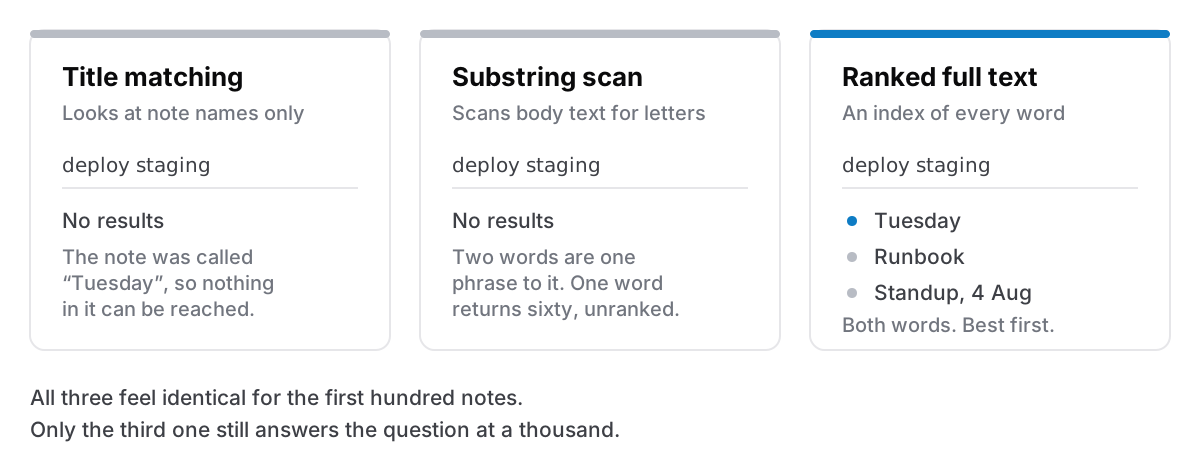
They feel similar for the first hundred notes and diverge completely after that.
Title matching. You type "invo" and it shows every note with "invo" in its name. Fast, cheap to build, and useless the moment the thing you want was written inside a note called "Tuesday".
Substring matching. It scans the body text for the letters you typed. Better, in that it finds things, but it has no idea which result matters. Type "api" and you get sixty notes in the order they were created, including every one that happens to contain "rapidly" or "capital".
Ranked full-text search. The app has built an index of the words in every note, so it knows which notes contain your term, how often, and where. Results come back ordered by how well they match rather than by when you happened to write them. This is the one that still works at a thousand notes, and it is the one that costs real engineering to build.
The tell is what happens with two words. Type deploy staging into title matching and you get nothing. Into substring matching and you get everything containing that exact phrase, which is usually also nothing. Into a real full-text index and you get the notes containing both words, best first.
Why local search feels different from cloud search
This is not about which is technically superior. It is about latency, and latency changes behaviour.
When search runs on your own machine, the results can update between keystrokes, because there is nothing to wait for: no request, no round trip, no server deciding whether your session is still valid. You type three letters, glance, type a fourth, glance again. Search becomes something you do while thinking, and a search you can do while thinking gets used for questions you would never bother submitting a query for.
When the index lives on a server, every keystroke either costs a network round trip or the app waits for you to stop typing and press return. Neither is slow in the sense of being broken. Both make search a deliberate act. You have to decide it is worth it before you start. And a search you have to decide about is a search you often skip in favour of scrolling, or of just writing the thing down again.
That is the actual cost of a slow search box: not the seconds, but the notes you rewrite because finding the old one felt like more work than retyping it.
What you should be able to find
Worth checking before you commit two years of writing to something. In a lot of apps the answer to several of these is no, and you will not discover which ones until you need them.
- Words inside code blocks. Plenty of editors exclude them from the index, which is precisely backwards, because a command with flags is the single most searchable-for thing anyone writes down.
- Text inside tick boxes and list items. Structured content sometimes lives outside the searchable body.
- Text in tables. Same problem, more often.
- Notes nested inside other notes. If sub-pages are their own documents, do they show up, and can you tell where they live?
- Notes you have locked. An encrypted note cannot be indexed in plain text without defeating the point. Most apps take the honest route and leave the content unsearchable while it is locked, but you should know that before you lock the note with the thing you will need to find.
The command palette is a different tool, and you want both
They get confused because they are both a text field that appears over the app.
A command palette, usually ⌘K, is for going somewhere you already know exists. You know the note is called "Rent", you press the shortcut, you type ren, you press return. It is navigation, and it should be judged on how few keystrokes get you there.
Search, usually ⇧⌘F, is for finding something whose location you have forgotten, using words that were in it. It is retrieval, and it should be judged on whether the right note is in the top three.
Apps that only ship one of these end up bending it into the other job, and it is always the palette that gets bent. You start typing half-remembered content into a box designed for names, and it politely returns nothing. If you are evaluating an app, try both questions: "take me to the note called X" and "find the note that mentioned X". Different questions. They want different boxes.
When search fails, it is usually not the search
The uncomfortable half of this. Once an app has real ranked full-text search, most remaining failures are notes that were written in a way nothing could find.
A note titled "Notes" containing "sorted it out, was the config thing" is unfindable by any technology, because it contains no word you will ever think to search for. The fix is not a better index. It is writing down the noun (the service name, the person, the error string, the invoice number) somewhere in the note, once. That is the whole discipline, and it takes about four extra words per note.
This is the same argument as folders, tags, or search: the structure you spend an afternoon building is worth less than the specific word you spend four seconds typing. Search rewards concrete nouns. Filing rewards nothing much.
What search still cannot do
Search matches words. It does not know what you meant.
If you are looking for "that thing about the thing", where you remember the shape of an idea but not one word that was in it, search will not save you. Neither will tags, honestly. What actually works is a different move: go to the date, or go to the note you know linked to it. Which is one of the better arguments for linking notes to each other rather than only filing them, and for keeping any kind of daily note at all.
Semantic search, where the app finds notes about the same idea in different words, solves some of this, and it is genuinely useful. It also, in every implementation I know of, involves sending your notes somewhere to be turned into embeddings, or running a model locally that adds a few hundred megabytes to the app. That is a real trade, not a free feature, and it is worth knowing which side of it an app has chosen before you assume the clever search is local.
The honest version
If your notes number in the low hundreds and you write them into folders you remember, title matching will not fail you and none of this matters. Apps with weak search are not badly made; they are made for a size of collection you may never exceed.
The moment it starts to matter is the moment you cannot remember whether you wrote something down at all. That is the question search is for, and it is the one that separates the three implementations above.
Cyanote indexes every note with SQLite's full-text engine, so ⇧⌘F searches the body of everything (prose, code blocks, tables, tick boxes, sub-pages) and ranks the results rather than listing them by date. ⌘K is the other box: it jumps to any page or note by name. On Windows, both use Ctrl in place of ⌘. Both run against a database on your own disk, which is why the results move while you are still typing, and why they still do it with the wifi off.