The address is in a note on your phone. You are at the work machine, which runs Windows, which you did not choose and cannot install software on, and what you need is two lines — a street and a postcode — to paste into a form before it times out. The phone is four feet away, holding the text, in an app that does not exist on the computer in front of you.
So you search for a download. That is how most people arrive here, so let me answer it first.
There is no Apple Notes application for Windows
Apple does not make one. It never has, and as of writing it has not announced one. Every result promising an Apple Notes download for Windows is one of three things: the iCloud for Windows installer, which does not include Notes; an unofficial wrapper that loads Apple's website in a window with an icon on it; or an article that ends by telling you to open a browser.
What Apple offers on a PC is Notes at iCloud.com, in any browser. That is the official route and the only one, and it works because your notes live in iCloud rather than on any one machine. There is no Mac notes app for Windows in the sense you mean — no installer, no offline copy, nothing in the Start menu that Apple maintains.
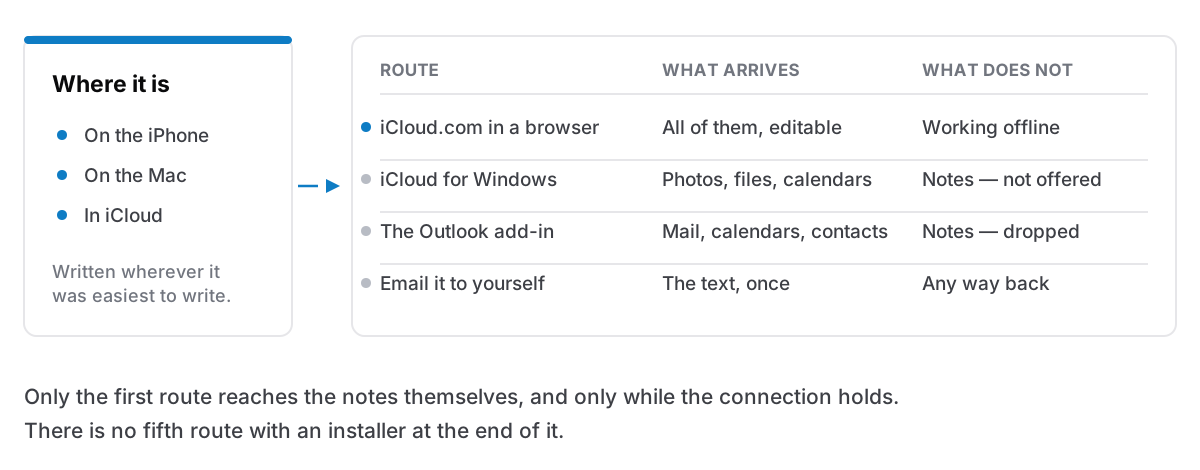
What actually works
iCloud.com in a browser. Sign in, open Notes, and you get most of what you know: folders and tags, creating and editing, lists and tables and links, search, shared notes and a recently-deleted bin. Attachments can be viewed and downloaded. Locked notes open once you enter the note's password.
What it is not is an application. Close the tab and there is nothing on the machine; lose the connection and there is nothing at all, so it fails precisely when a tunnel or a conference wifi decides it should. It is also a personal Apple account signed into a computer your employer administers, worth deciding deliberately rather than at nine in the morning in a hurry.
One thing catches people out: if you have turned on Advanced Data Protection, Apple disables data access on iCloud.com by default. You can switch web access back on, but until you do the symptom looks like notes that will not sync rather than a setting being off.
iCloud for Windows. This is the app people install expecting notes, so it is worth being exact about what it covers. It covers photos, iCloud Drive files, passwords, bookmarks, and calendars and contacts. Notes is not on that list, and it is not a checkbox you have failed to find — Apple's own documentation has a section for each of those categories and none for Notes. Install it if what you need across is files and photos, because iCloud Drive on a PC is useful. It will not put a single note on that machine.
The Outlook route, which has mostly gone. Years ago the iCloud add-in carried notes into an Outlook Notes folder, and plenty of advice written since then still says so. It stopped working when Apple changed the Notes format, and what the connection covers today is mail, calendars and contacts; Apple's own list of places iCloud Notes work does not include Outlook on Windows. That is the position as of writing, and it is the part of this post most likely to go stale — it has changed before. If a current Apple support page says otherwise, believe the page.
Email it to yourself. Not a joke, and not a last resort: this is what most people with a phone in one ecosystem and a desk in another actually do. Share the note to your work address and the text is in front of you in fifteen seconds, with nothing signed into a managed machine.
It is one note, in one direction, with no link back: edit the copy on the PC and the original does not know. For an address, a phone number, or a paragraph to paste into a ticket, that is adequate. I have written about the same trick pointed the other way, and the logic holds: a one-off transfer is a much smaller problem than sync, and it is worth knowing which of the two you have.
Why there is no app
Apple builds for Windows when there is a commercial reason to. iTunes existed because iPods had to be filled from PCs; iCloud for Windows exists so someone with an iPhone and a work PC does not lose their photos. Both protect hardware sales.
Notes is a different shape. It is not something Apple sells; it is a reason to keep the account, and the account is a reason to keep buying hardware. An application that worked properly on a PC would make it easier to own an iPhone and a Windows laptop and never need a Mac, which Apple has no incentive to build. People searching for a Windows version of a MacBook Pro hit the same wall: the machine and the software are sold as one thing, on purpose.
That is a rational way to run a business and it is not a scandal. But the consequence is worth saying plainly: a notes system whose vendor has decided which kind of computer you use is not something you can argue with. There is no feature request, no hidden setting, no workaround that eventually becomes an application. The decision was taken on your behalf, and the only question is what you do about it.
Which is, as it happens, one of the few reasons that genuinely justifies leaving Apple Notes.
If you genuinely live on both
Ranked, with what each costs.
A cross-platform app that syncs. The straightforward answer, and there are several decent ones.
Obsidian is free for personal use with no sign-up, stores notes as Markdown files in a folder you can open yourself, and runs on Windows, macOS, Linux, iOS and Android. Sync is the paid part — $4 a month billed annually at the time of writing — or you move the folder yourself. The cost is that it is a tool you configure rather than one you open, and many people bounce off it for that reason.
Joplin is open source, free on every desktop and mobile platform, encrypts end to end, and will sync through a service you already pay for — Dropbox, OneDrive, WebDAV, S3 — or through its own paid cloud. The cost is polish: it is noticeably less pleasant than Apple Notes, and that matters more across years than in a first evening.
OneNote is free, from Microsoft, and runs on Windows, Mac, the web, iPhone and Android. If the work machine has Office on it, this is the path of least resistance by a wide margin. The cost is a Microsoft account, notebooks in OneDrive, and a data model that is awkward to leave later. Note that the old OneNote for Windows 10 app ended support in October 2025; the one you want is called simply OneNote.
Notion is free for personal use and works anywhere there is a browser. The cost is that it is a cloud workspace first — offline is a cache rather than the design — and everything you write sits on someone's servers behind an account.
Google Keep is free and syncs instantly, and on a PC it is a browser tab, because there is no Windows application for it either. Good for short things, poor for long ones.
A plain-text folder in whatever sync service you already have. Markdown or .txt files in OneDrive, Dropbox or Google Drive, edited with any editor on either machine. Nothing to buy, nothing to be locked into, and the format will outlive every app above. The cost is that you have files rather than a notes app: no ranked search worth the name, no tags, no structure but the one you maintain by hand. At a few hundred notes it is better than it sounds. At a few thousand it is not.
Accept the split. Apple Notes for personal things on Apple devices; the work machine's notes staying there in whatever it already has. This reads like giving up and is frequently the right call, especially when the PC is administered by someone else. The boundary is real rather than administrative, and splitting by domain rather than by device is what most people who have solved this end up doing. Nothing lives in two places; that is the rule that makes it work.
None of the three is clean. Each costs you money, polish, an account, or the ability to have everything in one place. Any post that offers you a tidy answer here is selling you something.
Whichever you choose, export before you migrate, as its own step. Getting your notes out is worth doing even if you stay where you are: an export is also a backup, and the day you need one is never a day you planned.
The honest version
There is no Apple Notes for Windows, there is unlikely to be one, and the browser is the official answer. For the common case — a phone full of notes and a work PC you need three of them on — iCloud.com plus the odd email to yourself covers more than people expect, and costs nothing.
If you work on both platforms every day, stop looking for an installer and move to something built for both. Obsidian, Joplin and OneNote are all reasonable, and none of them is Apple Notes, which is the trade.
Cyanote is not the answer to this particular problem. It is a desktop app for Mac and Windows, $7.99 once, with no account and no sync; the Windows version is sold on the Microsoft Store, as a separate purchase from the Mac one. If your notes live on a Mac and the PC is somebody else's computer you visit twice a week, it is one file on your own disk you can copy, search and export — a different answer to the one you came for, and an honest one.