Every privacy page says the right things. That is what privacy pages are for.
The useful move is not reading more of them. It is checking, which is easier than most people assume, takes about ten minutes, and turns a claim into an observation. And it works on any app, including the ones whose pages you have never read.
What "telemetry" actually covers
The word is used loosely enough to hide things, so it is worth separating.
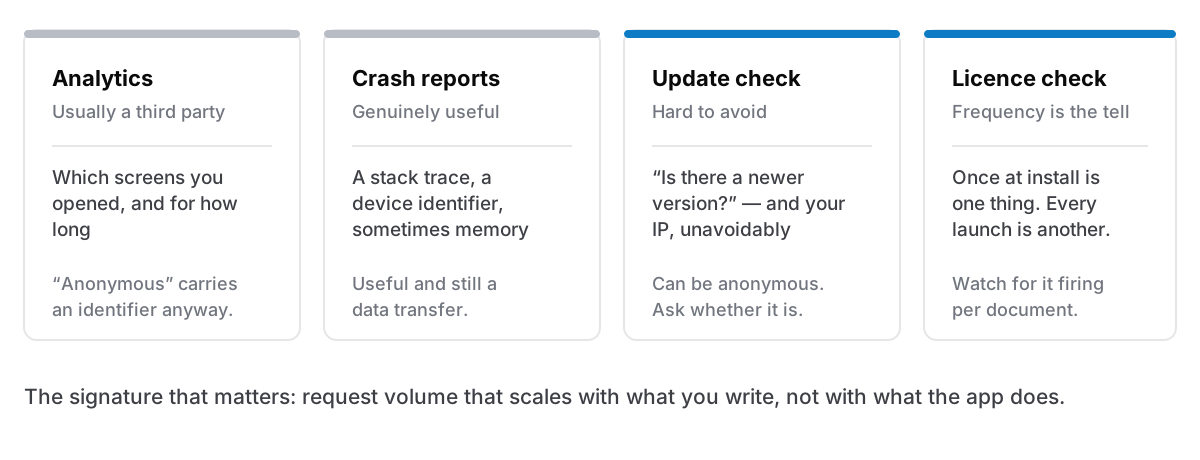
Analytics. An SDK reporting which screens you opened, which features you used, how long you stayed. Usually a third party. Usually described as "anonymous", which is doing more work in that sentence than it can carry. A device identifier plus a usage pattern is not anonymous in any useful sense.
Crash reporting. Sends a stack trace when the app falls over, often with a device identifier and sometimes with surrounding memory. Genuinely useful to developers and genuinely a data transfer.
Update checks. The app asks whether a newer version exists. This one is close to unavoidable for software distributed outside an app store, and it is the most defensible of the four, though it is still a request, still carries your IP, and can carry an identifier if the developer chose to include one.
Licence and account calls. Checking that your key is valid, or your session, or your subscription. Frequency is the tell: once at install is one thing, at every launch is another.
An app with none of the first two and one of the last two is a normal, honest arrangement. An app with all four, none of which is disclosed, is a different proposition.
How to check, in ten minutes
Three routes, in ascending order of effort and certainty.
Read the privacy page for specifics, not adjectives. A page that says "we respect your privacy" tells you nothing. A page that names the exact endpoints, what each one carries, and how often it fires is making claims you can then verify, and the willingness to be that specific is itself a signal.
Watch the connections. macOS ships with the tools. Open Activity Monitor, go to the Network tab, and watch the app's data figures while you use it. An app that transfers steadily while you type is doing something worth asking about. For detail, nettop -p <pid> in Terminal shows live connections per process, and lsof -i -a -p <pid> lists what it currently has open.
Use an outbound firewall. This is the real answer if you want certainty. Little Snitch and LuLu both intercept outbound connections and ask you to approve each one, by app and destination. You will learn a great deal in the first week — much of it about apps you had never suspected — and you can simply deny the ones you do not want. LuLu is free and open source; Little Snitch is paid and more capable.
The blunt test: turn the wifi off and use the app for ten minutes. Anything that stops working was talking to something. This does not find the quiet stuff, but it is free and takes no setup, and it is the same wifi-off test that tells you about offline capability.
What you will find, and what to make of it
Expect more connections than you assumed, and do not treat every one as a betrayal.
A request to api.<the developer's domain> once when you first enter a licence key is a licence check. A request to an update endpoint a few seconds after launch is an update check. A font loading from a CDN is a design decision. None of those is telemetry, and finding them is not a scandal.
What is worth reacting to: a third-party analytics domain, a crash reporter you were never asked about, a request that fires every time you open a document rather than every time you open the app, and — most of all — anything that scales with what you write rather than with what the app does. Request volume proportional to your content is the signature that matters, because it means content is going somewhere.
The part that is not about trust
There is a version of this argument that ends in paranoia, and it is not the useful version. Most developers who collect analytics are trying to find out which features are unused, which is a reasonable thing to want.
The point is not that data collection is malicious. It is that it is a surface: a copy of something about you, on infrastructure you do not control, subject to a breach at that company, an acquisition, a policy change, or a subpoena. Every one of those has happened to companies with sincere privacy pages. The only reliably safe data is data that was never transmitted, and that is an architectural property rather than a promise about intent.
Which is why the strongest version of this is not "we handle your data carefully". It is "there is no data here to handle", the local-first arrangement, where the absence of a server is the guarantee.
What good disclosure looks like
If you want a standard to hold apps to, this is a fair one:
- An exhaustive list of endpoints, not a summary. "These are the only requests" is a claim that can be falsified by watching the network, which is what makes it worth something.
- What each request carries, including what is inferable from it. An anonymous request still carries an IP address and a timestamp, and an honest page says so.
- How often it fires, in real units. "Periodically" is not a unit.
- What is not sent, stated plainly, so the absence is on the record.
- No third parties, or a clear statement of which ones and why.
An app that publishes all five and is telling the truth is verifiable in ten minutes. An app that publishes none of them may be perfectly fine. You just have no way to know, and no way to find out except by watching.
The honest version
You do not need to audit every app on your Mac. That is a hobby, not a security posture.
Audit the ones holding things you would not want copied: your notes, your journal, your client files, your passwords. For everything else, a privacy page is probably enough, and the checking is only worth ten minutes for the apps where the content matters.
Cyanote makes exactly three requests, and this is the whole list. A one-time licence check to api.lemonsqueezy.com when you first install, carrying your key and a label with the version and OS. An anonymous update check to updates.cyanote.app a few seconds after launch and every six hours the app stays open — no key, no account, no identifier. And a calendar feed, only if you subscribe to one, going to whoever runs that calendar rather than to us. There is no analytics SDK, no crash reporter, no usage pings and no install identifier, and none of the three requests carries a word you have written. All of that is checkable with the tools above, which is the reason to state it that specifically.