The test takes four seconds and almost nobody runs it before they need it: turn the wifi off, and open the app you keep your week in.
You find out three things immediately. Whether it opens at all. Whether your notes are there. And whether the app tells you honestly that it is offline, or just quietly stops saving.
I would run that test on a Tuesday afternoon rather than at thirty thousand feet.
"Offline support" means at least three different things
They are sold with the same word and they behave nothing alike.
Offline-tolerant. The app needs the network but degrades politely. It caches what you looked at recently, lets you read it, and queues edits. Works fine on a train with patchy signal. Falls apart on a two-week trip, or the moment the cache expires, or when you want something you have not opened in a month.
Offline-capable with sync. There is a real local copy of your data and a real local database. You can work fully offline for as long as you like, and changes reconcile when you reconnect. This is the good version of cloud software, and it is expensive to build, which is why it is rarer than the marketing suggests.
Local-first. There is no server in the loop at all. The database on your disk is not a cache of the truth; it is the truth. Offline is not a supported mode, because there is no other mode. The network was never involved.
The difference only shows up under pressure. All three feel identical on a good connection, which is precisely why people find out which one they bought at the worst possible moment.
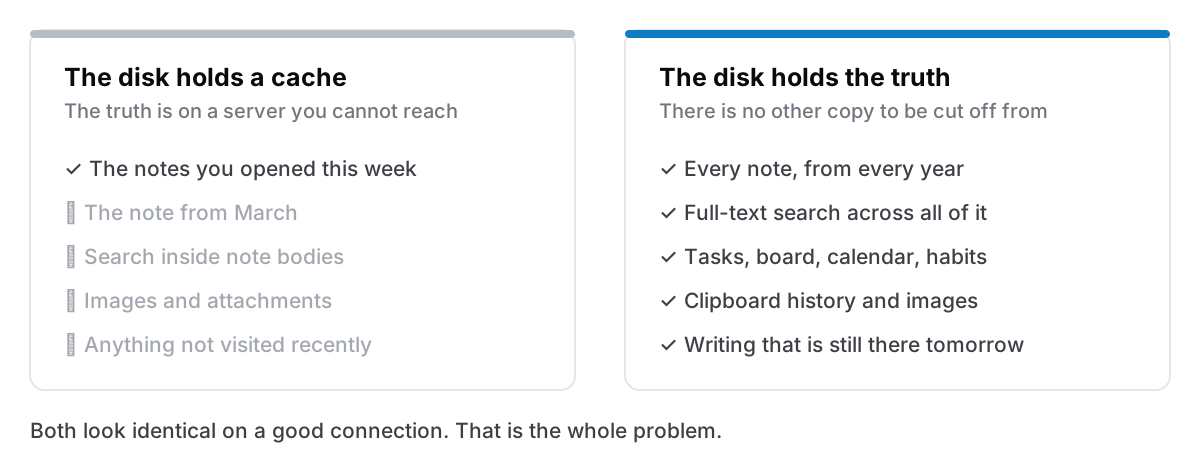
The four-second test, done properly
Turn off wifi. Then, in order:
Open the app cold. Quit it first — an app that is already running may be showing you memory, not disk. If the launch hangs on a spinner, you have learned the most important thing there is to learn about it.
Open something you have not touched in months. This is the real test, and the one people skip. Recent notes are cached almost everywhere; the note from March is what separates a local copy from a local cache.
Search for a word inside a note, not in its title. Full-text search is often the first thing to go, because in a lot of apps the index lives on the server. An app that can show you a note but cannot find it offline has given you a filing cabinet with the drawers welded shut.
Write something, then quit and reopen. Did it survive? Some apps accept typing while offline and lose it on relaunch, which is worse than refusing the edit, because you were told nothing.
Check the small things. Search, attachments, images in notes, the calendar, the clipboard history, whatever else you rely on. Attachments are the usual casualty: the text is local, the image is a URL.
Five minutes, once. It tells you more about an app than a fortnight of using it well-connected.
Why this is not really about planes
Everybody frames offline as a travel feature and that undersells it badly. Flights are the least common case.
The common cases are ordinary. A hotel captive portal that wants a room number you do not have. A conference wifi that authenticates for eleven minutes at a time. A train through a valley. The morning your home connection is out and you need the note with the account number in it, on the machine in front of you, to make the call about the connection being out. A café network so bad that the app is technically connected and therefore refuses to admit it is offline, which is the worst state of all, because a connected-but-useless app usually has no offline mode to fall into.
There is also the version with no network involved at all: a company that goes under, an account locked by an automated system, a service that decides your region is no longer supported. Those look nothing like a flight and produce exactly the same screen. I have written about what happens when the app itself shuts down. Offline capability is the same property, tested by a different failure.
What working offline should feel like
Not "a limited mode". Nothing at all.
If offline is genuinely handled, turning the wifi off changes nothing you can see. No banner, no reduced feature set, no read-only state, no queue counter. You do not find out the connection dropped, because the app was never asking.
That is the actual bar. Any visible offline experience — however well designed — is telling you that the app's normal state involves a server, and that you are currently in the fallback. Sometimes that is a fine trade for sync and sharing, and an account genuinely buys you things. But it should be a trade you made knowingly, not one you discover in an airport.
The trade you are making
Being honest about the other side, since a page arguing for local-first has an obvious incentive not to be.
No network means no sync. Your notes are on this machine, and if you want them on your phone you need to do something deliberate about it: an export, a file in a folder you sync yourself, or accepting that the phone is not part of the system. It means no collaboration: nobody else can see or edit anything. And it means backups are entirely your job, because there is no server quietly keeping a copy of everything for you. That last one is the real cost, and it is why backups deserve their own five minutes.
If your life genuinely runs across three devices and two other people, offline-capable-with-sync is the shape you want, and paying for it is reasonable. The mistake is paying for offline-tolerant while believing you bought one of the other two.
The honest version
Run the test. Whatever you use, and especially if it is something you have trusted for years without checking. It costs five minutes, and the answer is a fact about your own setup rather than a claim from a marketing page.
Cyanote is the third kind. Everything — notes, tasks, the board, the calendar, habits, routines, the clipboard history — lives in one SQLite database on your own disk, and the app draws every screen from it. On the Mac, exactly three requests ever leave the machine: a one-time licence check when you first install, an anonymous update check, and a calendar feed if you subscribe to one. None of them carries a word you have written, and none of them is needed to open the app, search it, or write in it. With the wifi off, nothing changes and nothing tells you it has.