This is the objection, and it deserves a straight answer rather than a deflection.
If your notes live in one database on one Mac, they are on one Mac. There is no phone app, no web view, and no clever architecture that makes a file on your desk appear in your pocket. That is not a missing feature; it is the same property that gives you the speed, the privacy and the not-having-an-account, seen from the other side.
So: what do people actually do about it, and is it enough?
First, the question that decides everything
Not "do I want my notes on my phone". Everyone says yes to that.
The question is: in the last month, how many times did you need something from your notes while away from your Mac, and could not get it?
Count honestly, in actual incidents. For a lot of people the number is one or two, and both were "the address of the place I am going", which is a solved problem. For others it is several times a week, because they genuinely read and write on a phone all day.
If your number is high, stop here. A local-first single-machine app is the wrong tool and no workaround fixes it. You want something with a real phone client and real sync, and paying for one is the correct decision. The rest of this is for people whose number turned out to be low, which is more people than expect it.
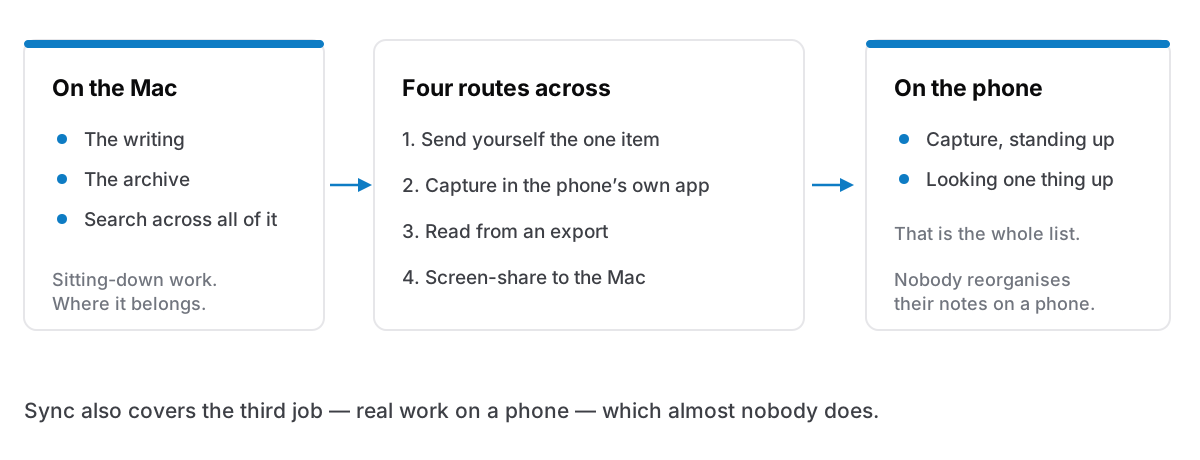
The four routes
In ascending order of effort, descending order of how often you need them.
One: send it to yourself. The thing you need on the phone is usually one address, one code, one paragraph. Message it to yourself, or email it. This looks unserious and it covers the overwhelming majority of real cases, because the real case is one item and not a library. The reason it feels like a hack is that we have been sold sync as the general solution to a problem that is almost always specific.
Two: put the phone-shaped things in a phone-shaped app. Your phone already has notes and reminders that sync for free and work brilliantly. Use them for what phones are for — capturing something while standing up, a shopping list, an address — and let the Mac hold the writing you do sitting down. This is not defeat. Two apps with clearly different jobs is a workable system; two apps with the same job is the mess people are trying to escape.
Three: export and read. Any local app worth using exports. A JSON or Markdown export into a folder your phone can reach means the archive is readable when you need it. It is not live and it is not editable. For "I need to look something up while travelling", it is entirely sufficient, and it is the same file you should be producing for backup reasons anyway.
Four: reach the Mac itself. Screen Sharing to your own machine over the network, or a remote-desktop app, and the notes are right there. Clunky, occasionally invaluable, and worth knowing exists before the day you need it.
What you should not do
Do not put the app's live database in iCloud Drive or Dropbox. It is the obvious idea and it is the one that ends badly. A sync service copies whole files after they change; a database is written to continuously, and two machines writing to one synced file produces conflicted copies or a silently chosen winner. You can move an app's storage to another disk or folder safely. Moving it into a folder that two machines are actively syncing is how corruption happens, and it happens quietly.
Do not run a self-hosted sync server unless you enjoy that. It works and some people love it. It also means you now operate a server, with the certificates, updates and 2am failures that implies. If that sentence sounds appealing, go ahead. If it sounds like a chore, it will be one.
The part nobody says about phone notes
Having your notes on your phone is not the same as using them there.
Watch what actually happens on a phone: capture, and lookup. You write four words while standing on a platform, or you check an address. Reading a long note on a phone is unpleasant; writing one is worse; reorganising anything is a genuinely miserable experience that people do once and never again.
Which means the phone requirement, examined closely, is usually capture plus lookup — two narrow jobs — and not "the full system, everywhere". Capture is solved by any app with a text field, including the one already on the phone. Lookup is solved by an export, or by having sent yourself the one thing you needed.
The full-sync solution solves all three jobs including the one nobody does. That is fine if it is free, and it is a real cost if it means an account, a subscription, and a spinner where your notes should be.
The version that works in practice
For people who have made this work, the shape is consistent:
- The Mac is where the writing lives. Long notes, the archive, the search, the actual thinking.
- The phone's own notes app is the inbox. Anything captured away from the desk lands there, and gets moved over — or not — during the weekly review.
- Anything genuinely needed on the go gets sent ahead, deliberately, the way you would check you have the tickets.
- An export sits somewhere reachable, updated occasionally, for the lookup case.
That is not as good as real sync. It is meaningfully cheaper, in money and in what it asks of your data, and for a lot of people the gap turns out to be smaller than the fear of the gap.
The honest version
I would rather say this plainly than sell around it: if you need your notes on your phone, buy something that does that. Apple Notes is free and excellent at it. Obsidian syncs a folder of files, including through iCloud Drive or Dropbox, because the notes are files rather than a live database. Notion is in any browser. All three are better answers to that requirement than any workaround above.
Cyanote is a desktop app, for Mac and Windows, with one database on your own disk, no account and no sync, and no phone app. The trade is the whole design: everything opens instantly, nothing needs a connection, and no copy of your writing exists anywhere you have not put it. Everything exports to a readable JSON file whenever you want, which is the route out and the route to any other device. If the four routes above sound like too much friction, that is a real answer, and it is worth knowing before you pay rather than after.