The export button is the most important feature in a notes app and the one nobody tests. It sits in a settings pane, everyone is glad it is there, and its actual behaviour is discovered on the day somebody is angry and leaving.
Which is the worst possible day to discover that your links between notes came out as plain text.
This is a practical guide to finding out early: what an export can and cannot carry, what to check in the file it produces, and why an export is not the same thing as a backup.
An export is not a backup
Worth separating, because apps use the words loosely.
A backup is for putting your data back into the same app. It can be a database file or a bundle of everything, and it can be perfectly faithful because the only thing that ever has to read it is the app that wrote it. Backing up notes that live on your own computer is a different job with different rules.
An export is for taking your data somewhere else. It has to be readable by software that knows nothing about your app, which means dropping to a shared format, and every shared format is smaller than what a modern editor can express.
Both matter. If an app gives you only one, ask which one it is, because "we have backups" and "you can leave" are different promises.
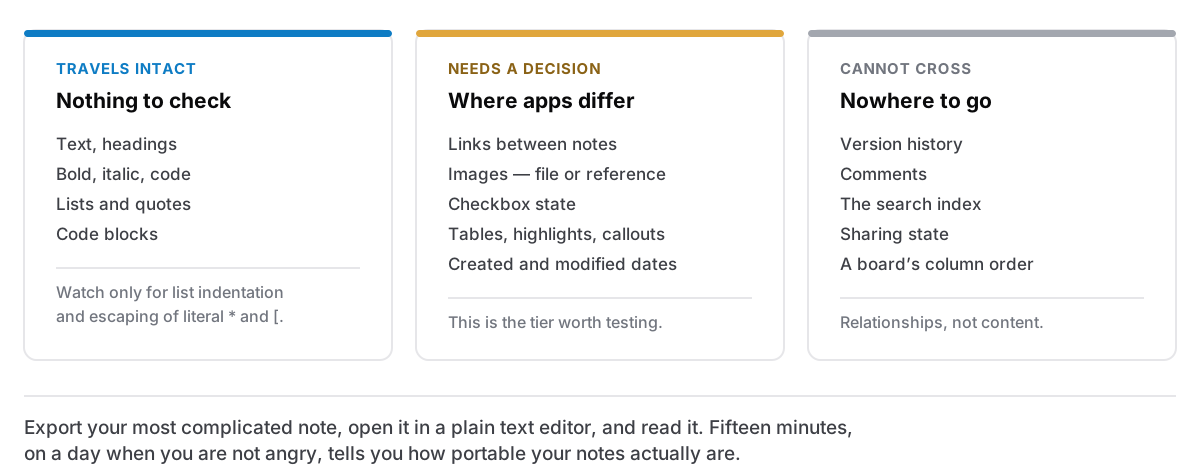
What travels intact
Text, headings, bold and italic, lists, quotes, code blocks. This is the settled core of Markdown, and any export worth the name gets it right.
Two details still go wrong here and are worth checking. Nested lists need consistent indentation to survive a round trip, and an app that writes two spaces where its own importer expects four will re-import its own export badly. And escaping: if you have a line containing an asterisk or a square bracket as literal text, a careful exporter escapes it so it does not become syntax on the other side. An uncareful one hands you a file where a paragraph about a * b has become italic in the middle.
What needs a decision, and where apps differ
This is the tier that matters.
Links between notes. If your app has [[wiki links]] or backlinks, they refer to a note by identity, and after an export there may be no file with that name — or several. There is no correct answer here, only choices. The one Cyanote makes is to keep the title and mark it as a note reference rather than write a link to a file that is not there, on the grounds that a broken link is worse than an honest label. Other apps rewrite them to relative file paths, which works beautifully if you export everything at once and produces dead ends if you export one note.
Images. Are they inside your notes or referenced from somewhere? An export that writes  next to a file called image.png is the good outcome. An export that writes a link to a file living inside the app's own storage is a document that will break the moment you uninstall the app.
Checkboxes. - [ ] and - [x] are a widely-supported extension, not part of the original spec. They usually survive. Their state — which ones are ticked — sometimes does not.
Tables. Pipe tables are an extension too. Simple ones travel; merged cells and formatting inside cells do not.
Highlights, callouts, toggles, coloured text. These are the app's own vocabulary. Markdown has no standard spelling for any of them, so each app invents one — ==highlight==, a blockquote with a marker, an HTML block. They will render somewhere and be literal text somewhere else.
Dates. Created and modified times usually live in the app's database rather than in the note text. Export to files and the filesystem stamps them with today. If the chronology of your notes matters to you, look for an export that writes the dates into the file itself.
What cannot cross
Some things are not lost by carelessness; they simply have nowhere to go.
Version history. Comments. The app's search index. Sharing state. Anything that is a relationship between notes rather than content inside one — a board's column order, a note's position in a hierarchy — unless the export encodes it in folder structure or in front matter.
Nobody should be surprised by this, but people are, because "export everything" sounds total.
The fifteen-minute test
Do this once, today, on the app you already use.
- Find your most complicated note. Not a representative one — the worst one. Images, a table, a link to another note, some ticked boxes, whatever your app does that plain text does not.
- Export it. Note whether you can export one note, a folder, or only everything at once. That matters more than it sounds: an all-or-nothing export is awkward to check and awkward to use.
- Open the result in a plain text editor. Not in another notes app — a text editor, so you see the characters rather than somebody's rendering of them. TextEdit in plain text mode is fine.
- Read it. Is the table there? Did the link to your other note become something meaningful? Is there an image file next to it, and does the note point at that file?
- Import it somewhere else. Anywhere. Another editor, a Markdown preview, a Git repository. The second reader is the one that finds what the first was being polite about.
Fifteen minutes, and afterwards you know something concrete about how portable your notes actually are, rather than how portable the feature list implies they are.
What good looks like
An export you can rely on has, in my view, four properties:
- A text format, so a program written in twenty years can read it without knowing anything about today.
- Images as real files next to the notes that use them.
- Structure in folders, so the shape of your work is visible in the Finder rather than only inside the app.
- No all-or-nothing, so you can take one note to a colleague without exporting your journal.
Cyanote stores notes as structured data in one local SQLite file and exports Markdown, because Markdown is the format most likely to outlive both of us. The structured storage is what makes the editor work; the export is what makes the storage acceptable. An app that stores something clever and cannot hand it back has just made your writing a hostage of its own cleverness.
Do it before you are annoyed
The reason to run the test now is that the export button's quality is uncorrelated with everything else about an app. It is not a feature people compare, it is not in the marketing, and it gets attention roughly in proportion to how often the developer imagines you leaving.
So find out while you are happy. If the answer is good, you have lost fifteen minutes and gained the ability to stop worrying. If the answer is bad, you would rather know now than on the morning the app announces it is shutting down, and knowing now means the next app you try gets judged on the thing that actually determines whether you can ever leave it.