Setapp is worth it if the subscription apps you would otherwise pay for come to more than $107.88 a year. That is the price of its cheapest Mac plan, billed yearly, and above it Setapp is the cheaper way to get the same apps. It is not worth it if the apps you want are sold once, because a one-time price stops and Setapp's doesn't. It also stops being worth it the day you only use one of its apps, unless that one app costs more than Setapp on its own.
That is the whole answer. The rest of this post is the arithmetic behind it, worked out with today's prices for notes, tasks, calendar and clipboard apps, plus what happens to your apps when you stop paying.
The short version
- Setapp's Mac plan is $14.99 a month, or $107.88 a year billed yearly, before tax. Two Macs, iPhone access and AI credits cost more. Prices rose on 10 June 2026.
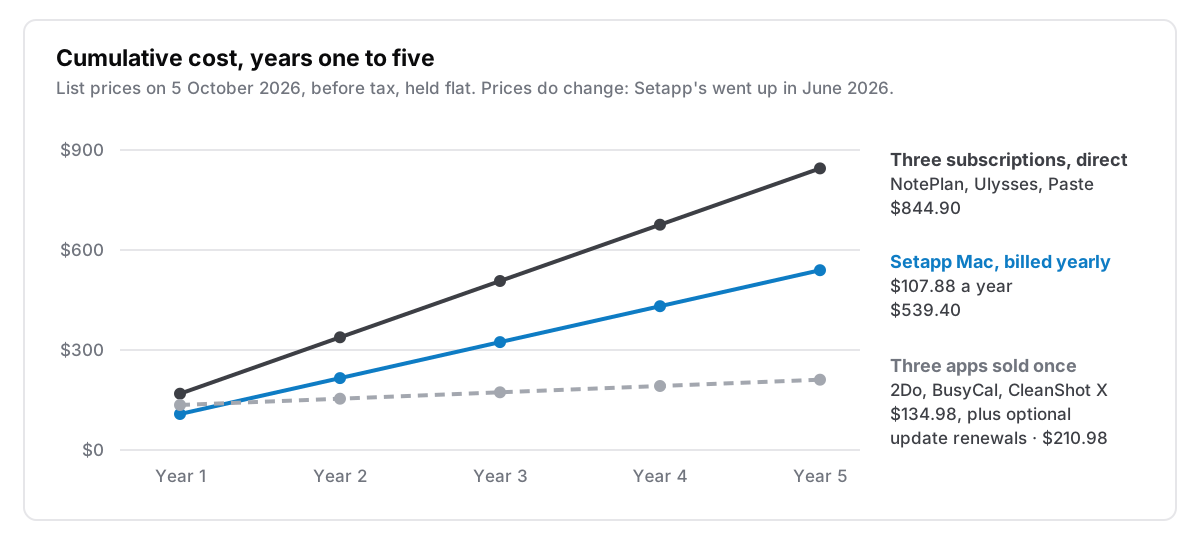
- It beats buying direct when your apps are subscriptions. NotePlan, Ulysses and Paste on their own yearly plans come to $168.98 a year. Setapp gives you all three, and a few hundred others, for $107.88.
- It loses to apps you buy once. 2Do, BusyCal and CleanShot X cost $134.98 between them, once. Setapp passes that in its second year.
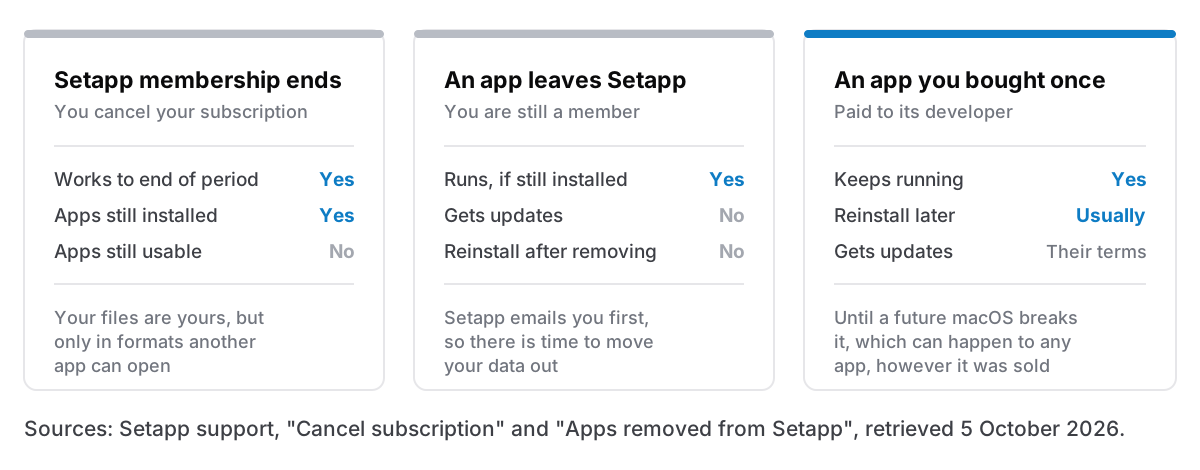
- When you cancel, the apps stay installed and stop opening. An app you bought outright keeps running.
- Billed monthly, it is a poor deal. $179.88 a year is more than those three apps cost on their own yearly plans.
I make Cyanote, a $7.99 one-time Mac app for notes, tasks, a calendar, habits and clipboard history. It is not in Setapp, and it competes with some of the apps that are. So weigh what follows with that in mind. I have tried to give Setapp its due, because for some people it is the best deal on the Mac.
What Setapp costs in October 2026
Setapp is a subscription from MacPaw that unlocks a catalogue of Mac and iPhone apps made by other developers. Its homepage puts the count at "300+ Mac, iOS, and web apps in one subscription". You install apps through Setapp's own launcher, and they work for as long as you are a member.
The pricing page shows three plans billed monthly, with a 7-day free trial and a "save up to 40% yearly" toggle. The full list, including yearly prices, is in Setapp's support article on subscription plans, which notes that prices exclude tax:
| Plan | Covers | Monthly | Yearly |
|---|---|---|---|
| Mac | 1 Mac | $14.99 | $107.88 |
| Two Macs | 2 Macs | $18.99 | $134.88 |
| Mac + iOS | 1 Mac, 4 iPhones or iPads | $18.99 | $134.88 |
| Power User | 4 Macs, 4 iPhones or iPads | $22.99 | $161.88 |
| AI Enthusiast | 1 Mac, more AI credits | $22.99 | $161.88 |
| AI Expert | 4 Macs, 4 iOS, more AI credits | $35.99 | $259.08 |
Prices from Setapp's pricing page and support article, retrieved 5 October 2026, excluding tax.
Two details are worth knowing before you compare. First, these prices are new. Setapp says it introduced new plans that cost more on 10 June 2026. Members who joined before then keep their old price, but only for as long as they stay on the same plan. Cancel and come back, or switch plans, and you pay the new rate. Reviews written before June quote the old, lower prices, so check the date on anything you read.
Second, the Mac plan is for one Mac. If you want Paste's iPhone app, for example, Paste's own pricing page says you need a Setapp plan that includes iOS devices, which is $134.88 a year rather than $107.88. There is no Windows version. Setapp's Windows page says plainly that you'll need a Mac to use it.
The break-even test
To decide, compare Setapp's price against what you would otherwise pay for the apps you would actually open every week. Leave out the ones you would only try once. A catalogue of 300 apps is worth exactly as much as the handful you use.
The test comes out very differently depending on how those apps are sold, so here it is twice, using notes, tasks, calendar and clipboard apps that are all in Setapp. Prices come from each developer's own site, retrieved today.
When your apps are subscriptions
| App | What it does | Bought direct |
|---|---|---|
| NotePlan | Markdown notes, tasks and calendar | $99 a year ($12 monthly) |
| Ulysses | Writing | $39.99 a year ($5.99 monthly) |
| Paste | Clipboard history | $29.99 a year ($3.99 monthly) |
| Total | $168.98 a year |
All three were listed in Setapp's catalogue on 5 October 2026 (NotePlan, Ulysses, Paste). On its yearly Mac plan they cost $107.88 together, which is $61.10 a year less than buying them separately. That is the case Setapp is built for, and it is a good deal. You do not need all three for it to work: NotePlan and Paste alone come to $128.99, still $21.11 more than Setapp. If Paste is the one you'd pay for, I wrote about what you give up by buying a clipboard manager once instead in a clipboard manager for Mac without a subscription.
Single apps are the edge case. NotePlan alone, at $99 a year, is $8.88 cheaper than Setapp. Paste also sells a lifetime licence for $99.99 once, according to its pricing page, so if Paste is the only app you want, buying it outright costs less than one year of Setapp and nothing after that.
When your apps are sold once
| App | What it does | Bought direct |
|---|---|---|
| 2Do | Tasks | $49.99 once |
| BusyCal | Calendar | $49.99 once |
| CleanShot X | Screenshots | $35 once, includes a year of updates |
| Total | $134.98 once |
These were also all in Setapp's catalogue on 5 October 2026 (2Do, BusyCal, CleanShot X), and here the sums run the other way. The first year of Setapp costs $107.88, which is a little less than $134.98. By the end of the second year it is $215.76, and the gap keeps growing.
CleanShot sells an optional $19 a year renewal if you want updates after the first year. Add it every year after the first and buying direct still costs $210.98 over five years, against $539.40 for Setapp. Some one-time apps charge for major upgrades, too. Even if all three did and the total doubled, it would still be well under Setapp.
The rule of thumb
Make a list of the apps you would open at least once a week. Add up what they cost each year bought directly, counting a one-time app as its price divided by the years you expect to use it. If the total is over about $108, Setapp's yearly Mac plan is cheaper. If it is under, or if most of the list is one-time apps, buy them separately.
Then check the monthly option, because it quietly fails the test. $14.99 a month is $179.88 a year, which is more than the three subscriptions above cost on their own yearly plans. Monthly billing makes sense for the 7-day trial and maybe a month after it, while you find out which apps you actually use. After that, switch to yearly or leave.
What happens when you stop paying
Setapp's cancellation article says your account stays active until the end of the billing period. After that, "the Setapp desktop and its apps will still be installed on your Mac or device, but you won't be able to use them." The apps stay on your Mac and stop opening.
An app can also leave Setapp while you are still paying. Setapp's support page on removed apps says that if you keep it installed, it keeps working. But it is "no longer updated or maintained in Setapp", it will probably stop working on newer versions of macOS, and once you uninstall it you cannot install it again. Setapp emails you before an app is removed, so you do get a warning.
None of this is unusual. Every subscription works this way, and in return you get a large catalogue at a low price for as long as you keep paying. What needs planning is your data. A clipboard history, a task list or five years of notes lives in whichever app made it. Before you put anything important into a Setapp app, check that it exports to something another app can open, such as Markdown, plain text, ICS or CSV, and try the export once while the app still works. I wrote more about this in what happens to your notes when the app shuts down and what breaks on the way out.
An app you bought once is not immune either. A future macOS can break it, and a developer can stop releasing updates. But nobody can switch it off from the outside, and it doesn't stop working because a card expired.
Setapp now sells single apps, too
Setapp also sells individual apps without the full membership, so it is no longer all or nothing. Its support article on single apps says you can "subscribe to a single app for a specific period, or buy it with a one-time purchase to own it forever", with each app billed separately. It covers Mac apps only, and not every app in the catalogue.
The same page notes that the terms can differ from the developer's own: "you might get a subscription instead of the developer's one-time purchase, or vice versa." So if a single app is all you want, compare three prices before you buy: Setapp's single-app price, the developer's own site, and the Mac App Store.
Who Setapp is right for
From the arithmetic above, Setapp is a good buy if:
- You already pay more than about $108 a year for its subscription apps. Moving them to Setapp's yearly plan saves money straight away, and you get the rest of the catalogue on top.
- You like trying tools. For someone who installs a new utility every month, Setapp means each experiment costs nothing extra, and that is a real benefit.
- You need lots of small single-purpose utilities. Menu bar tools, file renamers, screenshot and cleanup apps, things you might use twice a month. Buying each one separately would add up.
It is a poor buy if:
- The apps you'd use from it cost less than about $108 a year bought directly. Buy those directly.
- Your favourite apps are sold once. You end up renting software you could have owned.
- You care where your data lives in five years. Every app you rely on through Setapp is one you have to renew access to every year.
- You need Windows. Setapp has no Windows version.
Where Cyanote fits, and where it doesn't
A reminder that I make Cyanote, and this section is about my own product.
Cyanote covers notes, tasks, a calendar, habits and a clipboard history in one Mac app, for $7.99 once, with no subscription and no account. Notes stay on your own disk. If the reason you were looking at Setapp is NotePlan plus Paste, that is the same set of jobs, and you can compare them in detail on the NotePlan alternative and Paste alternative pages, including where each of those apps does more than Cyanote does.
What Cyanote does not do is everything else in Setapp. It isn't a screenshot editor, a disk cleaner or an AI writing assistant, and there is no iPhone or iPad app. If the reason you want Setapp is the breadth, Cyanote doesn't replace it, and Setapp is probably the right call. Cyanote is also sold separately on Windows through the Microsoft Store, at $7.99; one purchase doesn't cover both.
I went through a version of this calculation myself before building it, and wrote it up in I replaced five subscriptions with one $7.99 app. That post is about the stack Setapp is designed to replace, from the other direction.
Why the question keeps coming up
Most people's subscriptions grew one at a time, and few people stop to add them up. Deloitte's Digital Media Monitor, 2026 edition, published on 25 March 2026, found that the average subscribing US household spends $69 a month on video streaming alone, that 41% had cancelled at least one service in the previous six months, and that almost 75% are frustrated that the services they pay for keep raising prices. Those figures are about streaming, not software, but the habit is the same: a small monthly charge rarely gets re-decided.
Setapp is a sensible answer to that problem when it replaces several charges with one. It is the wrong answer when it adds one more charge for apps you could have bought once.
Questions people ask
Can you keep Setapp apps after you cancel?
No. According to Setapp's cancellation article, the apps stay installed but can't be used once the paid period ends. To keep an app, buy it from its developer, or check whether Setapp sells it as a single one-time purchase.
Is Setapp cheaper than buying apps separately?
It is when the apps you use are subscriptions and their yearly prices add up to more than $107.88, the price of the yearly Mac plan. It isn't when they are sold once, because Setapp keeps charging after a one-time price would have stopped.
Is Setapp safe?
Setapp was created by MacPaw, the company behind CleanMyMac, according to Setapp's about page, and apps install through its own launcher. The bigger risk is dependence. Your access to every app depends on the membership staying active, and on each app staying in the catalogue.
Does Setapp work on Windows?
No. Setapp's Windows page says it is designed for macOS and needs a Mac.