The Format button on a code note was broken for six of the seven languages it offers, in every built copy of the app, for weeks.
It worked perfectly in development. On every machine it was ever tried on. Type checking passed, the linter passed, the test suite passed, CI passed.
This is my favourite bug in the project, because everything that was supposed to catch it did its job correctly and none of them could have.
The failure
Clicking Format on a CSS note produced: Module name, 'prettier/plugins/postcss' does not resolve to a valid URL.
Only JSON worked. And only by accident. That path returns early on the browser's own JSON.parse before it ever reaches the loader that was broken. One of seven working, for a reason unrelated to the six that did not.
The cause was a single annotation. The formatter's plugin path was assembled as a template literal and marked with a comment telling the bundler not to analyse it. That comment is a real tool with real uses; it means "I know this looks like an import, leave it alone".
The bundler duly left it alone. It emitted no chunk for any plugin, and the shipped application contained the bare string prettier/plugins/ and a request, at runtime, for the webview to resolve that as a URL. Which it cannot. Browsers resolve URLs; they do not resolve npm package names. There is no package directory inside a Mac app.
Why nothing caught it
Here is the part worth the post.
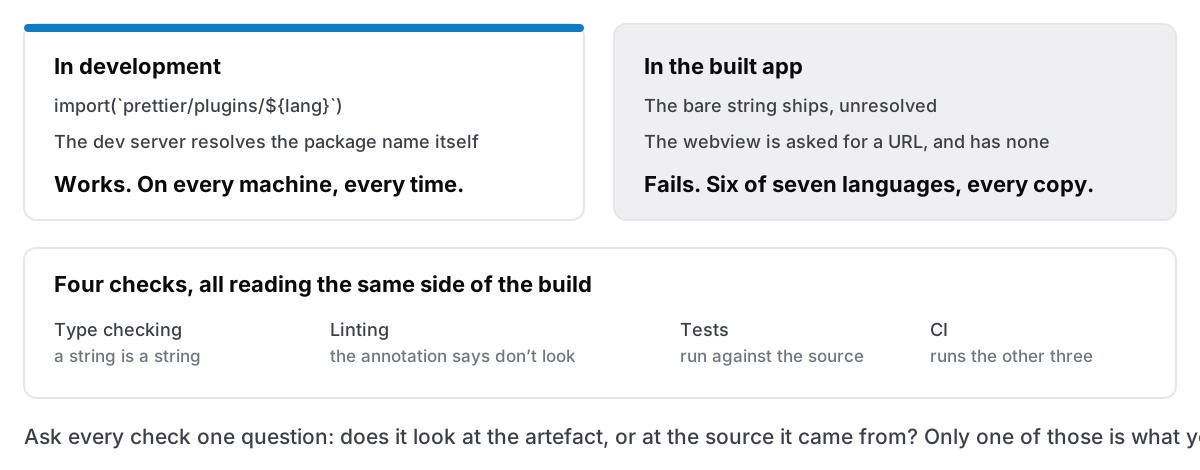
In development, the dev server resolves bare package names itself. That is one of the main things it is for. So during development the import worked, the formatter loaded, and the button did what it said. There was never a moment where the bug was visible on my machine.
Type checking cannot see it. The specifier was a string built at runtime. As far as the type system is concerned, a string is a string.
The linter cannot see it. The annotation that caused the problem is the documented way to suppress exactly the analysis that would have flagged it. I had explicitly told the tooling not to look.
The tests cannot see it. They run against the source, in the same environment as the dev server, with the same resolution. A test asserting that Format produces formatted CSS passes, because in that environment it does.
And CI cannot see it, because CI ran the same three things.
Every one of those tools examines the source. The bug existed only in the output, in the artefact produced by the build, which nothing in the pipeline ever opened. There was a hole in the shape of "the thing we actually ship", and four layers of quality tooling sat neatly around it.
The fix, and the better fix
The immediate repair is dull: literal specifiers, one per language, in a map. A typo becomes a type error instead of a runtime one, and each plugin stays a separately loaded chunk so the formatter is still kept off the startup path — an app that opens instantly does not load a code formatter to show you a note. That last part got verified rather than assumed: no formatter chunk is reachable from the entry bundle, only from the code editor.
The fix that matters is the other one. A script now reads the built chunks and fails the build if any dynamic import still carries a bare package name. It is wired into the build command itself, which is the step every path runs through: the dev build, the production release, CI. There is no way to produce something shippable that skips it.
And it was verified the only way such a thing can be: by restoring the broken code and watching the build refuse it. A check you have never seen fail is a check you are only assuming works. I have shipped a green light attached to nothing before, and it is a considerably worse position than having no light at all.
The same gap, twice more
Once you have the shape — the thing you verify is not the thing you ship — it turns up everywhere.
Notarisation. A stapled disk image containing an unstapled app passes every check on the machine that built it, because that machine has already cached the result. It fails on a stranger's Mac with no network. The only honest test is a machine that has never seen the app, which is now part of the release path rather than something I do when I remember.
An image encoder that substitutes silently. Asking a canvas for WebP does not fail when WebP is unavailable; it hands back a PNG and says nothing. Everything downstream then believes it has a WebP. The clipboard work checks what it actually received rather than what it requested, for that reason.
Both are the same mistake in different clothes: confirming the input to a process instead of the output.
The two-backend design, and the risk I took on purpose
There is a deliberate version of this divergence in Cyanote, and it is worth admitting.
All data access goes through one interface with two implementations: SQLite when running as the real app, and a browser-storage version when running as a plain web page. That means the entire application runs in an ordinary browser tab, which is how the screenshots on this site are made, why they show real software rather than a mockup, and why a UI change can be tried in a second instead of a rebuild.
It is also, structurally, exactly the situation that produced the Format bug: a development environment that is not the shipping environment. I keep it because the benefit is large and the risk is manageable, on one condition. Every data change has to be implemented in both backends and the rules they follow have to match. Search is the sharpest case: the browser version mirrors the same matching rules in JavaScript that SQLite's full-text index applies, specifically so a search behaves identically in both. When they drift, you get a bug that only exists in the shipped app, and you get it in the part where everything is stored.
I am not recommending this to everyone. I am saying it is a trade I made with my eyes open, and the mitigation is not discipline. It is that the build now inspects its own output.
The rule I write on things now
Every check in a pipeline should be asked one question: does this look at the artefact, or at the source it came from?
Both are worth having. Only one of them can tell you what your users will get. For a desktop app, where a bad build reaches people through an auto-updater and cannot be rolled back the way a website can, the second sort is the one that matters, and it is almost always the one missing.
Six of seven languages, in every shipped copy, working flawlessly on my machine. I would have bet money that button was fine.