Every Mac app you download outside the App Store has been through the same pipeline: signed with a Developer ID certificate, uploaded to Apple, scanned, issued a ticket, and stapled. Skip any of it and macOS greets your users with a warning that it cannot verify the app, which is where a good percentage of them stop.
I have written the buyer's side of that warning already. This is what it looks like from the other end.
What the $99 buys
An identity on file with Apple, and the certificate that proves it.
Enrolling in the Developer Program is $99 a year. What you get, for the purposes of shipping outside the App Store, is a Developer ID Application certificate: the thing that signs a binary such that macOS can say who shipped it and confirm nothing has been altered since.
That is the whole of it. Not a review, not a listing, not a store. The right to have your name attached to a file in a way the operating system will accept.
Two consequences people outside this get wrong. It is not a quality bar. Nobody at Apple looked at Cyanote. And it is not free of teeth: a Developer ID can be revoked, and a revoked certificate takes every copy of your app with it, on every machine, immediately. The identity is the point. Your name is the collateral.
The four variables
A production build here needs four environment values, and the shape of them says a lot about the process:
APPLE_SIGNING_IDENTITY   Developer ID Application: Name (AB12CD34EF)
APPLE_ID                 the account email
APPLE_PASSWORD           an app-specific password
APPLE_TEAM_ID            ten characters
The third is the interesting one. You cannot notarise with your actual Apple account password. You generate an app-specific password at appleid.apple.com, a one-purpose credential that exists so an automated build is not carrying the keys to your entire Apple identity. Good design. It also means the credential is a string that a script needs and a human generated, which is exactly the kind of thing that ends up pasted into a shell history at midnight.
Locally, none of this is needed. Development builds are signed with a self-signed certificate called cyanote-dev, which macOS accepts on the machine that made it and nowhere else. Two paths, deliberately: the dev one is fast and offline, the production one is slow and talks to Apple. Conflating them means every test build waits on a network round trip.
Build, sign, notarise, staple, verify
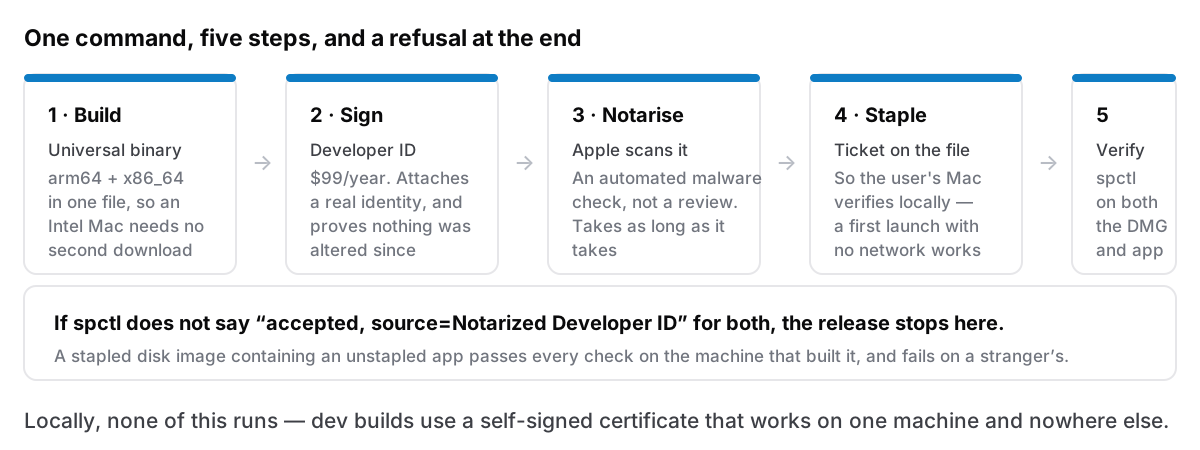
The production script does five things in order, and every one of them can fail in a way worth handling.
Build universal. arm64 and x86_64 in one binary, so the app runs natively on Apple Silicon and on the Intel Macs people are still perfectly happy with. No Rosetta, no second download, no "which one do I want" on the download page. It doubles the compile time and I would not trade it — an older Mac is a large part of who this app is for.
Sign with the Developer ID identity.
Notarise. Upload the build to Apple, which runs an automated malware scan and, if it passes, issues a ticket. This takes anywhere from a couple of minutes to considerably longer, entirely outside your control, at whatever hour you decided to cut a release.
Staple. Attach the ticket to the file itself, so a Mac can verify it without asking Apple anything. This is the step that matters for the promise the app makes about working offline: an app that had to phone Apple to check its own notarisation on first launch would be a different app. Stapled, the check is local. Skip stapling and everything looks fine on your machine — which has already cached the result — and fails on a fresh one with no network.
Verify, and refuse to continue if it fails. spctl has to say accepted, source=Notarized Developer ID for both the DMG and the app inside it. Both, because they are separately notarised objects and it is entirely possible to staple one and not the other. The script exits rather than uploading something that will greet a buyer with a warning.
The step that needed a human
For a while, the release could not run unattended. One step wanted the app-specific password typed at the keyboard.
That sounds minor. It is the difference between a release being a command and a release being an occasion. A process with a human step in the middle gets run less often, which means fixes sit in main waiting for a big enough batch to justify the ceremony, and batching changes is how a release becomes risky. The bug you shipped is somewhere in eleven commits instead of one.
Getting the human out of it is now, in my head, a first-class feature rather than tooling housekeeping. The whole thing is one command that builds, notarises, publishes the update payload, cuts the notes-only release, deploys the site, and pushes the tag. It is safe to re-run: every step after the build checks whether it already happened, because the failure mode you actually hit is a release that dies three-quarters of the way through on a network timeout.
It also refuses to start if CHANGELOG.md has no section for the version being released, the same text the app shows before anyone accepts an update. A release with no notes is not a release anyone should accept.
A detail that took an afternoon
Building the DMG briefly opens a Finder window. It has to. The disk image's layout is configured by actually mounting it and arranging it.
Harmless, and deeply irritating when it happens on every dev build while you are working. So it happens only on production builds now, which is a two-line change that meaningfully improved my day and would never appear in any changelog.
The other one: notarising the DMG and notarising the app inside it are separate operations, and a stapled DMG containing an unstapled app passes a casual check on a machine that has already seen the app. That is the class of bug where the only honest test is a fresh Mac with no network, which is the test I now run, because everything else confirms what you already believe.
Windows, in comparison
The Windows version is sold through the Microsoft Store, and one reason is that the equivalent process outside the Store is worse in an instructive way.
Authenticode signing has no $99 flat rate. It is a certificate from a commercial authority, priced per year, with identity validation attached, and until recently the norm was a physical hardware token that someone posts to you, which makes automated CI signing an interesting problem involving a USB device plugged into something. Cloud signing services have improved this a great deal. It is still several times the friction of Apple's process, and Apple's process involves a mandatory malware scan by a company that can revoke your identity.
I say that as someone who complains about Gatekeeper regularly. Having now done both, $99 and a stapled ticket is the better arrangement.