A phone is a capture device. You write four words on it, standing up, and that is genuinely most of what happens there, which is why going without sync to a phone turns out to be workable for a lot of people.
A second Mac is different. You write on both, you think on both, and a note started on one and needed on the other is not an edge case, it is Tuesday. The workarounds that cover a phone do not cover this, and pretending otherwise wastes your time.
First, the question that decides it
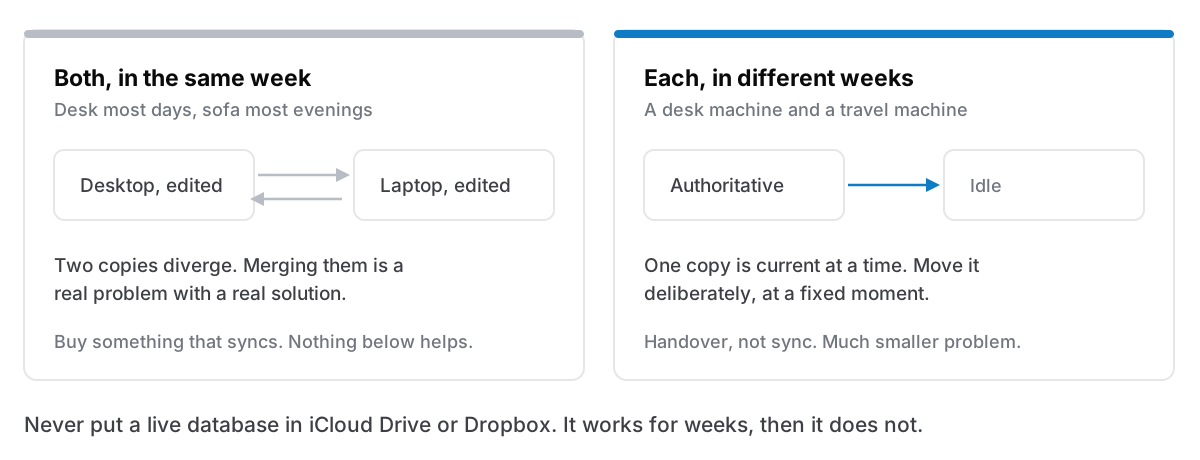
Do you use both machines in the same week, or in different weeks?
Same week — desktop at the desk, laptop on the sofa, both most days — and you genuinely need sync. Nothing below is adequate, and buying software that syncs is the right decision. Say so early rather than fighting it for a month.
Different weeks — the desktop is where work happens and the laptop comes out when travelling, or a work machine and a personal machine with a hard line between them — and you do not have a sync problem. You have a handover problem, which is much easier, and the arrangements below solve it.
Most two-Mac setups are the second kind and are treated as the first, which is where the frustration comes from.
The four arrangements
One machine is the home, the other borrows. The desktop holds everything. Before a trip, export or copy across what you will need; when you get back, bring the new material over. Deliberate, unglamorous, and it fails exactly once: the time you forget, and need the note you did not bring.
Split by domain, not by device. Work on the work machine, personal on the personal one, and no attempt to unify. This is the arrangement most people who have solved it actually use, and its strength is that the split is real rather than administrative: your employment contract and your privacy both point the same way. The rule to hold is that nothing lives in two places, because two half-collections is the worst outcome available.
A file you carry. The whole collection exports to one file; the file lives on a USB stick, an external SSD, or your own server. Copy it over, work, copy it back. This is the arrangement everyone thinks is primitive and it is genuinely fine for handover: a single file, moved deliberately, with no ambiguity about which copy is current.
Actual sync, from something built for it. Obsidian syncs a folder of files. Apple Notes syncs through iCloud. Notion is a browser away. If you are in the same-week case, this is the answer and it is not a compromise.
The one thing not to do
Do not put a live app database in iCloud Drive or Dropbox and call it sync.
It is the obvious move and it is the one that corrupts data. A file-sync service copies whole files after they change; a database is written continuously, often in more than one file, with a journal that must stay consistent with the main file. Two machines writing to that arrangement produces either a conflicted copy or a silently chosen winner, and neither preserves a database's internal consistency.
The failure is not immediate, which is what makes it dangerous. It works for weeks. Then one day both machines were open, and you have two divergent versions and no way to merge them.
If an app lets you relocate its storage, moving it to an external disk is fine, one machine at a time, mounted deliberately. Moving it into a folder that two machines are actively syncing is a different thing entirely.
Making handover reliable
If you are in the handover case, three habits make it stop failing.
Have one direction at a time. Decide, out loud, which machine is authoritative right now. Ambiguity about which copy is current is the entire problem, and a rule as crude as "the laptop is authoritative while I am away" resolves it completely.
Do the copy at a fixed moment. Not when you remember — as part of packing, and as part of unpacking. Attaching it to something you already do is the difference between a habit that survives and one that does not, which is the same reason routines beat intentions.
Take the export anyway, on both machines, on a schedule. The handover copy is not a backup, and the moment you have two machines is the moment you will eventually overwrite the wrong one. A backup is a copy that does not change when the original does. The handover file changes constantly, which disqualifies it.
What you gain by not syncing
Worth stating, since this reads as a list of limitations.
There is no sync conflict, ever. Anyone who has used syncing notes software for years has a story about a note that became two notes, or a paragraph that vanished on one device, or a merge that ate an afternoon. That entire category of failure does not exist when there is one copy.
There is no account, no server holding your work, and no subscription tied to being able to open your own notes. And every machine opens instantly, because opening does not involve asking anything.
Those are real, and they are exactly what you are trading for the convenience of not thinking about which machine you are on. Whether the trade is good depends entirely on the answer to the question at the top.
The honest version
If you work on two Macs in the same week, buy software that syncs. That is the whole recommendation and no amount of discipline substitutes for it.
If your second machine is occasional — travel, a sofa, a job you keep separate — then handover is a smaller problem than sync, and treating it as a sync problem is what makes it feel unsolvable.
Cyanote is a single-machine app and does not pretend otherwise: one SQLite database on your own disk, no account, no sync service. What it gives you for handover is a JSON export of everything — notes, tasks, calendar, habits, routines, clipboard, images — that restores on another Mac, replacing what is there rather than merging into it, and writing a rescue copy of the old data first. Settings will also move the database wherever you want, including an external disk. That is a deliberate handover mechanism, and it is not a substitute for sync. The licence covers installing it on the computers you personally own, so the second Mac costs nothing extra.