A notes app is the most convenient place you own. It is open, it is searchable, and it never asks why. That convenience is exactly why things end up in it that should not be there.
The problem is not that your notes are insecure today. It is that a note is a long-lived object: it gets backed up, restored onto a new machine, exported when you switch apps, opened on a screen someone else can see, and read by whoever inherits your computer. Anything you write is being written for all of those situations at once.
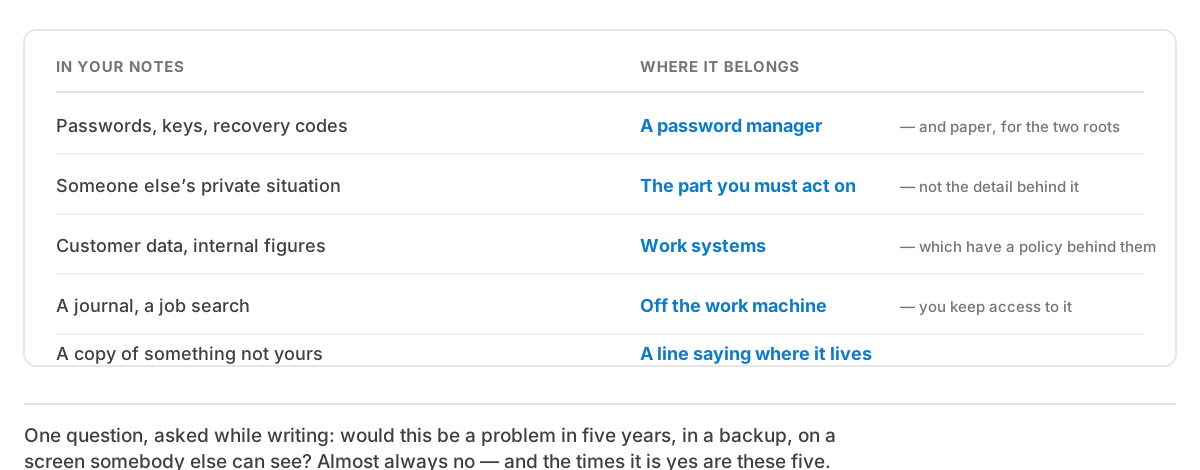
Here are five categories worth keeping out, and where each actually belongs.
1. Credentials
Passwords, API keys, recovery codes, PINs, the answers to security questions, a photo of a bank card.
This is the obvious one and it is still the most common. The reasoning that puts them there is sound in the moment — you need the thing, the note is right here — and the reasoning that keeps them out is about time. A password in a note is fine on the day you write it. It is a problem three years later, in an export, in a backup on an old drive, in a screenshot you send to support.
Where it belongs: a password manager. They are free, they fill things in for you, and the one thing they do that a note cannot is treat the secret as a secret across every copy that will ever exist.
There is a nuance for recovery codes, which people often keep in notes because a password manager feels like the wrong place. If you lose access to it, you have lost the codes too. That is a real concern and it has its own answer, which is still not a plain note.
2. Other people's private information
This is the one people never think about, and the one I would put first if I were ordering by how much harm it can do.
Your notes are full of other people. A colleague's health situation mentioned in a one-to-one. What someone earns. Somebody's immigration status, their divorce, the thing they told you in confidence because you are the sort of person people tell things to. A friend's address and door code.
They did not choose your notes app, your backup policy, your export habits or your screen-sharing hygiene. You chose all of those on their behalf, without being asked.
What to do instead: write the part you need and not the part you do not. "Sam needs Thursdays flexible for the next two months" carries everything you actually need to act on, and carries none of the medical detail behind it. This is not squeamishness. It is the same instinct that stops you forwarding a private email, applied to the file you keep forever.
If the detail genuinely matters to your work, a locked note is a reasonable middle ground. The important part is that it is a decision rather than a default.
3. Work data in personal notes, and personal notes on a work machine
Both directions, and both are underrated.
Customer records, unreleased plans, internal figures and anything covered by a contract or a data-protection obligation should not sit in a personal app on a personal machine. Not because you would misuse them, but because your personal Mac has no policy behind it: no retention rules, no access review, and nobody who could answer questions about it if something went wrong.
The reverse matters at least as much. Notes on a work machine are, in practice, work's. They can be backed up, imaged, reviewed, and read on the day you leave, and that day is rarely scheduled. Your journal, your job search, your health notes and your opinions about your manager are all things that should live somewhere you will still have access to next month. Keeping track of a job search on a work laptop is the version of this that bites people most often.
What to do: two apps, or one app and a clear rule about which folders are which. Whatever you pick, decide it now rather than at the moment you are annoyed and typing.
4. Anything you would not be able to explain
A useful test, borrowed from an editor I once worked with: assume the note will one day be read aloud by someone who does not like you.
That is not paranoia, it is just the range of ways notes surface: a shared screen, a laptop left open, a colleague looking over a shoulder, a legal request, a family member sorting out your affairs. Notes are written in one voice and read in another.
This does not mean writing everything as though it were a press release. It means noticing when you are writing something whose only protection is that nobody will see it, and deciding whether that is a protection you actually have. Vent by all means. Venting on paper is useful. Just know which note it is in, and consider whether the venting note needs a lock.
5. The stuff that is not yours to keep
Bulk contact lists exported from somewhere. A copy of a database. Somebody's entire email thread pasted for reference. Screenshots of another company's internal tools.
Each arrives for a good reason and stays forever, and collectively they turn a personal notes app into a small unmanaged archive of things you have no ongoing right to hold. The clipboard makes this especially easy — a clipboard history quietly accumulates whatever passed through it, including things you only meant to move from one window to another.
What to do: keep the reference, not the copy. A line saying where something lives and how to get it again is almost always as useful as the thing, and it does not age into a liability.
The habit that covers most of it
One question, asked while writing rather than later: would this be a problem in five years, in a backup, on a screen somebody else can see?
Most of the time the answer is no and you should write freely. A notes app you are frightened of is worse than useless. The value of the question is that the small number of times it says yes are almost always the same five categories above, and each has an obvious better home.
And if you already have years of notes that were written before you asked it, the fix is not an audit. It is a bounded clear-out: search for the obvious words once, deal with what comes up, and then get on with writing.