There is a small set of things whose loss is genuinely expensive: the recovery codes for your main email account, the passport number you need at 4am, the insurance policy, the licence keys for software you paid for, the list of accounts somebody would need if you were not around to explain them.
They tend to end up in one of two places, both bad. Either scattered across a notes app in plain text, or so carefully secured that you cannot get at them in the situation they exist for.
The way out is to separate two different things that people store together: the secrets, and the map.
The map belongs in your notes; the secrets do not
Almost everything in that opening list has two parts.
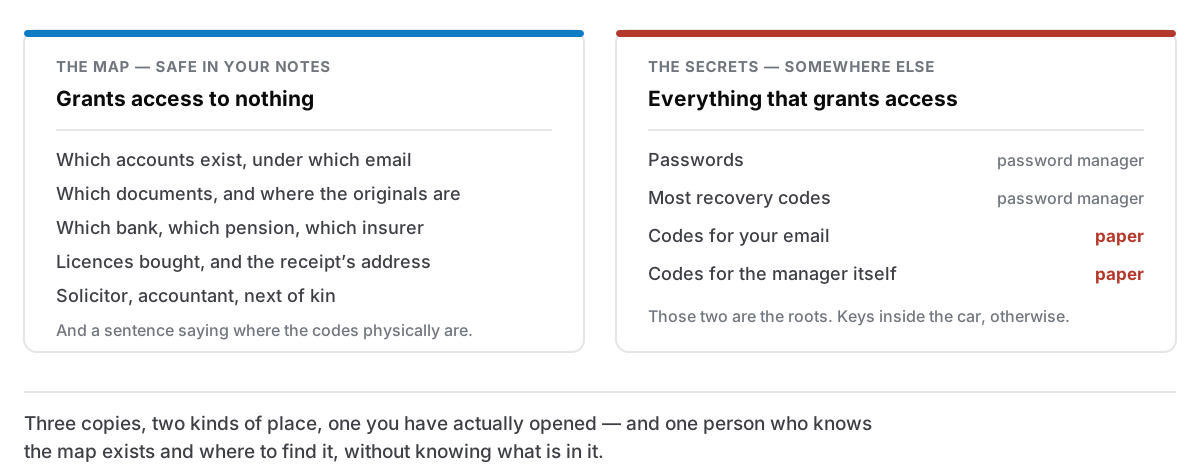
The secret part is the thing that grants access: the recovery code, the password, the key. It should live in something built for secrets: a password manager, an encrypted file, or paper in a safe place.
The map part is everything else: what exists, where it is, who to contact, what the reference number is for, which of the three insurers is the one for the flat. None of that grants access to anything, and all of it is what you are actually missing at the moment you need it.
Notes are excellent at the map and dangerous for the secrets. Splitting them means your notes stay useful and stay safe to back up, export and restore, which matters, because notes get copied to places you are not thinking about.
Recovery codes are the interesting case
Two-factor recovery codes — the ten one-time strings a service gives you when you turn on authentication — are the thing people most often get wrong, and for an understandable reason.
They exist for the day you lose access to your normal method. So the obvious home, your password manager, feels wrong: if the thing you have lost is access to the password manager, you have locked the keys inside the car.
Two rules resolve it:
The codes for your password manager and your primary email must not be inside your password manager. Those two are the roots of everything else — email recovers most other accounts, and the password manager holds the rest. Their recovery codes need to be somewhere physically separate.
Everything else can go in the password manager, because if you can open it you can recover any of them.
For the two roots: print them. Paper does not need a battery, cannot be ransomwared, and is readable by whoever has to sort things out if you cannot. Put them somewhere you would keep a passport, and write on the sheet what it is and what account it belongs to. An unlabelled block of codes found in a drawer in four years helps nobody.
The map note, in practice
One note, and it says what exists rather than how to open it:
- Accounts that matter, with what each is for and which email address they are under. Not passwords.
- Documents: what you have, where the original is, where a scan is. Passport, birth certificate, insurance, mortgage, guarantees.
- Money: which bank, which pension, which broker. Institution names, not numbers.
- Software licences: what you bought, from whom, which email address the receipt is in. This one gets used more often than you would guess, especially when moving to a new Mac.
- People: solicitor, accountant, landlord, next of kin.
- Where the recovery codes physically are. A sentence describing the location, which is only useful to somebody who can already get into your house.
That note can be locked if you like — a locked note stays encrypted where it sits — but the point of building it this way is that it does not have to be. Nothing in it is a credential.
Three copies, two places, one you have tested
The standard backup rule applies here more than anywhere, because this is the category where "I thought I had it" is the failure.
Three copies. The original, a backup, and one somewhere else entirely.
Two different kinds of place. Your Mac and a drive in the same room are one flood. Your Mac and a drive at your parents' house are two places. So are paper and digital.
One you have actually opened. A backup you have never restored from is a hypothesis. Once a year, open the encrypted file, try one recovery code, check that the scan of the passport is readable and not a 200 KB blur. The failure you are guarding against is not usually a lost file. It is a file you cannot open, in a format nothing reads any more, or protected by a password you have since changed.
Backing up notes that live on your own computer covers the mechanics; this is the part where you go and confirm the mechanics worked.
Somebody else should be able to find it
The uncomfortable half. Everything above assumes you are the one looking, and the situations where this matters most include several where you are not: illness, accident, or being gone entirely.
The minimum useful version is not a legal arrangement. It is that one person you trust knows two facts: that the map exists, and where to find it. Not what is in it. Just that there is a note, on this machine, in this folder, and that the codes are in the box in the wardrobe.
That single conversation converts an insoluble problem — reconstructing a life's accounts from scratch — into an afternoon's admin. It is a strange thing to schedule and it takes about ninety seconds.
What to do this week
If this is all theoretical at the moment, the useful minimum is three steps, and they take under an hour:
- Print the recovery codes for your email and your password manager. Label them. Put them somewhere sensible.
- Write the map note. Half an hour, and you will find two things you did not know you had lost track of.
- Tell one person it exists.
Everything else — the annual test, the second copy, the scans — is an improvement on a foundation. Those three are the foundation, and most people are missing all three while feeling reasonably well organised, because the systems that would show you the gap are the same systems you have not set up.