Who is writing this. I make Cyanote, so this is an interested party's argument. The prices are dated and checkable, and the section below about Notion's free plan is the one that makes this comparison harder for me, which is exactly why it goes first.
The short version: Cyanote is a macOS app that combines notes, to-dos, a board, a calendar, habit tracking, routines and a system-wide clipboard manager for a single $7.99 payment, stored locally, with no account. Notion is a cloud workspace that is free for individual use, runs in a browser or an Electron app, syncs everywhere, and is built for teams. Those are different products, and the honest comparison is narrower than most pages make it.
Still surveying the field? This page argues one case at length. If you have not narrowed it down yet, these are the other apps people land on from the same search — with the one-line version of each, and where I have written about them properly.
| The short version | |
|---|---|
| Obsidian | Free, local markdown files, endlessly extensible — if you want a system to maintain rather than an app that is finished. |
| Craft | The best-looking documents of the group. Cloud-backed with local caching; the free plan stops at 1,500 blocks. |
| Apple Notes | Free, already installed, syncs to your phone. Genuinely hard to beat if that is all you need. |
| Cyanote | $7.99 once, local, no account — notes, tasks, a board, a calendar, habits and a clipboard manager in one window. No sync, no phone, no collaboration. |
First, the part that hurts my case: Notion is free
A single-user Notion workspace gets unlimited blocks and unlimited pages on the free plan. Not a trial, not a teaser — genuinely free, indefinitely, for exactly the person most likely to be reading this page.
So if your objection to Notion is the bill, you probably do not have one. The paid tiers start at $10 per member per month, or about $8 a month billed annually, and they exist for teams: unlimited file uploads, collaborative blocks, forms, integrations. A solo user hits the free plan's real limits rarely — the 5 MB file cap and 7-day page history are the ones people actually notice.
Which means the case for leaving Notion has to be made on something other than money, or it is not a case at all.
What Notion does better than Cyanote
Comfortably more than the other way round, on features alone.
It works everywhere. Browser, Mac, Windows, iPhone, Android, someone else's laptop. Cyanote is one app on one Mac. If you write on a phone at all, this comparison is already over.
It collaborates. Shared pages, comments, permissions, guests. Cyanote has none of this and never will — there is no server for it to live on.
Databases. Relations, rollups, filtered views, the same records shown five different ways. This is the thing Notion genuinely invented a good version of, and Cyanote does not attempt it. A board and a to-do list are not a database.
It is enormously more flexible. Notion can be a CRM, a reading log, a wiki, a recipe box. Cyanote is seven fixed things and cannot become an eighth.
So why would anyone leave?
Four reasons, none of which is price.
Your notes live on someone else's computer. Notion is a cloud product with an account attached. That is not a scandal — it is how the product works, and it is what pays for the free plan. But it means your notes are subject to a company's continued existence, its pricing decisions, and its terms. I wrote separately about what actually happens when a notes app shuts down, because it is a more common ending than people expect. Cyanote writes to a database on your own disk; there is no account to lose access to.
It is heavy. Notion is a web application, and it feels like one — a loading state between you and a thought you are trying not to lose. This is the single most common thing people say when they leave, and it is hard to argue with because it is a matter of milliseconds accumulating over years.
It is a kit, not a system. Notion gives you blocks and expects you to build. Plenty of people enjoy that, and plenty of people spend a weekend building a beautiful dashboard, use it for eleven days, and never open it again. Cyanote's scope is fixed on purpose: the notes, the to-dos, the calendar, the habits and the clipboard already exist and are already wired together. You cannot redesign it, which is the cost and also the feature.
It stops well short of the whole week. Notion has no clipboard manager, no habit tracking, and no Pomodoro timer. Notion Calendar is a separate application you install separately. So the "all-in-one workspace" still leaves you running three or four other apps — which was the situation I was trying to end when I added up what my stack was costing.
The prices, as they stand
| Plan | Price | Who it is for |
|---|---|---|
| Notion Free | $0 | One person. Unlimited blocks and pages, 5 MB file cap, 7-day page history. |
| Notion Plus | $10/member/month, about $8 billed annually | Small teams — unlimited uploads, collaborative blocks, forms |
| Notion Business | $20/member/month, about $16 billed annually | Larger teams |
| Cyanote | $7.99 once | One person, one Mac, seven built-in tools |
USD, excluding tax, checked 13 August 2026. If you are a solo user, the honest comparison is $0 against $7.99 once — and Cyanote has to justify the $7.99 on something other than being cheaper, because it is not.
Not sure which side of "solo user" you actually fall on? I wrote a shorter test for that — count the databases you've touched this month, not built, and look at your last twenty edits. It settles the question in about five minutes, before you spend longer than that reading tables.
When Cyanote is the better buy
You work on one Mac and want your notes on it. No account, no sync, no company between you and your writing. If that sentence sounds like a downgrade, it is not for you; if it sounds like relief, that is the whole pitch.
You want it to open instantly. A local app reading a local database has a different floor than a web app, and the difference shows up every single time you open it.
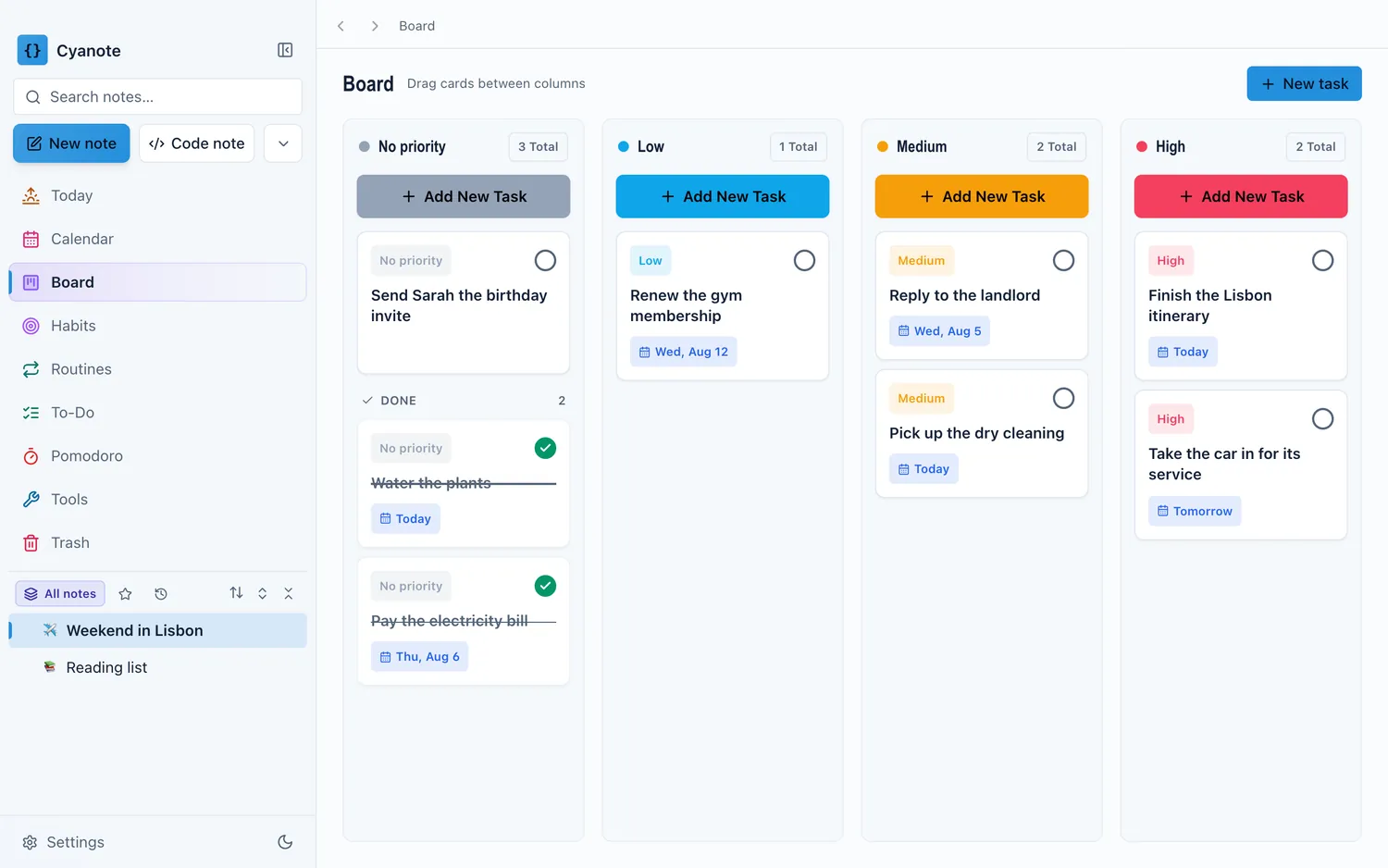
You never wanted to build a system. You wanted somewhere to put notes, a list of what is due, a calendar, and the three habits you are trying to keep. Notion will let you build that in a weekend. Cyanote ships with it.
You are also paying for the gaps Notion leaves. If Notion is your notes app but you are also running a clipboard manager, a habit tracker and a separate calendar, the comparison is no longer Notion against Cyanote — it is four apps against one.
Feature by feature
| Notion | Cyanote | |
|---|---|---|
| Price for one person | Free | $7.99 once |
| Notes | Yes — blocks, very flexible | Yes — notes and code notes |
| Databases and relations | Yes, the core feature | No |
| To-dos and board | Yes, via databases | Yes, built in |
| Calendar | Notion Calendar — a separate app | Built in |
| Habit tracking | Build it yourself from a database | Built in |
| Routines and Pomodoro | — | Built in |
| Clipboard manager | — | System-wide, with history |
| Account required | Yes | No |
| Where notes live | Notion's servers | A database on your Mac |
| Works offline | Partially, with caveats | Entirely — there is no online |
| Collaboration | Yes | No |
| Mobile | iOS and Android | No |
| Windows | Yes | Yes — Microsoft Store, separate purchase |
| Import from Markdown | Yes | Yes |
What you give up by switching
- Every other device. No phone, no browser, no second machine, no sync.
- Databases. If you have built anything with relations or rollups, there is no equivalent here and no migration path for it.
- Collaboration, entirely.
- Flexibility. Cyanote does seven things. It will not become the eighth thing you want.
- A large company's continuity. Cyanote is one person. Your data is on your own disk, which is the mitigation, but it is worth saying plainly.
Moving your notes over
This part is genuinely straightforward, because both ends speak Markdown.
- In Notion, export your workspace as Markdown & CSV. You get a folder of
.mdfiles. - In Cyanote, open Backup & Restore and choose Import Markdown. Select the files. It reports how many came in, how many were skipped as duplicates, and anything it could not read.
What survives: headings, paragraphs, bold, italic, inline code, fenced code blocks with their language, bullet, numbered and nested lists, task lists, blockquotes, horizontal rules and links.
What does not, and you should know before you start:
- Images are not imported. The alt text is kept and the import warns you which file it came from, but there is no asset pipeline yet.
- Tables arrive as the literal characters you typed. Notion exports plenty of tables, so if your notes are table-heavy, expect tidying.
- Databases do not come across as databases. Notion exports them as CSV. They are not notes and Cyanote will not turn them back into one.
- Front matter is not interpreted — the
---lines become horizontal rules and the keys become paragraphs.
The governing rule of the importer is that nothing is ever silently dropped: anything it does not understand stays in the note as the text it was written as. A note that reads oddly can be fixed in a minute. A note that arrived half-empty cannot.
If it turns out not to fit, the refund is fourteen days and needs no reason.
The honest summary
Notion is free, more capable, and available everywhere. Cyanote is $7.99, does less, and runs on one Mac without an account. If you use Notion's databases, collaborate with anyone, or write on a phone, stay — I mean that, and $7.99 is not worth the disruption.
The people who should switch are the ones using Notion as an expensive-feeling place to keep plain notes, who resent the loading spinner, who never wanted to build a workspace, and who are quietly running three other apps to cover what Notion does not do. For them the $7.99 is not buying a cheaper Notion. It is buying a smaller one that is already finished.