Things 3 is worth it if you manage your own tasks, you only use Apple devices, and you'll keep the app for more than a year. It costs $49.99 once on the Mac, with no subscription, and it's still being updated: the release notes show the Mac version last changed on 5 November 2026. It isn't worth it if you need to share lists with other people in real time, attach files to tasks, or use anything other than Apple hardware, because it doesn't do any of those.
The rest of this post covers what you'd pay, what happens if a new version arrives, and how hard it is to get your tasks back out.
The short version
- $49.99 is the Mac price, not the full price. iPhone is $9.99 and iPad is $19.99, so all three come to $79.97. Each is a separate purchase.
- It beats a subscription quickly. All three devices together cost less than two years of Todoist Pro or TickTick Premium.
- You can test it properly. The Mac app has a 15-day trial with no feature limits. iPhone and iPad have no trial.
- It leaves a lot out. There are no file attachments, no shared lists and no version for Windows, Android or the web.
- Leaving takes work. Things imports from Reminders, Todoist and OmniFocus, but its official export routes are a SQLite database, a PDF of one list at a time, or a script you write yourself.
I make Cyanote, a $7.99 one-time Mac app that includes a to-do list, also sold separately on Windows. That makes me a competitor, so read this with that in mind. Things has far deeper task features than mine, and I say where mine fits near the end. Everything about Things here comes from Cultured Code's own documentation and store listings, checked on 7 November 2026. This is a reading of those documents, not a long-term test of the app.
Things 3 price in November 2026
Things 3 is a one-time purchase for each platform, and Cultured Code's FAQ is direct about it: "there are no subscriptions". The apps are sold separately, there's no bundle, and you can only buy them through Apple's App Store.
| Device | Price | Trial |
|---|---|---|
| Mac | $49.99 | 15 days |
| iPhone | $9.99 | None |
| iPad | $19.99 | None |
| Apple Vision | $29.99 | None |
| Apple Watch | Included with the iPhone app | None |
App Store prices in US dollars, retrieved 7 November 2026, before tax. Trial details are from Cultured Code's trial page. Apple Watch coverage is from its FAQ.
Three details change the sums. Sync is included with your purchase, so there's no hidden yearly charge for keeping devices in step. The App Store listings say up to six family members can use each app through Family Sharing, which makes one purchase far better value for a household. And the FAQ's answer to "can I get a discount?" is no, so don't wait for a sale you can't count on.
The Mac and iPhone apps together cost $59.98. That's the price I'd weigh, because a task list you can't reach from your phone misses the moment you remember something on the way home.
When it pays for itself
Against a subscription, Things pays for itself early, and the Mac app alone costs less than one year of Todoist Pro. Todoist Pro is $60 billed yearly, and TickTick Premium is $49.99 a year. I went through what Todoist's subscription buys in leaving Todoist.
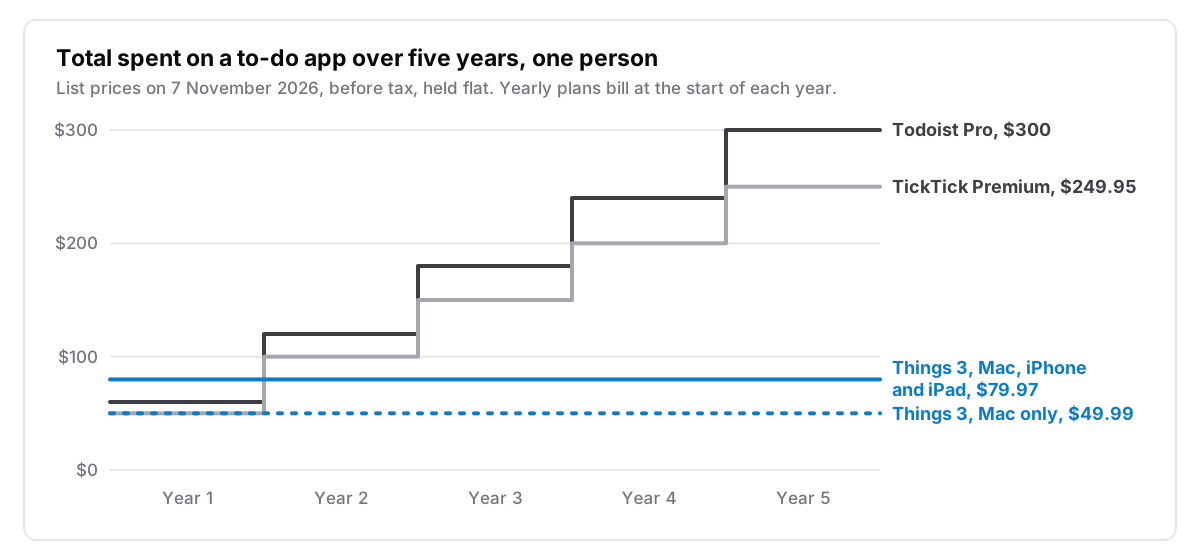
Because yearly plans bill up front, the comparison starts on day one. The Mac app is $10 cheaper than Todoist's first year and the same price as TickTick's. All three Apple apps cost more than either at first, then become the cheaper option at the first renewal, when Todoist reaches $120 and TickTick reaches $99.98.
| App | How you pay | Five years, one person |
|---|---|---|
| Apple Reminders | Included with your Mac | $0 |
| Things 3, Mac only | $49.99 once | $49.99 |
| OmniFocus 4 Standard, Mac, iPhone and iPad | $74.99 once | $74.99 |
| Things 3, Mac, iPhone and iPad | $79.97 once | $79.97 |
| TickTick Premium | $49.99 a year | $249.95 |
| Todoist Pro | $60 a year | $300 |
| OmniFocus Subscription | $99.99 a year | $499.95 |
Prices retrieved 7 November 2026, before tax, held flat for five years. One-time rows assume you stay on the version you bought.
These sums only apply once you need the paid tier. Todoist's free Beginner plan includes 5 personal projects, and TickTick has a free plan too, so try those first if your lists are small.
Will you have to pay again for Things 4?
Nobody outside Cultured Code knows. I found no official statement about a Things 4 or a paid upgrade on the company's blog or status page. Treat anything you read elsewhere as a guess.
The history is short. When Things 3 arrived in May 2017, Cultured Code called it "our first paid update (since 1.0!)" for existing users, with a 20% launch discount. People who had bought Things 2 between 1 March and 17 May 2017 got a free upgrade, and earlier buyers didn't.
Since then, the same purchase has carried buyers for nine and a half years. The App Store shows Things 3 first released on 18 May 2017, and it's current: version 3.24 added full support for macOS 27. Past updates tell you how the company has behaved, not what it will do next. A fair way to decide is to ask whether $49.99 would be good value if it only lasted five years. Even with the iPhone app, that's about $12 a year, against $60 for Todoist Pro.
What you get for the money
Things 3 is a task manager and nothing else.
A clear place for every task. Today holds what you want to start before the day ends, with a This Evening section for later on. Upcoming holds anything with a date. Anytime and Someday hold everything else, split by how serious you are about it. Finished work goes to the Logbook.
A structure for bigger work. A project holds a job with several steps, and headings split a project into parts. Areas group projects and to-dos by the ongoing parts of your life, such as Work or Home. Tags let you filter a list.
Fast capture. On a Mac, Ctrl-Space opens Quick Entry from any app. The date parser reads typed dates and times in When, Reminders and Deadlines. Mail to Things gives you a private address that turns emails into tasks, with limits: 100 emails a day, and message bodies are cut off at 4,000 characters.
The rest of the routine. You also get repeating to-dos, reminders and Markdown in task notes. There's also Shortcuts support and a URL scheme for automation.
Your calendar events appear in Today and Upcoming, but the link runs one way. Things reads them from Apple Calendar, and Cultured Code's support page says it "does not send your to-dos to Apple Calendar". If you plan by blocking tasks onto your calendar, Things won't do that part for you.
What it won't do
Any one of these can settle the question.
- No files on tasks. The FAQ says it's "not possible to add photos or any type of file to a to-do at this time". On a Mac you can store a link to a file, but the file isn't attached. Attachments sent to Mail to Things are ignored.
- No shared lists. Things "does not support real-time sharing of to-dos or lists". If you plan a house move with a partner, you'd each keep your own list.
- Apple only. The FAQ lists Windows, Android, Linux and web browsers as places Things will not work. You can't check a list from a work PC, even in a browser.
- No third-party sync. To sync, you need a free Things Cloud account, and iCloud and Dropbox aren't supported. If you use one device, you don't need an account at all.
- No board view that I could find. The features page doesn't mention one, and neither does the documentation I read. If you think in columns, a personal Kanban board is a different way of working.
On privacy, Things Cloud's support page says your data is encrypted in transit and at rest. Neither that page, the Things Cloud page nor the privacy policy mentions end-to-end encryption, so I wouldn't assume it. If that matters to you, you can use Things on one device without a Cloud account.
Getting your tasks back out
Things is much easier to get into than out of. It has full importers for Apple Reminders, Todoist and OmniFocus. Its export article, though, offers three routes, and none of them is a simple file you could hand to another app:
- The database. You can copy the SQLite file, which holds everything. Cultured Code calls it "machine-readable, not human-readable" and suggests a database viewer to read it.
- Print to PDF. This is Mac only and covers one list at a time, so it works as a record but not as a migration.
- Shortcuts or AppleScript. There's no ready-made export, so you write your own. AppleScript is Mac only, and the Shortcuts action that finds items stops at 500 results.
The article doesn't mention CSV or JSON. Your tasks are still backed up. The app keeps daily backups from the last ten days, Time Machine covers the database too, and SQLite is an open format sitting on your own disk.
But if you ever move, plan to do it by script or to rebuild your lists by hand. A short list won't take long. Years of projects with notes and repeating tasks will. It's a reason to run the trial with real work rather than a demo list, and to decide early whether this is the app you want to keep.
So who should buy it?
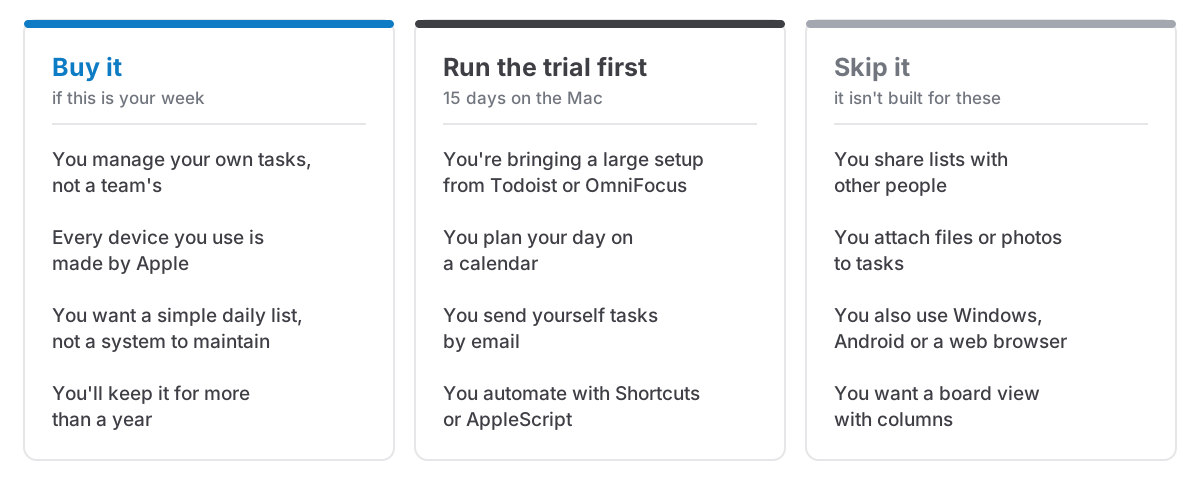
The 15-day Mac trial makes this low risk. Cultured Code says it gives you all features without limitations, and when it ends the app goes read-only rather than charging you. Use it for your real week, including a repeating task, a project with headings and an email or two.
If you're choosing between the alternatives, my round-up of Mac to-do apps you can buy once compares them side by side. Briefly:
- Apple Reminders comes with your Mac and may be all you need if your lists are simple. Try it before you spend anything.
- OmniFocus 4 suits people who want deep projects and a formal review. Standard is $74.99 and Pro is $149.99, one purchase covers Mac, iPhone and iPad, and there's a 14-day trial. Across three devices, Standard costs about the same as Things.
- Todoist is the answer if you need Windows or Android or shared projects.
Where Cyanote fits, and where it doesn't
Again: this section is about my own app.
If tasks are the main thing you want from an app, buy Things. Cyanote's task side is a single list grouped by due date, with no equivalent of projects, areas and headings. It has no repeating tasks and no subtasks, so a bill you pay every month has to be added again each time. It has no iPhone app and no sync, so it can't catch a thought on the way home.
Cyanote makes more sense if your tasks are one part of the day and you want them in the same window as your notes and calendar. You can type a task the way you'd say it, switch the same tasks to a board, and see them on a Today page beside your events, habits and routines. It also has clipboard history, and everything is stored on your own disk.
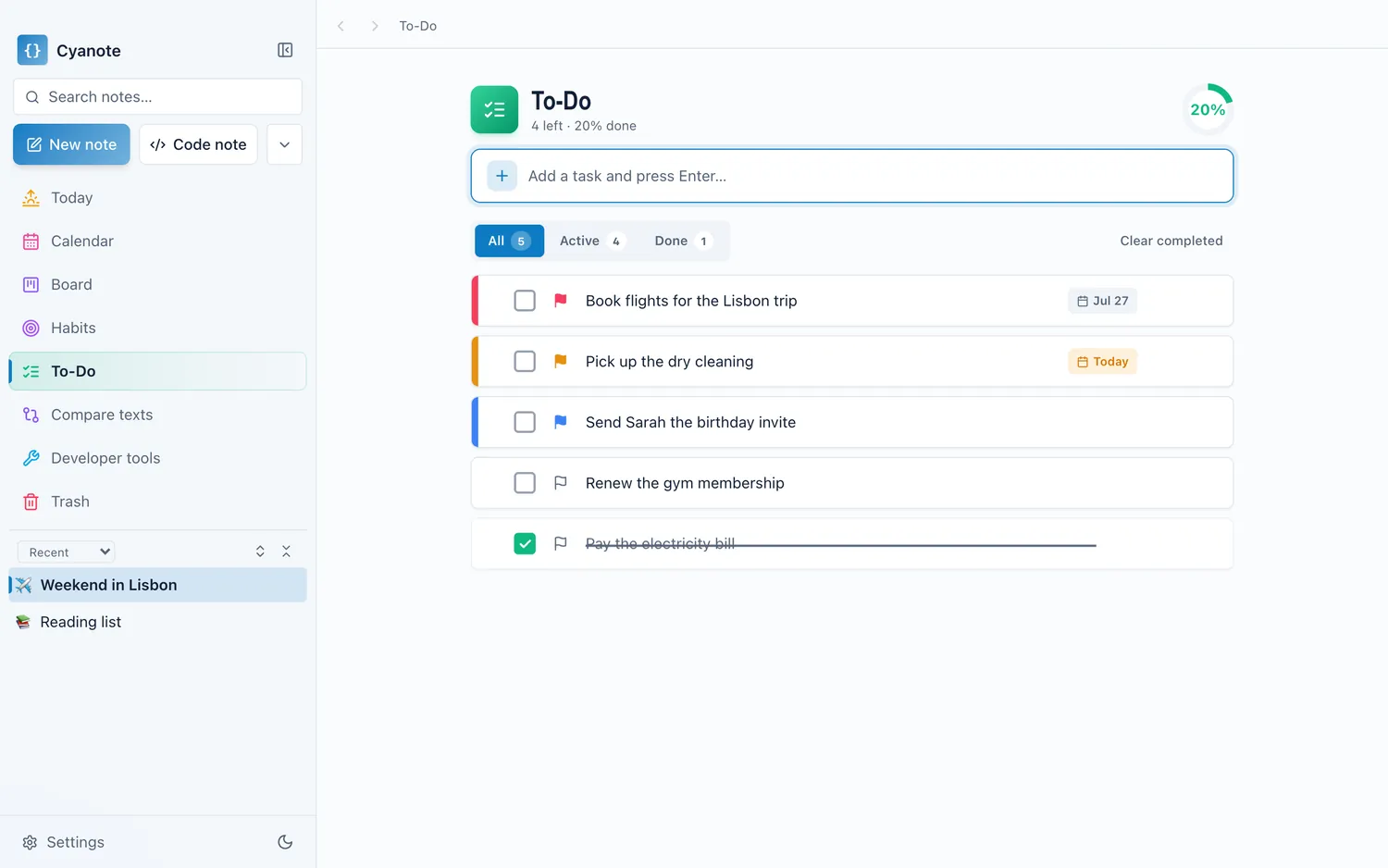
It costs $7.99 once on the Mac, with no subscription and no account. On Windows, where Things doesn't run, Cyanote's to-do list with reminders is a separate $7.99 on the Microsoft Store, and one purchase doesn't unlock the other.
Questions people ask
Is Things 3 a subscription?
No. Cultured Code's FAQ says it's a one-time purchase for each platform and that "there are no subscriptions". Sync through Things Cloud is included.
Is Things 3 a one-time purchase for all devices?
No. You buy it separately for each kind of device: $49.99 on the Mac, $9.99 on iPhone and $19.99 on iPad. Apple Watch is included with the iPhone app. Family Sharing lets up to six family members use each app.
Does Things 3 have a free trial?
On the Mac, yes. It runs for 15 days with all features, and the app goes read-only afterwards. Cultured Code doesn't offer a trial on iPhone, iPad or Vision.
Does Things 3 work on Windows or Android?
No. The FAQ lists Windows, Android, Linux and web browsers as places it won't work, and you can't view your to-dos without the app on a supported Apple device.
Is Things 4 coming?
I found no official announcement as of 7 November 2026. The only paid precedent is the move from Things 2 to Things 3 in 2017, which Cultured Code described as a paid update.