You copy a paragraph out of a web page — a booking reference, half an email, someone's address — and you want to look at it as text before it goes anywhere else. Not in the font the website picked, not carrying whatever invisible formatting came with it. Just the words, in a window, for about forty seconds.
On Windows that was Win+R, notepad, Enter, paste. The window opened before you had finished deciding to open it, the formatting fell off on the way in, and when you were done you closed it and clicked Don't Save without a thought.
On a Mac the obvious move is TextEdit, and the paste arrives still wearing its original typeface. That is the moment most people go looking for a notepad app for Mac, and the honest answer is that macOS ships nothing that does exactly this. The near-equivalents each fail in a specific, nameable way, and knowing which failure you can live with is most of the decision.
What people are actually asking for
Almost nobody wants Notepad the program. What they want is four properties that happened to arrive together in it, and they are worth naming, because they are the criteria for everything below.
It opens before you have finished deciding to open it. Not fast for an application — instant, the way a menu is instant. Any delay and you stop using it for forty-second thoughts, which is what it was for. I have written about this threshold elsewhere; it is the property people notice last and miss first.
It has no name and no home. You never told Notepad what the thing was or where it lived. There is nothing in the flow that asks.
It has no formatting. Not "formatting you can turn off" — none available, so pasted text arrives stripped and stays stripped. This is why people used it as a laundry for the clipboard.
You can throw it away without a decision. Don't Save was the normal ending, not a failure state. Nothing accumulated. Nothing needed tidying.
Four properties. Now the options.
TextEdit
What it is genuinely good at: it is already installed, it opens quickly, it handles large files far better than Notepad ever did, and once configured it is a perfectly good plain-text editor. For a lot of people this is the whole answer, which is why it is first.
Where it lets a Notepad user down: two places, one fixable and one not.
The fixable one is the rich text trap. New TextEdit documents are rich text by default, so pasting brings the source's fonts, sizes and colours with it. Two fixes: Format ▸ Make Plain Text converts the document in front of you (⇧⌘T), and to change it for good, open TextEdit's settings — TextEdit ▸ Settings on current macOS, TextEdit ▸ Preferences on older versions — go to the New Document tab and set Format to Plain text. Every new window is then plain text and every paste arrives as words. Do this in the first five minutes of owning a Mac.
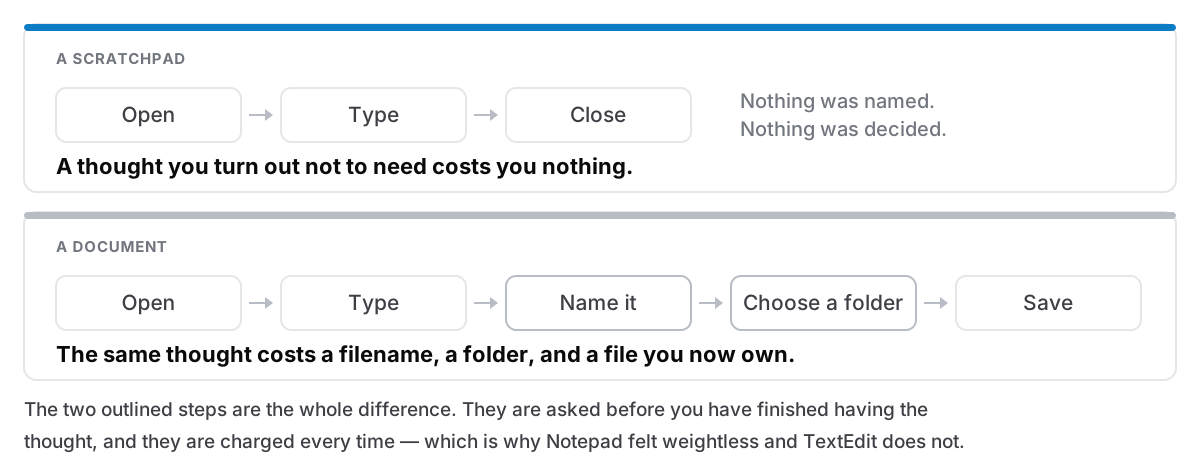
The unfixable one is that TextEdit is document-based, and that is not a setting. Every window is a file that does not exist yet. Close one and you are asked to name it and put it somewhere; that is macOS behaving correctly for a document editor, and it is exactly the ceremony Notepad did not have. Whether an unsaved window comes back after a restart depends on your Mac's window-restore settings, which is not a guarantee worth leaning on for something you care about.
So TextEdit gives you three of the four properties and charges you for the fourth, once per thought.
Stickies
What it is genuinely good at: it is the closest thing in spirit that Apple ships. A new note is one keystroke, it sits on the desktop, it needs no filename, and it survives a restart without being saved. For four or five live things — a phone number, a code, the thing you are about to type into a form — it is better than TextEdit and most people have forgotten it exists.
Where it lets a Notepad user down: it does not scale, in two directions. It is rich text, so a paste arrives formatted unless you remember Paste and Match Style. And it has no list — the notes are windows, so twenty of them is twenty windows, and finding one means looking at all of them. There is an Edit ▸ Find that can search across notes, but the result is a cursor landing in a window, not a set of results you can scan. It is a desktop, not a collection. If a desktop is what you want, I wrote up how to get the most out of Stickies.
Apple Notes
What it is genuinely good at: it is a good notes app, free, syncs to the phone, searches well, and Quick Note — from a hot corner or a shortcut — is genuinely close to the gesture you are looking for.
Where it lets a Notepad user down: it is rich text throughout, with no plain-text mode at all, which is the opposite of the property you came for. It is built around iCloud by default, though this one is fairer than most articles admit — Notes has an On My Mac account you can enable in its settings, and notes there stay on the machine. The real mismatch is the last property: Notes is a place things are kept. Everything you type joins a permanent list that you will eventually feel obliged to sort. That is a virtue for notes and the wrong shape for scratch, and it is why people end up with a folder called "Untitled" with sixty entries in it. If you want a version of that you never feel guilty about, that is a different idea entirely.
The Terminal route
What it is genuinely good at: if you are comfortable in a shell, macOS already ships the exact tool for the original problem. pbpaste prints the clipboard as plain text. So pbpaste on its own shows you what you copied with the formatting gone, pbpaste | pbcopy puts it back stripped, and pbpaste >> ~/scratch.txt appends it to a file you never have to name again. Three commands, no application, no window to close.
Where it lets a Notepad user down: it is not a window you can look at and edit. It handles stripping and appending, not thinking. And if you are not already a terminal user, "learn a shell" is not an answer to "I want to paste something".
Third-party text editors
What they are genuinely good at: BBEdit, VS Code, Sublime and the rest are excellent, and several are free or free enough. If you write code or edit configuration files, install one and stop reading — they are better at that job than anything else here.
Where they let a Notepad user down: they are editors, not scratchpads, and the distinction is the whole article. They open into a project, or a folder, or a window with tabs; they want to know what file you are working on. Worth noting on the specific point: BBEdit does have a Scratchpad, a persistent document that needs no saving and is the closest single feature to what you are after — and it is one of the things reserved for the paid licence, not the free mode. That is a fair thing to charge for, and a signal that the feature is not a rounding error.
The distinction nobody explained when you switched
A scratchpad and a document are not the same object, and Windows blurred the line so effectively that most people meet the difference for the first time on a Mac.
A document is a thing you own. It has a name and a location, it appears in backups, it can be found later, and it persists because you decided it should. All of that is correct behaviour for a document, and it is why TextEdit asks.
A scratchpad has none of that, and its whole value is the absence. The reason Notepad felt weightless is not that it was small or old or ugly. It is that it never asked you to decide whether to keep anything. The decision cost is the tax, and it is charged per thought, which is why it stops you writing down the small ones.
Which gives a specification, if you are going shopping. A Mac scratchpad has to open instantly, from one keystroke, anywhere; it has to be plain text by default so a paste is a paste; it has to survive quitting and restarting without you saving anything; and it has to be searchable later, because the thing about scratch is that roughly one line in twenty turns out to have mattered. That last one is the requirement people forget, and it is the one that turns a pile of scratch into something you can actually use — search that works on the body text, not on filenames you never wrote.
If the underlying problem is really the clipboard — you paste the same things repeatedly, or you want to see what you copied twenty minutes ago — then a scratchpad is the wrong tool and a clipboard history is the right one. They get confused constantly, because Notepad was doing both jobs badly at once.
What I would actually do
If you have just moved from Windows: open TextEdit, set new documents to plain text, and use it for a fortnight. For a lot of people that is genuinely the end of it — the formatting problem was the real problem, and the save prompt turns out to be a shrug rather than an obstacle. Do not spend a weekend evaluating notes apps to solve something a settings checkbox fixed.
If after two weeks you notice you have stopped writing things down — that the small thoughts are not getting captured because a save dialog is standing between you and them — then the save prompt was the real problem, and you want something built as a scratchpad rather than an editor. That is a different category of app, and it is worth knowing that it is a category before you go looking.
One more thing worth settling early, since it decides what you buy: whether you want plain text on disk or something richer. It is a smaller decision than it looks, and for scratch the answer is almost always plain.
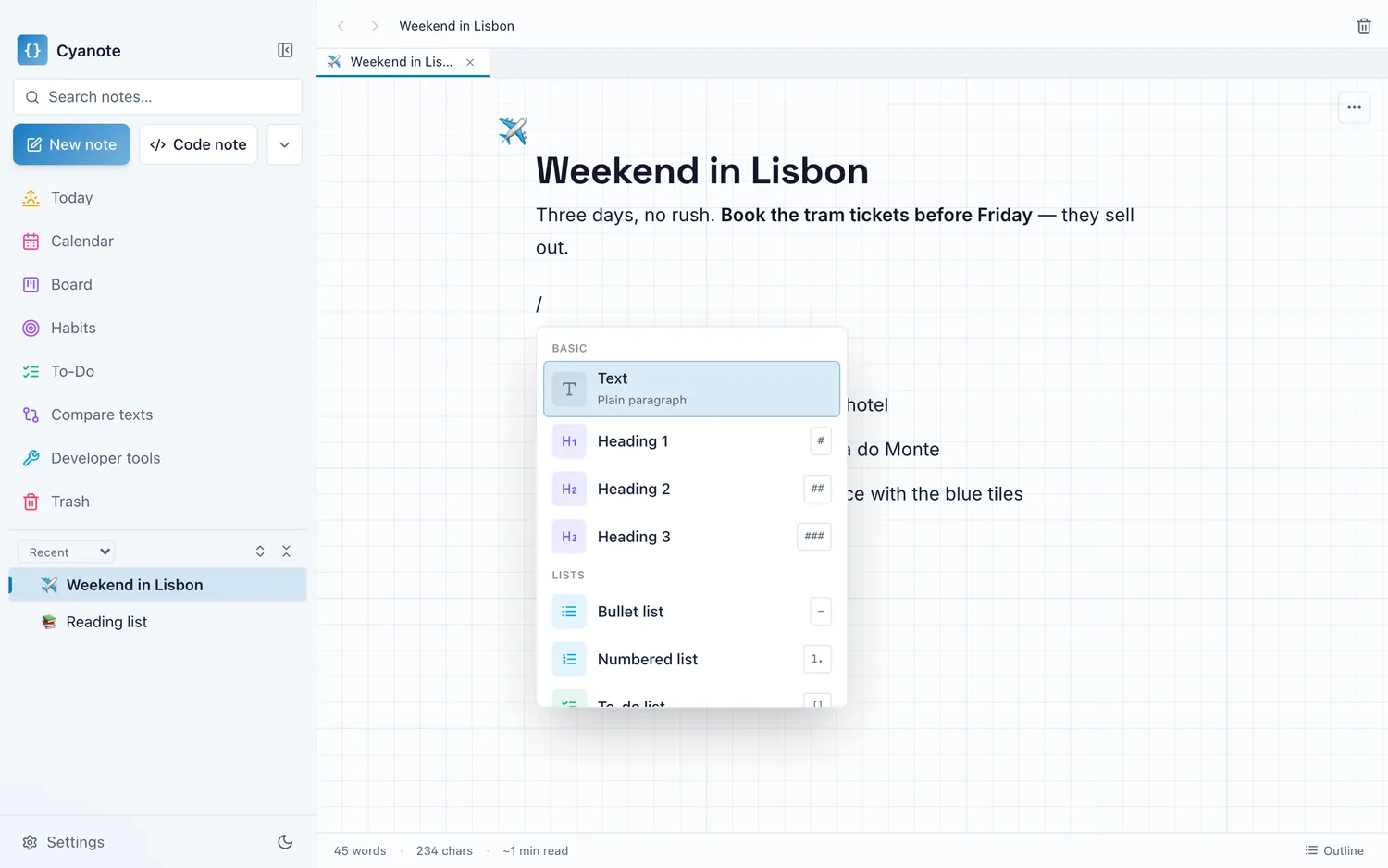
Cyanote is the version of this I built: it opens from a keystroke, everything lives in one file on your own Mac with no account, and search runs over the text rather than the titles. It is $7.99 once. But if TextEdit set to plain text is doing the job, keep it — that is not a consolation prize, it is the correct answer to the question most people are asking.