You type a password into a note. You lock the note. The app shows the lock screen, asks for your password, and refuses to show the content without it.
On disk, in the version before 1.0.3, the plaintext was sitting right there beside the encrypted copy. Searchable. Showing as the note's own title in the sidebar.
It took two numbers to produce, and they are the most instructive pair in the whole codebase.
500 against 138
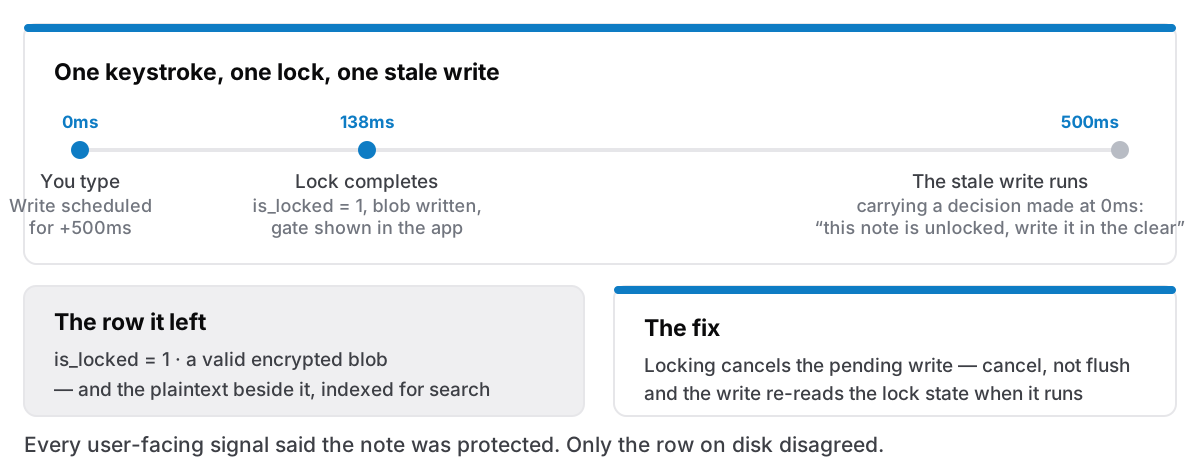
Typing in a note does not write to the database on every keystroke. It schedules a write 500 milliseconds later, and each new keystroke pushes that out, an ordinary debounce, in every editor ever built.
The save function decided, at the moment it was scheduled, whether the note was locked. If unlocked, write the plaintext. If locked, encrypt. Sensible-looking code. The decision was captured in a closure, and the closure ran half a second afterwards.
Locking a note took about 138 milliseconds, measured.
So: you type. A write is scheduled for 500ms from now, carrying a captured decision that says this note is unlocked, write it in the clear. At 138ms you finish locking. At 500ms the stale closure runs and does exactly what it was told half a second ago.
The row it left behind: is_locked = 1, a valid encrypted blob, and the plaintext in content_json and content_text beside it. Both true at once.
Why that was worse than it sounds
Plaintext on disk under a lock is bad enough. The full-text index is what made it serious.
Cyanote's search index is kept in step with the notes by triggers. A write to content_text fires the trigger. So the secret was not merely on disk. It was indexed, and a search for a word inside a locked note would find it, without the password, while the note itself still showed the lock gate.
The sidebar draws a note's title from the same text. Whatever you had typed in those last few seconds became the note's visible title.
None of that is subtle once you see it, and none of it was visible from inside the app. The interface was completely honest: the lock was on, the gate appeared, the password was required to open it. Every user-facing signal said the note was protected. The disk disagreed.
The same bug, pointing the other way
Chasing the leak turned up its mirror image, which lost data instead of exposing it.
"Lock now" deleted the in-memory session key synchronously. If a write was already queued, it ran a moment later, found no key, and hit the guard that stops a locked note being written in the clear. The guard worked. The edit was dropped: no toast, no retry, gone.
Unrecoverable, too, and for a deliberate reason: the app keeps an unsaved snapshot to recover from a crash, and that snapshot is withheld for locked notes, because a plaintext recovery file for an encrypted note is the same bug in a different place. The safety mechanism removed the safety net.
So one race leaked the last words you typed, and one lost them. Both from the same root: a decision about lock state made at schedule time and acted on at run time.
The fix, in three parts
Locking cancels the pending write rather than flushing it. This is the part I got wrong in my first attempt. Flushing feels safer. Do not lose the edit, write it first, then encrypt. But flushing writes plaintext to disk on the way past, which is precisely the thing being fixed. The newest text is already going into the encrypted blob, because locking reads the live editor content. So the pending write has nothing to contribute and everything to leak. Cancel it.
Ending a session flushes before the key goes. The opposite order, for the opposite reason. Here the note stays locked and the key is being dropped from memory; the queued write can still be encrypted, so let it complete first.
And the write closures now re-read the lock state when they run, instead of trusting the flag they captured. This is the actual fix; the other two are the specific paths. Any decision that can change during a debounce window must be made inside the window, not before it. That one line also covers the case I would never have thought to test: a write queued while the note was locked, running after the lock was removed.
What I actually take from this
Two independent representations of one fact will disagree. is_locked said one thing, the presence of plaintext said another, and nothing in the schema prevented both being true. The lasting fix would be a shape where they cannot both exist, where the encrypted blob and the plaintext columns are not simultaneously expressible. I have that on the list, and I am aware that "check it more carefully" is a weaker answer than "make it impossible", which is the lesson from the clipboard arriving again in a different costume.
A debounce is a promise to act on stale information. Every scheduled callback in a UI carries a snapshot of the world from before the user's most recent action. That is what it is for. Any security decision inside one is a decision made in the past about a present it cannot see.
The interface being right is not evidence. Everything on screen behaved correctly throughout. If I had verified this the way a user would — lock a note, confirm it asks for a password — it passes. It only appears if you look at the row on disk, which is why the check that now guards it queries the database directly and asserts the plaintext columns are empty.
This shipped in 1.0.3, where the public note reads: locking a note now keeps everything you just typed, including the words written in the moments right before you locked it. True, and about a tenth of the story. The changelog is deliberately vague about which code paths were unreliable, which is the right call for a public release page, and the reason a blog exists is so the full version has somewhere to go.
If you use locked notes: this was fixed before the app went on sale, in the 1.0.x series, and the note protection design covers what the lock does and does not claim.