Every app ships a page of keyboard shortcuts and almost nobody reads it twice. Not through laziness, but because a list of forty is unlearnable, and a shortcut you have to look up is slower than the mouse it was meant to replace.
The useful version is much smaller. In practice, four shortcuts carry nearly all the value in any app of this kind, and everything past those four is a rounding error you can pick up over years or never.
Why the mouse costs more than it looks
Not because moving your hand is slow. It is about a second, and a second is nothing.
The cost is that reaching for the mouse breaks the sentence. You were mid-thought, the thought needed a new note, and getting there involved leaving the keyboard, finding a target, clicking it, and coming back. The thought survives that about two thirds of the time.
Which is the same argument as an app that opens instantly: the loss is not measured in seconds, it is measured in the things that did not get written down because the route to writing them involved a detour.
The four that matter
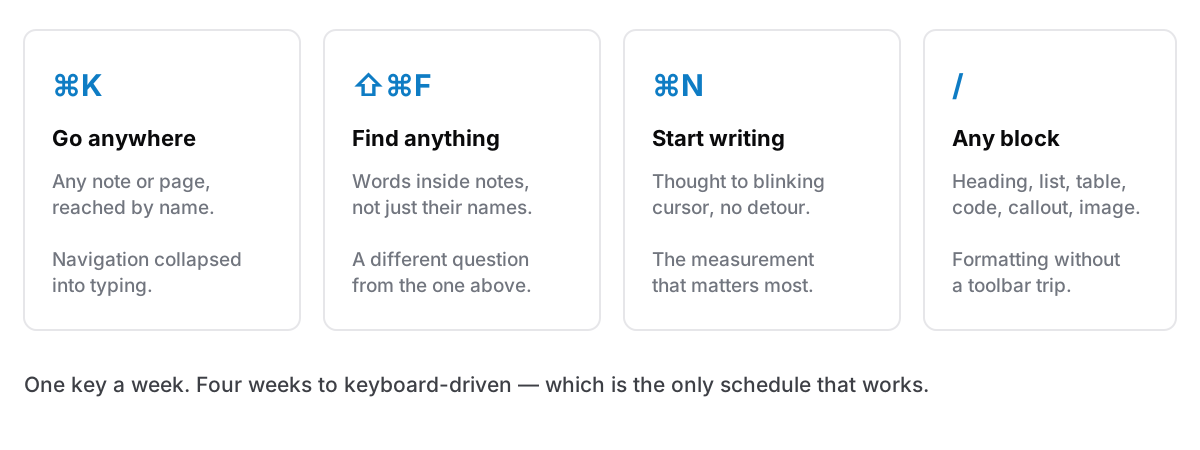
A command palette. One shortcut, type a few letters, go anywhere — a note by name, a page, a setting. This is the single highest-value key in any modern app, because it collapses the entire navigation surface into one thing you already know how to use: typing. Almost universally ⌘K.
Search across everything. Distinct from the palette, and worth its own key. The palette finds things by name; search finds them by what is inside them. Usually ⇧⌘F. Both matter for different questions, and having one bound to the other's job is a common small frustration.
New thing, immediately. ⌘N. The distance between "I should write that down" and a cursor blinking in an empty note is the most important measurement in the app, and this key is most of it.
A slash menu inside the editor. Type / and reach every block type — heading, list, table, code, callout, toggle, image — without a toolbar. This is the one that makes formatting keyboard-native rather than keyboard-adjacent, and it is the difference between writing a structured note without lifting your hands and writing a plain one because the alternative was a mouse trip to a toolbar.
Those four, and you are effectively keyboard-driven. Anything else you learn is optimisation.
The ones worth adding later
Once the four are automatic, these earn their place, and not before, because learning them alongside the first four is how people end up learning none.
Today's note. A key that opens or creates today's daily note removes the last decision from capture: there is always somewhere to put a thing, and no thought about where.
Focus mode. Hide the sidebar and the chrome. Small, and it changes how the app feels to write in for long stretches.
Back and forward. Once notes link to each other, navigation becomes browsing, and browsing without back is miserable.
Find within the note. ⌘F, distinct from searching everything. Obvious in retrospect, frequently overlooked.
Global hotkeys are a different category
A shortcut inside an app only works when the app is in front. A global one works from anywhere, and that difference is bigger than it sounds. A global key means the app can do something for you without you going to it.
The clearest example is clipboard history: a key that opens a small window over whatever you are in, lets you pick, pastes into that app and gives the foreground back. You never visited the notes app; it visited you. That is the whole design requirement for anything meant to be used mid-task.
Two cautions. Global hotkeys are a scarce shared resource. Every app on your Mac is competing for the same combinations, and a conflict presents as one of them silently not working, which is a genuinely annoying thing to debug. And any app that can paste into another app needs macOS Accessibility permission to do it, which is a real permission you should understand before granting.
Anything global should be rebindable. If it is not, one conflict is unfixable.
How to actually learn four keys
Not by reading the list. By having a rule.
Pick one, use it for a week, ignore the rest. One key per week means four weeks to keyboard-driven, which is a slower schedule than anyone wants and the only one that works.
When you catch yourself reaching for the mouse, stop and look up the key for that one action. Once. Immediate, specific and in context. That is how nearly every shortcut anyone actually knows was learned.
Bind the ones you have to think about. If a default combination is awkward on your keyboard or your layout, change it. A shortcut you have to contort your hand for is a shortcut you will not use, and there is no prize for keeping the defaults.
Do not learn a shortcut for something you do monthly. Genuinely. The mouse is fine for rare things, and cluttering your memory with rare bindings is what makes people give up on shortcuts altogether.
The honest version
Keyboard-driven is not a virtue in itself, and there is a strain of this that tips into performance: people who have memorised sixty bindings and are not writing more than anyone else.
The reason it matters at all is narrow: the gap between having a thought and having somewhere to put it. Four keys close that gap. Sixty do not close it any further.
Cyanote is built for those four: ⌘K for the command palette, ⇧⌘F for full-text search across every note, ⌘N for a new one, and / inside the editor for every block type, from headings, lists, quotes and tables to tick boxes, images, callouts, toggles, and code with syntax highlighting. Then ⇧⌘D for today's daily note, ⌘\ for focus mode, ⌥← and ⌥→ for back and forward. Three hotkeys work from any app on the Mac: ⌥⇧V for clipboard history, ⌥⇧B for pinned snippets, ⌥⇧C to bring the window to the front. All of them are rebindable in Settings, because a shortcut you cannot change is a shortcut somebody else chose.