Yes, Apple Notes are encrypted, but on the default settings Apple holds the keys and can decrypt them. Apple's iCloud data security overview lists Notes under Standard Data Protection as encrypted "in transit & on server", with the keys held by Apple. Your notes become end-to-end encrypted, unreadable to Apple, in only two cases. One is turning on Advanced Data Protection for your whole iCloud account. The other is locking an individual note with a password.
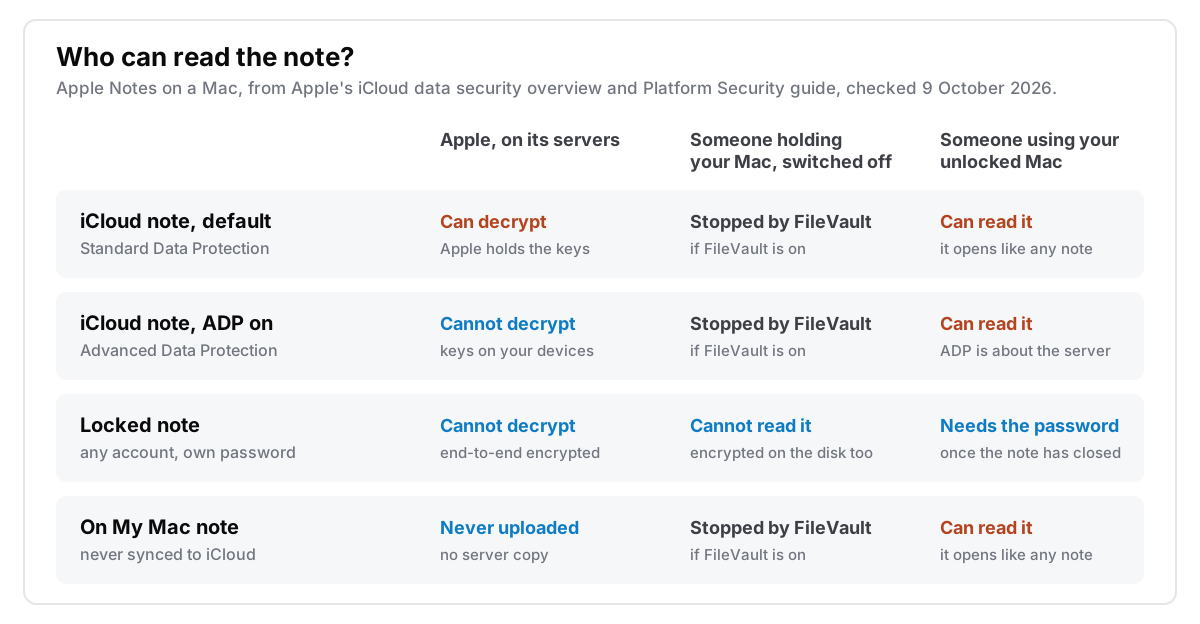
Only the second, the locked note, also protects it from someone using your Mac while it's unlocked. And a note kept "On My Mac" never reaches Apple at all. Most of the confusion comes from these being four separate answers that people treat as one.
I make Cyanote, a notes app that stores everything on your own disk, so I have an obvious angle here. Apple Notes is a good app with strong encryption options. What follows is what each setting actually does, checked against Apple's own documentation on 9 October 2026.
The short version
- Default iCloud notes are encrypted, but not end-to-end. Under Standard Data Protection, Apple's overview says it "can decrypt your data on your behalf whenever you need it."
- Advanced Data Protection makes iCloud notes end-to-end encrypted. It is optional and off unless you turn it on. It needs every device on your account updated and a recovery contact or recovery key, and Apple no longer offers it to new users in the UK.
- A locked note is end-to-end encrypted under either setting. It is the only option that also protects the note from someone at your unlocked Mac. Some notes can't be locked: shared notes, notes with tags, Quick Notes, and notes with a PDF, document, audio or video attached.
- "On My Mac" notes are never uploaded, so Apple's keys don't come into it. On disk, an unlocked note isn't encrypted by Notes itself; FileVault is what encrypts it at rest, if you've turned it on.
- If you forget a separate Notes password, Apple can't recover the notes it locked. That is what end-to-end encryption means.
What does "encrypted" mean for an iCloud note?
Apple encrypts every iCloud note. What matters is who holds the key. Apple's iCloud data security overview, updated January 2026, gives each kind of iCloud data two settings:
| Data | Standard Data Protection (default) | Advanced Data Protection |
|---|---|---|
| Notes | In transit and on server; Apple holds the keys | End-to-end; keys on your trusted devices |
| iCloud Backup | In transit and on server; Apple holds the keys | End-to-end; keys on your trusted devices |
| iCloud Drive | In transit and on server; Apple holds the keys | End-to-end; keys on your trusted devices |
From Apple's iCloud data security overview, retrieved 9 October 2026.
"In transit and on server" means the note is encrypted on its way to Apple and while it sits in Apple's data centres. That protects it from someone intercepting your connection, and from someone who steals a disk out of a server rack. Because Apple keeps the keys, though, Apple itself can read it. Apple presents this as a feature: it is what lets you lose every device you own, sign in on a new one, and still get your notes back.
The same page shows that Apple already end-to-end encrypts some things by default. Under Standard Data Protection, 15 categories get it as of October 2026, including Health data and passwords in iCloud Keychain. Notes is not one of them.
What Advanced Data Protection changes for Apple Notes
Advanced Data Protection moves the Notes keys from Apple to your own devices. Once it is on, Apple's overview lists Notes as end-to-end encrypted, with the keys held on your trusted devices. The number of end-to-end encrypted categories goes from 15 to 25, and iCloud Backup and iCloud Drive are among the additions. Apple calls it "an optional setting", so nothing changes unless you go and turn it on.
Apple's setup page lists what it needs:
- Two-factor authentication on your Apple Account, and a passcode or password on your devices.
- Every device signed in to that account updated to at least iOS 16.2, iPadOS 16.2, macOS 13.1, watchOS 9.2, tvOS 16.2, HomePod 16.0 or iCloud for Windows 14.1. An old iPad in a drawer can block it.
- A recovery contact or a recovery key. Apple can't reset your access for you any more, so one of those has to be able to.
- It isn't available for Managed Apple Accounts or child accounts.
Two catches before you count on it.
It doesn't cover everything about a note. The same overview notes that some metadata stays under Standard Data Protection, including when a note was created, last modified and last viewed. Apple still encrypts that metadata, but it holds the keys. The contents are protected; the timestamps are not end-to-end.
It isn't available everywhere. In February 2025 Apple withdrew the feature in the UK, and its support article says Apple "can no longer offer Advanced Data Protection in the United Kingdom to new users." People in the UK who already had it have to turn it off themselves. So if you are in the UK, the default is the only option for an iCloud note you haven't locked.
What Advanced Data Protection does not change is your Mac. On your own machine the note is just as readable as before to anyone sitting at it while you are logged in. The protection is about the copy on Apple's servers.
What locking a note does
Locking a note encrypts it with a password only you know, everywhere it is stored. Apple's Platform Security guide says locked notes are "end-to-end encrypted using a user-provided passphrase". The note and its supported attachments are encrypted with AES-GCM, and the key is derived from the passphrase with PBKDF2 and SHA-256. That applies whether your account is on Standard or Advanced Data Protection, and to notes stored on your Mac as well as in iCloud.
It is the only option that protects a note on your own Mac while you are logged in. If someone borrows your unlocked laptop, the note stays encrypted until they type the password, as long as it has closed again. Notes closes locked notes after a period of inactivity or when you quit it, and the Lock button next to the search field closes them straight away. I go through the three layers involved, the login password, FileVault and the locked note, in how to password-protect a note on your Mac.
The limits are in Apple's Lock your notes guide, and they rule out more notes than people expect. You can't lock:
- a note you've shared with other people,
- a note with a video, audio file, PDF or document attached,
- a note with tags,
- a Quick Note.
The Platform Security guide makes the same point from the other side: only notes that aren't locked can be shared. So a shared shopping list, or a note with a scanned contract attached, sits outside the strongest protection Apple Notes has.
Before you lock anything important, two more details from Apple's documentation:
- A forgotten password is final. If you set a separate Notes password, forget it, and can't use Touch ID, Apple's guide says "Apple can't help you regain access". You can use your Mac's login password instead, which most people find easier to remember. For iCloud notes that also needs two-factor authentication and iCloud Keychain.
- Resetting the password only affects new notes. According to the Platform Security guide, notes you locked before a reset still need the old passphrase. Save it in your password manager the moment you create it.
What about notes stored "On My Mac"?
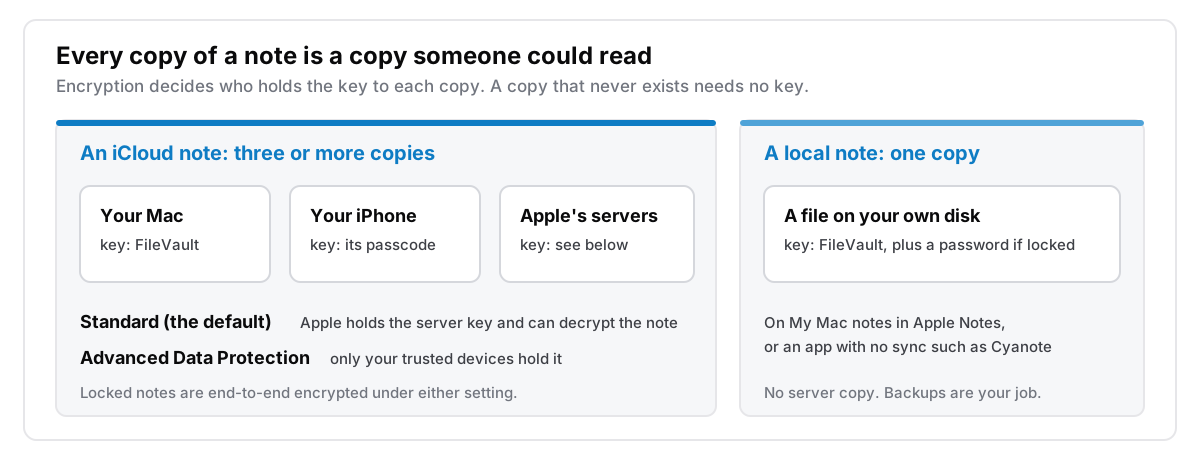
If you turn on the "On My Mac" account in Notes, notes in it are stored only on your Mac and never go to iCloud. Apple's keys don't apply to them, because Apple never receives a copy.
On disk, those notes live in a database inside ~/Library/Group Containers/group.com.apple.notes/. The developer of an open-source forensic parser for that database describes note contents as compressed rather than encrypted, and the tool needs a password only for locked notes. I haven't found an Apple document that says otherwise. On a Mac, an unlocked local note is protected at rest by FileVault, if it's on, the same as everything else in your home folder.
That is a reasonable arrangement, and it is how many local apps work, mine included. It does mean FileVault matters more than any notes setting. Apple's FileVault guide shows where to check it: System Settings, then Privacy & Security, then FileVault.
Which setup should you use?
Pick the case that matches the note:
- Ordinary notes you want on your phone. The default is fine for most people. Apple can technically read them, but the threat model behind that is a legal request or a breach at Apple, not your housemate.
- You'd rather Apple couldn't read any of it. Turn on Advanced Data Protection if you're outside the UK and every device on your account is up to date. Set up the recovery contact or recovery key first. The one switch covers iCloud Backup and iCloud Drive as well.
- A handful of sensitive notes. Lock them, whichever iCloud setting you use. Recovery codes, medical details, private details about other people. It's the only setting that also covers your unlocked Mac.
- Notes that should never leave this Mac. Use an "On My Mac" account, or an app that has no server at all. Turn on FileVault and keep a backup, because nobody else holds a copy.
Whichever you pick, count the copies of the note, as in the diagram above, and check who holds the key to each one.
Where Cyanote fits
Cyanote is the last case on that list, built as a whole app rather than a single folder. Your notes, tasks, calendar and clipboard history sit in one database file on your own disk. There is no account, no sync and no server, so there is no copy on anyone else's computer for anyone to hold a key to. I explain the general idea in what local-first actually means.
Any note can be locked with its own password. The body is encrypted with AES-256-GCM, using a key derived from your password with PBKDF2 and SHA-256, which is the same family of methods Apple uses. The password itself is never stored. The note's title stays readable in the sidebar so you can find it. Like Apple, I can't recover a locked note if you forget its password, because there is nothing on my side to recover it from.
Three things Cyanote doesn't do:
- Unlocked notes are not encrypted separately inside the database. Like "On My Mac" notes in Apple Notes, they rely on FileVault. Turn it on.
- There is no iPhone app and no sync. If you need a note on your phone, Apple Notes with Advanced Data Protection is the better choice, and I'd say so if you asked.
- Backups are your job. A local file has no server copy to restore from. Time Machine covers it, and there is more in how to back up notes that live on your own computer.
Cyanote is $7.99 once on the Mac through Lemon Squeezy, with no subscription and no account. Windows is a separate $7.99 purchase on the Microsoft Store; one doesn't unlock the other. Details are on the pricing page.
Common questions
Can Apple read my notes?
On the default Standard Data Protection, technically yes. Apple holds the keys to iCloud notes and says it can decrypt them on your behalf. With Advanced Data Protection on, or for a locked note under either setting, it can't. Notes in an "On My Mac" account are never sent to Apple.
Is Apple Notes end-to-end encrypted?
Locked notes always are. Other iCloud notes are end-to-end encrypted only if you've turned on Advanced Data Protection for your Apple Account, which is off unless you enable it.
Does Advanced Data Protection protect notes on my Mac?
No. It changes who holds the keys to the copy on Apple's servers. Anyone using your unlocked Mac can still open an unlocked note. For that, lock the note, and use FileVault for a Mac that's switched off.
If you're weighing whether to move notes out of iCloud altogether, iCloud Notes, explained properly covers how the accounts and folders work, and when it is actually worth moving off Apple Notes is the honest case for staying put. If you also keep notes in Notion, is Notion private? asks the same questions of it.
Quick Notes are Apple Notes that cannot be locked; see Quick Note on Mac for where they are saved.