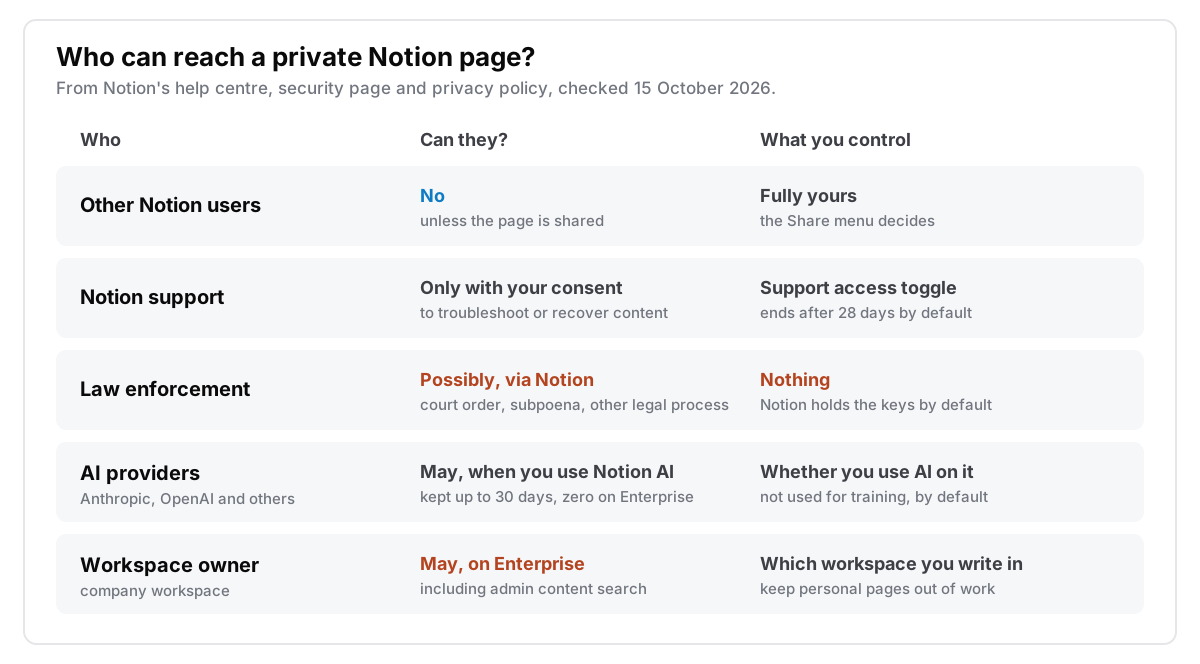
Notion is private from other people, but not from Notion. Your private pages are invisible to other users unless you share them. They are also encrypted on Notion's servers, but by default Notion holds the keys, and it does not claim end-to-end encryption anywhere on its security page. So Notion can technically read a page. Its own documents describe a handful of routes to one: support access you grant, internal access limited to need-to-know, legal and safety requests, Notion AI, and, on a company Enterprise workspace, your employer's workspace owner.
I make Cyanote, a notes app that keeps everything on your own disk, so I have an angle. Notion is a well-run service with serious security certifications, and for a lot of work it is the right home. What follows is what Notion's own documentation says, checked on 15 October 2026, and where that leaves a page you would rather nobody else read.
The short version
- Encrypted, not end-to-end. Notion's help centre says data is encrypted at rest with AES-256 and in transit with TLS 1.2 or greater. By default, Notion holds the keys.
- Support needs your permission. Support can open your workspace only after you turn on support access, and that access ends after 28 days by default.
- Legal process is one route you can't switch off. The privacy policy says Notion may disclose information to comply with law enforcement requests and legal process, "such as a court order or subpoena."
- Notion AI can send your pages to outside model providers. Notion names Anthropic and OpenAI. Outside the Enterprise plan they keep data for up to 30 days, and by default nobody trains on it.
- On an Enterprise workspace, your employer's workspace owner can get at your content. Including through a search that shows pages marked private.
- Page lock is not a privacy feature. It stops edits. It doesn't hide or encrypt anything.
Is Notion encrypted?
Yes, but in the way most cloud services are, not the way a password manager is. Notion's security and privacy help page says customer data is encrypted on Notion's internal networks and "at rest in Cloud storage, database tables, and backups", using AES-256, and that data in transit uses TLS 1.2 or greater. Backups run at least daily. The security page adds that keys are rotated regularly and lists annual audits including SOC 2 and ISO 27001.
That protects a page from someone tapping your connection, and from someone who walks out of a data centre with a disk. It doesn't keep the page from Notion, because the service has to decrypt the page to show it to you in a browser, index it for search, and run AI over it. End-to-end encryption would mean only your devices hold the key. Neither page mentions end-to-end encryption, and the features Notion is built around (search across a workspace, real-time collaboration, AI) are hard to offer without the server reading the content.
Enterprise customers get one more lever. The security page lists the ability to "manage encryption keys" among Enterprise controls. That changes who controls the key. Notion doesn't describe it as end-to-end encryption, and the service still has to read pages to search and display them.
Compare that with Apple Notes, which lets one note be end-to-end encrypted with its own password. I covered that in my post on whether Apple Notes are encrypted. Notion has no equivalent.
Can Notion employees read your pages?
Not routinely. Notion's data access consent page says support "can only access your account or workspace data to troubleshoot an issue or recover content", and that Notion won't view or change anything without your permission. You grant it yourself:
- For your account: Settings, then your name, then Support access.
- For a workspace: Settings, then Security, then Support access. On Enterprise, each grant and change is recorded in the audit log.
Access ends on its own after 28 days by default, and you can turn it off sooner. Internally, the security page describes "least privilege access" that is time-bound and based on need-to-know.
The consent setting covers support. It doesn't cover legal requests. The privacy policy, last updated 29 September 2025, says Notion may "access, preserve, and disclose any information we store in association with you" when it believes in good faith that doing so is required or appropriate, including to comply with law enforcement or national security requests and legal process. That is standard for any service that holds the keys, and it is the route you can least control. I couldn't find a law enforcement guide or a transparency report with request numbers on notion.com, so I can't tell you how often it happens.
What happens to your pages when you use Notion AI?
They can leave Notion for a model provider, for a limited time. Notion's AI security practices page says its models are "hosted by Notion as well as by organizations such as Anthropic and OpenAI". So a request may run on a Notion-hosted model or go to an outside provider, and AI answers that search the workspace can draw on more pages than the one you have open. The terms differ by plan:
| Outside Enterprise | Enterprise | |
|---|---|---|
| Used to train models | No, by default | No, by default |
| Kept by the LLM provider | Up to 30 days, then deleted | Zero data retention |
From Notion's AI security practices, retrieved 15 October 2026.
The exact line is "By default, Notion and its AI Subprocessors do not use Customer Data to train any models." That sentence says "by default". The FAQ also lists a workspace setting called "Share data to improve Notion AI", which workspace owners can change, so check it in your workspace's Notion AI settings rather than assuming. According to the Notion AI FAQ, full Notion AI comes with the Business and Enterprise plans; Free and Plus get a limited trial. So the 30-day retention applies to anyone outside Enterprise, trial users included. Zero retention is only for Enterprise.
AI also opens a different kind of risk, one encryption can't help with. In September 2025, security researchers at CodeIntegrity showed that a PDF with hidden white-on-white text could instruct Notion 3.0's AI agent to collect private data from a workspace and send it to an outside address through its web search tool. Simon Willison's write-up explains why it worked: the agent could read private data, read untrusted content, and talk to the internet. The Decoder reported that Notion responded with better injection detection, approval prompts for suspicious links, and an option for admins to turn off agents' web access entirely. Notion has added defences since, but any assistant that can read your private pages and the internet at the same time gives data a way out. I went through the wider trade in AI features in a notes app, and what they cost.
Can your workspace owner see your private pages?
In a personal workspace, you are the owner, so the question doesn't arise. In a company workspace it depends on the plan, and on the Enterprise plan the answer can be yes. Notion's security and privacy page says that in an Enterprise workspace, your content "may be accessed by the workspace's workspace owner".
The tool for it is admin content search, available only on Enterprise. Owners can search the workspace's content. Each result shows whether a page is private, shared internally, shared externally or shared to the web, and owners can change its permissions. Notion's own warning on that page: "Using this feature may provide workspace owners with access to the personal data of workspace members and guests." Enterprise owners also get an audit log.
So a "private" page in your employer's Enterprise workspace is private from your colleagues, not from your employer. On other plans Notion doesn't give owners a search like this, but it is still the company's workspace. If you keep a journal, job-search notes or health notes in a work workspace, move them to a personal one or out of Notion.
Does page lock keep a page private?
No. Page lock is an editing guard. Notion's page lock guide says that once a page is locked, "no one can make changes to the page's content unless they explicitly turn the lock off", and that anyone with full or edit access can turn it off. The guide doesn't mention passwords or encryption. Anyone who could read the page before can still read it.
If you came looking for a way to put a password on one Notion page, there isn't one built in. Password-protecting a note is a different feature, and I covered how it works on a Mac in how to password-protect a note on your Mac.
Where copies of a Notion page live
Encryption tells you who holds a key. To know who can read a page, you also need to know where its copies are, and who holds the key to each.
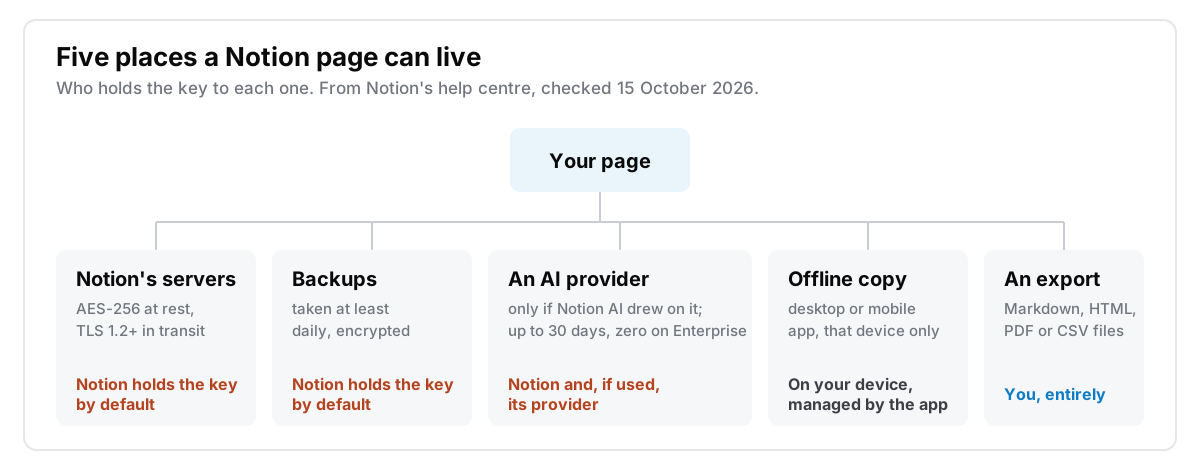
Offline copies. Notion's desktop and mobile apps can now keep pages offline; the offline guide says it isn't available in a browser. On any plan you can download pages one at a time. On paid plans, recently visited and favourite pages download on their own, and databases bring only the first 50 rows of their first view. The guide doesn't say whether the offline copy is encrypted on your device. It is a cache, and the copy on Notion's servers is still the main one.
Deleted pages. Deleting a page doesn't remove it right away. Notion's deletion guide says pages stay in Trash for 30 days by default, and after you empty them from Trash Notion keeps them another 30 days before they become inaccessible. I couldn't find a stated period for how long they stay in backups after that.
Exports. Settings, General, "Export all workspace content" gives you HTML, or Markdown with CSV for databases, plus your uploaded files, as a download link that expires after 7 days, according to the export guide. Pages can also go out as PDF; including subpages in a PDF needs Business or Enterprise. A workspace or teamspace owner can turn exporting off. An export is the only copy where nobody else holds the key, so it is worth making one whatever you decide. I wrote about what survives the trip in getting your notes out.
Which notes belong in Notion?
Decide by what a note would cost you if someone else read it, not by how private it feels:
- Team docs, project plans, wikis, anything shared. Notion is a good home. Collaboration needs a server that can read the pages, and for this kind of material that's a fair trade.
- Your own work notes, reading notes, plans. Fine in a personal workspace. Check that support access is off and skip AI on anything you'd mind leaving for 30 days.
- Anything in your employer's Enterprise workspace that isn't about work. Move it. Admin content search lets the owner review exactly this kind of page.
- Journals, health notes, notes about other people, recovery codes. These belong somewhere no server can decrypt: a locked note in Apple Notes, an end-to-end encrypted app, or an app with no server at all. I wrote about keeping a journal that stays private.
Where Cyanote fits
Cyanote is the last option on that list. Notes, tasks, a calendar and clipboard history live in one database file on your own Mac or PC. There is no account, no sync, no server and no AI features, so there is no copy for anyone else to hold a key to, and no support switch, because I have nothing to look at. Any note can be locked with its own password, which encrypts its body until you type it. The idea behind it is in what local-first actually means.
Where Notion is better, and it is better at a lot:
- Collaboration. Cyanote is for one person. If a page needs comments from three colleagues, it belongs somewhere like Notion.
- Your phone. Cyanote has no iPhone or Android app.
- Databases. Notion's relational databases have no real equivalent in a local notes app. I went through what transfers and what doesn't in what you give up leaving Notion, and the side-by-side is on the Notion alternative page.
- Backups. Notion backs up for you. With a local file, backups are your job.
Cyanote is $7.99 once on the Mac through Lemon Squeezy, with no subscription and no account. Windows is a separate $7.99 purchase on the Microsoft Store, and one doesn't unlock the other. The details are on the pricing page.
Common questions
Can Notion see my private pages?
Technically yes, because by default Notion holds the encryption keys. Support opens your workspace only after you turn on support access. Other internal access is limited to need-to-know, and Notion may disclose data when it believes in good faith that doing so is required or appropriate, including for legal requests. Notion AI may also send page content to an outside model provider such as Anthropic or OpenAI. In an Enterprise workspace, the workspace owner may access your content too.
Is Notion end-to-end encrypted?
No. Notion encrypts data with AES-256 at rest and TLS 1.2 or greater in transit, and by default holds the keys itself. Neither its security page nor its security help page claims end-to-end encryption.
Is Notion safe for journaling?
From other users and from outsiders, yes, as long as it's in a personal workspace and never shared. Not if you mean nobody but you can read it, because Notion can decrypt it and can be compelled to hand it over. For that, use something end-to-end encrypted or something with no server.