Evernote is private from other people, but not from Evernote. Your notes are invisible to other users unless you share them, and they're encrypted on Google Cloud, but with keys Google manages for Evernote. So the service can read a note, and has to, to search it and run AI over it. Its privacy policy says no person at Evernote looks at your content unless you give permission or the law requires it. The only end-to-end encryption Evernote offers covers text you highlight and encrypt yourself, not whole notes, attachments or notebooks.
I make Cyanote, a notes app that keeps everything on your own disk, so I have an angle. Evernote is a mature service with an ISO 27001 certificate and a long record of publishing how it handles legal requests. What follows is what Evernote's own pages say, checked on 17 October 2026, and what that means for a note you'd rather nobody else read.
The short version
- Encrypted, not end-to-end. Evernote's security overview says data at rest is encrypted with AES-256 using "Google-managed encryption keys", and all traffic goes over TLS.
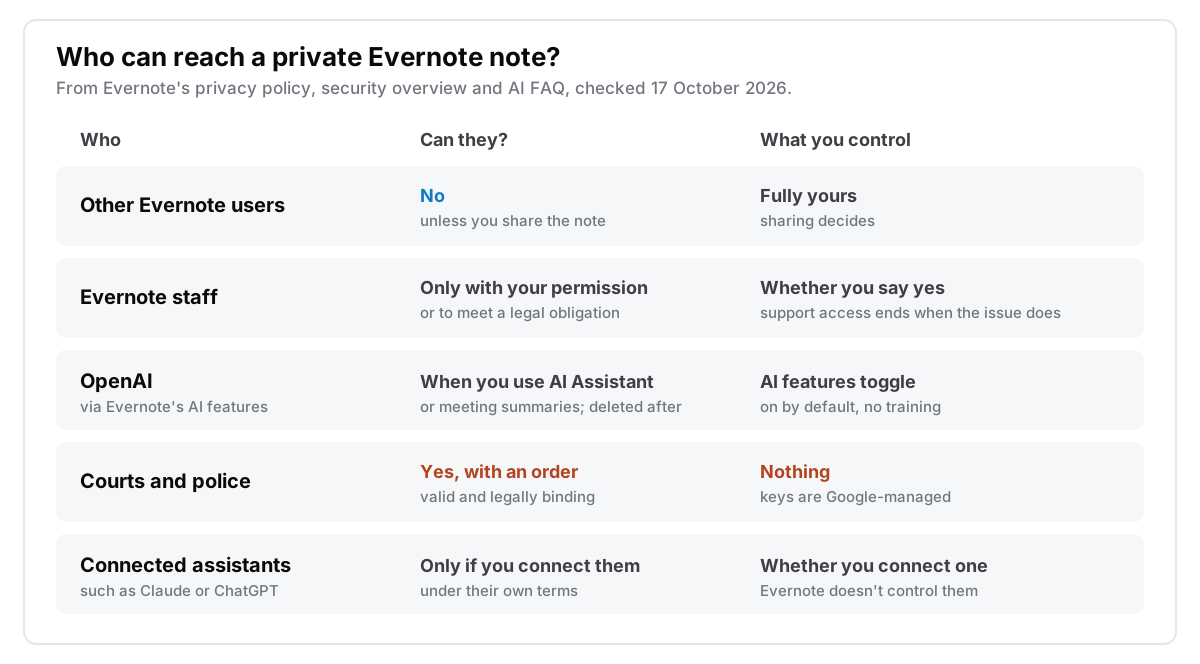
- Staff need your permission, with one exception. The privacy policy says nobody at Evernote can view your content unless you expressly allow it or it's needed to meet a legal obligation.
- AI is on by default, and two features send content to OpenAI. Evernote's AI FAQ says AI Assistant sends the notes it uses, and AI Meeting Notes sends what it needs for a summary. Evernote says OpenAI deletes it after answering, and nothing is used for training.
- Courts can get a note. Evernote discloses content in response to "a valid and legally binding order". In 2023 it handed over data for 8 of 16 US criminal requests.
- Encrypt Selected Text is the only private part. A passphrase Evernote never sees locks the highlighted text. Images, files, tables and checklists can't be encrypted at all.
Is Evernote encrypted?
Yes, the way most cloud services are, not the way a password manager is. The security overview says the service is "entirely hosted on the Google Cloud Platform", and that it uses Google's server-side encryption "with Google-managed encryption keys" to encrypt everything at rest with AES-256. In transit, Evernote forces HTTPS with TLS for all services. It doesn't state a TLS version.
That protects a note from someone snooping on your Wi-Fi, and from someone who walks out of a data centre with a disk. It doesn't protect the note from the service, because Evernote has to decrypt it to show it on the web, to search the text inside your PDFs and photos, and to build the AI index of meaning for every note in your account. The privacy policy says this directly: Evernote's systems "automatically analyze your data to power Evernote features", in a way that doesn't need a person to look.
End-to-end encryption would mean only your devices hold the key. The security overview doesn't claim that for your account as a whole. On the pages I checked, Evernote uses the phrase for one feature only.
What Encrypt Selected Text protects
On the Mac, on Windows and on Evernote Web, you can highlight text in a note, right-click, choose Encrypt Selected Text and set a passphrase. Evernote's security tips page calls this end-to-end encryption, and for that text it is. The key is derived from your passphrase with PBKDF2 and 50,000 rounds of SHA-256, the text is encrypted with 128-bit AES, and Evernote says it never receives the passphrase or the key. If you forget the passphrase, Evernote can't recover the text.
The catch is what it covers. The help article says you can't encrypt an entire note or notebook. The note's title stays readable, and so does everything around the block.
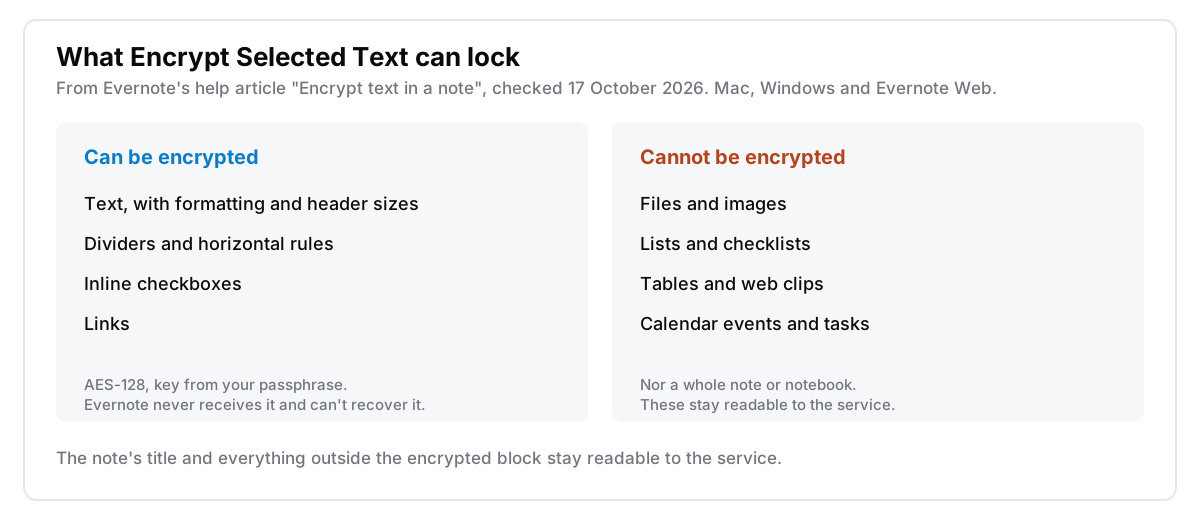
In practice that makes it good for one thing: a short secret inside an otherwise ordinary note, like a door code in a house note or an account number in a travel note. It's poor for a scanned passport, a photo of a prescription or a table of anything.
Can Evernote employees read your notes?
Not routinely. The privacy policy, last updated 1 October 2026, says Evernote limits the use of your content "to make sure that no one at Evernote can view it unless you expressly give us permission or it's necessary to comply with our legal obligations". It names the cases:
- Support. If you ask for help with a specific note, support may ask for temporary permission to look. That permission ends when the issue is resolved. Activity logs you attach to a help request can also contain note and notebook titles, and you can edit those out before sending.
- Improving features. Evernote may ask permission to review parts of your content, and the policy calls that permission completely voluntary.
- Abuse and security. No person is involved here: systems scan emails sent to your Evernote address, and notes you share, for spam and malware.
Internally, the security overview describes least-privilege access that is time-limited, with mandatory two-factor authentication or passkeys on every employee account.
In December 2016 Evernote announced a policy change that would have let employees read notes to check its machine-learning results, with no way to opt out of the human part. After a backlash it reversed course within days, and its then-CEO told TechCrunch "We heard them, and we're taking immediate action to fix it." Today's policy still makes that kind of human review opt-in.
The company behind the policy has changed too. Bending Spoons, an Italian company based in Milan, completed its purchase of Evernote in January 2023, according to its legal advisers. The privacy policy now names Bending Spoons S.p.A. as the data controller, while saying synced notes are stored on servers in the United States.
Does Evernote AI send your notes anywhere?
Some of it does. According to Evernote's AI features FAQ, checked on 17 October 2026:
- AI Assistant sends your chat, plus any notes it selected or found by search, to OpenAI. Evernote says OpenAI deletes that data as soon as it answers and doesn't train on it.
- Semantic Search runs on Evernote's own models. It builds embeddings, numeric summaries of what each note is about, for every note in your account, including text read out of attachments. They stay on Evernote's servers.
- AI Meeting Notes transcribes with Evernote's own models, but the content needed for the summary is sent to OpenAI, under the same delete-after-answering terms.
All three are switched on by default. You can turn each one off in Settings, then Preferences, then AI features on the desktop and web, or Settings, then AI features on mobile. The privacy policy adds that Evernote doesn't use your input or output to train its own models or a provider's.
One more route is separate from all of this. If you connect an outside assistant such as Claude or ChatGPT to your Evernote account, the privacy policy says that service's own terms govern what it does with your notes, and Evernote doesn't control it. I went through the general version of this question in AI features in a notes app, and what they cost.
When do courts and police get your notes?
When they bring an order. The privacy policy says Evernote interprets requests narrowly and discloses content only if it's "specifically responsive to a valid and legally binding order" or you've consented. The information for authorities page, now run by Bending Spoons, asks for "a valid and legally binding order" too.
Evernote's transparency report page lists a report for each year from 2013 to 2023. The newest one on the page covers 2023 and was last updated on 9 February 2024:
| Request type, 2023 | Received | Answered with data |
|---|---|---|
| US government criminal requests | 16 | 8 |
| Foreign government criminal requests | 53 | 0 |
| Other third-party legal requests | 1 | 1 |
| US national security requests (NSL and FISA) | 0–250 | 0–250 |
From Evernote's 2023 transparency report, retrieved 17 October 2026. For national security requests, the US only allows a range, and the second column counts customer selectors targeted.
The 2023 report says Evernote requires a search warrant before it considers handing over account contents to a US criminal investigator, and doesn't give contents to foreign agencies without the user's consent. It also states "a policy of notifying a user" about legal requests, except in limited cases. The current authorities page uses softer wording: Bending Spoons "may notify users" when permitted or required. No report for 2024 or 2025 is listed.
Because Evernote can decrypt your notes, there's no setting that takes you out of this route. Only text you encrypted with a passphrase is beyond it.
Where copies of a note live
Besides the live copy on Evernote's servers, a note can sit in backups, in exports and on your own devices.
Deleted notes. Deleting a note and syncing removes it from your account, but the privacy policy says Evernote's backups "may retain residual copies" of deleted content and attachments for up to 60 days.
Exports. This is the one copy nobody else holds a key to. The export guide says export only works in the Mac or Windows desktop app, not on the web. You can export a whole notebook, or up to 100 notes at a time, as ENEX or HTML, and free users can export too. That matters on the free plan, which today allows 50 notes, one notebook and one connected device. I wrote about what survives the trip in getting your notes out, and about leaving with a long archive in leaving Evernote, fifteen years later.
Your own devices. The desktop apps keep a local copy, and the security tips page points out that a thief with your unlocked laptop can read Evernote like any other app. A login password and FileVault or BitLocker do more here than anything inside Evernote. For the account itself, turn on two-step verification, which Evernote offers on all accounts.
Which notes belong in Evernote?
Decide by what a note would cost you if someone else read it:
- Web clips, research, recipes, receipts, project notes. Evernote is a good home. Its search through scans and PDFs is a big part of why many people chose it.
- One short secret inside an ordinary note. Encrypt Selected Text handles it, as long as it's plain text and you won't forget the passphrase.
- Scans of ID, medical records, anything mostly images or tables. Encrypt Selected Text can't touch these. If you'd mind a court order or an AI index reaching them, keep them elsewhere, or at least turn off the AI features.
- Journals, notes about other people, recovery codes. These belong somewhere no server can decrypt: a locked note in Apple Notes, an end-to-end encrypted app, or an app with no server. I covered how Apple's locked notes work in are Apple Notes encrypted, and the same question for Notion in is Notion private.
Where Cyanote fits
Cyanote is the last option on that list. Notes, tasks, a calendar and clipboard history live in one database file on your own Mac or PC. There's no account, no sync, no server and no AI features, so no company holds a key, and there's nothing for me to read or hand over. Any note can be locked with a password, which encrypts the whole note body, not a highlighted part, until you type it. The idea behind it is in what local-first actually means.
Where Evernote is the better pick, and it is for a lot of people:
- Web clipping. Evernote's clipper is still among the best. Cyanote has none.
- Search inside scans and PDFs. Evernote reads the text in images and documents. Cyanote doesn't.
- Your phone. Evernote syncs to iPhone and Android. Cyanote has no mobile app.
- Sharing. Evernote lets you share notes and notebooks. Cyanote is for one person.
- Backups. Evernote backs up for you. With a local file, backups are your job.
Cyanote is $7.99 once on the Mac through Lemon Squeezy, with no subscription and no account. Windows is a separate $7.99 purchase on the Microsoft Store, and one doesn't unlock the other. The details are on the pricing page.
Common questions
Can Evernote see my notes?
Technically yes, because Evernote's notes are encrypted with Google-managed keys, so the service can decrypt them. Its privacy policy says no person at Evernote views your content unless you give permission, such as for a support request, or the law requires it. Automated systems analyse notes for search and AI features, and scan shared and emailed-in notes for spam and malware.
Is Evernote end-to-end encrypted?
Only for text you encrypt yourself. Encrypt Selected Text uses 128-bit AES with a key from your passphrase, which Evernote never receives. Whole notes, notebooks, attachments, tables and checklists aren't end-to-end encrypted.
Does Evernote use my notes to train AI?
No. Evernote's privacy policy and AI FAQ both say your content isn't used to train Evernote's models or any third party's. AI Assistant and meeting summaries do send content to OpenAI, and Evernote says OpenAI deletes it once the answer or summary is done.
Is Evernote safe for a journal?
From other users and from outsiders, yes, as long as you never share it and turn on two-step verification. Not if you mean nobody but you can read it, because Evernote can decrypt it and must answer a valid court order. For that, use something end-to-end encrypted or something with no server, like a journal that stays private.