Google Keep is private from other people, but not from Google. Nobody sees a note unless you share it, and Keep encrypts your notes on Google's servers, but Google holds the keys. Google's automated systems can read the text, and Keep has no end-to-end encryption and no way to lock a note with a password. If you turn on Gemini's Keep connection, a note it reads becomes part of a Gemini chat, which follows Gemini's rules on retention and human review.
I make Cyanote, a notes app that keeps everything on your own disk, so I have an angle. Keep is a good free app, and Google's account security is better than most. What follows is what Google's own pages say, checked on 31 October 2026, and what that means for a note you'd rather nobody else read.
The short version
- Encrypted, not end-to-end. Google's Workspace encryption whitepaper lists Keep notes and attachments as encrypted at rest with Google-managed keys. Google can decrypt them.
- Automated systems read your content. Google's privacy policy, effective 16 October 2026, says its systems analyse content to provide features and to detect spam, malware and abuse.
- The ads promise doesn't name Keep. The same policy says Google won't personalise ads from your content in Drive, Gmail or Photos. Keep isn't on that list, and the policy doesn't say either way.
- Gemini changes the rules for any note it reads. Its text becomes part of a Gemini chat. Google says a subset of chats is reviewed by people, reviewed chats are kept for up to three years, and its privacy hub doesn't exclude connected-app content from that.
- No lock, no extra encryption. Keep has no per-note password, and Google's client-side encryption for business accounts doesn't cover it.
Is Google Keep encrypted?
Yes, in transit and at rest, but with Google's keys rather than yours. Google's Workspace encryption whitepaper lists Keep among the services encrypted at rest, covering note contents and attachments such as images, drawings and recordings. Data is split into chunks, each encrypted with AES-128 or stronger, and the keys sit in Google's own key management service. The whitepaper says this applies to consumer and business data alike. It's marked correct as of June 2021, and it's the latest version I could find. The privacy policy adds that Google encrypts data in transit.
| Protection | Google Keep |
|---|---|
| Encrypted in transit | Yes |
| Encrypted at rest | Yes, with keys Google manages |
| End-to-end encryption | No |
| Client-side encryption on business plans | No; it covers Drive, Gmail, Calendar and Meet |
| Password lock on a single note | No |
| Included in a Workspace admin's data export | Yes |
From Google's encryption whitepaper, CSE overview and Workspace export help, checked 31 October 2026.
That protects a note from someone on your café Wi-Fi and from a stolen disk. It doesn't protect the note from Google, because Google's servers decrypt it to show it in your browser, to search it and to sync it. That's the same arrangement I found when I looked at Notion and Evernote.
Google does sell a stronger option, and it skips Keep. Client-side encryption, where the organisation holds the keys and Google can't read the content, is available on some business and education plans. Google's CSE overview lists Drive (with Docs, Sheets and Slides), Gmail, Calendar and Meet. Keep isn't one of them. For a personal account, I found no Google page offering end-to-end encryption for Keep at all.
Keep also has no way to lock a single note. Apple Notes lets you put a password on one note, and Evernote can encrypt selected text. In Keep, every note is protected by your Google sign-in and nothing else.
Can Google read your Keep notes?
Its systems can and do. The privacy policy says Google's automated systems analyse your content to customise features and to detect spam, malware, illegal content and abuse. Searching your notes from any browser depends on Google's servers being able to read them.
Human access is narrower. The policy says Google limits access to personal information to employees, contractors and agents who need it to process the data for Google, under strict confidentiality obligations, and that they can be disciplined or fired for breaking them. It doesn't describe anyone at Google routinely reading stored notes.
Does Google use Keep notes for ads?
Google doesn't say. The privacy policy names three products: it won't show you personalised ads based on your content from Drive, Gmail or Google Photos, unless you make that data available to other Google services that support personalised ads. Keep isn't on that list. I found nothing saying Google uses Keep notes for ads, and nothing saying it doesn't. The policy also says Google never personalises ads on sensitive categories such as health, religion or sexual orientation.
For work and school accounts the answer is clearer. Google's page on Gemini in Workspace apps says Workspace content isn't used for ad targeting.
What happens when Gemini reads a Keep note?
The note becomes part of a Gemini chat, and Gemini's rules apply to it from then on. On a personal account, the Gemini Keep help page says Gemini can create notes and lists, find and show your notes, add items to a list, and use your notes in other tasks. It can't share notes, see images or drawings, or add images.
To connect at all, a setting called Keep Activity has to be on. Despite the name, that's Gemini's chat history setting, not anything to do with Google Keep. Google's Gemini Apps Privacy Hub, updated 26 October 2026, says that with Keep Activity on:
- Chats are saved for 18 months by default. You can change that to 3 or 36 months, or turn auto-delete off.
- Some chats are read by people, including trained service providers, after they've been disconnected from your account. Google tells you not to enter anything confidential.
- Reviewed chats are kept for up to three years, and deleting your activity doesn't delete them.
- Your activity can be used to improve Google services, including the generative AI models behind Gemini.
On connected apps, the hub says Gemini "saves and uses info from Connected Apps according to this notice, including to provide and improve Gemini Apps", and lists content such as emails, files and events among what's shared. It doesn't carve that content out of human review. So the note in Keep stays under Keep's terms, but the copy of its text in the chat is under Gemini's. If you turn Keep Activity off, chats are kept for 72 hours and aren't used for training, but Gemini can't reach your Keep notes either.
Work and school accounts are treated differently. Google's Workspace generative AI privacy hub, updated 6 October 2026, says customer data isn't used to train models without the customer's permission, and that your content isn't reviewed by people outside your organisation without permission. I went through the general version of this trade in AI features in a notes app, and what they cost.
Who else can reach a Keep note?
Six parties can reach a private Keep note in some way, and you control only some of them. Google's systems and Gemini are covered above. The other four are below.
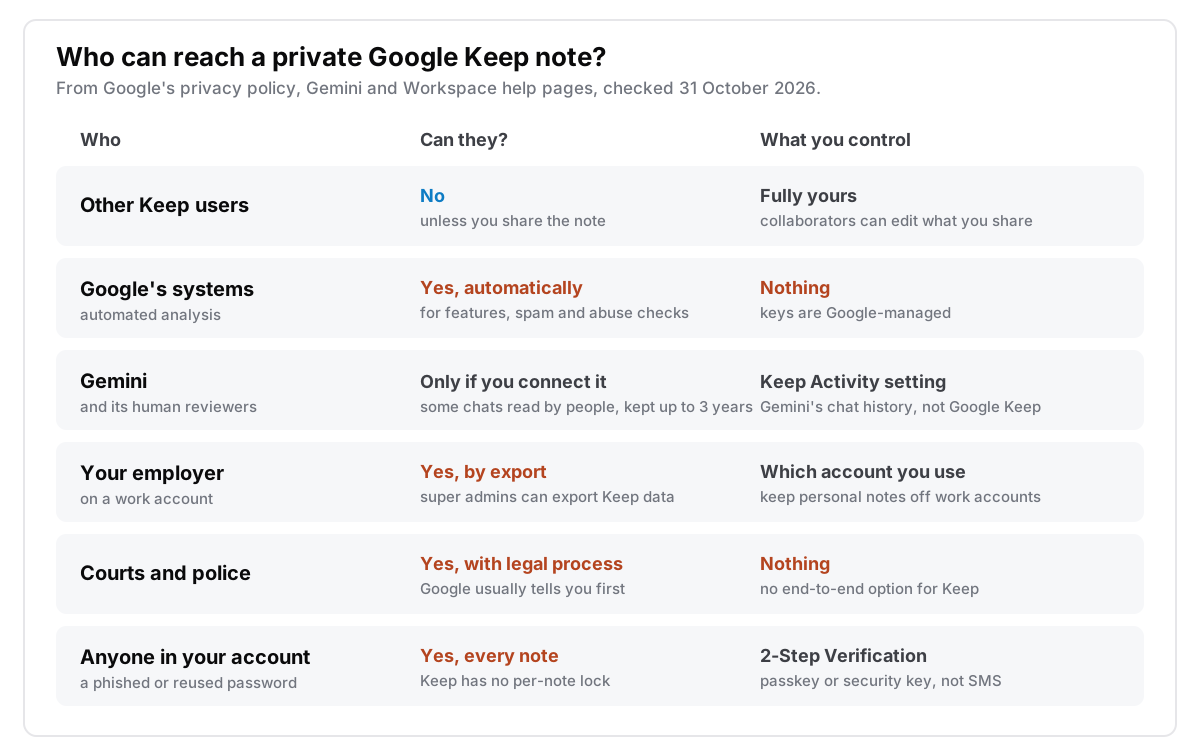
People you share with. Keep's sharing help says everyone you share a note with can edit its text, lists, images, drawings and recordings. If you don't want that, it suggests sending a copy through another app instead. If the owner deletes a shared note, it's deleted for everyone.
Your employer, on a work account. A Workspace super admin can run Google's data export tool, which lists "Keep data" among the exported services. The page doesn't mention notifying the users whose data is exported. Google Vault, the eDiscovery tool, doesn't list Keep on its supported services page. Either way, a personal note on a work account is a note your employer can export.
Courts and police. Google's government requests page says it reviews each request against the law, tries to narrow requests that are too broad, and sometimes refuses. It generally emails the user before handing anything over, except where the law forbids it or in emergencies, and on a managed account it tells the admin instead. Because Google holds the keys, there's no setting that takes your notes out of this route. Google publishes request counts in its Transparency Report, across all of its services rather than Keep alone.
Anyone who gets into your account. This is the route most in your hands. Keep sits in the same account as your email, so one phished password opens both. With 2-Step Verification on, a stolen password alone doesn't get someone in. Google's page notes that text-message codes are the weakest option, so use a passkey, a security key or Google prompts. Google's Advanced Protection Program goes further for people at higher risk. Neither changes what Google itself can read.
Where copies of a Keep note live
A deleted note isn't gone at once, and an exported note is the only copy outside Google.
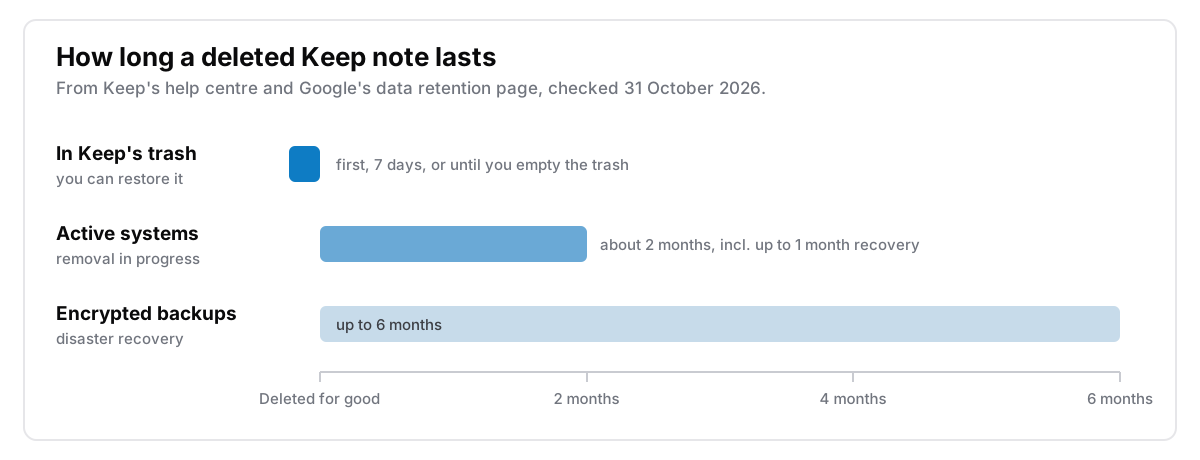
The trash. Keep's help page says a deleted note stays in the trash for seven days before it's removed. You can empty the trash sooner.
Google's systems. Google's retention page says deleted data generally takes around two months to leave its active systems, including a recovery window of up to a month. Encrypted backups can hold it for up to six months.
Your export. Google Takeout exports Keep with the rest of your Google data as a zip or tgz archive, and downloading it doesn't delete anything from Google. Open a few notes from the archive before you rely on it, especially checklists and anything with images. I wrote up what to check in leaving Google Keep. Once it's on your computer, a login password and FileVault or BitLocker protect it.
Which notes belong in Google Keep?
Sort your notes by who you'd mind reading them:
- Shopping lists, parking spots, reminders, shared family lists. Keep is a good home, and free is the right price.
- Notes you'd ask Gemini about. Fine, as long as you'd be comfortable with a person at Google reading the chat. If not, leave Keep Activity off for those.
- Personal notes on a work account. Move them. A super admin can export them.
- Journals, health notes, notes about other people, recovery codes. These belong somewhere no server can decrypt: a locked note in Apple Notes, an end-to-end encrypted app, or an app with no server at all. The list of what not to write down is longer than most people expect.
Where Cyanote fits
Cyanote is the no-server option. It's a desktop app for the Mac and Windows that keeps notes, tasks, a calendar and clipboard history in one database file on your computer. You don't sign in to anything, nothing syncs, and there are no AI features, so there's no copy of your notes anywhere I could read or be asked to hand over. A note you lock with a password is encrypted on disk until you unlock it. The idea behind it is in what local-first actually means.
Where Keep is the better pick, and for a lot of people it is:
- Your phone. Keep is a first-class app on Android and works on iPhone. Cyanote has no mobile app.
- Sharing. Keep lets your household edit the same list. Cyanote is for one person.
- Price. Keep is free. Cyanote isn't.
- Backups. Google keeps your notes safe from a dead laptop. With a local file, backups are your job.
Cyanote is $7.99 once on the Mac through Lemon Squeezy, with no subscription and no account. Windows is a separate $7.99 purchase on the Microsoft Store, and one doesn't unlock the other. The details are on the pricing page.
Common questions
Can Google see my Google Keep notes?
Its systems can. Keep notes are encrypted with keys Google manages, so Google can decrypt them, and its privacy policy says automated systems analyse content to provide features and detect abuse. The policy limits human access to staff who need it, under confidentiality rules.
Is Google Keep end-to-end encrypted?
No. Keep is encrypted in transit and at rest with Google-managed keys. Google's client-side encryption for business plans covers Drive, Gmail, Calendar and Meet, but not Keep, and I found no end-to-end option for personal accounts on any Google page.
Can you lock a note in Google Keep?
No. Keep has no per-note password or lock. The protection is your Google account's sign-in, so turn on 2-Step Verification, ideally with a passkey or security key.
Is Google Keep safe for passwords?
Not a good idea. Anyone who gets into your Google account can read every note, and nothing in Keep adds a second lock. A password manager is built for this. For other private notes, see a journal that stays private.